AI-ready infrastructure
 Refer and earn


 Ethereum
 Hyperliquid
 Solana
 Arbitrum
 BNB Smart Chain
 Base
Base Polygon
 TRON
TRON Sui
Sui Robinhood


Erigon vs Geth: choosing the right Ethereum client

Introduction
Ethereum is one of the most widely used blockchains and a leading smart-contract platform. For teams running node infrastructure in 2026, the practical question is usually not what an Ethereum client is, but which client is the better operational fit. This guide compares Geth and Erigon across the criteria that most affect production outcomes: sync model, disk footprint, trace/debug behavior, and archive-node suitability.
Since Ethereum’s transition to Proof-of-Stake in September 2022, both Geth and Erigon have continued to evolve significantly. By 2026, archive node requirements have increased, making sync behavior and storage efficiency more important for production infrastructure decisions (see chainstats.org for current sizing trends).
Recent upgrades such as EIP-4844 (Proto-Danksharding), implemented in March 2024, have also changed how clients handle data availability. At the same time, the client ecosystem has expanded with newer options like Reth, giving teams more flexibility in how they run Ethereum infrastructure.
Against this backdrop, Geth and Erigon remain actively developed and widely used. This guide focuses on the practical choice between them: sync model, disk efficiency, tracing/debug workflows, and archive-node suitability.
Erigon vs Geth at a glance
| Dimension | Erigon | Geth | Practical decision signal |
|---|---|---|---|
| Sync architecture | Staged sync pipeline optimized for fast catch-up and modular processing | Traditional sync modes with broad default usage | Choose Erigon if sync throughput and operational tuning are priorities |
| Disk footprint | Typically more storage-efficient data layout for historical-heavy use cases | Often larger footprint for equivalent historical workloads | Choose Erigon for archive or analytics-sensitive infrastructure |
| Trace/debug workflows | Strong fit for historical analysis and tracing-heavy backends | Widely supported, but workload cost can rise for heavy trace patterns | Choose based on how trace-heavy your production workload is |
| Archive suitability | Frequently preferred for archive/indexer-style operations | Viable, but can be more resource intensive at scale | For sustained historical querying, Erigon is often more cost-efficient |
| Tooling/ecosystem default | Growing adoption, but less “default-first” than Geth | Broadest default compatibility across guides/tooling | If you need lowest-friction ecosystem default, Geth may be simpler |
For practical comparison, we benchmarked RPC behavior on both clients, focusing on trace/debug workflows and response characteristics relevant to production use.
The center of these comparison tests is the debug_traceTransaction method, and the bulk of the testing focused on the differences in response speed between Erigon and Geth and the amount of data retrieved.
In our tests, Erigon returned richer trace output than Geth for the same debug_traceTransaction calls. That additional output can increase response size and processing time, so latency comparisons should be interpreted together with payload depth, not speed alone.
Erigon’s benefits
Erigon originated from Turbo-Geth and has diverged significantly in architecture and storage design. The team made some fundamental changes to the full sync algorithm and the storage system, allowing you to sync an Ethereum archive node much faster and using less disk space.
Staged sync
Erigon improves sync speed by adopting a staged sync process. When Geth synchronizes a full node, it downloads the blocks’ data. Then, it replays the transactions while working on other operations, for instance, retrieving the senders of the transactions from the private signatures or verifying the block headers. As a result, the process is less efficient since many things are happening simultaneously.
Erigon instead breaks down the process into different stages and completes them in sequence; this means that the program will first complete a stage before moving on to the next, making the overall process faster.
16 stages compose staged sync, and the Erigon Documentation explains it extensively.
Disk efficiency
Erigon uses a more effective system to store data compared to Geth, and three main features allow Erigon to be so good at optimizing disk space:
Flat KV storage
Erigon stores the data in a database made of key-value pairs, allowing it to store it more straightforwardly.
You can find a detailed explanation of the database storage in the Erigon Documentation.
Pre-processing
Erigon uses an ETL (Extract, transform, Load) architecture to process data. It extracts the data from its source, transforms it into the required data type, loads it into a temporary file, and places it in the correct order in the database. This way, the process is sped up by pre-processing data before saving it into the database.
You can find a detailed explanation of the ETL framework in the Erigon Documentation.
Single accounts/state trie
Ethereum uses a data structure called Merkle Patricia Trie for its storage layer and to verify the integrity of the transactions. Geth uses 3 Merkle Patricia Tries Transaction Trie, Receipt Trie, and State Trie, while Erigon uses a single Merkle trie. This structure allows Erigon to be more efficient.
I recommend checking Erigon’s primary documentation for more details about all the features and functionalities Erigon offers, which are often updated.
What can you do with Erigon?
Like Geth, Erigon allows users to deploy nodes, but one substantial difference compared to Geth is that Erigon is commonly used for full/archive-style workloads; check the current Erigon docs for mode-specific behavior and flags.
Erigon is also available on Windows, Linux, and macOS, and the Erigon’s documentation explains how to install it.
Once you install Erigon, you can use this line to check available commands.
erigon --helpNow that we have seen how Geth and Erigon compare on the sync speed and disk utilization side of things— let’s explore the DApp development side.
Erigon offers a few RPC methods that are not available when querying a node running Go Ethereum, the most prominent being eth_getBlockReceipts and the debug (unless it’s activated) and trace API.
eth_getBlockReceipts RPC Method
Calling eth_getBlockReceipts will return the receipts of all the transactions in a specified block displaying the transaction details. This method can be helpful when you want to retrieve information about all the transactions in a block in one go— instead of calling multiple different methods.
Below, you can find an example of the code you would run in cURL to call this method, but you can find a detailed explanation in the eth_getBlockReceipts guide repository, where you will find an example of what the method returns.
curl -X POST 'ERIGON_NODE_URL' \
-H 'Content-Type: application/json' \
--data '{"method":"eth_getBlockReceipts","params":["latest"], "jsonrpc":"2.0","id":1}'
Remember that you need access to an endpoint from a node running Erigon to use eth_getBlockReceipts.
Debug and trace transactions
Erigon includes the debug and trace modules, which allow you to get deeper into the processing of a transaction. These functions are generally used to troubleshoot failed transactions or trace calls and transactions.
You can study calls or transactions that are already validated or simulated.
Trace
So far, we know that tracing a transaction will give us extra information about it, but what does that mean?
Generally, we can have two kinds of transactions, a direct Ether transfer between accounts and a transaction to a smart contract. For example, transferring ETH from A to B is pretty straightforward, and nothing else will happen besides updating the accounts’ balances— it is another story if the transaction goes to a smart contract. In addition to sending ETH to the smart contract, a portion of the bytecode can be executed during the transaction.
A smart contract can execute complex operations. For example, it can interact with many accounts simultaneously and even call functions from other smart contracts. So, without tracing the transaction, it would not be possible to see all these intermediate operations.
trace_transaction use case
At this point, we know what tracing does, but why would you want to trace a transaction in the first place?
trace_transaction is one of the methods available in Erigon, and it takes a transaction hash as input, allowing you to see the internal function calls made into a smart contract. This is important because you could send a transaction to a proxy smart contract, which will then call a function from another one, and you would never know this without tracing the transaction.
Below, you can find an example of the cURL code you would run to call this method:
In this case, this transaction calls the claim function to mint an NFT; check the detailed analysis of the transaction on the trace_transaction analysis gist, where it shows it goes through a proxy contract.
curl -X POST 'ERIGON_NODE_URL' \
-H 'Content-Type: application/json' \
--data '{"method":"trace_transaction","params":["0x8c66dab09ffdc7024a958a4a08e998b83fa146f805b301dd636909107deb9edf "],"id":1,"jsonrpc":"2.0"}'
Remember that you need access to an endpoint from a node running Erigon to use trace_transaction.
There are multiple RPC methods that you can call using the trace module, and some of them do not support all the trace types. Check all the JSON RPC methods available using Erigon in the docs.
Debug
The debug function is handy while developing a smart contract to understand why a transaction is failing. The debug_traceTransaction method accepts a transaction hash as the parameter. It returns an array of traces that include logs of low-level opcode (operation code), allowing one to understand what might be wrong during the processing of the transaction.
Below, you can find an example of the cURL code you would run to call this method:
In this case, this transaction calls the transfer function of a smart contract, and it fails. Check the detailed debug analysis on the debug_traceTransaction analysis gist, showing that the transaction is reverted because the address is not included in the whitelist mapping.
curl -X POST 'ERIGON_NODE_URL' \
-H 'Content-Type: application/json' \
--data-raw '{"method": "debug_traceTransaction", "params": ["0x1cd5d6379c7a06619acaf07a1a87116e5a476203b1798862ebb7144ecc5ebba9", {}],"id":1,"jsonrpc":"2.0"}'
Try debug and trace on Chainstack’s web app
The app allows you to input the endpoints of two nodes, an Erigon node and a Geth node, and the transaction hash of the transaction on which you want to call the debug_traceTransaction method.
With the debug module enabled, you can use any RPC endpoint available if the node runs Erigon and/or Geth. But if you don’t have access to such nodes, Chainstack got you covered, of course.
Follow these steps to sign up on Chainstack, deploy a node, and find your endpoint credentials:
- Sign up with Chainstack.
- Deploy a node.
- View node access and credentials.
📖 You can test the app directly in JS fiddle or run it locally by cloning the GitHub repository, which includes comprehensive instructions and explanations about the source code.

Then you can choose whether to call the trace_transaction method (available only on Erigon) or the debug_traceTransaction method.

Tracing or debugging the transaction will calculate the time needed to retrieve the data, the size of the data retrieved, and display the parsed result, which will look something like this:

trace_transaction method using the Erigon endpoint.You can also only compare the two nodes on the same transaction hash. This will call the debug_traceTransaction method at the same time and display only the analytics.

If you call the debug_traceTransaction method on the same transaction hash, you will notice that Erigon will take more time to retrieve the data, but it will also retrieve more data, as Erigon will also return the memory data.
What is Go Ethereum (Geth)?
Go Ethereum, often abbreviated to Geth, is a Command Line Interface (CLI) Ethereum client written in Go (An open-source programming language developed by Google) and is the official Go implementation, fully open source, and licensed under GNU LGPL v3. Because of this, developers have free access to its code and can help improve it and add new features.
But how does Geth allow you to participate in the Ethereum network? Geth is a versatile client, and comes with a built-in JavaScript console, has a big community around it, and allows you to:
- Run nodes to secure the network
As you know, you can run different types of nodes, a full node is a standard, but you can also deploy a light node or a full node in archive mode.
Check out this article by Petar for details about the different types of nodes.
- Provide access to the blockchain via JSON RPC endpoints exposed on HTTP, WebSocket, or IPC transports
RPC endpoints are your access point to the blockchain. For instance, you can retrieve information using a DApp or use a custom endpoint for your MetaMask. Geth allows you to expose your node’s endpoint and use it for these operations.
You can enable your HTTP endpoint using this command:
geth --http The Geth docs provide instructions to configure the node’s endpoint.
Geth also supports the GraphQL API, which can help make the requests to the node more efficient, reducing the load. The GraphQL endpoint runs on top of the HTTP endpoint, and you can activate it with this command:
geth --http --graphql The Geth documentation explains how to activate the GraphQL endpoint and query it.
- Create a private network and run testnet nodes
This option allows you to create your own private Ethereum network. Organizations and enterprises often use this feature to leverage blockchain technology without exposing information to the public or using real Ether to pay for transactions.
Geth supports different operating systems, including Windows, macOS, and Linux. The Go Ethereum website goes through all the other options and instructions, but Linux is the most used.

How does Geth synchronize?
Synchronization is the process that allows the node to get the latest and updated blockchain state from other nodes, and when you start the sync process, your client will look for other peers in the network to download data from.
Geth has different sync modes available depending on the type of node you wish to deploy and what state information you want your node to retain. The different sync modes available with Geth at the moment are:
Snap
The snap mode is the default synchronization method in Geth, and you can use it to quickly set up a node to interact with the network. This mode was introduced in Geth version 1.10.0 and was designed to reduce the time and resources needed to sync to the blockchain, particularly disk space.
The typical use case for the average user is to just interact with the blockchain, for instance, transfer ETH and interact with smart contracts. To achieve this, you do not need historical data, and this sync mode allows a user to get up and running faster than synchronizing a full node.
How does snap work
Instead of starting the syncing process from the genesis block (the first block in the chain) and processing every transaction, the snap mode just downloads a snapshot of the current state. This mode gets you up and running quickly, but does not retain historical state — queries beyond the last 128 blocks are not available without running in archive mode.
To secure the network, a node started with snap mode must first go through the state trie download phase, where it will download the accounts data (state of the network) and cross-check it with the blocks to ensure that the information is accurate.
As we mentioned, the snap mode is the default on Geth, and once you have installed it, you can initiate it with this command:
geth consoleThis command will initiate the snap sync mode on the Ethereum mainnet and the JavaScript console, where you can interact with web3 and call the JSON RPC methods.
This is what the beginning of the process looks like on the console. I am using Windows in this example:

Full nodes
A full node stores the entire blockchain and is responsible for verifying the transactions. This sync mode will download all the blocks from genesis, including headers, transactions, and receipts, verify all blocks, and re-execute every transaction. Full nodes are the backbone of the network and are responsible for maintaining security and ensuring only valid transactions propagate to the rest of the chain.
A full node can be used to retrieve information about the state of the blockchain, but to maintain efficiency, some info is periodically pruned (removed). Because of this, a full node running on Geth can only query the state of the blockchain up to the last 128 blocks. Technically, the node can reconstruct all the intermediate states from genesis, but it would be very resource intensive and might cause the node to fall out of sync and disable.
To start synchronizing a full node, run this command after you installed Geth:
geth --syncmode fullAs mentioned above, a full node prunes data to save disk space, but if you need historical data, you could run a full node in archive mode. In this case, it would store all the intermediate states, and you could query information from any point in the past.
Usually, running an archive node is the least desired option, as there is so much data that it would take months to sync an archive node.
To sync an archive node, you must run this command, defining the garbage collection mode to archive:
geth --syncmode full --gcmode archiveThis article explains the difference between full and archive nodes in greater detail.
Geth commands
The paragraphs above show you the commands to start the sync process, but Geth has many options available to configure your node. You can find all the commands available by typing this line in the console:
geth --help Or by visiting the command-line options page in the Go Ethereum docs.
What is an Ethereum client?
In the computer world, a client is a software that can connect to a server to exchange data. For example, the web browser you use to read this article is a client that connects to a website’s server, receives its content, and displays it to you.
In the Ethereum blockchain case, the client is a program that connects to other clients in the peer-to-peer network and implements the Ethereum protocol. The EVM is the execution environment used to run smart-contract bytecode within that protocol. Essentially, if you install and run an Ethereum client, your computer will turn into an Ethereum node. Nodes verify transactions, read data from the blocks, and execute smart contract instructions keeping the network secure and up to date.
What does EVM mean?
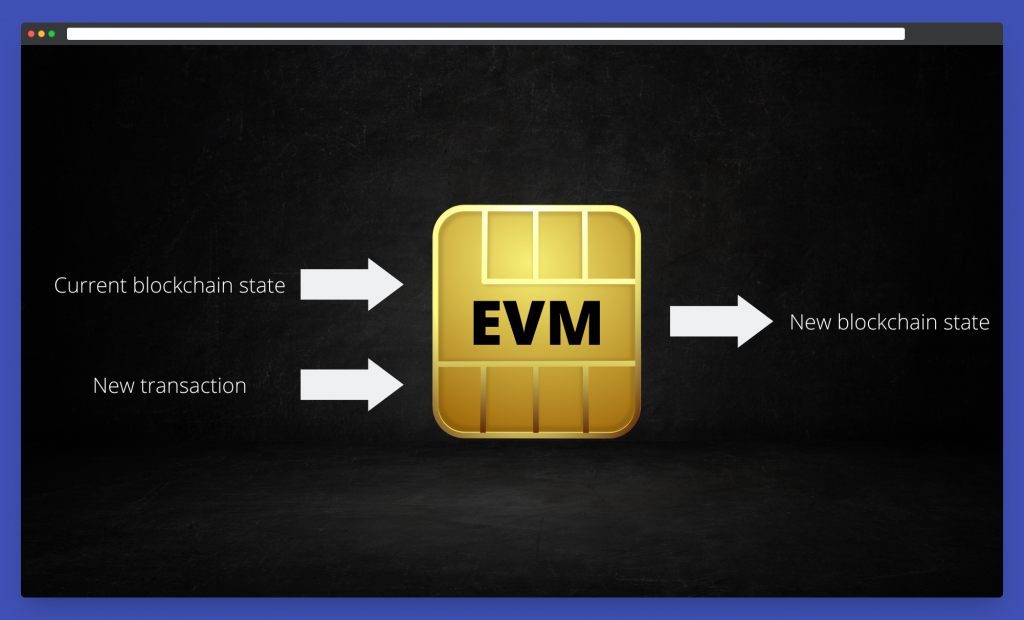
At this point, after comparing clients, it helps to briefly clarify the EVM and EVM-compatible networks for context. Of course, you already know that the Ethereum network is made of computers that run the Ethereum client. The Ethereum Virtual Machine runs in each of these Ethereum instances. Essentially, its role is to execute the code of the smart contracts (like how the CPU executes instructions on your PC) and update the blockchain state.
The state of the Ethereum blockchain is made by accounts identified by an address. Each account holds four fields:
- The account nonce identifies how many transactions that account made.
- The current ETH balance.
- The smart contract code.
- The smart contract storage.
The code and storage fields are empty if the account is not a smart contract.
When an account makes a transaction, the EVM, which already holds the current state, computes it and updates the states, keeping track of the account balance, nonce, etc.
EVM is not only Ethereum
As a result of the support for smart contracts, the Ethereum blockchain became incredibly popular, leading to congestion in the network and high transaction costs.
Because of this, developers created other more efficient blockchains while maintaining EVM compatibility, so that smart contracts existing on the Ethereum network could easily be redeployed on other networks attracting users and developers.
In short, an EVM-compatible network is a blockchain developed following the EVM specifications. As a result, developers do not need to learn a new programming language to deploy smart contracts to another EVM-compatible blockchain or re-write the code from scratch if they want to redeploy a contract already existing on the Ethereum network.
BNB Chain, Avalanche, and Polygon are examples of popular EVM-compatible blockchains, and Chainstack supports many EVM-compatible protocols. You can check Chainstack’s website for an updated list of supported protocols.
Erigon for EVM-compatible chains
As we saw, Erigon has enormous potential as it allows us to maintain nodes with a fraction of the hardware compared to Geth. For this reason, it is becoming more popular among networks other than Ethereum, especially as the disk requirements to keep archive nodes keep growing.
Now more of these chains are integrating their consensus mechanism into the Erigon client; the most prominent ones are the BNB Chain and the Polygon network.
Disk requirements for archive nodes have grown significantly since Erigon was introduced. For Ethereum mainnet, Erigon archive nodes require approximately 3–3.5 TB compared to 18–20 TB for Geth. For Polygon, the archive node using Erigon is approximately 4.5 TB. These numbers grow continuously — check the Erigon hardware requirements docs for current figures
This guide explains how to run a Polygon archive node on Erigon, while you can check the BNB chain documentation to run an archive node for the BNB chain.
Over time, the disk space required to maintain archive nodes will only grow, and it is vital for software like Erigon to succeed in the long term to have a way to run archive nodes in a more user-friendly manner.
Conclusion
For most production teams choosing between Erigon and Geth, the decision comes down to sync model, disk profile, and tracing/debug workload needs. Erigon is often preferred for archive and analytics-heavy use cases, while Geth remains the default for broad ecosystem compatibility.
- Discover how you can save thousands in infra costs every month with our unbeatable pricing on the most complete Web3 development platform.
- Input your workload and see how affordable Chainstack is compared to other RPC providers.
- Connect to Ethereum, Solana, BNB Smart Chain, Polygon, Arbitrum, Base, Hyperliquid, Robinhood Chain, Arc, Tempo, MegaETH, Monad, Plasma, Avalanche, Optimism, Aptos, Cronos, Gnosis Chain, Moonbeam, Celo, Aurora, TON, Ronin, and Bitcoin mainnet or testnets through an interface designed to help you get the job done.
- Fast access to blockchain archive data and gRPC streaming on Solana.
- To learn more about Chainstack, visit our Developer Portal or join our Telegram group.
- Connect your AI agent to Chainstack in seconds using Chainstack MCP — give Claude, Cursor, Codex, Gemini, and Windsurf live access to blockchain data, node management, and docs.
- Are you in need of testnet tokens? Request some from our faucets. Sepolia faucet, Base Sepolia faucet, Solana devnet faucet, Hoodi faucet, BNB faucet, zkSync faucet, Robinhood Chain faucet, Hyperliquid faucet, Monad faucet, Amoy faucet, Plasma faucet, TON faucet.
Have you already explored what you can achieve with Chainstack? Get started for free today.