Ethereum
 Solana
 Hyperliquid
 Arbitrum
 Base
Base BNB Smart Chain
 Tempo
Tempo Monad
Monad Avalanche
 Aptos
Aptos TRON
TRON Ronin
Ronin zkSync Era
 Optimism
 Sonic
Sonic Polygon
 Unichain
 Fantom
 Gnosis Chain
 Sui
Sui Avalanche Subnets
 Polygon CDK
 Starknet Appchains
 zkSync Hyperchains




 Refer and earn
 Discord
 Telegram
 X (Twitter)
How to get a Hyperliquid RPC endpoint

Learn how to get a Hyperliquid RPC endpoint for both mainnet and testnet, choose between public and private options, and set up a reliable RPC provider.
TL;DR
Hyperliquid is an L1 with a native order book and an EVM-compatible execution layer (HyperEVM). As usage grows, public HyperEVM RPC access is increasingly constrained for high-frequency workloads.
Starting August 9 2025, public HyperEVM RPC is rate-limited to 100 requests/minute per IP. That is usually fine for testing and light reads, but it is a bottleneck for bots, indexers, and latency-sensitive systems.
This guide explains:
- Public vs private Hyperliquid RPC access.
- Full vs archive node trade-offs.
- How to get a private endpoint for production workloads.
- How to use official public endpoints for testing.
Hyperliquid API endpoint cheat sheet
Use this as a quick integration reference for HyperEVM RPC access.
Endpoint format
- Mainnet public RPC (read-only):
https://rpc.hyperliquid.xyz/evm - Testnet public RPC (read-only):
https://rpc.hyperliquid-testnet.xyz/evm - Private RPC pattern:
https://<your-rpc-host>/evm - Optional private info endpoint:
https://<your-rpc-host>/info
Auth header pattern
- Public endpoints: no auth header.
- Private endpoints (provider-specific):
Authorization: Bearer <API_TOKEN>
orx-api-key: <API_KEY>
Minimal cURL
```bash
curl -sS https://rpc.hyperliquid.xyz/evm \
-H 'content-type: application/json' \
--data '{"jsonrpc":"2.0","id":1,"method":"eth_blockNumber","params":[]}'
What is a Hyperliquid RPC endpoint?
A Hyperliquid RPC endpoint lets you read data from the HyperEVM (the chain’s EVM-compatible execution layer) over HTTP. If you’ve worked with Ethereum, this will feel familiar: the HyperEVM implements a subset of the standard JSON-RPC API used across EVM chains.
Hyperliquid runs two execution environments under one consensus: HyperCore, the trading engine that handles the order book and exchange logic, and HyperEVM, the smart contract layer. RPC endpoints only expose the EVM layer. Trading actions are routed through a separate API path with different capabilities.
When you send a request to a Hyperliquid RPC endpoint, you’re querying data or simulating state transitions from the HyperEVM. The RPC is used to read contract state, check balances, fetch logs, and simulate calls, but not to send transactions. Execution happens off-path, through a separate submission layer that functions more like a sequencer than a traditional mempool.
Hyperliquid RPC layer is designed to support bots, dashboards, indexers, and other offchain infra that rely on fast, consistent access to chain data.
This makes the choice of RPC provider (or the decision to self-host) especially important if you’re building production infrastructure.
Public vs private Hyperliquid RPC endpoints
There are two ways to access the HyperEVM RPC: through the public endpoint maintained by the core team, or via a private RPC, either self-hosted or through a provider like Chainstack.
| Public RPC | Private RPC |
|---|---|
| Free and open to everyone | Paid service (self-hosted or managed) |
| Rate-limited to 100 requests/minute (as of August 9) | No rate limits or much higher limits |
| Shared infrastructure | Dedicated infrastructure |
| Best for: prototyping, occasional queries, building demos | Best for: production apps, trading bots, indexers, real-time applications |
| No SLA or uptime guarantees | Provider SLAs available (e.g., Chainstack) |
| No observability or metrics | Request-level observability and monitoring |
| Single-region access | Global routing available (with managed providers) |
| Higher latency under load | Lower latency, consistent performance |
In short: If your workload is occasional and non-critical, public RPC is acceptable.
If you need stable throughput, lower latency variance, observability, or operational guarantees, private RPC is the safer default.
Full node vs archive Hyperliquid node
Hyperliquid nodes can be configured to store varying amounts of historical data. Full nodes typically store recent blockchain state, while archive nodes retain complete historical data from genesis.
| Full node | Archive node |
|---|---|
| Stores recent blockchain state (recent blocks and transactions) | Stores complete historical blockchain data from genesis |
| Suitable for: sending transactions, querying current state, real-time monitoring | Suitable for: analytics, explorers, historical queries, compliance tools |
How to get a private Hyperliquid RPC endpoint on Chainstack
Chainstack now supports private Hyperliquid RPC endpoints via GEN, available on all paid plans. These endpoints offer higher request throughput than the public RPC, removing the 100 requests/minute limit per IP.
To get started:
- Log in to your Chainstack account. Create an account if you don’t have one.
- Create a new project or select an existing project.
- Choose Hyperliquid as your network and select mainnet or testnet.
- Deploy a node configured for Hyperliquid RPC access.
- Once deployed, your private RPC URLs, including the /evm and /info endpoints, will be available in your node dashboard.
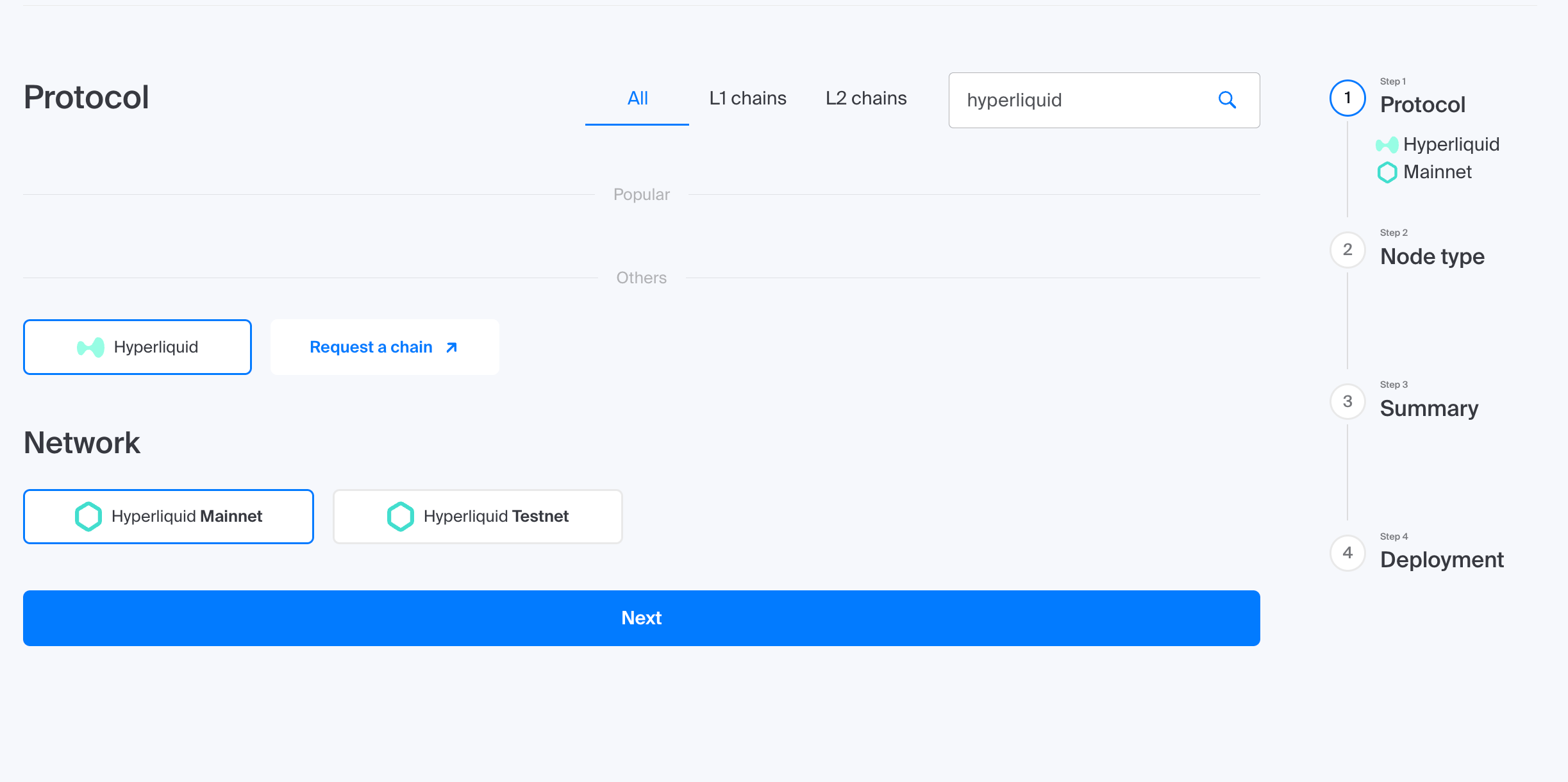
You can then use these endpoints in your trading bots, indexers, or real-time apps without worrying about public rate limits.
Chainstack also gives you visibility into how it’s performing: logs, metrics, and request data. You can also lock it down with Access rules to avoid leaking keys or getting spammed.
Here’s what it looks like to spin up your own HyperEVM RPC endpoint in less than two minutes with Chainstack:
💡 Quick tips for stable Hyperliquid RPC performance
- Use HTTP for simple reads, WebSocket for real-time data – WebSockets are great for subscriptions (
eth_subscribe, pending txs, logs). For everything else, HTTP is faster and easier to retry. - Add a fallback RPC – If your primary endpoint fails, route to a backup (public or secondary private). Log failovers so you can catch issues early.
- Cache aggressively – Don’t hit the RPC for static data like token metadata or contract ABIs. Cache locally and refresh only when needed.
- Monitor your usage – Chainstack gives you metrics on latency, errors, and request volume. Use them to spot issues before they break your app.
How to get a public Hyperliquid RPC endpoint
Hyperliquid provides a free, publicly accessible HyperEVM RPC endpoint—ideal for testing, prototyping, or light scripting. It’s maintained by the core team and can be used without signup, but as of August 2025, it’s rate-limited to 100 requests per minute per IP.
Official Hyperliquid public RPC URLs
| Mainnet | Testnet |
| https://rpc.hyperliquid.xyz/evm | https://rpc.hyperliquid-testnet.xyz/evm |
What’s supported
These endpoints support standard read-only JSON-RPC methods like:
eth_call– Execute a message call without creating a transactioneth_getLogs– Get logs matching a filtereth_blockNumber– Get the current block number
Important limitations:
- ❌ No transaction submission
- ❌ No gas estimation
- ❌ No WebSocket support
- ⚠️ 100 requests/minute rate limit per IP
For production applications or anything requiring higher throughput, use a private RPC endpoint instead.
Supported methods / limits / errors
This table summarizes practical method availability and common failure patterns for integration planning.
| Method / capability | Common use case | Typical limits or constraints | Common errors | Practical fix |
|---|---|---|---|---|
eth_blockNumber | Health checks, latest block polling | Public RPC is shared; private endpoint capacity depends on plan | 429 (rate-limited), timeout (temporary congestion) | Backoff + retry, reduce poll frequency, move sustained traffic to private RPC |
eth_call | Read contract state for bots/dashboards | Read-only path; heavy burst traffic may be throttled | -32602 (bad params), 429 (throttle) | Validate calldata/params, batch reads where possible, retry idempotently |
eth_getLogs | Event indexing and backfills | Wide-range queries can be expensive; throughput depends on endpoint type | timeout / query failure (range too broad), 429 | Split block ranges, paginate scans, checkpoint progress |
eth_sendRawTransaction | Transaction submission | Not supported on public HyperEVM read RPC | -32601 / method unsupported | Use Hyperliquid execution/submission path for writes |
eth_estimateGas | Pre-trade simulation | Not supported on public HyperEVM read RPC | -32601 / method unsupported | Use execution workflow/tooling that supports simulation |
| WebSocket subscriptions | Real-time stream subscriptions | Public endpoints list no WebSocket support | connection failure / unsupported transport | Use HTTP polling or a provider endpoint with WS support |
| Authenticated private RPC | Higher-throughput production workloads | Limits and auth model depend on plan | 401/403 (auth issue) | Verify header format, token/key scope, and endpoint URL |
How to add Hyperliquid to your wallet
MetaMask doesn’t come preloaded with Hyperliquid, and neither do most EVM-compatible wallets like Rabby, or Rainbow. Whether you’re using a private RPC URL from Chainstack or the public endpoint, you’ll need to add the network manually.
The steps below use MetaMask, but they work for any EVM wallet that supports custom networks.
Option 1: Add your private Hyperliquid RPC
To use a private Hyperliquid Mainnet RPC:
- Open wallet
- Click the network dropdown → Add network manually
- Fill in the fields:
| Field | Value |
|---|---|
| Network name | Hyperliquid Mainnet |
| RPC URL | your Chainstack mainnet URL |
| Chain ID | 999 |
| Currency symbol | HYPE |
| Block explorer | https://app.hyperliquid.xyz/explorer |
To use a private Hyperliquid Testnet:
| Field | Value |
|---|---|
| Network name | Hyperliquid Testnet |
| RPC URL | your Chainstack testnet URL |
| Chain ID | 998 |
| Currency symbol | HYPE |
| Block explorer | https://app.hyperliquid-testnet.xyz/explorer |
Option 2: Use a public Hyperliquid RPC URL
If you don’t have a private endpoint, you can use a public RPC URL instead. These are shared across all users and may be rate-limited or less reliable.
| Hyperliquid Mainnet (RPC URL public) | Hyperliquid Testnet (RPC URL public) |
|---|---|
| https://rpc.hyperliquid.xyz/evm | https://rpc.hyperliquid-testnet.xyz/evm |
These endpoints support standard read-only JSON-RPC methods like eth_call, eth_getLogs, and eth_blockNumber. They do not support transaction submission or gas estimation. Use the same MetaMask steps as above, just paste in the public URL instead of your private one.
Conclusion
Hyperliquid public RPC is useful for testing and light read workloads, but production systems typically require private infrastructure for predictable throughput and reliability.
If your application depends on continuous reads, low latency variance, or operational controls, use private Hyperliquid RPC and treat public endpoints as fallback or development-only access.
FAQ
Prioritize workload fit: low-latency reads for trading bots, stable log/query throughput for indexers, and predictable limits/support for production operations. Compare providers on method support, endpoint stability, and private endpoint options.
Usually only for light or bursty read traffic. For sustained bot/indexer workloads, private endpoints are typically the safer option for consistency and operational control.
HyperEVM public JSON-RPC endpoints use the /evm path for mainnet and testnet. See the Hyperliquid RPC public endpoint format section above for current endpoint patterns.
Public read endpoints typically do not require authentication. Private endpoints usually require provider-specific credentials such as an API key or bearer token.
eth_sendRawTransaction on the public Hyperliquid RPC?Treat the public HyperEVM RPC path as read-oriented. Trading and order execution should use the protocol’s execution/submission path, not the public read RPC interface.
Use retries with backoff, reduce burst concurrency, and split heavy read workloads (especially logs/backfills). If this is a recurring issue, move critical traffic to private endpoints.
Recommended reading
If you want to go deeper into the Hyperliquid ecosystem and start building production-ready trading systems, we also recommend checking out the following guides:
- What is Hyperliquid? — an overview of Hyperliquid’s architecture.
- How to build a Hyperliquid trading bot — a step-by-step guide to set up and wire a trading bot.
- Hyperliquid On-Chain Activity Tracker — build automated alerts with Hyperliquid RPC.
- Mastering Hyperliquid — guides to Hyperliquid APIs, authentication, and trading.
Power-boost your project on Chainstack
- Discover how you can save thousands in infra costs every month with our unbeatable pricing on the most complete Web3 development platform.
- Input your workload and see how affordable Chainstack is compared to other RPC providers.
- Connect to Ethereum, Solana, BNB Smart Chain, Polygon, Arbitrum, Base, Optimism, Avalanche, TON, Ronin, zkSync Era, Starknet, Scroll, Aptos, Fantom, Cronos, Gnosis Chain, Klaytn, Moonbeam, Celo, Aurora, Oasis Sapphire, Polygon zkEVM, Bitcoin and Harmony mainnet or testnets through an interface designed to help you get the job done.
- To learn more about Chainstack, visit our Developer Portal or join our Discord server and Telegram group.
- Are you in need of testnet tokens? Request some from our faucets. Multi-chain faucet, Sepolia faucet, Holesky faucet, BNB faucet, zkSync faucet, Scroll faucet.