AI-ready infrastructure
 Refer and earn


 Ethereum
 Hyperliquid
 Solana
 Arbitrum
 BNB Smart Chain
 Base
Base Polygon
 TRON
TRON Sui
Sui Robinhood


How to get an XRP Ledger RPC endpoint (2026 guide)

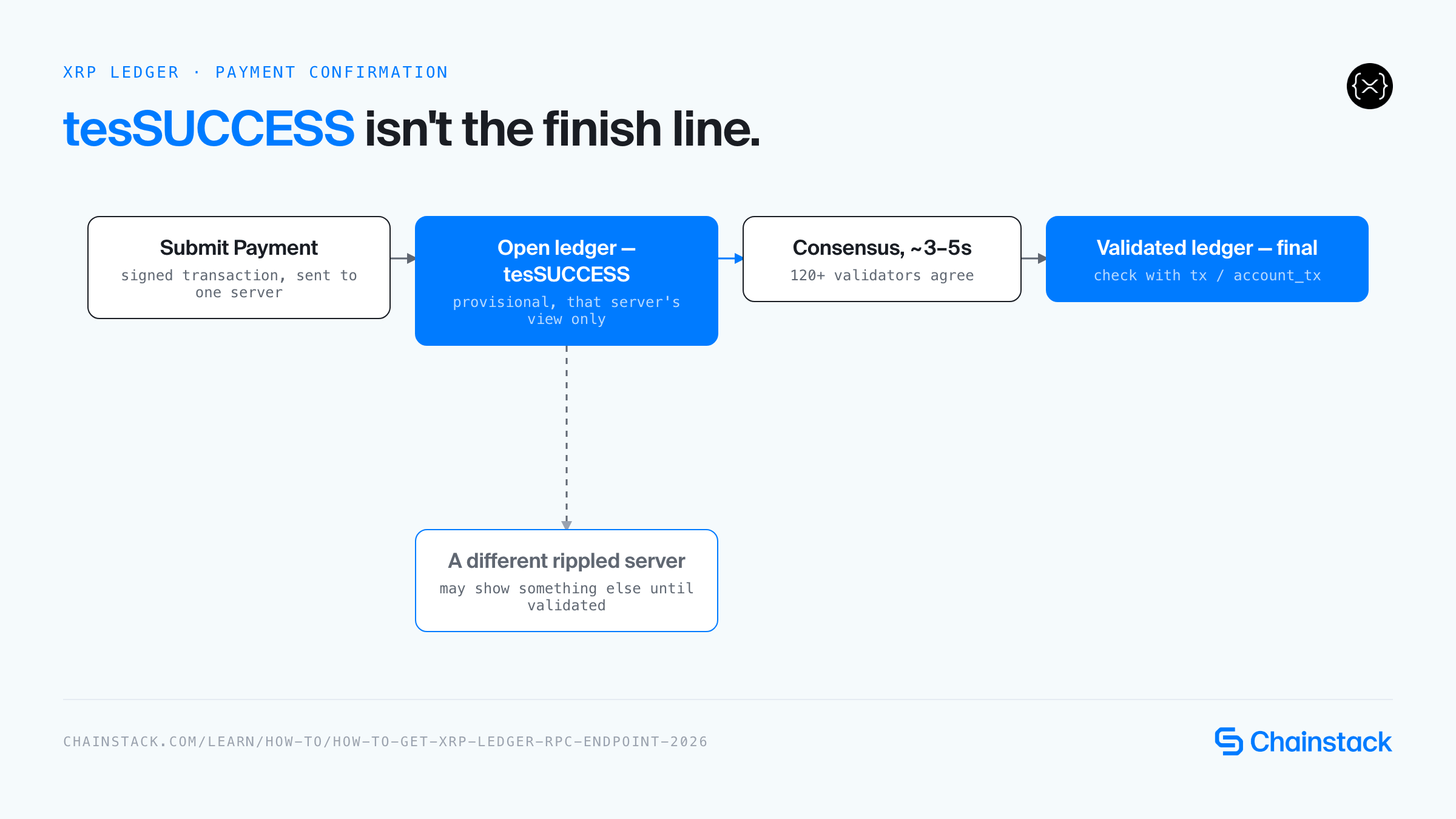
TL;DR: A payment that comes back tesSUCCESS from submit hasn’t actually happened yet — it just means the transaction was provisionally applied to that one server’s own “open” ledger, and a different rippled server can show something else until consensus validates a ledger roughly every 3 to 5 seconds. Add a rolling history window of under six days on shared infrastructure, and reconciling or confirming a payment against the wrong server or the wrong ledger state becomes the single most common source of silent bugs in XRP Ledger payment integrations. This guide covers how XRP Ledger RPC endpoints actually behave, why the free public servers aren’t built for that job, and how to deploy a private XRP Ledger RPC endpoint for production payment flows in 2026.
What is an XRP Ledger RPC endpoint
An XRP Ledger RPC endpoint is how any application talks to the network — there’s no eth_* interface here. A rippled server (the reference XRP Ledger node software) exposes its own JSON-RPC API over HTTPS, where every call is an HTTP POST with a method field and a params array, plus a WebSocket API for subscriptions and lower-latency request/response. Method names reflect the ledger’s actual data model: account_info for balances and settings, submit for sending signed transactions, tx and account_tx for looking up transaction results, book_offers and path_find for the ledger’s native decentralized exchange. There’s also a second server type in the mix: Clio, a read-only API server that sits behind a rippled node and serves only validated data — useful for historical queries, but one extra network hop compared to talking to rippled directly.
For a payments application, almost everything user-facing runs through this endpoint:
- Reading account balances and trust lines before authorizing a payment (
account_info) - Submitting signed Payment transactions (
submit) - Confirming whether a transaction actually landed in a validated ledger, not just an open one (
tx,account_tx) - Subscribing to ledger closes and account transaction streams in real time so a checkout flow doesn’t have to poll (
subscribeover WebSocket) - Finding a payment path across order books for cross-currency payments, since XRP Ledger’s DEX and path-finding are protocol-native features rather than smart contracts (
book_offers,path_find)
You can review the full list of supported JSON-RPC and WebSocket methods in the XRP Ledger developer documentation.
On XRP Ledger, endpoint quality isn’t just about uptime — it’s about knowing exactly which server state you’re reading. A full rippled node can show you its own current, unvalidated view of the world a few seconds ahead of consensus; a Clio server only ever shows validated results. Building a payments backend on the wrong assumption about which one you’re querying produces race conditions that only show up once real transaction volume hits it.
How XRP Ledger RPC differs from EVM chains
XRP Ledger predates and structurally diverges from the EVM model, and an EVM developer moving over has several assumptions to unlearn. There’s no eth_call, no EVM state trie, and — this is the one that trips up payment integrations specifically — no mempool in the Ethereum sense. A submitted transaction is relayed peer-to-peer and applied to each server’s own “open” ledger immediately, but it’s only final once the network’s consensus process (Ripple Protocol Consensus Algorithm, run by 120+ independent validators, no mining or staking involved) closes it into a validated ledger, which happens on a roughly 3-to-5-second cadence. submit returning tesSUCCESS tells you the transaction was provisionally accepted by the server you talked to — not that it’s confirmed.
Balances and fees are denominated in drops (1 XRP = 1,000,000 drops) rather than wei, and transaction fees are a small, dynamically-adjusted flat amount rather than a gas price/gas limit auction. There’s no arbitrary smart contract layer on the core ledger — value moves through native transaction types (Payment, OfferCreate, TrustSet, and so on), and the built-in DEX handles order matching and cross-currency path-finding as a protocol feature rather than application code. Transaction finality is also handled differently: instead of waiting for probabilistic block confirmations, you check whether a transaction’s LastLedgerSequence has been exceeded by a validated ledger to know definitively whether it succeeded, failed, or expired.
XRP Ledger RPC endpoint options
Public vs private XRP Ledger RPC endpoints
Ripple operates a small set of free public rippled servers, and its own documentation is explicit that they’re not meant to carry real traffic — which matters more for payments than almost any other workload, because a connection dropping mid-settlement is worse than a connection being merely slow.
Official public endpoints:
- Mainnet (Ripple):
https://s1.ripple.com:51234/andhttps://s2.ripple.com:51234/(WebSocket:wss://s1.ripple.com/,wss://s2.ripple.com/) - Mainnet (InFTF full-history cluster):
https://xrplcluster.com/(WebSocket:wss://xrplcluster.com/) - Testnet (Ripple):
https://s.altnet.rippletest.net:51234/(WebSocket:wss://s.altnet.rippletest.net:51233/)
⚠️ Ripple’s own docs state plainly that its public servers “are not for sustained or business use” and can go offline without warning — and the XRP Ledger docs themselves recommend using professional RPC providers for production traffic instead of the free cluster.
| Public endpoints | Private endpoints | |
|---|---|---|
| Access | Free and open | Restricted access |
| Resources | Shared infrastructure | Dedicated resources |
| Best use case | Development & testing | Production workloads |
| Uptime guarantee | None — can go offline without notice | SLA-backed Global Nodes and Dedicated Nodes |
| Ledger history | Rolling window under a week (except the InFTF full-history cluster) | Configurable retention on Dedicated Nodes |
| WebSocket subscriptions | Available, shared connection pool | Available with dedicated capacity |
📖 For a detailed comparison of XRP Ledger RPC providers, see Top 6 XRP Ledger RPC providers for payments in 2026.
For a payments pipeline, that missing uptime guarantee is the whole argument for managed infrastructure: a dropped connection during the exact window a payment is closing into a validated ledger is a support ticket, and on a free server with no SLA, there’s no one to escalate it to.
Full node vs archive XRP Ledger node
On XRP Ledger, “historical data” usually means reconciliation and compliance work — matching a customer’s payment against a ledger that closed weeks or months ago — rather than the block-explorer-style backfills EVM chains need.
| Full node access | Beyond the retention window |
|---|---|
Current account balances and trust lines (account_info) | Reconstructing complete transaction history for compliance audits |
Real-time payment confirmation via account_tx and ledger-close subscriptions | Historical ledger data beyond the retention window (lgrNotFound otherwise) |
| Live order book and path-finding for active DEX routing | Long-term settlement reconciliation across a payment provider’s full operating history |
Chainstack does not currently offer a dedicated Archive Node product for XRP Ledger the way it does for chains like Ethereum, Solana, or BNB Chain. Global Nodes run rippled in full mode only, holding the same rolling window as the public network — per Chainstack’s own tooling documentation, that’s roughly 127,935 ledgers (about 5.73 days) on Mainnet and a similar window on Testnet, after which a ledger query returns lgrNotFound. Dedicated Nodes give you an isolated rippled instance you control, and rippled itself supports a full-history configuration — but that’s a self-managed setup rather than a packaged archive product with its own pricing tier.
For most payment integrations that’s not a limitation in practice, since confirming and reconciling a transaction typically happens within hours, not months, of it landing on the ledger — but if your compliance workflow needs to look back further than that, plan for a full-history Dedicated Node rather than assuming Global Nodes will cover it.
HTTPS vs WebSockets
For a payments app, the difference between HTTPS and WebSocket isn’t operational convenience — it’s whether your checkout flow finds out about a confirmed payment the moment it closes, or several seconds late because you polled for it.
| Feature | HTTPS | WebSocket |
|---|---|---|
| Model | Request/response | Persistent connection |
| Complexity | Simple operationally | Requires reconnect/heartbeat logic |
| Best for | One-off balance checks, submitting a Payment, one-time path-finding queries | Subscribing to ledger closes and transaction streams so payment confirmation is event-driven, not polled |
| Latency | Standard | Lower for frequent updates |
| Connection overhead | Per request | One-time handshake |
Both public and Chainstack-managed XRP Ledger endpoints support WebSocket, so this is a design choice rather than a limitation — but a payments app that only ever polls account_tx on a timer will always be a few seconds slower to react than one subscribed to the ledger stream.
For a worked example of just how early a subscription can see a transaction, Chainstack’s own xrplwatch is an open-source tool that connects directly to the XRP Ledger peer-to-peer network and reads transactions off the gossip layer, before they even reach a server’s WebSocket feed. It’s a demonstration of where that data first appears, not something to depend on in production — the real fix for a payments backend is still a managed endpoint with a guaranteed WebSocket connection, not borrowed peer slots.
How to get a private XRP Ledger RPC endpoint with Chainstack
Deploying a private XRP Ledger RPC endpoint on Chainstack takes a few minutes:
- Log in to the Chainstack console (or create an account).
- Create a new project
- Select XRP Ledger as your blockchain protocol
- Choose network: XRP Ledger Mainnet or Testnet
- Deploy the node
- Open Access and credentials and copy your HTTPS and WebSocket endpoints
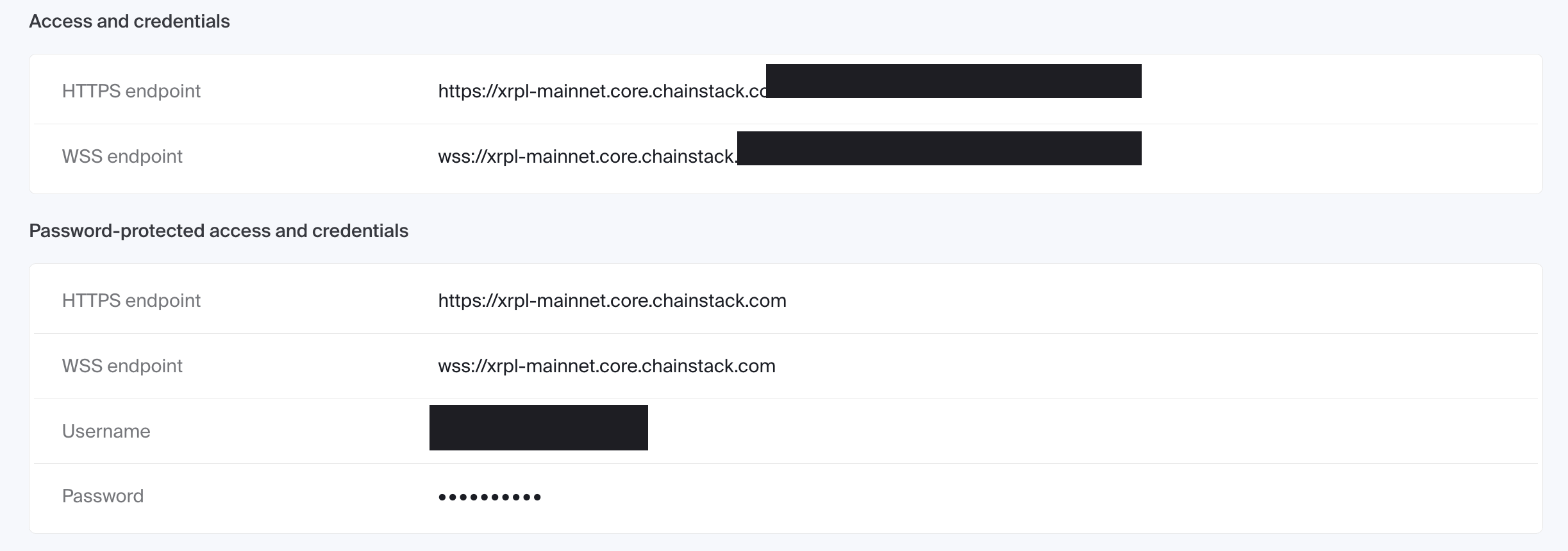
Global Nodes are the fastest path to a working endpoint and cover most payment integrations out of the box. If you need an isolated rippled instance with a custom configuration or a specific retention depth, Dedicated Nodes give you single-tenant infrastructure instead.
Here’s a minimal example using xrpl-py, the official Python library for XRP Ledger, to check the account state you’d need before building a Payment transaction:
from xrpl.clients import JsonRpcClient
from xrpl.models.requests import AccountInfo

# Connect to your Chainstack XRP Ledger endpoint
client = JsonRpcClient("YOUR_CHAINSTACK_ENDPOINT")

# ledger_index="validated" avoids reading the server's unvalidated open ledger
request = AccountInfo(account="YOUR_WALLET_ADDRESS", ledger_index="validated")
response = client.request(request)

account_data = response.result["account_data"]
print(f"Balance: {account_data['Balance']} drops")
print(f"Sequence: {account_data['Sequence']}")
📖 For the full integration guide, see the Chainstack XRP Ledger tooling documentation.
You can also access Chainstack XRP Ledger RPC directly from Claude, Cursor, Codex, Windsurf, Gemini CLI, GitHub Copilot, Antigravity, Claude.ai, or ChatGPT using Chainstack MCP. For the full agent stack — MCP, the Chainstack skill, llms.txt, and WebMCP — see the Chainstack Agents page.
The JavaScript equivalent uses xrpl.js, the official JavaScript/TypeScript library, which handles offline operations like key management, transaction signing, and binary encoding, while your HTTPS client handles the actual calls to your endpoint.
Using Chainlist
Chainlist is EVM-only and doesn’t apply to XRP Ledger — there’s no chain ID, no wallet-network dropdown to populate, and no equivalent registry for rippled endpoints.
Chainstack pricing for XRP Ledger RPC
Chainstack bills by request unit (RU) rather than a compute-unit model that penalizes specific method calls, which makes forecasting a payments workload’s monthly cost more straightforward. See the full Chainstack pricing page for plan details and current overage rates.
| Plan | Cost | RU/Month | RPS | Overage (per 1M extra RU) |
|---|---|---|---|---|
| Developer | $0/mo | 3M | 25 | $20 |
| Growth | $49/mo | 20M | 250 | $15 |
| Pro | $199/mo | 80M | 400 | $12.50 |
| Business | $499/mo | 200M | 600 | $10 |
| Enterprise | $990+/mo | 400M+ | Unlimited | $5 |
Advanced options relevant to a payments deployment:
- Dedicated Nodes (Pro plan and above): compute from $0.50/hour per node, plus storage at $0.01 per 20 GB/hour
- Unlimited Node add-on (Growth plan and above): flat-fee RPS tiers starting at $149/month for 25 RPS, useful if a payment processor wants a guaranteed throughput ceiling instead of tracking RU consumption
How to estimate monthly cost
- Count your expected daily active payment flows (checkouts, remittance transfers, settlement jobs)
- Estimate calls per flow: an
account_infobalance check, asubmit, and one or moreaccount_tx/txconfirmation checks - Multiply by RU per call — XRP Ledger has no full-vs-archive multiplier, so every supported method costs the same 1 RU per request on Chainstack
- Add headroom for WebSocket subscription overhead and retries
- On XRP Ledger, the real budget lever isn’t method complexity — it’s how aggressively your app polls for confirmation. Subscribing to ledger closes over WebSocket instead of repeatedly calling
account_txon a timer keeps RU consumption (and confirmation latency) down at the same time
Production readiness checklist
- Primary + fallback RPC provider configured
- Request timeout policy set
- Retry logic with exponential backoff implemented
- Credentials stored in env/secret manager (never hardcoded)
- Monitoring for latency, error rate, and throttling
- Alerts for sustained degradation
- Transaction finality confirmed against a validated ledger (
tx,account_tx) — never trust atesSUCCESSresponse fromsubmitalone as proof of confirmation - WebSocket subscription to ledger closes with reconnect and resubscribe logic, since a dropped connection during a payment’s confirmation window is exactly when it matters most
- Ledger retention window confirmed against your reconciliation and compliance SLA before relying on Global Nodes alone
Troubleshooting common XRP Ledger RPC issues
| Issue | How to fix |
|---|---|
429 Too Many Requests on a public endpoint | Move to a managed endpoint with a plan sized for your RPS |
| WebSocket disconnects mid-session | Implement reconnect logic, resubscribe to the ledger stream, and backfill any missed transactions via account_tx |
Transaction shows tesSUCCESS but isn’t actually confirmed | Query the transaction by hash with tx against a validated ledger; don’t treat submit‘s immediate response as final |
lgrNotFound on a historical ledger query | The ledger fell outside the retention window; use a Dedicated Node configured for full history if you need it |
| Inconsistent account state across repeated requests | You may be hitting different rippled servers behind a shared endpoint at different sync states; pin queries to ledger_index: "validated" or use a single managed endpoint |
Payment fails with tecPATH_DRY | No viable path was found for a cross-currency payment; check order book liquidity with book_offers before resubmitting |
Conclusion
The failure mode that actually costs money on XRP Ledger isn’t downtime — it’s confidently treating a provisional result as a final one. A payment that returns tesSUCCESS and then gets queried against a different server, or against that same server’s still-unvalidated open ledger, can look confirmed when it isn’t, or look stuck when it already succeeded. That’s the kind of bug that only surfaces under real transaction volume, is hard to reproduce locally, and erodes trust in a payments product fast because the symptom — a payment that “didn’t go through” but actually did — is exactly the one users notice first.
The fix is not complicated, but it is non-negotiable: always confirm a transaction against a validated ledger via tx or account_tx, never against submit‘s immediate response; subscribe to ledger closes over WebSocket instead of polling on a timer so confirmation is event-driven; and run all of this against a single managed endpoint with an actual uptime guarantee, not a round-robin across free public servers with no SLA and an explicit warning against production use.
Chainstack’s Developer plan gets a private XRP Ledger endpoint running in minutes at no cost, and Dedicated Nodes are there when a payments deployment needs isolated infrastructure and predictable retention.
FAQ
Not as a standalone product the way it does for Ethereum or Solana. Chainstack’s Global Nodes run rippled in full mode with the same rolling retention window as the public network (roughly 5.73 days). Dedicated Nodes can be configured for full-history retention, but it’s a self-managed setup rather than a packaged archive add-on.
tesSUCCESS from submit means the transaction was provisionally applied to the server’s own current ledger — it isn’t proof of final confirmation. Always check the transaction’s actual status with tx or account_tx against a validated ledger before treating it as settled.
A full rippled node participates in the network directly and can show you both live/unvalidated and validated data. A Clio server sits behind a rippled node and serves only validated, historical query results — it’s read-only and adds one network hop, but it’s built specifically for the kind of lookups (transaction history, account history) that benefit from not touching an in-sync full node.
No. Chainlist is an EVM chain-ID registry, and XRP Ledger has no EVM chain ID or JSON-RPC namespace that Chainlist tooling recognizes.
The official libraries: xrpl-py for Python and xrpl.js for JavaScript/TypeScript. Both handle transaction signing and serialization client-side and talk to your endpoint over JSON-RPC or WebSocket.
Track request latency and error rate per method, WebSocket disconnect frequency, and how often you’re hitting 429 throttling. For payment flows specifically, also track the gap between a transaction’s submit response and its confirmed validated-ledger status — a widening gap usually means you’re polling instead of subscribing.
Additional resources
- Chainstack XRP Ledger tooling documentation
- xrplwatch — an open-source tool for reading XRP Ledger transactions directly off the peer-to-peer gossip layer
- Chainstack introduces XRP Ledger support
- What is XRP Ledger? Consensus, RLUSD, and RPC Explained
- More XRP Ledger tutorials and articles on the Chainstack Blog
- XRP Ledger official documentation