Ethereum
 Solana
 Hyperliquid
 Arbitrum
 Base
Base BNB Smart Chain
 MegaETH
 Tempo
Tempo Avalanche
 Aptos
Aptos TRON
TRON Ronin
Ronin zkSync Era
 Optimism
 Sonic
Sonic Polygon
 Unichain
 Fantom
 Gnosis Chain
 Sui
Sui Avalanche Subnets
 Polygon CDK
 Starknet Appchains
 zkSync Hyperchains




 Refer and earn
 Discord
 Telegram
 X (Twitter)
x402 on Solana: developer guide to micro-payments

A hands-on deep dive into building autonomous micro-payment infrastructure with x402 on Solana, enabling Telegram bots to pay per API request with on-chain USDC settlement.
❓ Prefer diving straight into the code? Get the x402Bot on Utkarshini’s GitHub: https://github.com/utkarshiniarora/x402-bot
TL;DR
Modern AI systems are increasingly autonomous. Agents call APIs, fetch data, execute strategies, and coordinate across services without human intervention. What they lack is a native way to pay for the resources they consume.
In this guide, we’ll build a Telegram bot that pays per API request using x402, settles on Solana, uses USDC via the Exact SVM scheme, integrates a PayAI facilitator, and runs on a reliable Chainstack RPC endpoint. The bot will automatically deduct funds from a wallet and pay for every request it makes to a protected API server.
We will implement:
- A paid API server protected with x402
- A client who automatically signs payments
- A Telegram bot interface
- Cron-based automated execution
- Wallet-based micro-deductions per request
- Solana settlement through Chainstack RPC
By the end, you’ll understand how to build pay-per-request infrastructure for a telegram bot, without API keys, subscription dashboards, or centralized billing systems.
📖 Before jumping into this blog, you may read in detail about x402: x402 protocol: Architecture and payment flow for AI agents
What is x402?
➡️ If you are already familiar with x402 and and ready to dive into coding, jump to “Build bot x402 on Solana step-by-step” section below.
x402 is a protocol that revives the unused HTTP 402 Payment Required status code and turns it into a native web monetization primitive. Historically, HTTP 402 was reserved but never standardized. x402 gives it concrete meaning:
- A client requests a protected resource
- Server responds with
402 Payment Required - The response includes payment instructions
- Client signs a payment
- The request is retried with proof of payment
- Server verifies and returns
200 OK
Instead of API keys or subscription tokens, access is granted per request based on payment.
Why micro-payments matter for AI Agents
AI agents operate independently and execute tasks.
- An agent may: call a pricing API 10 times per minute, fetch a dataset once, execute a trade, or trigger a webhook.
- Traditional billing models are human-centric: API keys, monthly subscriptions, credit-based dashboards, and off-chain billing reconciliation. AI agents require deterministic cost per request, autonomous payment capability, stateless access control, and no human intervention.
Micro-payments on Solana with x402 solve this. Instead of committing to a monthly subscription, agents pay per call. If an agent needs one request, it pays once. If it needs 1,000, it pays 1,000 times.
Why Solana?
- ~400ms block times
- Low transaction fees
- High throughput
- USDC availability
- Mature RPC infrastructure
With Solana, per-request settlement becomes economically viable. Why this matters for builders: you monetize APIs instantly, benefit from very low Solana transaction fees, no billing infrastructure required, revenue captured at the application layer, no API key leaks, fully programmatic access. This is foundational infrastructure for AI-native services.
Build bot x402 on Solana step-by-step
We will use:
- A Chainstack account → Create your account for free
- @x402 libraries
- @payai/facilitator
- @solana/web3.js
- Telegram bot
- dotenv
- express
- Node.js
Environment setup
Set up Solana RPC on Chainstack
- Head to Console and create a free account
- This is where you can manage all your nodes across 70+ protocols
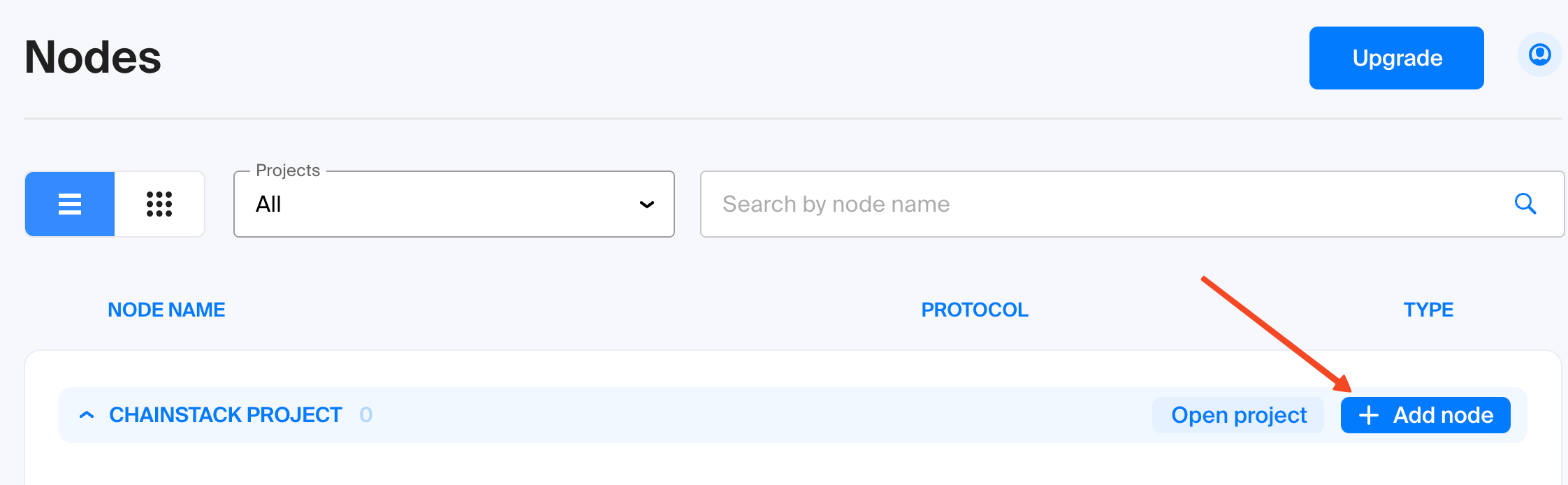
- Click on “Add node”
- Choose Solana and then select “Solana Devnet” in the network section below
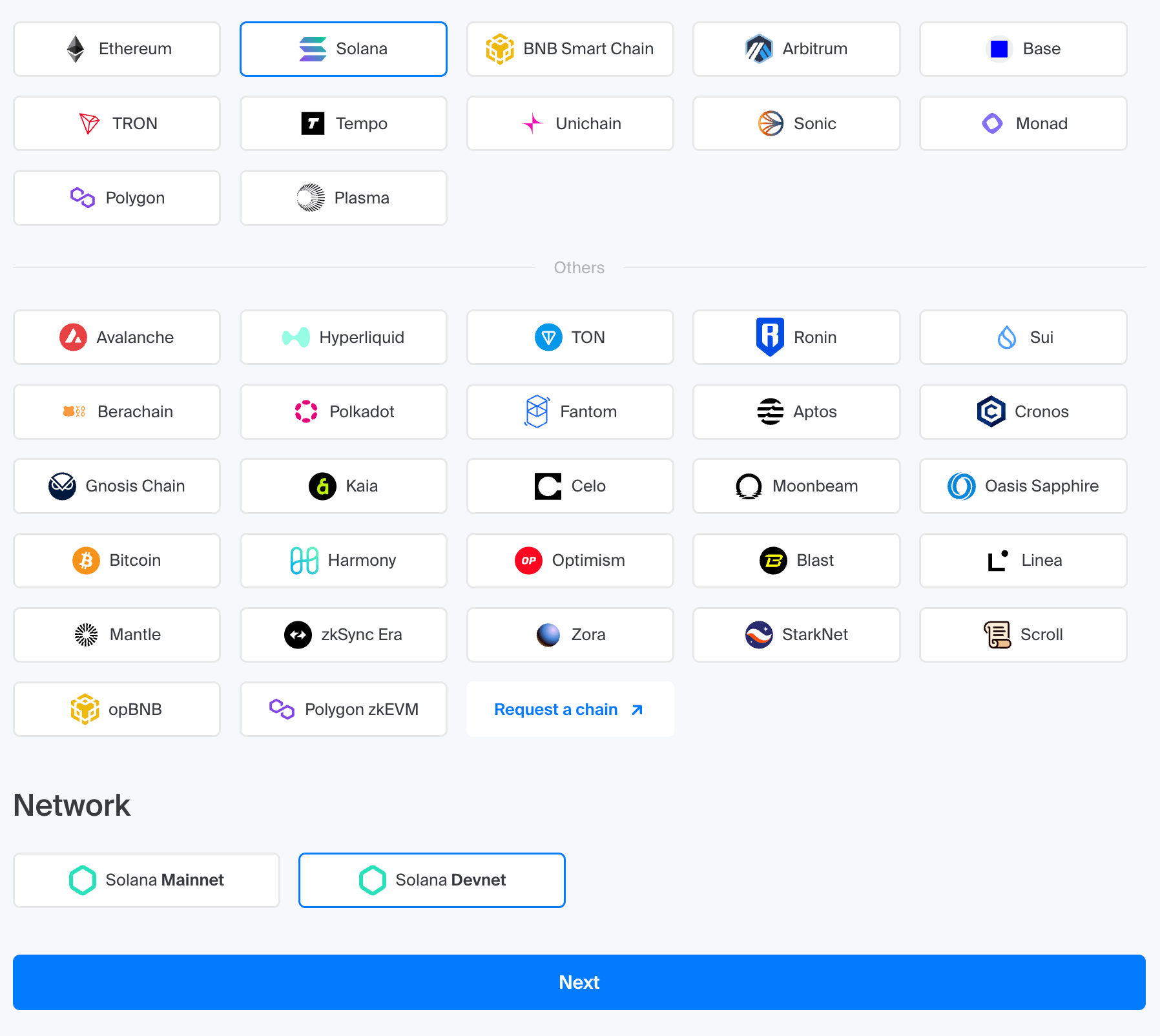
- Click “Next”
In the next step, select the type of node. For this project, choose “Global Node.” Give your node a name, review all the settings in the summary, and click “Deploy Node”.
Once the node is deployed, click “View Node Details”. Scroll down to the “Access and credentials” section. Here you will find the endpoint URL, copy it and keep it safe. It will be needed in the next step.
⚠️ Do not expose your URL. Store it securely in a
.envfile and add it to your.gitignorebefore pushing the code to GitHub. Consider using password-protected endpoints to enhance security.
Install dependencies:
npm init -y
npm install express dotenv
npm install @x402/express @x402/fetch @x402/svm @payai/facilitator @scure/base @solana/kit @solana/web3.js
npm install node-telegram-bot-api
express: Minimal framework to create API routes.dotenv: Loads environment variables from.env.@x402/express: ProvidespaymentMiddlewareto protect routes@x402/fetch: ProvideswrapFetchWithPaymentto auto-handle 402 responses@x402/svm: ProvidesExactSvmSchemefor Solana payments@payai/facilitator: Provides a facilitator toHTTPFacilitatorClientto verify payments@scure/base: Utility for base encoding/decoding@solana/kit: Helper utilities for Solana development@solana/web3.js: Official Solana SDK for blockchain interactionnode-telegram-bot-api: build and connect to Telegram bots
Create an .env file
BOT_TOKEN=
SVM_PRIVATE_KEY=
SELLER_ADDRESS=
SOLANA_RPC=
SOLANA_RPC: The RPC endpoint URL obtained from Chainstack when the Solana node was deployedBOT_TOKEN: The token generated by BotFather for your Telegram botSVM_PRIVATE_KEY: The Base58-encoded private key of the Solana wallet used to sign x402 paymentsSELLER_ADDRESS: The public Solana wallet address that receives payments for your API service
⚠️ Never commit
.env. For best security practices use separate wallets for dev and production
Build the x402 server
⚠️ If you do not wish to run a server , you can use x402 Echo https://x402.payai.network/ payai facilitator for testing purposes. All test payment will be instantly refunded.
server.js is the payment-protected API layer
Import the dependencies:
import expressfrom"express";
import {paymentMiddleware,x402ResourceServer }from"@x402/express";
import {ExactSvmScheme }from"@x402/svm/exact/server";
import {HTTPFacilitatorClient }from"@x402/core/server";
import {facilitator }from"@payai/facilitator";
Initialize facilitator:
constfacilitatorClient=newHTTPFacilitatorClient(facilitator);
Create resource server:
constresourceServer=newx402ResourceServer(facilitatorClient)
.register(
"solana:EtWTRABZaYq6iMfeYKouRu166VU2xqa1",
newExactSvmScheme()
  );
This registers the network, payment scheme and facilitator
Protect Routes with paymentMiddleware
Protected routes are /alpha and /track which will trigger a HTTP 402 USDC payment on Solana:
app.use(
paymentMiddleware(
    {
"GET /alpha": {
        accepts: [
          {
            scheme:"exact",
            price:"$0.001",
            network:"solana:EtWTRABZaYq6iMfeYKouRu166VU2xqa1",
            payTo:CONFIG.SELLER_ADDRESS,
          },
        ],
        description:"Premium Solana news feed",
        mimeType:"application/json",
      },
"GET /track": {
        accepts: [
          {
            scheme:"exact",
            price:"$0.001",
            network:"solana:EtWTRABZaYq6iMfeYKouRu166VU2xqa1",
            payTo:CONFIG.SELLER_ADDRESS,
          },
        ],
        description:"Paid Solana price feed via Chainstack RPC",
        mimeType:"application/json",
      },
    },
resourceServer
  )
);
Routes are declared payable.
- If unpaid: HTTP 402 Payment Required
- If paid: continue to the handler
Run the server:
node server.js
Build the x402 client
Now the Telegram bot must pay automatically.
services.js defines utility functions:
Solana Signer: This derives a signer from base58 private key
asyncfunctiongetSigner() {
returnawaitcreateKeyPairSignerFromBytes(
base58.decode(CONFIG.SVM_PRIVATE_KEY)
  );
}
Payment Logic : wrapFetchWithPayment expects fetch and client
constclient=newx402Client();
client.register("solana:*",newExactSvmScheme(signer));
constfetchWithPayment=wrapFetchWithPayment(fetch,client);
When calling endpoint:
constresponse=awaitfetchWithPayment(url, {
  method:"GET",
});
wrapFetchWithPayment: Detects 402, signs transaction, retries request & attaches PAYMENT-SIGNATURE
Build the Telegram Bot
bot.js initializes:
exportfunctioninitBot(token) {
constbot=newTelegramBot(token, { polling:true });
}
On /start: Initializes subscription entry, explains pricing and lists commands
On track: Pays $0.001, fetches Solana market data and returns structured market info
On alpha: Cron-based auto-fetch of /alpha keep going on until stop or wallet balance below $10
Run a cron job:
schedule("0 * * * * *",async () => {
for (const [userId]ofsubscriptions) {
awaitrunJob(userId);
  }
});
Every minute:
- Check balance
- If < $10 → pause
- Call paid endpoint
- Deduct cost
- Send update
You can set this to daily or trigger dynamically.
This enables:
- Recurring payments
- Autonomous agent loops
- Wallet-based deductions
Run client:
node index.jsChecking the bot execution
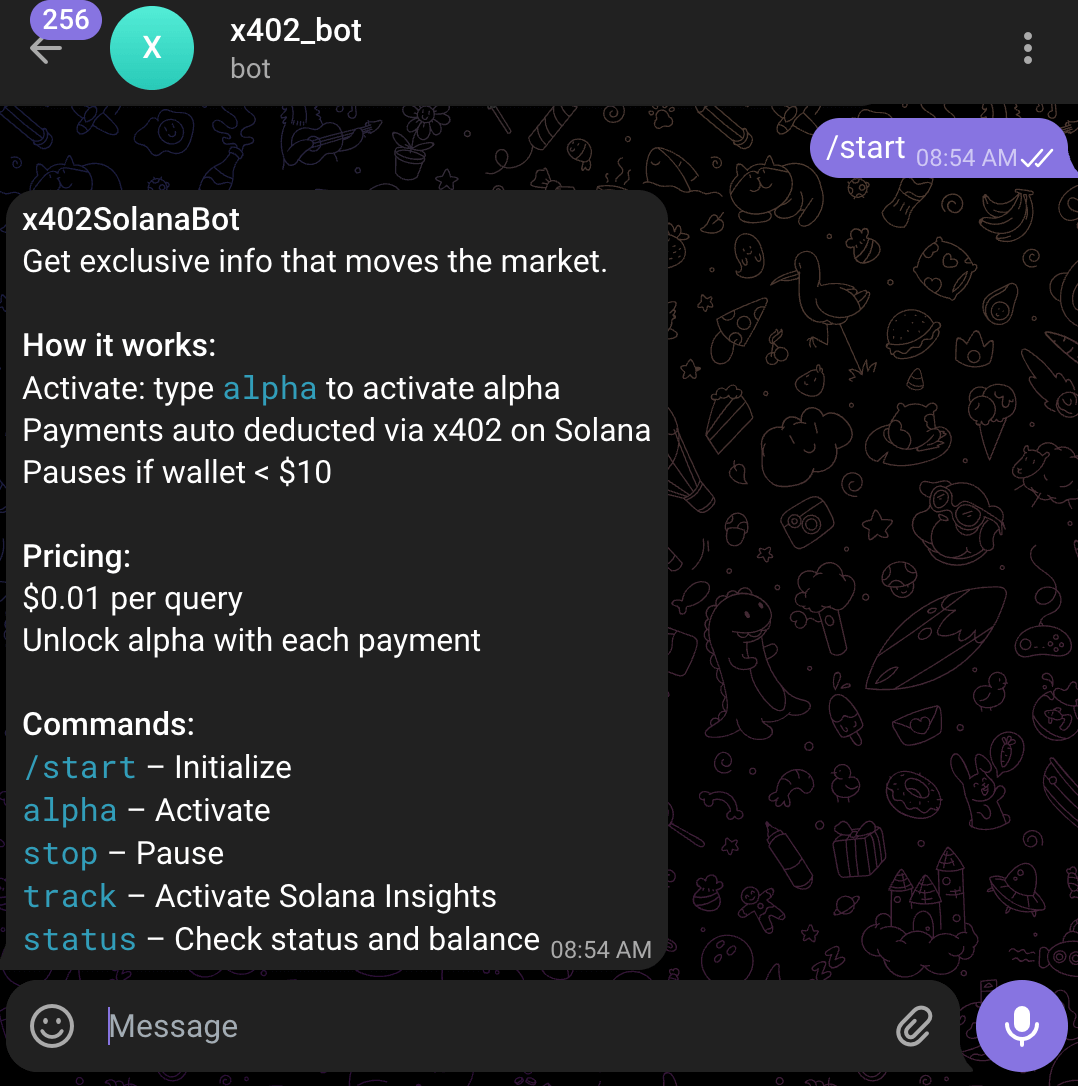
Go to Telegram and send /start to the bot.
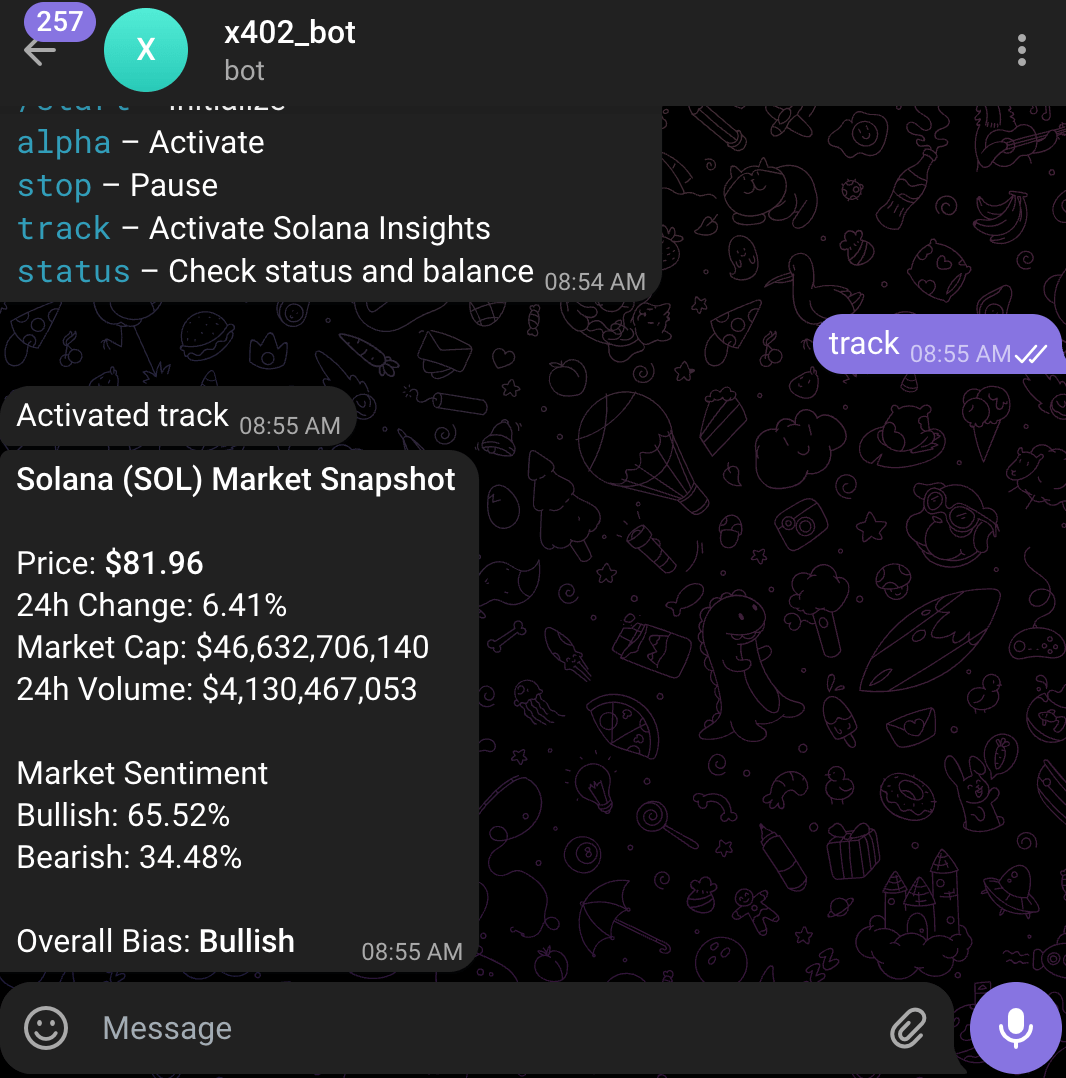
Send command track to get latest insights on Solana
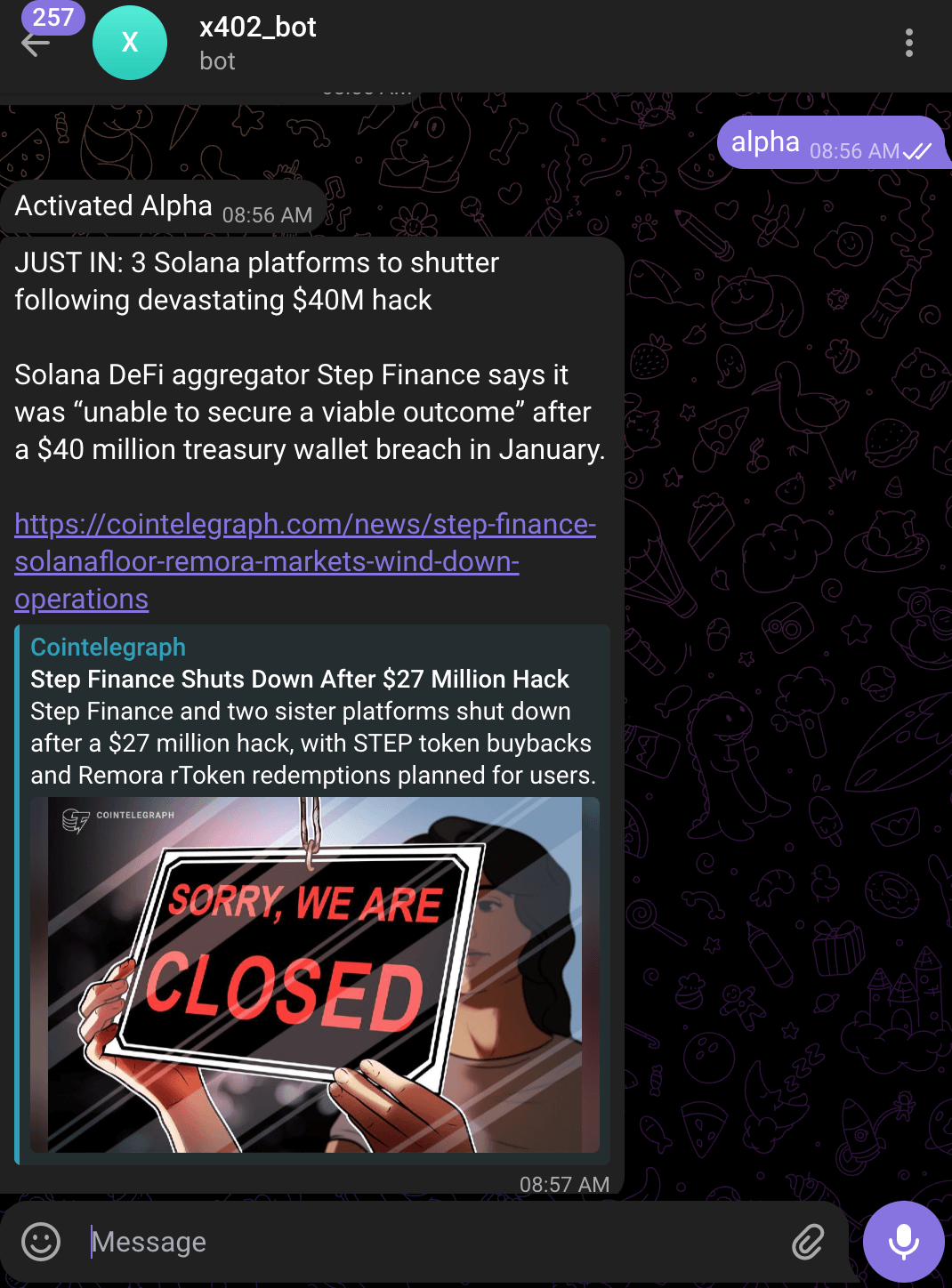
Then send alpha to get latest news on Solana

Cron job sends alpha when new news pops up
Optionally, send stop to terminate the bot from giving alpha and auto deduct payments via x402.
Security and production considerations
When building autonomous micro-payment infrastructure, security and operational discipline are critical. Small mistakes can compound quickly when payments are triggered programmatically.
Below are key safeguards to implement:
- Never expose private keys: Use
.envand secure secret storage - Protect RPC endpoints: Use IP whitelisting where possible
- Rate limit API endpoints: Prevent spam-triggered microtransactions
- Validate facilitator responses: Never assume settlement without verification
- Replay protection: Ensure nonce usage in the signature scheme
- Monitor cron frequency: Avoid accidental rapid-fire payment loops
- Separate dev and prod wallets: Never test with production funds
Conclusion
x402 on Solana turns HTTP 402 into a practical monetization layer for AI agents. With pay-per-request micro-payments, developers can build scalable API businesses without traditional billing complexity.
In this guide, we built a complete pay-per-request architecture: a payment-protected resource server, an automated client that signs transactions, a Telegram bot interface, cron-based execution loops, and wallet-based micro-deductions settled on Solana using USDC. With a facilitator coordinating payments and reliable RPC infrastructure from Chainstack, the system operates without API keys, subscription dashboards, or centralized billing backends.
Now you have the context and architectural blueprint to implement per-call monetization in your own stack, and with dependable infrastructure in place, you can deploy and scale your first x402-powered application with confidence.
Reliable Solana RPC infrastructure
Getting started with Solana on Chainstack is fast and straightforward. Developers can deploy a reliable Solana node within seconds through an intuitive Console — no complex setup or hardware management required.
Chainstack provides low-latency Solana RPC access and real-time gRPC data streaming via Yellowstone Geyser Plugin, ensuring seamless connectivity for building, testing, and scaling DeFi, analytics, and trading applications. With Solana low-latency endpoints powered by global infrastructure, you can achieve lightning-fast response times and consistent performance across regions.
Start for free, connect your app to a reliable Solana RPC endpoint, and experience how easy it is to build and scale on Solana with Chainstack – one of the best RPC providers.
Related articles for reading