Ethereum
 Solana
 Hyperliquid
 Arbitrum
 Base
Base BNB Smart Chain
 MegaETH
 Tempo
Tempo Avalanche
 Aptos
Aptos TRON
TRON Ronin
Ronin zkSync Era
 Optimism
 Sonic
Sonic Polygon
 Unichain
 Fantom
 Gnosis Chain
 Sui
Sui Avalanche Subnets
 Polygon CDK
 Starknet Appchains
 zkSync Hyperchains




 Refer and earn
 Discord
 Telegram
 X (Twitter)
Solana transfer hooks: anchor 0.31 and Token-2022

Solana Transfer Hooks in the Token-2022 standard let you run custom on-chain logic every time a token transfer happens. In this guide, you will build a production-ready Transfer Hook with Anchor 0.31, configure ExtraAccountMetaList for account resolution, avoid common CPI pitfalls, and validate behavior on Solana Devnet with real transactions.
Implementing Solana Transfer Hooks within the modern Solana toolchain requires a precise understanding of cross-program invocations (CPIs) and account resolution. In this comprehensive guide, we will architect a production-ready Transfer Hook that enforces a maximum transfer limit constraint. We will cover environment configuration, the mechanics of the ExtraAccountMetaList, the optimal Rust implementation bypassing common CPI pitfalls, and a robust TypeScript integration test suite.
In this blog post we will understand the hands-on side of the hooks extension and how to use it.
What are Solana Transfer Hooks in Token-2022?
The Solana Token-2022 standard and the Transfer Hook Interface introduce the ability to create Mint Accounts that execute custom instruction logic on every token transfer. This architectural shift unlocks a massive design space for token transfers, enabling use cases such as:
- Enforcing NFT royalties.
- Building black or white lists for wallets authorized to receive tokens.
- Implementing dynamic, custom fees on token transfers.
- Creating custom token transfer events.
- Tracking on-chain statistics over your token transfers.
To achieve this, developers must build a program that implements the Transfer Hook Interface and initialize a Mint Account with the Solana Transfer Hook extension enabled. For every token transfer involving tokens from the Mint Account, the Token Extensions program makes a Cross Program Invocation (CPI) to execute an instruction on the Transfer Hook program.
Crucially, when the Token Extensions program CPIs to a Transfer Hook program, all accounts from the initial transfer are converted to read-only accounts. This means the signer privileges of the sender do not extend to the Transfer Hook program a deliberate design decision implemented at the runtime level to prevent the malicious use of Transfer Hook programs.
Solana Transfer Hook Interface: Execute and Account Meta Instructions
The Transfer Hook Interface provides a standardized method for developers to implement custom instruction logic that is executed on every token transfer for a specific Mint Account. The interface specifies the following core instructions:
- Execute: The primary instruction that the Token Extension program invokes on every token transfer.
- InitializeExtraAccountMetaList (optional): Creates an account that stores a list of additional accounts required by the custom Execute instruction.
- UpdateExtraAccountMetaList (optional): Updates the list of additional accounts by overwriting the existing list.
While it is technically not required to implement the InitializeExtraAccountMetaList instruction directly through the interface (the account can be created by any custom instruction), the Program Derived Address (PDA) for the account must be derived deterministically using specific seeds:
- The hardcoded string
"extra-account-metas" - The Mint Account address
- The Transfer Hook program ID
By storing the extra accounts required by the Execute instruction in this predefined PDA, these accounts can be automatically resolved and added to a token transfer instruction from the client.
Environment setup for Anchor 0.31 + Token-2022
Required CLI and Crate Versions
Recent updates to the Solana ecosystem require strict version alignment between the Anchor framework, the Agave toolchain, and the SPL interface crates. To establish a stable build environment for Token-2022 development, In this blog we will use:
- Agave CLI:
v3.1.9. - Anchor CLI:
0.31.1. - SPL Interface Crates:
0.10.0
Cargo.toml dependencies you need
Cargo.toml example:
...
[dependencies]
anchor-lang = "0.31.1"
anchor-spl = { version = "0.31.1", features = ["token_2022", "token_2022_extensions"] }
spl-transfer-hook-interface = "0.10.0"
spl-tlv-account-resolution = "0.10.0"
How ExtraAccountMetaList solves Account Resolution
To truly master Solana Transfer Hooks, developers must first understand the fundamental limitation of Solana’s execution model: A program cannot read from or write to an account that was not explicitly passed to it in the transaction. In a standard token transfer, the client (or wallet) only passes four core accounts: the Source, the Mint, the Destination, and the Owner. However, custom Transfer Hook will likely need access to other accounts, such as a global configuration state, a whitelist directory or any other use-case.
Since the client initiating the transfer has no knowledge of your protocol’s internal architecture, how does the Token-2022 program know which additional accounts to fetch and pass to your Hook?
The answer lies in On-Chain Account Resolution via the ExtraAccountMetaList.
The ExtraAccountMetaList PDA Seeds and Derivation
The ExtraAccountMetaList is a stateless, on-chain roadmap. It is a Program Derived Address (PDA) deterministically generated using three seeds:
- The hardcoded byte string
b"extra-account-metas" - The SPL Token Mint address
- Your Transfer Hook Program ID
Before executing the cross-program invocation (CPI) to your Hook, the Token-2022 program queries this specific PDA. If the PDA exists, Token-2022 reads its data, unpacks the roadmap, and automatically appends the requested accounts to the transfer transaction.
Defining extra Accounts in Anchor
To set this up safely, we first define the validation constraints for the initialization context.
#[derive(Accounts)]
pub struct InitializeExtraAccountMetaList<'info> {
    #[account(
        init,
        seeds = [b"extra-account-metas", mint.key().as_ref()],
        bump,
        payer = payer,
        // 8 bytes for the Anchor discriminator + 64 bytes for the TLV data
        space = 8 + 64
    )]
    /// CHECK: PDA storing the metadata roadmap for the Token-2022 program
    pub extra_metas_account: AccountInfo<'info>,
    /// CHECK: The SPL Token Mint
    pub mint: AccountInfo<'info>,
    #[account(mut)]
    pub payer: Signer<'info>,
    pub system_program: Program<'info, System>,
}
Note: Notice how the PDA is derived using the exact seeds required by the Token-2022 specification that was defined above.
How Anchor fulfills the specification
If you look at the seeds = [...] array in the code above, you only see two items explicitly written:
b"extra-account-metas"(The hardcoded byte string).mint.key().as_ref()(The Mint’s Public Key).
So, where is the third seed (the Program ID)?
This is where the Anchor framework steps in. Whenever you use theseeds = [...] macro in an Anchor #[account(...)] constraint, Anchor automatically appends the currently executing Program ID as the final seed during compilation. Full docs here.
// Under the hood, Anchor translates that macro into the raw Solana runtime function:
Pubkey::find_program_address(&[b"extra-account-metas", mint.key().as_ref()], program_id)
The initialize_extra_account_meta_list Function
With the account structure validated, developers must implement the initialize_extra_account_meta_list instruction. This function’s sole responsibility is to pack the ExtraAccountMeta configurations into the PDA.
Instead of hardcoding static addresses (which breaks composability), professional implementations use Seed-Based Resolution.
    pub fn initialize_extra_account_meta_list(ctx: Context<InitializeExtraAccountMetaList>) -> Result<()> {
        let account_metas = vec![
            // Instructs Token-2022 to derive the required PDA using dynamic seeds
            spl_tlv_account_resolution::account::ExtraAccountMeta::new_with_seeds(
                &[
                    spl_tlv_account_resolution::seeds::Seed::Literal { bytes: b"extra-account-metas".to_vec() },
                    spl_tlv_account_resolution::seeds::Seed::AccountKey { index: 1 }, // Resolves using the Mint (Index 1)
                ],
                false, // is_signer
                false, // is_writable
            )?
        ];
        let mut data = ctx.accounts.extra_metas_account.try_borrow_mut_data()?;

        // Formats the data as a Type-Length-Value (TLV) structure for the Execute instruction
        spl_tlv_account_resolution::state::ExtraAccountMetaList::init::<
            spl_transfer_hook_interface::instruction::ExecuteInstruction
        >(&mut data, &account_metas)?;
        msg!("Extra Account Meta List Initialized");
        Ok(())
    }
By utilizing ExtraAccountMeta::new_with_seeds(), you instruct the Token-2022 program to dynamically derive the required accounts at the exact moment of transfer.
For example, by specifying Seed::AccountKey { index: 1 }, you are telling the Token-2022 runtime: “To find the extra account my Hook needs, derive a PDA using the Public Key of the account currently sitting at Index 1 of this transaction (the Mint field in the InitializeExtraAccountMetaList struct ).”
This dynamic resolution mechanism ensures that your Solana Transfer Hook remains entirely deterministic, allowing the Token-2022 program to bridge the gap between standard wallet transfers and complex, multi-account protocol logic.
The line:
let mut data = ctx.accounts.extra_metas_account.try_borrow_mut_data()?;In Solana, an account’s data payload is protected behind a RefCell. By calling try_borrow_mut_data()?, we bypass standard Anchor struct serialization to safely borrow a mutable reference to the PDA’s underlying raw byte slice (&mut [u8]). We need this raw access because Token-2022 expects a very specific memory layout that we are about to construct manually.
spl_tlv_account_resolution::state::ExtraAccountMetaList::init::<
    spl_transfer_hook_interface::instruction::ExecuteInstruction
>(&mut data, &account_metas)?;
Once we have our raw byte slice (&mut data), we invoke the init function from the spl_tlv_account_resolution crate. This function formats your account_metas vector and writes it into the PDA using a Type-Length-Value (TLV) encoding scheme. TLV is the backbone of Token-2022, allowing multiple extensions and state variables to be packed sequentially into a single account without data collisions.
Implementing the Transfer Hook Program
With the account resolution architecture defined, we can move on to the core logic. Writing a Transfer Hook requires stepping slightly outside the standard Anchor boundaries.
Below is the complete implementation for our Transfer Hook. This program initializes the metadata roadmap and enforces a strict volume constraint on transfers.
use anchor_lang::prelude::*;
use spl_transfer_hook_interface::instruction::TransferHookInstruction;
declare_id!("<YourGeneratedAddress>");
#[program]
pub mod transfer_hook_project {
    use super::*;
    /// Initializes the PDA that Token-2022 reads to resolve extra accounts.
    pub fn initialize_extra_account_meta_list(ctx: Context<InitializeExtraAccountMetaList>) -> Result<()> {
        let account_metas = vec![
            // Instructs Token-2022 to derive the required PDA using dynamic seeds
            spl_tlv_account_resolution::account::ExtraAccountMeta::new_with_seeds(
                &[
                    spl_tlv_account_resolution::seeds::Seed::Literal { bytes: b"extra-account-metas".to_vec() },
                    spl_tlv_account_resolution::seeds::Seed::AccountKey { index: 1 }, // Resolves using the Mint (Index 1)
                ],
                false, // is_signer
                false, // is_writable
            )?
        ];
        let mut data = ctx.accounts.extra_metas_account.try_borrow_mut_data()?;

        spl_tlv_account_resolution::state::ExtraAccountMetaList::init::<
            spl_transfer_hook_interface::instruction::ExecuteInstruction
        >(&mut data, &account_metas)?;
        msg!("Extra Account Meta List Initialized");
        Ok(())
    }
    pub fn transfer_hook(_ctx: Context<TransferHook>, amount: u64) -> Result<()> {
        msg!("Hook executed for transfer amount: {}", amount);

        if amount > 1_000_000_000_000 {
            return err!(ErrorCode::TransferVolumeExceeded);
        }
        Ok(())
    }
    pub fn fallback<'info>(program_id: &Pubkey, accounts: &'info [AccountInfo<'info>], data: &[u8]) -> Result<()> {
        let instruction = TransferHookInstruction::unpack(data)?;
        match instruction {
            TransferHookInstruction::Execute { amount } => {
                let amount_bytes = amount.to_le_bytes();

                // Routes execution to the Anchor instruction without requiring a standard CPI
                __private::__global::transfer_hook(program_id, accounts, &amount_bytes)
            }
            _ => return Err(ProgramError::InvalidInstructionData.into()),
        }
    }
}
#[derive(Accounts)]
pub struct InitializeExtraAccountMetaList<'info> {
    #[account(
        init,
        seeds = [b"extra-account-metas", mint.key().as_ref()],
        bump,
        payer = payer,
        space = 8 + 64
    )]
    pub extra_metas_account: AccountInfo<'info>,
    pub mint: AccountInfo<'info>,
    #[account(mut)]
    pub payer: Signer<'info>,
    pub system_program: Program<'info, System>,
}
#[derive(Accounts)]
pub struct TransferHook<'info> {
    /// CHECK: Source Token Account
    pub source: AccountInfo<'info>,
    /// CHECK: The SPL Token Mint
    pub mint: AccountInfo<'info>,
    /// CHECK: Destination Token Account
    pub destination: AccountInfo<'info>,
    /// CHECK: Owner of the Source Account
    pub owner: AccountInfo<'info>,
    /// CHECK: The resolved ExtraAccountMetaList PDA
    #[account(
        seeds = [b"extra-account-metas", mint.key().as_ref()],
        bump
    )]
    pub extra_metas_account: UncheckedAccount<'info>,
}
#[error_code]
pub enum ErrorCode {
    #[msg("Transfer amount exceeds the maximum protocol limit.")]
    TransferVolumeExceeded,
}
Handling the CPI Discriminator mismatch
If you look closely at the code above, a glaring architectural question arises: If our core logic lives inside an Anchor function, why doesn’t the Token-2022 program call it directly? Why do we need a fallback function to intercept the call? Furthermore, why not just name our function execute to match the Token-2022 standard?
The answer lies in how the Solana Virtual Machine (SVM) and the Anchor framework handle instruction routing via Instruction Discriminators.
When the Anchor framework compiles your Rust code, it automatically generates an 8-byte discriminator for every function to route incoming transactions. To prevent naming collisions between different programs, Anchor automatically injects a namespace prefix before hashing the string. For a standard instruction, it uses the prefix global:.
If you were to name your function pub fn execute(...), Anchor would generate the discriminator by taking the SHA-256 hash of exactly this string: "global:execute".
However, the Token-2022 program has no knowledge of your Anchor program’s internal namespaces. When a token transfer fires, Token-2022 blindly issues a CPI using the standardized SPL interface discriminator, which is generated by hashing this specific string: "spl_transfer_hook_interface:execute".
Because the input strings are different, the resulting 8-byte hashes are entirely different. If the Token-2022 program hits your standard Anchor instruction, Anchor will immediately reject the transaction as an “Invalid Instruction,” even if the human-readable function names are identical.
Fallback Router and Context Isolation
To bridge this gap, we must implement the fallback function. In Anchor, the fallback acts as a catch-all safety net. If an incoming instruction does not match any known Anchor discriminator, the framework passes the raw transaction data directly to the fallback.
Inside this fallback, we manually assume control of the routing logic:
- We unpack the raw SPL instruction data.
- We cryptographically verify it is the standard
Executecommand. - We dynamically route the execution to our actual
transfer_hookfunction.
The Context Routing Trick: Notice the __private::__global::transfer_hook call inside the fallback.
A common critical mistake developers make here is attempting to use a standard Solana invoke (a self-CPI) to jump from the fallback to the target function. This will cause an immediate crash (Account missing error) because the Token-2022 runtime actively strips out non-essential accounts (like the System Program or your Program ID) from the transfer payload to maintain strict security boundaries.
By utilizing __private::__global, we tap into an internal Anchor dispatcher. It takes the raw accounts passed by Token-2022 and feeds them directly into our Anchor instruction within the exact same call stack. This completely bypasses the SVM’s CPI limitations, allowing your program to retain all of Anchor’s robust security constraints without the overhead or limitations of a cross-program invocation.
Deploying and Testing on Solana Devnet
Deploying a Solana Token-2022 Transfer Hook to Devnet requires a few specific configuration shifts to ensure both the Anchor framework and the SPL CLI are targeting the correct RPC cluster.
Deploy the Anchor Program
First, open your Anchor.toml file at the root of your project. You need to switch the provider cluster from Localnet to Devnet and explicitly declare your program ID for the new network.
[provider]
cluster = "Devnet"
wallet = "~/.config/solana/id.json" # Ensure this points to your active deployment keypair
[programs.devnet]
transfer_hook_project = "<YOUR_NEW_PROGRAM_ID>"
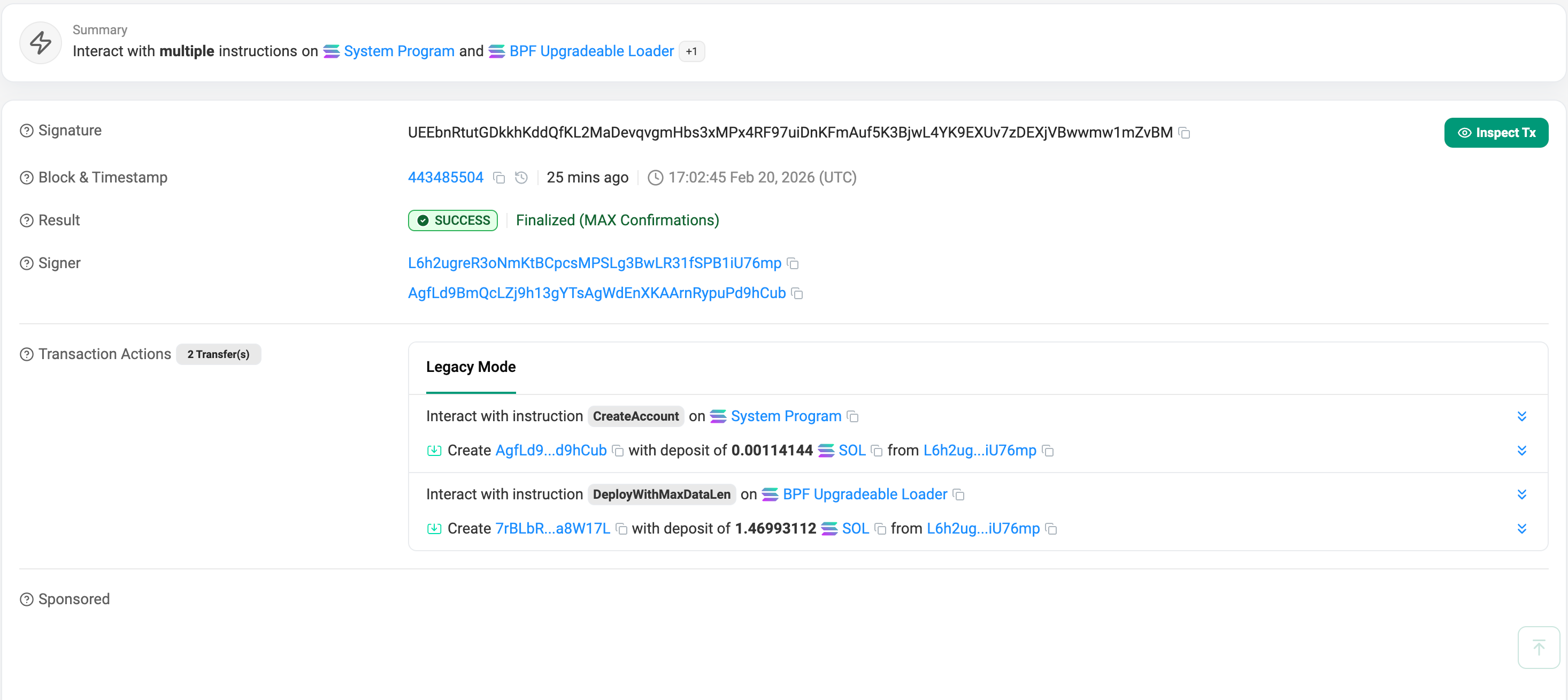
Once configured and funded with Devnet SOL, run a clean build and deploy the program to the live network:
anchor clean
anchor build
anchor deploy
you should see something like:

on Explorer:
Create a Token-2022 Mint with Transfer Hook
Once the Anchor program is successfully deployed, we can leverage the spl-token CLI to create the actual Token-2022 Mint, attach the hook, and prepare our test accounts.
# Create the Token-2022 Mint and attach the newly deployed Hook
spl-token create-token --program-id TokenzQdBNbLqP5VEhdkAS6EPFLC1PHnBqCXEpPxuEb --transfer-hook <YOUR_PROGRAM_ID> --url devnet
# output:
# Creating token 71H52RsWiLbMXQuBtH5a1hLSzUnbTgiDjFhktuJrJT1m under program TokenzQdBNbLqP5VEhdkAS6EPFLC1PHnBqCXEpPxuEb
# Address:  71H52RsWiLbMXQuBtH5a1hLSzUnbTgiDjFhktuJrJT1m
# Decimals:  9
# Signature: 2rtXMX3TaXZoWMJqcYj7vwhtWng3eLUBfDHbG4N45QxnQnuwrNReKZgPoLPNfHKBXofuoH1daFAP73FoWJAFRWJV
on Explorer:

# Create your Devnet Associated Token Account (ATA)
spl-token create-account <TOKEN_MINT_ADDRESS> --program-id TokenzQdBNbLqP5VEhdkAS6EPFLC1PHnBqCXEpPxuEb --url devnet
# Mint the initial test supply to your wallet
spl-token mint <TOKEN_MINT_ADDRESS> 2000 --url devnet
Note: Now your account should have 2000 of the minted token
Initialize the ExtraAccountMetaList PDA
At this point, the Token-2022 program is aware of your Hook, but any token transfer will still fail because the ExtraAccountMetaList PDA has not been instantiated on Devnet. You must invoke your initialize_extra_account_meta_list instruction to write the resolution map to the blockchain.
Since this logic lives entirely inside your custom Anchor program, the standard SPL CLI cannot do this for you. We bridge this gap with a standalone TypeScript script:
import * as anchor from "@coral-xyz/anchor";
import { Program } from "@coral-xyz/anchor";
import { TransferHookProject } from "../target/types/transfer_hook_project";
async function main() {
    // 1. Force the provider to use Devnet
    process.env.ANCHOR_PROVIDER_URL = "https://api.devnet.solana.com";
    const provider = anchor.AnchorProvider.env();
    anchor.setProvider(provider);
    // 2. Define your specific Devnet addresses
    const programId = new anchor.web3.PublicKey("<ProgramID>");
    const mintAddress = new anchor.web3.PublicKey("<MintID>");
    console.log("Connecting to Devnet as:", provider.wallet.publicKey.toBase58());
    // 3. Load the workspace program
    const program = anchor.workspace.TransferHookProject as Program<TransferHookProject>;
    // 4. Deterministically derive the PDA using the exact Token-2022 seeds
    // Only for the print, not needed for the program its done automatically.
    const [extraMetasPDA] = anchor.web3.PublicKey.findProgramAddressSync(
        [Buffer.from("extra-account-metas"), mintAddress.toBuffer()],
        programId
    );
    console.log("Target Mint:", mintAddress.toBase58());
    console.log("Derived Metadata PDA:", extraMetasPDA.toBase58());
    console.log("Broadcasting initialization transaction...");
    // 5. Execute the Anchor instruction
    try {
        const tx = await program.methods
            .initializeExtraAccountMetaList()
            .accounts({
                mint: mintAddress,
            })
            .rpc();
        console.log("\nSuccess! The ExtraAccountMetaList roadmap is live on Devnet.");
        console.log(`View on Explorer: https://explorer.solana.com/tx/${tx}?cluster=devnet`);
    } catch (error) {
        console.error("Transaction failed:", error);
    }
}
main();
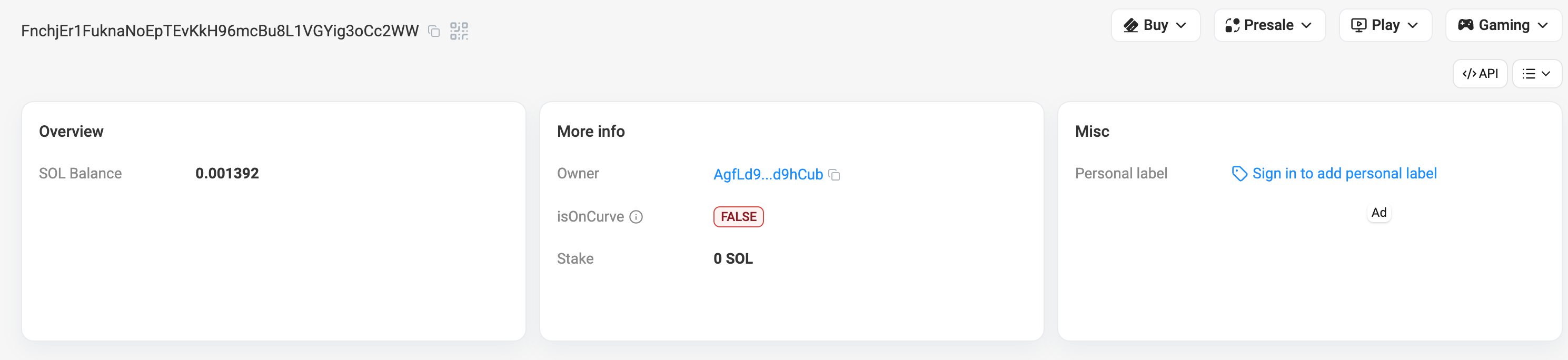
The output should look like:

On Explorer:
Validate Transfers on Devnet (Fail/Pass Cases)
With the PDA roadmap live on Devnet, your token is now 100% locked into the Transfer Hook. The modern spl-token CLI natively supports Solana Transfer Hooks and Account Resolution. Let’s trigger a transfer that violates our 1,000-token limit:
spl-token transfer <TOKEN_MINT_ADDRESS> 1500 <DESTINATION_WALLET> --fund-recipient --url devnetThe Error:
Error: Client(Error { request: Some(SendTransaction), kind: RpcError(RpcResponseError { code: -32002, message: "Transaction simulation failed: Error processing Instruction 1: custom program error: 0x1770", data: SendTransactionPreflightFailure(RpcSimulateTransactionResult { err: Some(UiTransactionError(InstructionError(1, Custom(6000)))), logs: Some([
  ...
  "Program log: Instruction: TransferHook",
  "Program log: Hook triggered for amount: 1500000000000",
  "Program log: AnchorError thrown in programs/transfer-hook-project/src/lib.rs:36. Error Code: AmountTooBig. Error Number: 6000. Error Message: Transfer amount exceeds the blog's demo limit.",
  "Program AgfLd9BmQcLZj9h13gYTsAgWdEnXKAArnRypuPd9hCub failed: custom program error: 0x1770"
])
The Hook perfectly intercepted the transfer and threw our custom Anchor error!
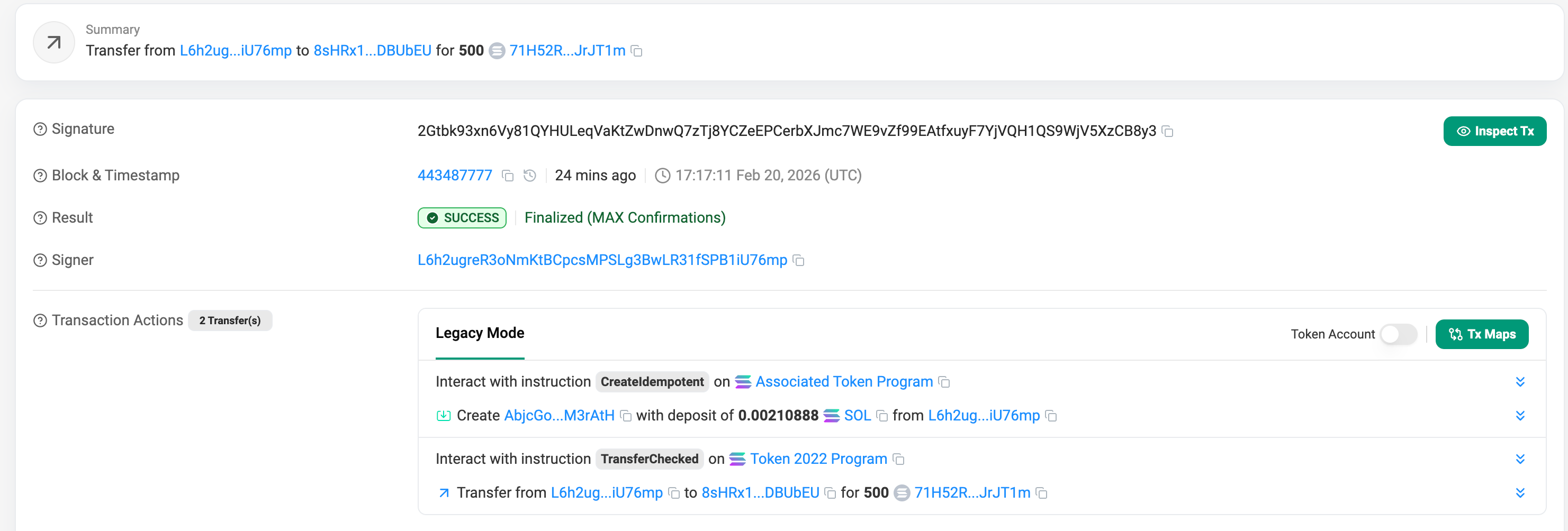
Now, let’s drop the volume to 500 tokens to satisfy the protocol constraint:
spl-token transfer <TOKEN_MINT_ADDRESS> 500 <DESTINATION_WALLET> --fund-recipient --url devnetThe output

On Explorer:
Summary
If you followed along and executed the final Devnet transactions, you successfully intercepted a native token transfer and injected custom business logic directly into the execution flow using Solana Transfer Hooks.
Token-2022 has expanded what developers can build on Solana. By mastering Solana Transfer Hooks, Account Resolution through ExtraAccountMetaList, and Anchor context isolation to avoid CPI discriminator mismatches, you can implement secure, synchronous state updates with minimal compute overhead.
Learn more about Solana architecture from our articles:
- Solana Token-2022 Metadata
- Solana Token-2022 Transfer Hooks and Fee-on-Transfer
- Where token metadata lives on Solana
- SPL Token Program Architecture
- Architecture & Parallel Transactions
- Account Model and Transactions
- Anchor Accounts: Seeds, Bumps, PDAs
- Instructions and Messages
- Transaction, Serialization, Signatures, Fees, and Runtime Execution
Reliable Solana RPC infrastructure
Getting started with Solana on Chainstack is fast and straightforward. Developers can deploy a reliable Solana node within seconds through an intuitive Console — no complex setup or hardware management required.
Chainstack provides low-latency Solana RPC access and real-time gRPC data streaming via Yellowstone Geyser Plugin, ensuring seamless connectivity for building, testing, and scaling DeFi, analytics, and trading applications. With Solana low-latency endpoints powered by global infrastructure, you can achieve lightning-fast response times and consistent performance across regions.
Start for free, connect your app to a reliable Solana RPC endpoint, and experience how easy it is to build and scale on Solana with Chainstack – one of the best RPC providers.