AI-ready infrastructure
 Refer and earn


 Ethereum
 Hyperliquid
 Solana
 Arbitrum
 BNB Smart Chain
 Base
Base Polygon
 TRON
TRON Sui
Sui Robinhood


Solana off-chain messages: from CLI to one-time sign-in

In the previous Solana posts, we followed a transaction from instructions to a compiled message, then from that message to a signature the network can verify. But not every signature request in a wallet is a transaction.
Sometimes a website only wants us to sign in. There is no program instruction, no fee payer, and nothing to find in the explorer. We approve a readable message, the wallet returns some bytes, and the application decides whether to trust them.
That last step is where things get interesting. Verifying a signature is straightforward. Knowing what that signature is allowed to authorize takes more work.
In this post, we will start where we started in the other Solana posts: the CLI. We will create a keypair, sign a message, verify it, and deliberately break verification. Then we will open up the bytes behind those commands and move from a reusable “login” signature to a one-time Sign-In With Solana challenge.
A message is not necessarily a transaction message
We already covered the transaction meaning of “message” in Solana: Instructions and Messages, and how it gets signed in Solana: Transactions, Execution, Fees, and Runtime.
There, the message is a specific serialized structure: account references, instructions, a blockhash, and the other fields required by its transaction format. The signature authorizes that structure.
An off-chain message can instead be application data. A login statement is one example. An order or an authorization interpreted by another system is another. The signature does not automatically submit anything to Solana.
For this article, our verifier is a local application. It receives a public key, message bytes, and a signature, and checks whether they belong together. It does not need a balance lookup, an RPC connection, or a deployed program, just pure “backend” code.
Signing happens with a key. Execution happens in whichever system accepts the signed statement. Those are separate steps.
This is also why “no network fee” does not mean “no consequences.” An application may treat a signature as permission to do something important. You need to read the statement and understand who will accept it.
From an Ethereum address to a Solana public key
If you followed the EIP-191 and EIP-712 posts, you have already seen the general idea: agree on a representation, sign it, and verify the result.
The mechanics here are different. For an ordinary Solana Ed25519 keypair, the familiar Base58 address encodes the 32-byte public key itself. We decode that address and supply the public key to the verifier. We are not using Ethereum’s address-recovery flow.
The verifier needs three inputs:
- Message bytes: the exact payload that was signed.
- Signature: the 64-byte Ed25519 signature.
- Public key: the 32-byte verification key.
This applies to keypair-backed addresses. A PDA does not have a private key that a browser wallet can use to sign an arbitrary message.
What is inside those 64 bytes?
An Ed25519 signature contains two encoded values: a curve point, R, followed by a scalar, S. Each occupies 32 bytes. Neither is an Ethereum-style recovery identifier.
Conceptually, signing derives a secret-dependent value from the message, uses it to construct R, and combines the message, R, and the public key into a challenge. Verification checks a curve relation tying those values together. Change the message and the relation no longer holds for the original signature.
Ed25519 already uses SHA-512 internally. That does not mean our application should first hash every message and then pass the hash to the signing function. That would define a different payload. We will demonstrate the mismatch below. The exact algorithm, including encoding and validation rules, is specified in RFC 8032.
Hands-on with the Solana CLI
Example 1: Sign and verify with the Solana CLI
We will use solana-keygen, solana sign-offchain-message, and solana verify-offchain-signature. These are part of the Solana CLI. The command reference lists both off-chain signing commands. Solana CLI reference
The execution shown here uses Agave Solana CLI 3.1.9. The byte-layout section below is specifically about the version-0 format that this CLI signs. Off-chain message versions are not transaction versions: this 0 has nothing to do with v0 transactions or address lookup tables.
Create a disposable signer
Run the complete block below in Bash or Zsh. Keep the same terminal open throughout the examples, later commands use the exported values. There is no repository checkout required.
The keypair is saved as offchain-demo.json in the current directory, without replacing our default Solana wallet. The --silent flag keeps the recovery phrase out of the output. We deliberately skip the mnemonic passphrase for this disposable exercise, not as a recommendation for a real wallet. Remember to keep the keypair file out of Git.
Use only the fresh lab keypair. Do not fund it, upload its JSON file, or use it for real authentication. We will print its public address and signatures, never its private key.
# Run in Bash or Zsh. Keep this terminal open for the later examples.
export OFFCHAIN_DEMO_KEYPAIR="$PWD/offchain-demo.json"
solana --version
solana-keygen new --silent --no-bip39-passphrase \
  --outfile "$OFFCHAIN_DEMO_KEYPAIR"
export OFFCHAIN_DEMO_ADDRESS=$(solana-keygen pubkey "$OFFCHAIN_DEMO_KEYPAIR")
export OFFCHAIN_DEMO_MESSAGE="Login to ByteBeetle"
export OFFCHAIN_DEMO_SIGNATURE=$(solana sign-offchain-message \
  --keypair "$OFFCHAIN_DEMO_KEYPAIR" \
  --version 0 "$OFFCHAIN_DEMO_MESSAGE")
printf 'Address: %s\n' "$OFFCHAIN_DEMO_ADDRESS"
printf 'Message: %s\n' "$OFFCHAIN_DEMO_MESSAGE"
printf 'Signature: %s\n' "$OFFCHAIN_DEMO_SIGNATURE"
solana verify-offchain-signature \
  --signer "$OFFCHAIN_DEMO_ADDRESS" \
  --version 0 "$OFFCHAIN_DEMO_MESSAGE" "$OFFCHAIN_DEMO_SIGNATURE"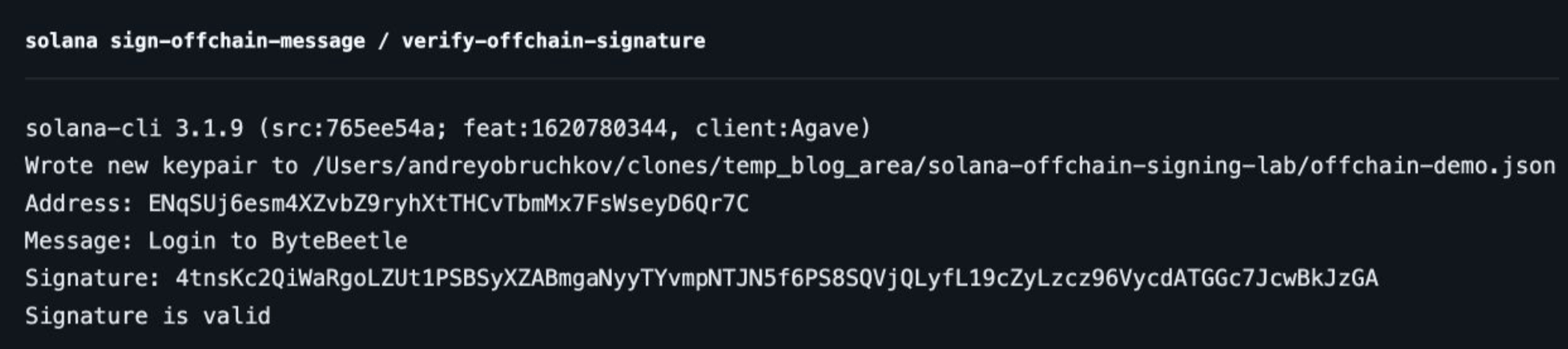
What did those commands actually do?
Create a keypair. solana-keygen new generated a signing key locally. Creating a keypair is not the same as creating an on-chain account. We did not request an airdrop or pay rent.
Get its public address. solana-keygen pubkey gives us the Base58 representation of the public key. Your address and signature will differ from the screenshot because your keypair is generated randomly. All screenshots in this article use the same lab keypair.
Sign the message. --keypair explicitly selects our disposable signer. The command returns a Base58 signature, which we save in a shell variable. The CLI does not submit it to the network.
Verify the signature. Notice the different argument: --signer receives the public address, not the keypair file. Verification does not require the private key. A successful check prints Signature is valid.
There is no devnet configuration here because there is no network operation to configure. The local signer and verifier have everything they need.
But there is one detail we have not inspected yet: the CLI did not sign only the visible sentence. It wrapped that sentence in an off-chain message envelope. Let’s first see what happens when the sentence changes.
Example 2: Break verification, then reuse the proof
Keep the original signature and run these commands in the same terminal:
# Keep the original signature. Change only the text being verified.
printf '\nChanged text:\n'
if solana verify-offchain-signature --signer "$OFFCHAIN_DEMO_ADDRESS" --version 0 \
  'Login to ByteBeetle!' "$OFFCHAIN_DEMO_SIGNATURE"; then
  echo "UNEXPECTED: changed text accepted"
else
  echo "Expected rejection"
fi
# $'\n' creates an actual newline in Bash and Zsh.
printf '\nExtra newline:\n'
if solana verify-offchain-signature --signer "$OFFCHAIN_DEMO_ADDRESS" --version 0 \
  "${OFFCHAIN_DEMO_MESSAGE}"$'\n' "$OFFCHAIN_DEMO_SIGNATURE"; then
  echo "UNEXPECTED: changed text accepted"
else
  echo "Expected rejection"
fi
printf '\nOriginal proof, verified again:\n'
solana verify-offchain-signature --signer "$OFFCHAIN_DEMO_ADDRESS" --version 0 \
  "$OFFCHAIN_DEMO_MESSAGE" "$OFFCHAIN_DEMO_SIGNATURE"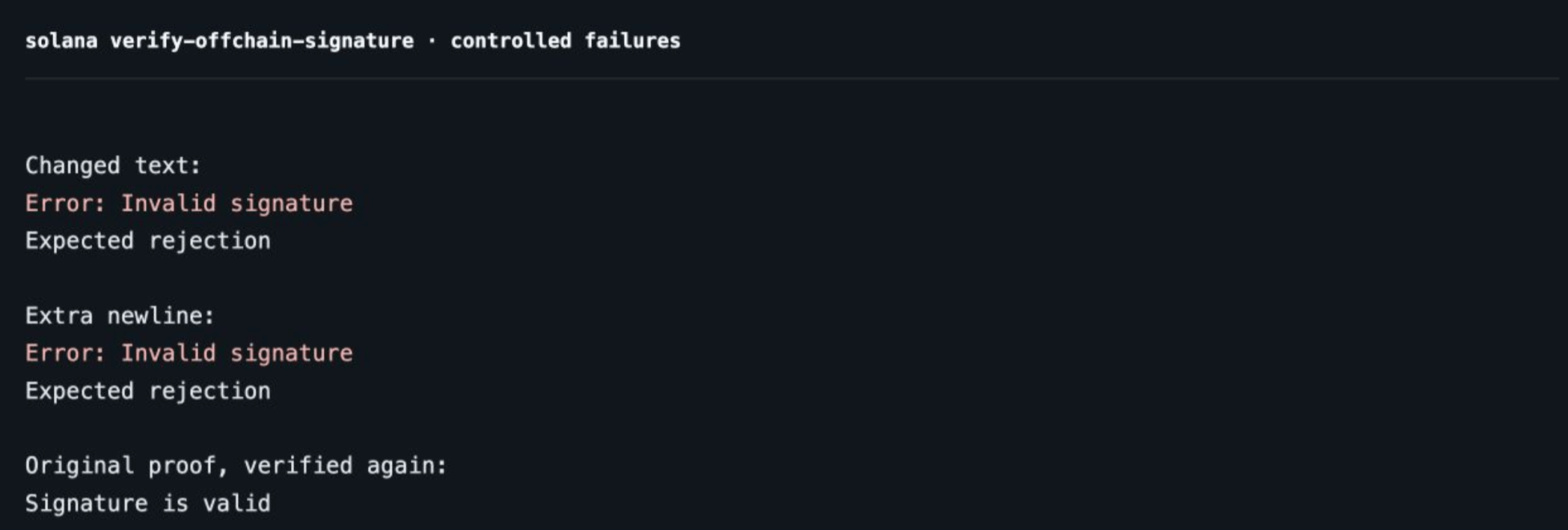
The first case appends an exclamation mark. The second appends an actual newline byte, not the two visible characters \n. Both produce Error: Invalid signature and a failing exit status. The if blocks let us continue after these expected failures.
The verifier is rebuilding the envelope from the text we supply. Change the text and it no longer reconstructs the bytes that the original signature authenticated. A newline can look harmless in a terminal, but it is still data.
Now look at the final command. We submit the original text, address, and signature again, and the CLI accepts them again. Verification has not “used up” the signature. Keep that result in mind when we reach the login example.
Signatures authenticate exact bytes. They do not compare human meaning
Example 3: What bytes did the CLI sign?
We now have a real CLI-generated signature. Instead of trusting another CLI success message, let’s reconstruct the signed bytes and verify that same signature independently.
For this one short ASCII message, the layout we will test is:
Bytes  0–15: signing domain   ff + UTF-8("solana offchain")
Byte     16: version          00
Byte     17: message format   00 (restricted ASCII)
Bytes 18–19: text length      13 00 (19, little-endian)
Bytes 20–38: text             UTF-8("Login to ByteBeetle")
That is 20 header bytes + 19 text bytes = 39 signed bytes. There is no space between the initial ff byte and the s in solana. The space is between the words solana and offchain.
This matches the compact v0 serializer used by this CLI. Do not mix its offsets with other off-chain-message implementations or proposal layouts. The implementation is linked here, and the independent check below verifies the layout against our actual CLI output. OffchainMessage serializer
Reference from source code
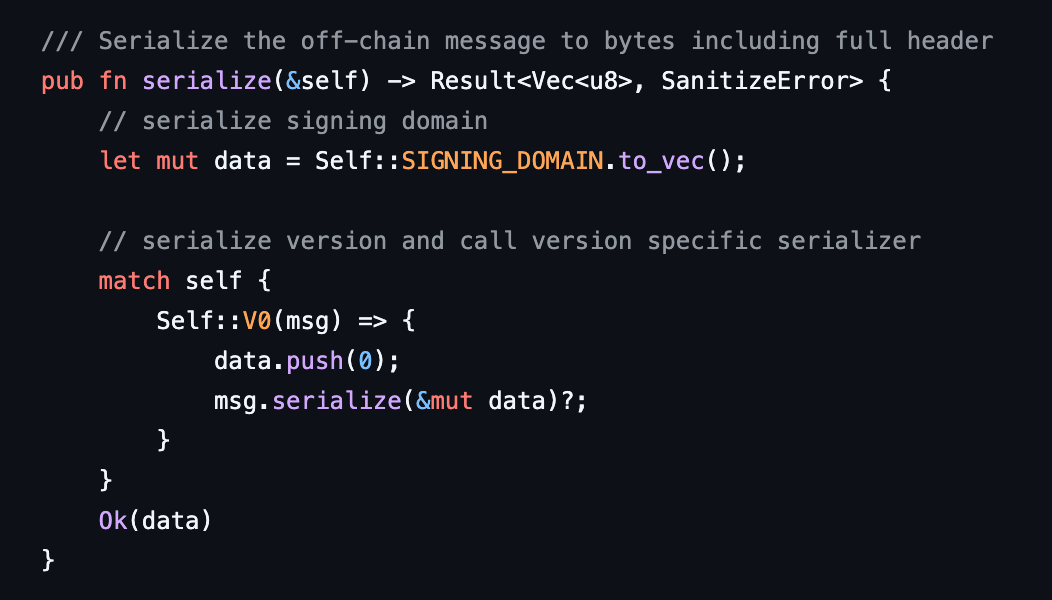
where SIGNING_DOMAIN is

Reconstruct and verify, without the private key
The CLI handles signing. We use a small Python script to inspect the exact bytes being signed and see what happens when we change the verifier’s input. The cryptography library performs Ed25519 signature verification. The base58 library only converts between Base58 text and bytes, it does not sign or verify anything.
In an empty working folder, create and activate a Python virtual environment, then install the two dependencies for this example:
python3 -m venv .venv
source .venv/bin/activate
python -m pip install "base58==2.1.1" "cryptography==50.0.1"
Save the full program below as 03-inspect-cli-envelope.py in that folder. Run it with Python from the same terminal where you exported the CLI values. It reads the wallet address, message, and signature from those environment variables, it does not open the keypair file or access your private key.
import hashlib
import os
import base58
from cryptography.exceptions import InvalidSignature
from cryptography.hazmat.primitives.asymmetric.ed25519 import Ed25519PublicKey
address = os.environ.get("OFFCHAIN_DEMO_ADDRESS")
text = os.environ.get("OFFCHAIN_DEMO_MESSAGE")
encoded_signature = os.environ.get("OFFCHAIN_DEMO_SIGNATURE")
if not (address and text and encoded_signature):
    raise SystemExit(
        "Run the CLI setup and export its variables in this terminal first"
    )
public_bytes = base58.b58decode(address)
signature = base58.b58decode(encoded_signature)
body = text.encode("utf-8")
assert len(public_bytes) == 32, "Expected a 32-byte public key"
assert len(signature) == 64, "Expected a 64-byte signature"
# This inspector supports only short, printable ASCII messages.
assert 0 < len(body) <= 1212, "Expected between 1 and 1212 message bytes"
assert all(
    0x20 <= byte <= 0x7E for byte in body
), "This example supports printable ASCII only"
domain = b"\xffsolana offchain"
header = (
    bytes([0])  # CLI off-chain message version.
    + bytes([0])  # Restricted ASCII format.
    + len(body).to_bytes(2, byteorder="little")
)
envelope = domain + header + body
# Python accepts the raw public key, so no SPKI DER prefix is needed.
public_key = Ed25519PublicKey.from_public_bytes(public_bytes)
checks = [
    ("CLI envelope", envelope, True),
    ("Bare text only", body, False),
    ("SHA-256 of envelope", hashlib.sha256(envelope).digest(), False),
    (
        "Base58 round trip",
        base58.b58decode(base58.b58encode(envelope)),
        True,
    ),
]
print("Address:", address)
print("Public key bytes:", len(public_bytes))
print("Text bytes:", len(body))
print("Domain hex:", domain.hex())
print("Version / format / length hex:", header.hex())
print("Signed envelope bytes:", len(envelope))
print("Envelope hex:", envelope.hex())
print("Signature bytes:", len(signature))
for label, payload, expected in checks:
    try:
        public_key.verify(signature, payload)
        valid = True
    except InvalidSignature:
        valid = False
    print(f"{label}: {valid}")
    assert valid == expected, f"{label}: expected {expected}, got {valid}"
Run it from the same terminal:
python 03-inspect-cli-envelope.py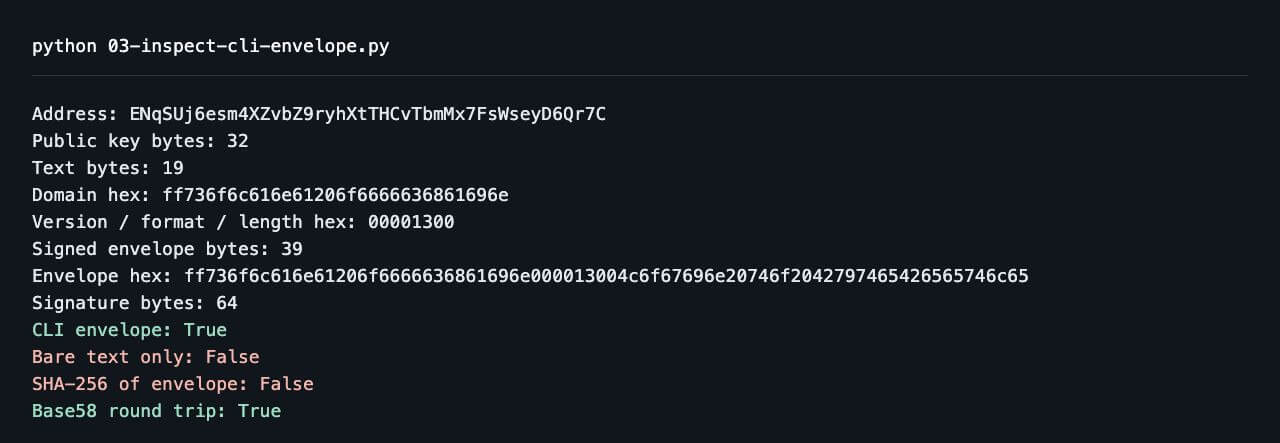
Reading the result
The envelope passes. We reproduced the exact payload the CLI signed. The public key is 32 bytes, and the decoded signature is 64 bytes. Base58 is just how we moved those values between tools.
Bare text fails. "Login to ByteBeetle" still contains 19 bytes, but it is missing the signing domain and header. Correct key, correct signature, wrong input bytes.
The SHA-256 digest fails. Hashing the envelope first does not produce a shorter equivalent input. It produces different bytes. Python’s public_key.verify(signature, payload) checks the signature against the payload we supply. Ed25519 performs its own internal hashing, manually hashing the envelope with SHA-256 changes the message being verified. Successful verification returns normally, a signature mismatch raises InvalidSignature. Ed25519 verification documentation
The Base58 round trip passes. Encoding and decoding restored all 39 bytes unchanged. A reversible encoding is not a hash.
Ed25519PublicKey.from_public_bytes(public_bytes) accepts the raw 32-byte public key. We do not need a DER wrapper, and we do not append the public key to the signed message. The key and the message are separate inputs to verification.
Our inspector deliberately rejects anything outside its short, printable-ASCII scope. It explains this example, it is not a general-purpose encoder for every message format. A newline or non-ASCII text requires different format handling. Do not simply reuse the hard-coded format byte.
A prefix is not an application policy
The signing domain identifies the off-chain message format. It does not say “this is for ByteBeetle,” set an expiration time, or prevent replay. We still need application-specific context inside the signed statement.
Ed25519 is the algorithm. The CLI envelope, raw message bytes, and a structured sign-in statement are choices of payload. Using the same key and algorithm does not make those payloads interchangeable.
A valid signature is not a complete login system
Our first message has a serious problem: it can be reused.
Suppose a backend accepts Login to ByteBeetle whenever its signature verifies. An attacker who obtains that proof does not need to forge a new signature. They can submit the existing message and signature again.
The cryptography works exactly as designed. It simply has no record of whether the application accepted this proof yesterday, one second ago, or in another browser session.
We need a challenge: fresh data issued by the backend for a particular sign-in attempt, with a short lifetime and one permitted use. The wallet signs the challenge, the backend verifies it and consumes it before issuing a session.
Here, the nonce is an unpredictable application-level challenge value. It is not an Ethereum transaction counter, and it is not a Solana durable nonce account. We will cover durable nonce accounts separately.
From signing a message to signing in
If a wallet can already sign arbitrary messages, why do we need a separate sign-in standard?
The traditional approach was to connect the wallet, construct a message inside the application, and ask the wallet to sign it through signMessage. The SIWS documentation calls this the legacy authentication flow. Here, “legacy” does not refer to Solana’s legacy transaction format. It describes how the application requests an authentication proof.
This approach can implement secure authentication. An application can include a domain, generate a fresh challenge, check its lifetime, and reject reuse. The problem is that each application must decide how to represent those requirements. One might ask the user to sign a short sentence. Another might present JSON. A third might use a multiline message with its own field names.
The signature algorithm does not resolve those differences. It authenticates the supplied bytes, whether they describe a carefully scoped request or an ambiguous statement.
SIWS introduces a shared structure. Instead of assembling the final message itself, the application supplies named parameters to the wallet’s signIn feature. The wallet constructs the sign-in message according to the standard. This gives wallets a consistent structure to inspect and present, rather than requiring them to infer the meaning of arbitrary text. SIWS specification
Consider a request that names one website while another website is asking for the signature. A recognizable domain field gives a wallet something it can compare against the requesting site. That comparison matters: writing a legitimate domain into a message does not prove that the request came from that domain. SIWS describes domain binding as a way for wallets to warn about such mismatches. It is not a guarantee that every suspicious request will be prevented. SIWS motivation
There is also a distinction between connecting and authenticating. Connecting makes an account available to the application. Authentication requires the application to verify a proof tied to its sign-in request. Receiving an address is not equivalent to receiving that proof.
However, a standardized message does not make the application’s decisions disappear. The verifier still needs its own expectations. A signature over a correctly formatted message can belong to an expired challenge or an already completed sign-in attempt. The standard helps the participants agree on what was signed, the application still decides whether to accept it.
What our sign-in challenge contains
For our blog example, we choose:
- Domain and URI:
localhost:3000and its HTTP origin. In production, use your configured HTTPS origin. - Address: the disposable CLI-generated wallet we expect to authenticate.
- Statement: a narrowly scoped request to sign in to the classroom.
- Chain ID:
solana:devnet, as signed application context. This does not make a devnet request. - Nonce: 16 cryptographically random bytes, represented as 32 hexadecimal characters.
- Issued and expiration times: a two-minute validity window.
- Request ID: the identifier used to locate this challenge’s backend record.
These are our application’s required fields. Do not confuse “optional in the general interface” with “safe to omit from your authentication policy.”
The sign-in message and the signing format are different layers
We now have two ideas that can sound interchangeable: an off-chain message format and a sign-in message. They describe different parts of the process.
The sign-in message expresses the request. It identifies the application, the account, and the conditions attached to that request. The signing format determines the exact bytes presented to the signature algorithm.
We already saw this distinction with the CLI. The visible sentence was “Login to ByteBeetle,” but the signed payload contained a prefix and header before that sentence. Verifying the sentence alone failed because those additional bytes were part of the signature’s input.
The same distinction matters when moving between tools. Two interfaces can display identical text while signing different byte sequences. A verifier cannot reconstruct the payload from the visible sentence alone unless it also knows the format used by the signer.
The Wallet Standard makes this explicit: its message-signing output includes signedMessage, and the wallet may prefix or otherwise modify the requested message before signing it. Those returned bytes must still be checked against the application’s intended request. A valid signature over an unexpected message is not an acceptable substitute. Wallet Standard message-signing interface
“Version” depends on which layer we mean
The compact version-0 layout inspected earlier belongs to the CLI implementation used in our experiment. It should not be treated as the layout of every Solana off-chain signing interface.
All three layouts start with the 16-byte signing prefix, followed by a version byte. The fields after that byte are:
Compact CLI v0 used here: Format, text length, text.
Legacy v0 described in the specification: Application domain, format, signer count, signer public keys, text length, text.
v1 described in the specification: Signer count, signer public keys, UTF-8 content.
Anza’s current off-chain message specification describes a version-1 format containing the signing prefix, a version byte, a required-signer list, and UTF-8 content (reference). Compared with the legacy version-0 layout documented in that specification, it removes the application-domain field, message-format byte, and message-length prefix. It also requires signer addresses to be unique and sorted, making their serialization deterministic. That specification’s legacy v0 layout is itself different from the compact CLI layout we reconstructed. Off-chain message specification
This is why changing a version byte is not enough to upgrade an encoder. The version identifies rules for the surrounding structure. The signer and verifier must agree on those rules.
In addition, the Wallet Standard’s signIn feature has its own API version. Its 1.1.0 interface introduces an option to request version-1 off-chain-message signing from supporting wallets. That API version is not the message’s binary version, and neither should be confused with Solana transaction versions or the Version: 1 field inside a SIWS message. Wallet Standard sign-in interface
Our next example deliberately chooses one precise representation: the readable SIWS text encoded as UTF-8 and signed directly. It does not add the CLI envelope or implement the newer off-chain-message envelope.
Hands-on: a one-time sign-in
Example 4: Accept once, reject the replay
The CLI showed us that the same proof verifies twice. It cannot maintain our application’s challenge store, browser sessions, or login policy. For that final layer, we will use a small local program that simulates both sides. The signature operations and SIWS verification are real, the wallet UI and HTTP session are not part of this demonstration.
We are now changing the message format. This example signs the readable SIWS text constructed by create_sign_in_message(), not the CLI envelope. Passing that text through solana sign-offchain-message would add the CLI envelope and produce a signature over different bytes.
We reuse the disposable keypair created earlier, so the public address stays the same. Python’s cryptography library stands in for the wallet’s signer. The first 32 bytes of the keypair file contain the Ed25519 seed. We load that seed directly, and the last 32 bytes give us the public key. No PKCS#8 wrapper is needed.
Reading the private key is strictly a local teaching shortcut. In a real sign-in flow, the private key stays in the wallet. The application receives the public proof, never the keypair file.
There are three roles to follow:
issue_challenge()creates a fresh challenge and stores the application’s own copy.simulate_wallet()constructs the SIWS message and signs it.accept_sign_in()decides whether the returned proof can satisfy the outstanding challenge.
Inside the third function, verify_sign_in() performs a narrower check: does the returned message match the expected message, and is its signature valid? It does not check the clock or consume the challenge.
Our Python helper supports the exact SIWS fields and message layout used in this example. It is not a complete replacement for the JavaScript Wallet Standard library. It also trusts the shape of the wallet’s response, so a production verifier should first check that the account, public key, and signature fields exist and have the expected types and lengths.
Save this as 04-one-time-sign-in.py:
import copy
import json
import os
import secrets
import time
import uuid
from datetime import datetime, timezone
import base58
from cryptography.exceptions import InvalidSignature
from cryptography.hazmat.primitives.asymmetric.ed25519 import (
    Ed25519PrivateKey,
    Ed25519PublicKey,
)
with open(os.path.expanduser(os.environ["OFFCHAIN_DEMO_KEYPAIR"])) as f:
    keypair = bytes(json.load(f))
# The first 32 bytes are the Ed25519 seed, the last 32 are the public key.
private_key = Ed25519PrivateKey.from_private_bytes(keypair[:32])
public_bytes = keypair[32:]
address = base58.b58encode(public_bytes).decode("ascii")
pending = {}
def now_ms():
    return time.time_ns() // 1_000_000
def iso_time(ms):
    dt = datetime.fromtimestamp(ms / 1000, tz=timezone.utc)
    return dt.isoformat(timespec="milliseconds").replace("+00:00", "Z")
def parse_time(value):
    dt = datetime.fromisoformat(value.replace("Z", "+00:00"))
    return round(dt.timestamp() * 1000)
def create_sign_in_message(data):
    # Newlines, spaces, field order, and the absence of a final newline matter.
    return (
        f"{data['domain']} wants you to sign in with your Solana account:\n"
        f"{data['address']}\n\n"
        f"{data['statement']}\n\n"
        f"URI: {data['uri']}\n"
        f"Version: {data['version']}\n"
        f"Chain ID: {data['chainId']}\n"
        f"Nonce: {data['nonce']}\n"
        f"Issued At: {data['issuedAt']}\n"
        f"Expiration Time: {data['expirationTime']}\n"
        f"Request ID: {data['requestId']}"
    ).encode("utf-8")
def verify_sign_in(data, output):
    if output["signedMessage"] != create_sign_in_message(data):
        return False
    key = Ed25519PublicKey.from_public_bytes(output["account"]["publicKey"])
    try:
        key.verify(output["signature"], output["signedMessage"])
        return True
    except InvalidSignature:
        return False
def issue_challenge(session_id, now):
    request_id = str(uuid.uuid4())
    data = {
        "domain": "localhost:3000",
        "address": address,
        "statement": "Sign in to the ByteBeetle classroom.",
        "uri": "http://localhost:3000",
        "version": "1",
        "chainId": "solana:devnet",
        "nonce": secrets.token_hex(16),
        "issuedAt": iso_time(now),
        "expirationTime": iso_time(now + 120_000),
        "requestId": request_id,
    }
    # The verifier keeps its own copy of the original challenge.
    pending[request_id] = {"sessionId": session_id, "input": copy.deepcopy(data)}
    return {"requestId": request_id, "input": data}
def simulate_wallet(data):
    message = create_sign_in_message(data)
    return {
        "account": {"address": address, "publicKey": public_bytes},
        "signedMessage": message,
        "signature": private_key.sign(message),
    }
def accept_sign_in(session_id, request_id, output, now):
    record = pending.get(request_id)
    if not record or record["sessionId"] != session_id:
        return "REJECT: unknown challenge"
    data = record["input"]
    if now < parse_time(data["issuedAt"]):
        return "REJECT: not yet valid"
    if now >= parse_time(data["expirationTime"]):
        return "REJECT: expired"
    account = output["account"]
    if (
        account["address"] != data["address"]
        or base58.b58encode(account["publicKey"]).decode("ascii") != data["address"]
    ):
        return "REJECT: account mismatch"
    if not verify_sign_in(data, output):
        return "REJECT: message or signature"
    del pending[request_id]
    return "ACCEPT: challenge consumed"
def run_demo():
    session = "local-test-session"  # Not a production session mechanism.
    now = now_ms()
    first = issue_challenge(session, now)
    output = simulate_wallet(first["input"])
    print("MODE: SIMULATED WALLET / REAL SIWS SIGNATURE CHECKS")
    print("Address:", address)
    print("\nSigned SIWS message:\n" + output["signedMessage"].decode("utf-8"))
    print("\nverify_sign_in, first call:", verify_sign_in(first["input"], output))
    print("verify_sign_in, same proof again:", verify_sign_in(first["input"], output))
    wrong_domain = simulate_wallet({**first["input"], "domain": "other.example"})
    domain_result = accept_sign_in(session, first["requestId"], wrong_domain, now)
    print("Wrong domain:", domain_result)
    assert domain_result == "REJECT: message or signature"
    accepted = accept_sign_in(session, first["requestId"], output, now)
    replayed = accept_sign_in(session, first["requestId"], output, now)
    print("First submission:", accepted)
    print("Replay submission:", replayed)
    assert accepted == "ACCEPT: challenge consumed"
    assert replayed == "REJECT: unknown challenge"
    second = issue_challenge(session, now)
    late_output = simulate_wallet(second["input"])
    later = parse_time(second["input"]["expirationTime"]) + 1
    print("Expired proof, helper only:", verify_sign_in(second["input"], late_output))
    expired = accept_sign_in(session, second["requestId"], late_output, later)
    print("Expired proof, server policy:", expired)
    assert expired == "REJECT: expired"
if __name__ == "__main__":
    run_demo()
Run it:
python 04-one-time-sign-in.py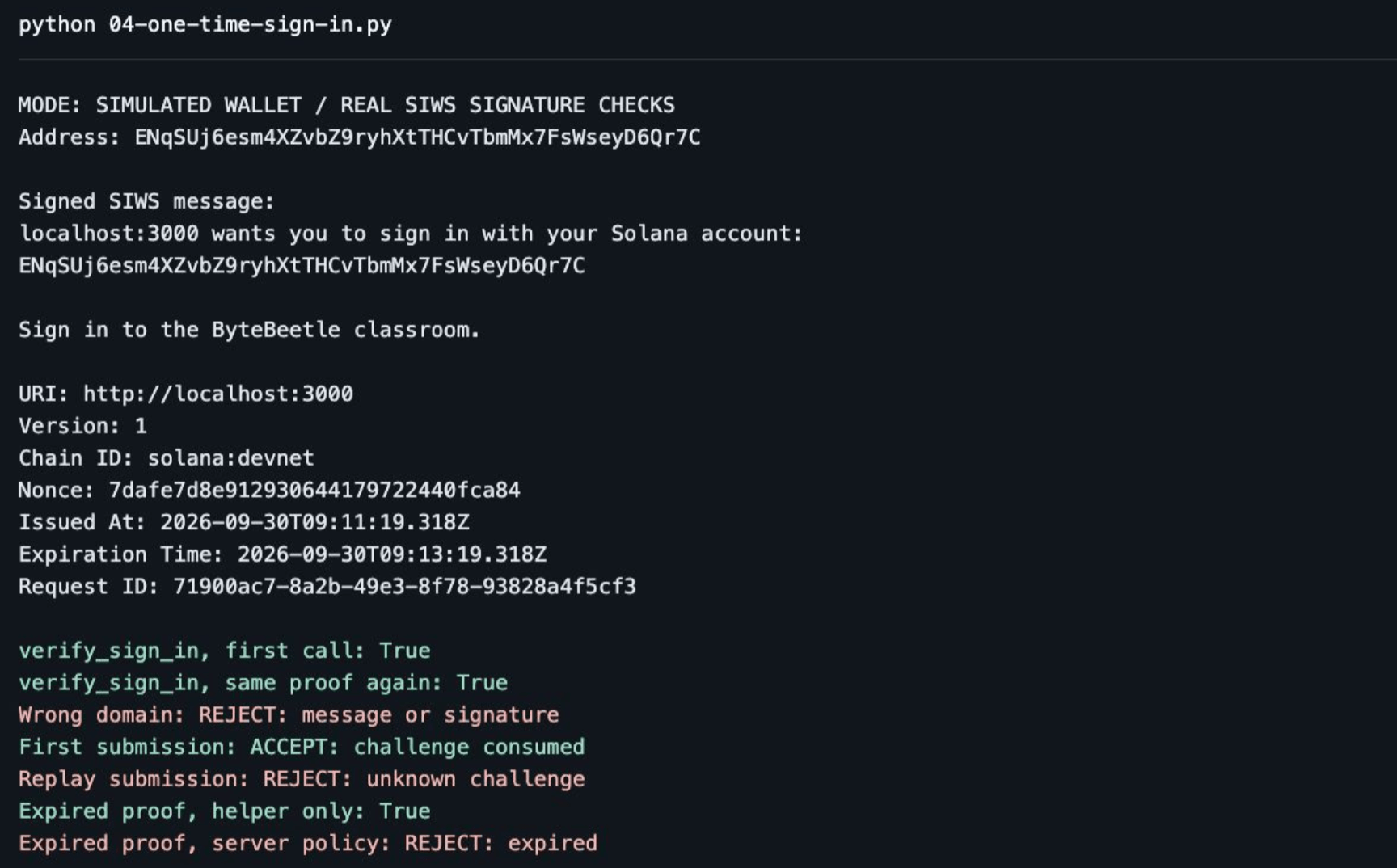
Step 1: the backend remembers what it asked for
The pending dictionary stores a copy of the original challenge together with its session identifier. Modifying the object returned to the client cannot rewrite that stored copy.
This is why accept_sign_in() receives a request ID and proof, rather than trusting a fresh input object sent by the client. If the client could choose the expected domain, nonce, and expiry during verification, it would be choosing the rules against which its own proof is checked.
For this offline demonstration, the expected address is fixed. A real application can bind the challenge to the selected wallet address at issuance. That initial selection is a claim, verification is what proves control of the key.
Step 2: the claimed address must match the actual signing key
The returned proof contains both an address and public-key bytes. Our application checks output["account"]["address"] against the address in its stored challenge. It also Base58-encodes output["account"]["publicKey"] and checks that the result matches that same address.
Why check both? A client can write an address into a field without controlling its private key. We need the address named by the challenge to correspond to the public key that actually verifies the signature.
Next, verify_sign_in() reconstructs the expected SIWS message from the stored challenge. It compares those bytes with output["signedMessage"], then verifies the signature using the returned public key.
This separates two questions: did the signer sign the exact statement we expected, and does the signature verify under the expected identity?
Our helper does not inspect pending or compare timestamps with the current time. Those checks belong to accept_sign_in().
Step 3: replay protection is a state transition
The two output lines labelled verify_sign_in both return True because both calls receive the same matching message and valid signature.
Neither call accepts a login. Neither reads or modifies pending. We have checked the proof twice, but we have not consumed the challenge.
Now follow the first submission of the original, correct proof to accept_sign_in(). It finds the challenge in pending, checks the session and validity window, and calls verify_sign_in(). Once all checks pass, it deletes the challenge with del pending[request_id] and returns ACCEPT: challenge consumed.
The replay calls accept_sign_in() again with the same request ID and proof. This time, pending.get(request_id) finds no record. The function returns REJECT: unknown challenge before it reaches signature verification.
The signature has not become invalid. If we directly called verify_sign_in() again with the original challenge and proof, it would still return True.
Think of a signed ticket. Checking that the ticket is authentic can succeed repeatedly. Deciding whether it has already been used requires a separate record.
The nonce makes the challenge fresh, storing and consuming the challenge makes acceptance single-use. A random nonce alone does not prevent someone from resubmitting the same signed proof.
Our demonstration runs sequentially in one thread. With concurrent requests, the transition from outstanding to consumed must succeed only once. Otherwise, two requests could both find the challenge before either removes it.
Step 4: an authentic message can still be for the wrong application
The wrong-domain test is signed with the same valid lab key. Its signature is not random or corrupted. But the signed domain differs from the one in our stored challenge, so our sign-in flow rejects it.
This is what binding the signature to a purpose looks like in practice. We are not asking only whether the user signed something, we are checking whether they signed the statement this application issued.
Step 5: expiry belongs to the acceptance policy
The last test advances the verifier’s test clock beyond the deadline. It does not sleep for two minutes or change the computer’s clock.
The helper still returns True for the original matching proof. Our application returns REJECT: expired because the server-side deadline has passed.
A valid signature can be expired, already used, or intended for another application. Authentication must check all of those conditions, not just the signature.
Where the browser wallet fits
In a real frontend, the browser wallet replaces simulate_wallet(). The private key stays in the wallet. Your backend must never ask the user to upload it.
For authentication, use the wallet’s SIWS feature when available, passing the challenge obtained from your backend. Send the returned proof back for server-side verification. Wallets without that feature need an explicitly supported fallback, connecting a wallet by itself is not authentication. SIWS integration
For comparison, Phantom’s lower-level signMessage flow takes a byte array and opens a message-approval prompt. That API is useful for understanding the signer, but it does not build our challenge store, expiry checks, or application session for us. Phantom message signing
The boundary should remain simple: the wallet signs, the server decides whether that proof satisfies the pending request.
Signing in does not need an RPC connection, which is why everything above ran offline. Once the user is authenticated, though, most applications want to know something about the account: its SOL balance, the tokens it holds, or whether it owns a particular NFT. Those are reads against a node. A Solana RPC endpoint from Chainstack serves the HTTP and WebSocket methods for that, such as getBalance and getAccountInfo, so the backend that verifies the SIWS proof can check what the account holds before it issues a session.
Conclusion
Off-chain signing removes the transaction from the flow, not the need to define authority carefully.
We started with the Solana CLI: generate a disposable keypair, sign, and verify. Then we changed the text and saw verification fail, reconstructed the CLI’s 39-byte envelope, and verified the same signature independently. Finally, we moved to SIWS and kept a signature valid while changing the application’s decision: wrong context, expired challenge, or already-consumed proof.
Those are different layers. Ed25519 authenticates bytes. A message format gives those bytes structure. The backend decides what the statement means, when it is valid, and whether it has already been used.
Once the proof is accepted, the next question is usually what that account holds on-chain, and that is a read against your Solana node.
In the next Solana deep dive, we will look at a different use of the word nonce: durable nonce accounts, where the state lives on-chain and controls the lifetime of a pre-signed transaction.
Frequently asked questions
An off-chain message is application data signed with a Solana key and never submitted to the network. Unlike a transaction message, it has no instructions, fee payer or blockhash. A verifier needs three inputs: the exact message bytes, the 64-byte Ed25519 signature and the 32-byte public key.
Run solana sign-offchain-message with –keypair, –version 0 and your text to get a Base58 signature. Check it with solana verify-offchain-signature, passing the public address to –signer, the same text and the signature. Verification needs only the address, not the keypair file.
No. A transaction signature authorizes a serialized transaction message that the network executes. An off-chain signature authorizes whatever the receiving application decides it means, and nothing is submitted to Solana.
The signature covers exact bytes. The CLI wraps your text in an envelope with a signing domain, a version, a format byte and a length, so changing even a trailing newline changes the bytes and verification fails.
SIWS is a standard that gives sign-in requests a shared structure. The application passes named fields such as domain, nonce, issued-at and expiration time, and the wallet builds the message. That lets a wallet compare the domain with the requesting site and warn about a mismatch.
A valid signature verifies every time, so replay protection is application state. Issue a fresh random nonce for each attempt, give the challenge a short lifetime, and delete it when the first valid proof is accepted, so a second submission finds nothing to match.
No. Signing and verifying are local operations, so there is no fee and no RPC call. You need a Solana RPC endpoint only when the application then reads on-chain data about the account, such as its balance or token holdings.
Additional resources
- Solana: Instructions and Messages
- Solana: Transactions, Execution, Fees, and Runtime
- Solana: Architecture, Account Model and Transactions
- Solana CLI reference
- Off-chain message signing specification (Anza)
- Sign In With Solana specification
- Wallet Standard sign-in interface
- RFC 8032: Edwards-curve digital signature algorithm
- Solana methods
- Solana API reference