AI-ready infrastructure
 Refer and earn


 Ethereum
 Hyperliquid
 Solana
 Arbitrum
 BNB Smart Chain
 Base
Base Polygon
 TRON
TRON Sui
Sui Robinhood


Solana durable nonces: offline signing and replay protection

In our off-chain signing walkthrough, we separated a valid off-chain signature from an application accepting a sign-in request. The signature proved that a key authorized specific bytes. The application still had to decide whether those bytes represented a fresh request.
Now we move that question into Solana’s transaction runtime.
What happens when a transaction needs several approvals, or a signature from a machine that is deliberately offline? We can construct the transaction now, but its recent blockhash may be unusable by the time everyone has signed it. Replacing that blockhash changes the signed message. We would need the signatures again.
Solana’s durable nonce accounts solve this by making transaction freshness depend on stored account state. That gives us more time to collect signatures, but it also creates state that someone must manage.
We will create a nonce account, inspect its bytes, sign without a working RPC connection, let an ordinary blockhash expire, and submit the durable transaction afterward. Then we will deliberately fail a transfer and examine what the runtime keeps.
A transaction needs both authorization and freshness
A signature does not have a built-in timer. If an Ed25519 signature verifies against some bytes today, the passage of time does not change that mathematical result. This creates a separate question for the network: should those authorized bytes still be allowed to change account state?
For example, consider a treasury payment that needs approval from an offline signer. The payment amount and recipient can be decided before the signing device receives the request. Meanwhile, the chain continues producing blocks. If the transaction’s recent blockhash becomes too old during that approval process, a valid signature cannot make the transaction acceptable again. Updating the blockhash would produce a different message, so the signer would have to approve it again. Durable nonces address this coordination problem by tying validity to a value that remains in a specific account until an authorized operation changes it.
Solana transactions add a separate freshness condition through the message’s recent_blockhash. For an ordinary transaction, the validator checks whether that value is recent enough. A signature/status cache helps prevent processing the same transaction again within that window.
This is why the object returned by getLatestBlockhash contains both a hash and lastValidBlockHeight:
{
  "blockhash": "3u3wKsvSikZCcZ74sgtDFJ14U6WFoW5YZQ6zyZTJMkdU",
  "lastValidBlockHeight": 387
}
Solana gives us lastValidBlockHeight alongside the blockhash. Think of it as an expiry point measured in blocks. In the example above, it is 387: once the confirmed block height reaches 388, a transaction using that blockhash can no longer be accepted.
Save that value and compare it with the confirmed block height returned by getBlockHeight while checking whether your transaction succeeded. Blocks do not arrive at perfectly regular intervals, so counting seconds can give the wrong answer. Solana’s confirmation guide explains this check, and Chainstack’s guide to handling the transaction expiry error covers the retry logic that goes with it. The method references for getLatestBlockhash and getBlockHeight list the parameters.
That expiry is a problem if our offline signer needs more time. A durable nonce transaction lets us sign now and submit later without the usual blockhash expiry deadline.
To build one, we first create a nonce account: an on-chain account that stores a hash called a durable nonce. We read that hash and put it in the transaction’s recent_blockhash field. Unlike an ordinary blockhash, this stored value does not expire just because new blocks arrive.
The transaction must also start with AdvanceNonceAccount, an instruction that replaces the stored nonce with a new value. The account’s designated nonce authority must sign to allow this. Once the nonce changes, transactions signed with its previous value no longer match the account. This prevents the same signed transaction from being used again. Solana’s durable nonce documentation describes this process.
💡 Prefer JavaScript? Chainstack’s docs walk through the same lifecycle with
@solana/kitand@solana/web3.jsin Solana: Durable nonces for offline signing. This article stays at the byte level so you can see what those libraries do for you.
The two checks are different:
- For an ordinary transaction, the validator asks whether the blockhash is still recent enough.
- For a durable transaction, it checks whether the nonce account still holds the value we signed and whether the required instruction and authority are valid.
An ordinary blockhash eventually becomes too old. A stored nonce stays usable until an authorized operation changes the account in a way that makes the transaction invalid.
ordinary transaction:
    signed recent blockhash is still acceptable

durable nonce transaction:
    specified nonce account still holds the signed nonce
    + required nonce instruction and authority are valid
This changes the lifetime condition. It does not reserve the transfer balance, freeze a market price, or guarantee that the application instructions will succeed later.
It is also different from an Ethereum account nonce. There is no automatic per-wallet integer that we increase from 7 to 8. We are working with an explicitly created Solana account that stores a hash.
Inspect the account before trusting the abstraction
The System Program owns the nonce account and controls how its data can change. The account also stores an authority public key. The holder of that key signs operations that need the authority’s permission, such as advancing the nonce. The program owner and the signing authority have separate roles.
The initialized account has 80 data bytes:
offset    bytes    field
0         4        version discriminator
4         4        state discriminator
8         32       nonce authority public key
40        32       durable nonce
72        8        lamports-per-signature metadata
The version discriminator has two possible values:
Legacy(0): The older nonce-account format (not covered in this article). It must be upgraded toCurrentbefore it can authorize a durable nonce transaction.
Current(1): The version used in our example. It separates durable nonce values from ordinary blockhashes, allowing the runtime to distinguish them.
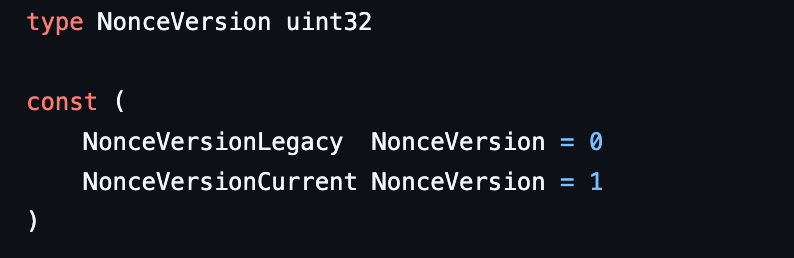
The definition is in the Solana Foundation Go library.
The state discriminator has two possible values:
Uninitialized(0): The account has no initialized nonce data to use for a durable transaction.
Initialized(Data)(1): the account is initialized and contains an authority, a durable nonce, and fee data.
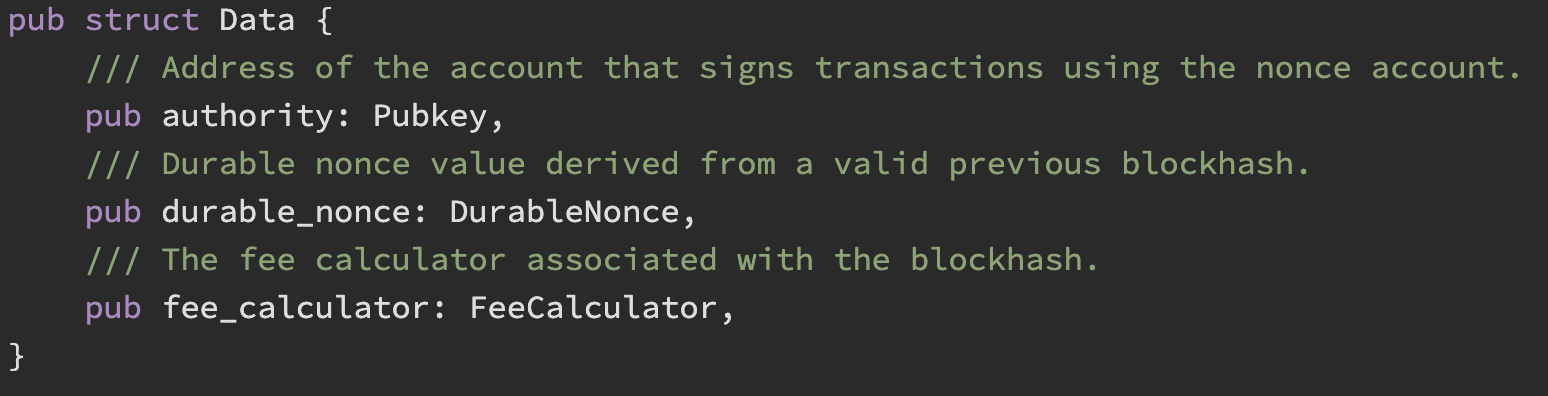
The same enum is in the Solana State enum and Foundation nonce decoder.
The remaining bytes hold the fields of the Initialized(Data) state:
Nonce authority public key (authority):
Pubkey (32 bytes): The public key whose signature authorizes advancing the nonce. This is a public address, not a private key.
Note: The authority is separate from the account’s owning program. The System Program owns the account and updates its data; the authority’s signature gives permission to advance the nonce.
Durable nonce (durable_nonce):
DurableNonce (32 bytes): The value we put in the transaction’srecent_blockhashfield when building a durable nonce transaction.
For the Current version, the nonce is derived by hashing the byte prefix DURABLE_NONCE together with a blockhash’s raw bytes:
import hashlib

durable_nonce_bytes = hashlib.sha256(b"DURABLE_NONCE" + blockhash_bytes).digest()
Here, blockhash_bytes represents a blockhash’s 32 raw bytes. We place the fixed bytes DURABLE_NONCE before them and hash the combined input with SHA-256. The result is the 32-byte durable nonce.
The prefix gives durable nonces a separate derivation from ordinary blockhashes. Solana performs this calculation when initializing or advancing the nonce account. When building our transaction, we read the resulting value from the account.
Note: Two nonce accounts advanced against the same environment blockhash can contain the same hash. The resource we manage is the account and its current value, not a globally unique nonce string.
When the nonce advances, the account stores a new value, and a transaction signed with the previous value can no longer use it.
You can find the derivation in DurableNonce::from_blockhash.
Stored fee rate (fee_calculator.lamports_per_signature):
u64 (8 bytes): An unsigned 64-bit integer recording the fee rate, in lamports per signature, when the nonce was initialized or last advanced.
If this field contains 5000, it records a fee rate of 5,000 lamports per signature from when the nonce was initialized or last advanced. The account’s SOL balance and the amount we transfer are separate values.
At that rate, a transaction with two signatures would cost 10,000 lamports in base fees, plus any priority fee. The transaction’s fee payer pays that cost. However, the validator uses its current fee rules to calculate the actual charge, so the rate stored here does not lock in the price of a future transaction.
Sources: FeeCalculator field definition and durable nonce documentation
Note: This field was added in 2020 to preserve the fee rate for transactions submitted later. In Agave 3.1.8, a stored value such as
5000does not set the actual fee; the validator uses its current rate. The field remains in the account format, although developers proposed removing it in 2024. Treat it as historical fee metadata, not a guaranteed price for your transaction.
This layout separates three responsibilities:
- Identify the format and state: The version and state discriminators tell us how to interpret the account’s data and whether the nonce is initialized.
- Identify the authority: The stored authority public key tells us whose signature is required to authorize nonce operations.
- Record the nonce value: A pending durable transaction must use the nonce value currently stored in the account.
Validate before decoding. Check that the account belongs to the System Program and uses a supported nonce format. Having 80 bytes of data alone does not make an account a valid nonce account.
Note: The account’s SOL balance and owning program live in the outer account metadata. They are not hidden somewhere inside those 80 bytes.
You can find all the definitions in the Solana nonce data structure.
Create a local account and separate the roles
We use four addresses:
- Payer: pays fees and supplies the SOL for the example transfer.
- Nonce authority: signs permission to consume or advance the nonce. It is a separate key from the payer in this example, although in practice it can also be the payer’s key.
- Nonce account: stores the lifetime state. Its creation key is not the ongoing authority in this example.
- Recipient: receives the transfer.
In this example: the payer signs the 1 SOL payment and pays its transaction fee. The nonce authority signs to allow the nonce account to advance. Both sign the same complete message, but they give different permissions: one allows the funds to move, and the other allows the nonce to change. Having the nonce-authority key alone does not let someone spend the payer’s SOL.
The nonce account also has its own SOL balance. We put 0.01 test SOL into it to keep the account rent-exempt. The payer still needs enough money for the payment and fees when the transaction runs. A durable nonce gives us more time to submit the transaction; it does not set that money aside.
Let’s start in a fresh directory:
mkdir nonce-lab
cd nonce-lab
mkdir keys

solana-keygen new --no-bip39-passphrase --silent -o keys/payer.json
solana-keygen new --no-bip39-passphrase --silent -o keys/authority.json
solana-keygen new --no-bip39-passphrase --silent -o keys/nonce.json
solana-keygen new --no-bip39-passphrase --silent -o keys/recipient.json

solana-test-validator
Leave the validator running.
Let’s open a second terminal in the same nonce-lab directory. Once the validator shows its RPC address and advancing slots, fund the payer with 10 test SOL and create the nonce account.
solana -ul -k keys/payer.json airdrop 10 --commitment confirmed

solana -ul -k keys/payer.json \
  create-nonce-account keys/nonce.json 0.01 \
  --nonce-authority keys/authority.json \
  --commitment confirmed

solana -ul nonce-account keys/nonce.json --commitment confirmed
-ul selects the default local RPC, -k keys/payer.json selects our payer. We use confirmed commitment so the CLI and Python reads agree.
Running this on a real network? Everything here uses a local test validator, so you need no account or endpoint. Every call is standard Solana JSON-RPC, so you can point
RPC_URLand the CLI’s-uflag at a Chainstack Solana node instead, and get devnet SOL from the Chainstack faucet in place ofairdrop.
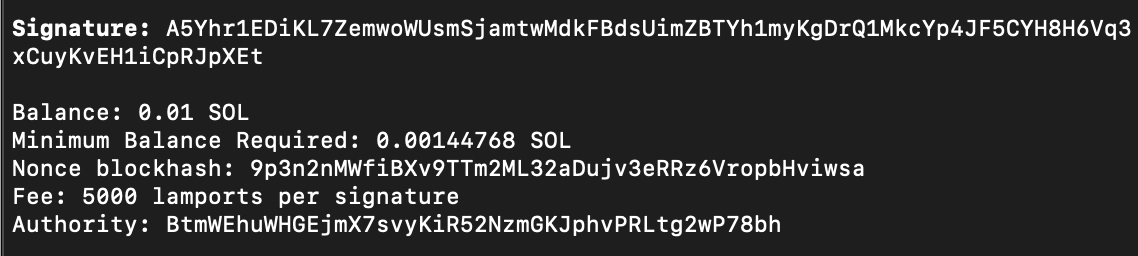
The nonce-account command displays the account’s balance, the minimum balance needed to remain rent-exempt, the stored nonce, its authority, and the recorded fee rate.
We deposited 0.01 SOL to keep the account rent-exempt. The stored nonce is the value we will read before signing and put into the transaction’s recent_blockhash field. The authority identifies the key whose signature permits the nonce to advance. The fee rate of 5,000 lamports per signature is stored metadata; the transaction’s fee payer pays the actual transaction fee.
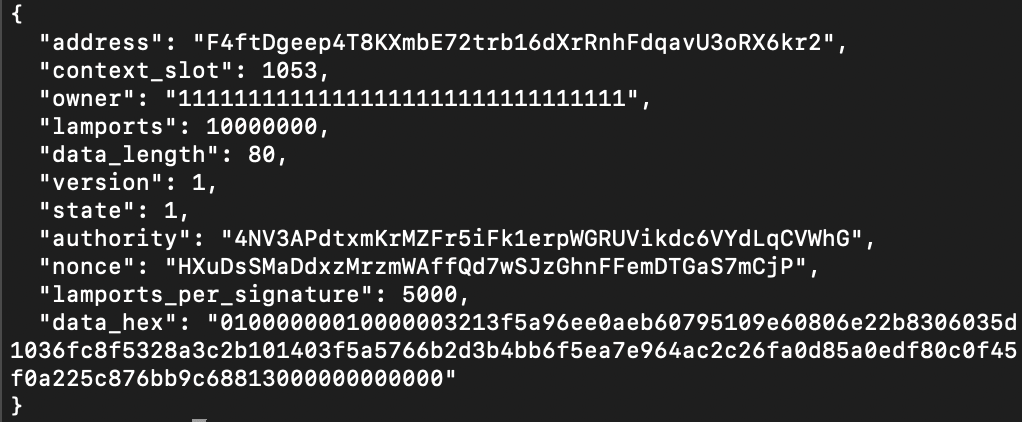
The CLI gives us a readable summary. To see the raw bytes and owning program, first run solana-keygen pubkey keys/nonce.json and copy the address it prints. In your editor, create a file named inspect_nonce.py inside nonce-lab. Paste the complete code below, replace PASTE_YOUR_NONCE_ACCOUNT_ADDRESS_HERE with that address, and save the file.
import base64
import json
import struct
import urllib.request

RPC_URL = "http://127.0.0.1:8899"
NONCE_ACCOUNT = "PASTE_YOUR_NONCE_ACCOUNT_ADDRESS_HERE"

SYSTEM_PROGRAM = "11111111111111111111111111111111"
ALPHABET = "123456789ABCDEFGHJKLMNPQRSTUVWXYZabcdefghijkmnopqrstuvwxyz"

def b58encode(data):
    number = int.from_bytes(data, "big")
    text = ""
    while number:
        number, remainder = divmod(number, 58)
        text = ALPHABET[remainder] + text
    leading_zeros = len(data) - len(data.lstrip(b"\0"))
    return "1" * leading_zeros + text

payload = {
    "jsonrpc": "2.0", "id": 1, "method": "getAccountInfo",
    "params": [NONCE_ACCOUNT, {"encoding": "base64", "commitment": "confirmed"}],
}

request = urllib.request.Request(
    RPC_URL, json.dumps(payload).encode(),
    {"Content-Type": "application/json"},
)

with urllib.request.urlopen(request, timeout=10) as response:
    reply = json.load(response)
if "error" in reply:
    raise SystemExit(json.dumps(reply, indent=2))

account = reply["result"]["value"]
if account is None:
    raise SystemExit("Account does not exist at confirmed commitment")
if account["owner"] != SYSTEM_PROGRAM:
    raise SystemExit("Account is not owned by the System Program")

data = base64.b64decode(account["data"][0], validate=True)

if len(data) != 80:
    raise SystemExit(f"Expected 80 data bytes, received {len(data)}")
version, state = struct.unpack_from("<II", data, 0)

if (version, state) != (1, 1):
    raise SystemExit(f"Unsupported version/state: {(version, state)}")

print(json.dumps({
    "address": NONCE_ACCOUNT,
    "context_slot": reply["result"]["context"]["slot"],
    "owner": account["owner"],
    "lamports": account["lamports"],
    "data_length": len(data),
    "version": version,
    "state": state,
    "authority": b58encode(data[8:40]),
    "nonce": b58encode(data[40:72]),
    "lamports_per_signature": struct.unpack_from("<Q", data, 72)[0],
    "data_hex": data.hex(),
}, indent=2))
Then run python3 inspect_nonce.py
Output:
Freeze the message, then collect signatures
First read the stored nonce while connected. Copy the printed value into PASTE_NONCE_VALUE_HERE in the next command.
solana -ul nonce keys/nonce.json --commitment confirmedNow sign a 1 SOL transfer. Replace PASTE_NONCE_VALUE_HERE with the value just printed. The > signed.json creates a file containing the message and signatures.
solana -u http://127.0.0.1:1 -k keys/payer.json \
  transfer keys/recipient.json 1 \
  --nonce keys/nonce.json \
  --nonce-authority keys/authority.json \
  --blockhash PASTE_NONCE_VALUE_HERE \
  --allow-unfunded-recipient \
  --sign-only --dump-transaction-message --output json \
  > signed.json
Output:
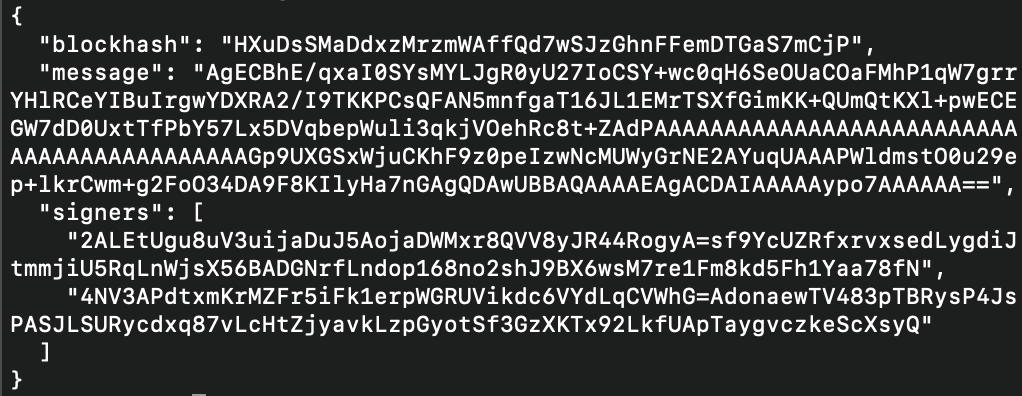
If we decode the message:
import base64
import json

with open("signed.json") as file:
    signed = json.load(file)

message = base64.b64decode(signed["message"], validate=True)

print("Message length:", len(message), "bytes")
print("Header bytes:", list(message[:3]))
the output will be:
Message length: 256 bytes

Header bytes: [2, 1, 2]
The command worked because we had already supplied everything needed to build and sign the message: the payer, recipient, amount, nonce-account address, stored nonce value, and signing keys. We pointed -u at http://127.0.0.1:1, where nothing listens, so no RPC call could succeed. This shows that the signing step did not need to fetch a new blockhash or contact a node. It only exported the message and signatures; it did not send the payment.
The online preparation step and the offline signing step therefore have different jobs:
- Preparation reads the state we intend to rely on.
- Signing authorizes a specific message built from that snapshot.
- Reading the nonce does not reserve it, and producing a signature does not lock it.
If someone advances the account during the signing ceremony, the signatures can still verify mathematically while the completed transaction has already become stale.
That is an offline-construction test, not a claim that the machine was physically air-gapped. In a real signing ceremony, only public request data should travel to a cold signer, and private keys stay in their signing environment. The offline signing guide describes the CLI’s signer and sign-only model.
The resulting legacy message was 256 bytes. Its first three bytes, the message header were [2, 1, 2]:
- two required signatures,
- one read-only signed account,
- two read-only unsigned accounts.
The payer is a writable signer. The nonce authority is a read-only signer: its signature authorizes the operation, but the authority account itself does not need to be modified.
Our signed transaction asks the System Program to perform two operations in a specific order.
- Instruction zero: AdvanceNonceAccount. It identifies the writable nonce account, the recent-blockhashes sysvar, and the nonce authority. A sysvar exposes runtime-provided information to programs. The authority’s signature supplies permission to advance the account.
- Instruction one: transfers 1 SOL from the payer to the recipient using the payer’s spending authorization.
The nonce account must be writable because its stored value changes. The authority remains read-only because supplying permission does not require modifying the authority’s own account data.
These roles explain why a single payment needs two signatures in our example. Both signatures cover the complete message, including both instructions. They are not separate signatures over just the instruction associated with each key.
To see this let’s create inspect_message.py. SIGNED_FILE = "signed.json" tells the script which signing export to read. It prints the legacy message’s header, account permissions, and instruction order. This is our decoder’s output; it does not send the transaction or verify its signatures.
import base64
import json
import struct

SIGNED_FILE = "signed.json"

ALPHABET = "123456789ABCDEFGHJKLMNPQRSTUVWXYZabcdefghijkmnopqrstuvwxyz"
SYSTEM_PROGRAM = "11111111111111111111111111111111"

def b58encode(data):
    number = int.from_bytes(data, "big")
    text = ""
    while number:
        number, remainder = divmod(number, 58)
        text = ALPHABET[remainder] + text
    return "1" * (len(data) - len(data.lstrip(b"\0"))) + text

def shortvec(data, offset):
    value = shift = 0
    while True:
        if offset >= len(data) or shift > 14:
            raise ValueError("Invalid short-vector length")
        byte = data[offset]
        offset += 1
        value |= (byte & 127) << shift
        if not byte & 128:
            return value, offset
        shift += 7

with open(SIGNED_FILE) as source:
    signed = json.load(source)

message = base64.b64decode(signed["message"], validate=True)
if len(message) < 3 or message[0] & 128:
    raise SystemExit("This decoder only supports legacy messages")

required, readonly_signed, readonly_unsigned = message[:3]
count, offset = shortvec(message, 3)

if count < required or len(message) < offset + 32 * count + 32:
    raise SystemExit("Invalid legacy message account list")

accounts = [b58encode(message[offset + 32*i:offset + 32*(i+1)])
            for i in range(count)]

offset += 32 * count
blockhash = b58encode(message[offset:offset + 32])
offset += 32
instruction_count, offset = shortvec(message, offset)
instructions = []

for index in range(instruction_count):
    program_index = message[offset]
    account_count, offset = shortvec(message, offset + 1)
    indices = list(message[offset:offset + account_count])
    size, offset = shortvec(message, offset + account_count)
    data = message[offset:offset + size]
    offset += size
    instruction = {
        "index": index, "program_id": accounts[program_index],
        "account_indices": indices, "data_hex": data.hex(),
    }

    if accounts[program_index] == SYSTEM_PROGRAM:
        if data == b"\x04\0\0\0":
            instruction["decoded"] = {"type": "AdvanceNonceAccount"}
        elif len(data) == 12 and data[:4] == b"\x02\0\0\0":
            instruction["decoded"] = {
                "type": "Transfer",
                "lamports": struct.unpack_from("<Q", data, 4)[0],
            }
    instructions.append(instruction)

if offset != len(message):
    raise SystemExit("Instruction lengths do not match the message length")

print(json.dumps({
    "message_bytes": len(message),
    "header": {"required_signatures": required,
               "readonly_signed_accounts": readonly_signed,
               "readonly_unsigned_accounts": readonly_unsigned},
    "recent_blockhash": blockhash,
    "instructions": instructions,
}, indent=2))

print("Account indices used by the instructions:")

for index, address in enumerate(accounts):
    signer = index < required
    writable = (index < required - readonly_signed if signer
                else index < len(accounts) - readonly_unsigned)
    print(f"{index}: {address} signer={signer} writable={writable}")
Output:
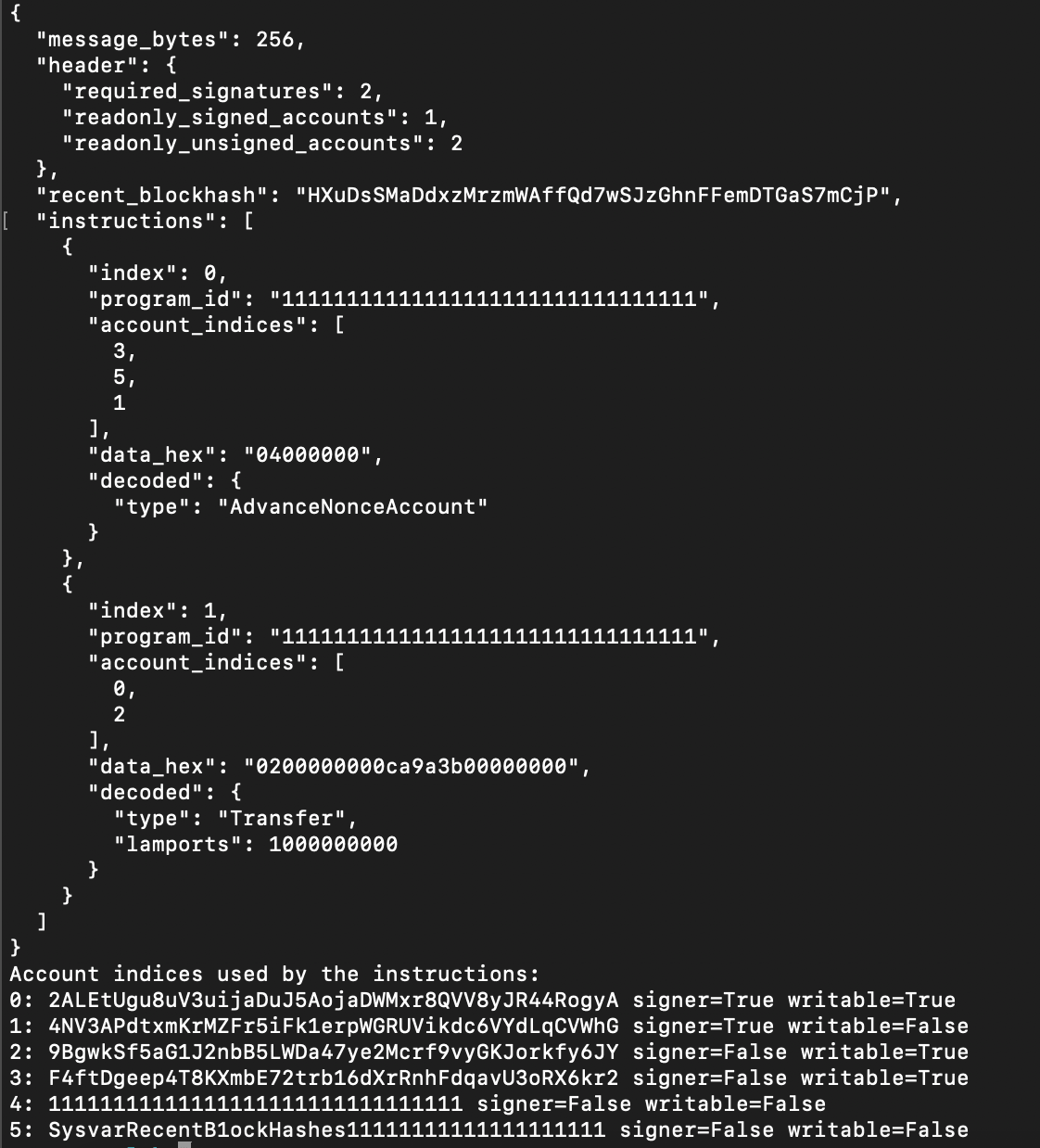
AdvanceNonceAccount must be the transaction’s first instruction, at index 0. This is how the runtime recognizes a durable nonce transaction. Calling it later, or calling it from another program through a cross-program invocation (CPI), does not meet this requirement. If your transaction builder adds compute-budget instructions, put those after the nonce advance. The message-recognition implementation shows this check.
To advance the nonce, the runtime must produce a value different from the one already stored. It derives the new value from a blockhash available during processing. If the account was just initialized or advanced using that same blockhash, another advance would produce the same value and fail this check. The nonce is a hash, so advancing it does not mean adding one.
Changing the payer, recipient, amount, nonce, or instruction order changes the message that the signers approved. The existing signatures cannot authorize those edited bytes.
There is a practical consequence: freeze the fee payer before collecting signatures. The payer, account permissions, nonce value, instruction order, and instruction data are all part of the signed message. A broadcaster can transport the signed bytes later but cannot replace the payer or refresh the nonce while keeping those signatures. Partial signing requires every signer to approve the same message.
Submit the same bytes after an ordinary transaction expires
To keep the comparison meaningful, we will sign an ordinary 1 SOL transfer and the durable 1 SOL transfer before waiting. The ordinary message contains one signature and no nonce-advance instruction. We keep its lastValidBlockHeight and poll isBlockhashValid until the answer becomes false.
Keep signed.json from the above section unsent. Before fetching the short-lived ordinary blockhash, let’s create wait_for_expiry.py.
import json
import time
import urllib.request

RPC_URL = "http://127.0.0.1:8899"
LIFETIME_FILE = "ordinary-lifetime.json"

def rpc(method, params):
    payload = {"jsonrpc": "2.0", "id": 1, "method": method, "params": params}
    request = urllib.request.Request(
        RPC_URL, json.dumps(payload).encode(), {"Content-Type": "application/json"})
    with urllib.request.urlopen(request, timeout=10) as response:
        reply = json.load(response)
    if "error" in reply:
        raise RuntimeError(json.dumps(reply))
    return reply

with open(LIFETIME_FILE) as source:
    lifetime = json.load(source)["result"]["value"]
print("Saved getLatestBlockhash value:")
print(json.dumps(lifetime, indent=2), flush=True)
first = True
while True:
    reply = rpc("isBlockhashValid", [lifetime["blockhash"], {"commitment": "confirmed"}])
    valid = reply["result"]["value"]
    if first or not valid:
        print("isBlockhashValid response:")
        print(json.dumps(reply, indent=2), flush=True)
        first = False
    if not valid:
        print("getBlockHeight response at expiry (confirmed):")
        print(json.dumps(rpc("getBlockHeight", [{"commitment": "confirmed"}]), indent=2))
        break
    time.sleep(1)
Now let’s fetch the ordinary blockhash. The first command saves the full RPC response as ordinary-lifetime.json, the second displays it. Run those two commands first, then copy the blockhash value into PASTE_ORDINARY_BLOCKHASH_HERE in the signing command below. This transaction uses an ordinary blockhash and has no nonce instructions.
curl -sS http://127.0.0.1:8899 -H 'Content-Type: application/json' \
  --data '{"jsonrpc":"2.0","id":1,"method":"getLatestBlockhash","params":[{"commitment":"confirmed"}]}' \
  > ordinary-lifetime.json

python3 -m json.tool ordinary-lifetime.json
solana -u http://127.0.0.1:1 -k keys/payer.json \
transfer keys/recipient.json 1 \
--blockhash PASTE_ORDINARY_BLOCKHASH_HERE \
--allow-unfunded-recipient \
--sign-only --dump-transaction-message --output json \
> ordinary.jsonRun python3 wait_for_expiry.py. It reads the saved hash and asks the validator whether it is still valid. Once the answer becomes false, it prints the confirmed block height. The one-second pause is only the polling interval; the chain’s response tells us when the blockhash expires.
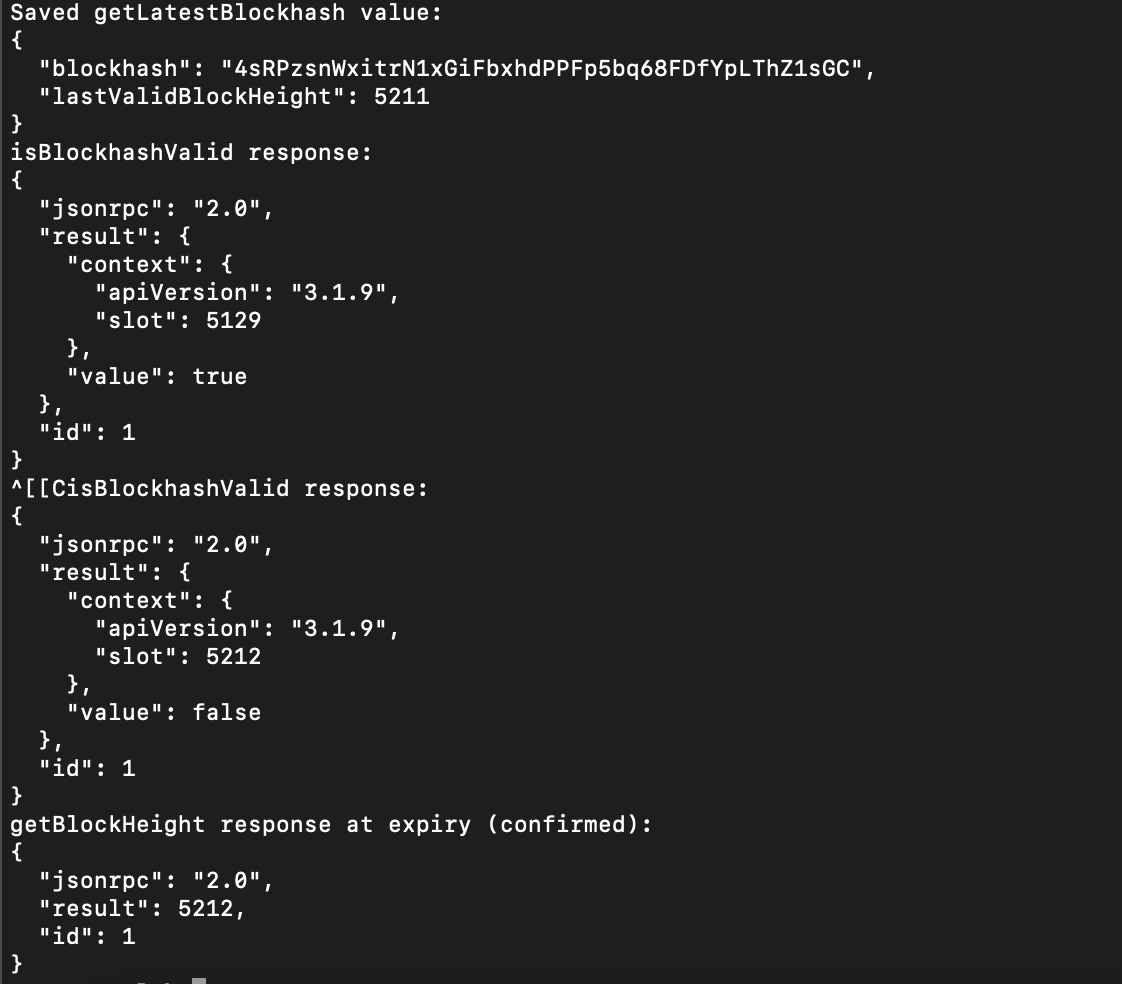
Once isBlockhashValid returns false, the ordinary transaction’s blockhash has expired. We can now test the durable transfer saved in signed.json. We will submit the message and signatures created before the wait, keeping the nonce value and instructions exactly as they were when we signed.
Before sending it, we need to prepare the transaction for the RPC. signed.json contains the message and signatures as separate fields. The message describes what the transaction should do; the signatures prove that its signers approved that message. The RPC’s sendTransaction method expects those parts packed together into one serialized transaction.
Our helper reads signed.json, decodes the message and signatures, and combines them. It places the signatures in the same order as their public keys in the message, then adds the unchanged message after them. Finally, it encodes the complete transaction as base64 so it can be sent inside a JSON request. This step packages what we already signed. It does not sign anything again.
In our example, the message is 256 bytes, and the payer and nonce authority each supplied a 64-byte signature. The validator checks each signature against the public key assigned to that position. Swapping the signatures would make verification fail because each signature would be checked against the wrong key.
Let’s create send_signed.py. Start with SIGNED_FILE = "ordinary.json" and SKIP_PREFLIGHT = False. The helper packages the unchanged message with its signatures and submits those bytes.
import base64
import json
import urllib.request

RPC_URL = "http://127.0.0.1:8899"
SIGNED_FILE = "ordinary.json"
SKIP_PREFLIGHT = False
ALPHABET = "123456789ABCDEFGHJKLMNPQRSTUVWXYZabcdefghijkmnopqrstuvwxyz"

def b58decode(text):
    n = 0
    for char in text:
        n = n * 58 + ALPHABET.index(char)
    zeros = len(text) - len(text.lstrip("1"))
    return b"\0" * zeros + n.to_bytes((n.bit_length() + 7) // 8, "big")

def shortvec(data, offset):
    value = shift = 0
    while True:
        byte = data[offset]
        offset += 1
        value |= (byte & 127) << shift
        if not byte & 128:
            return value, offset
        shift += 7

signed = json.load(open(SIGNED_FILE))
message = base64.b64decode(signed["message"])
assert not message[0] & 128, "This helper expects a legacy message"
required = message[0]
assert 0 < required < 128
account_count, offset = shortvec(message, 3)
assert account_count >= required
by_key = {
    b58decode(item.split("=", 1)[0]): b58decode(item.split("=", 1)[1])
    for item in signed["signers"]
}
signatures = [by_key[message[offset+32*i:offset+32*(i+1)]]
              for i in range(required)]
assert all(len(signature) == 64 for signature in signatures)
wire = bytes([required]) + b"".join(signatures) + message

options = {"encoding": "base64", "preflightCommitment": "confirmed",
           "skipPreflight": SKIP_PREFLIGHT,
           "maxRetries": 0}
payload = {"jsonrpc": "2.0", "id": 1, "method": "sendTransaction",
           "params": [base64.b64encode(wire).decode(), options]}
request = urllib.request.Request(RPC_URL, json.dumps(payload).encode(),
                                {"Content-Type": "application/json"})
with urllib.request.urlopen(request, timeout=10) as response:
    reply = json.load(response)
if "error" in reply:
    raise SystemExit(json.dumps(reply, indent=2))
print(reply["result"])
Let’s run that file in two steps:
The first send uses ordinary.json and should return BlockhashNotFound after expiry.
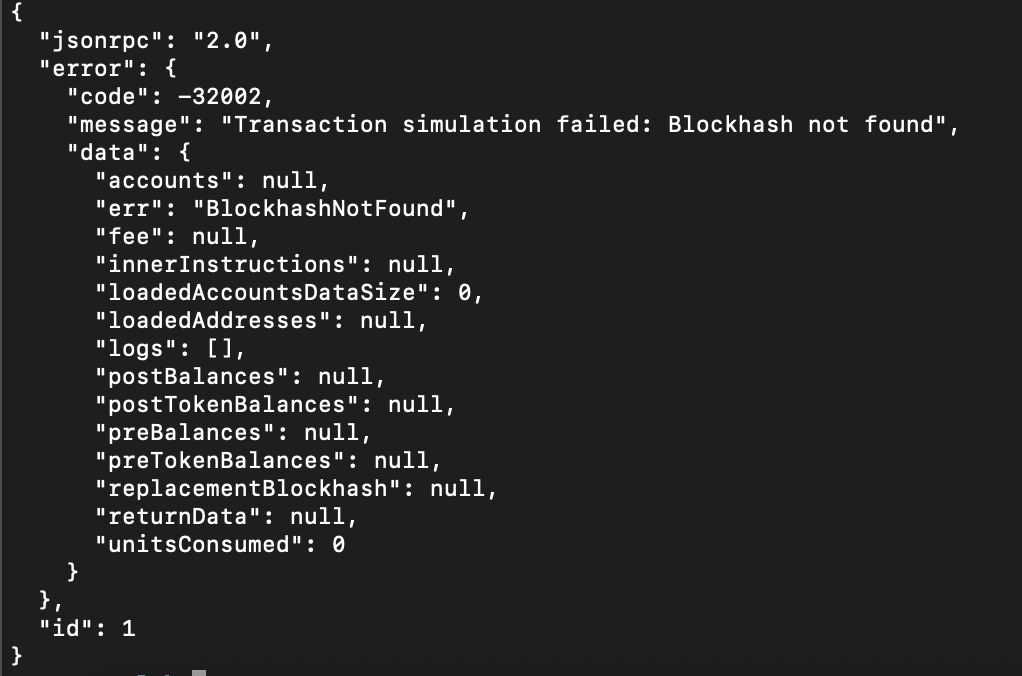
Now open send_signed.py, change the setting to SIGNED_FILE = "signed.json", and run it again. Copy the printed signature and check it with solana -ul confirm PASTE_SIGNATURE_HERE --verbose --commitment confirmed.
Output:
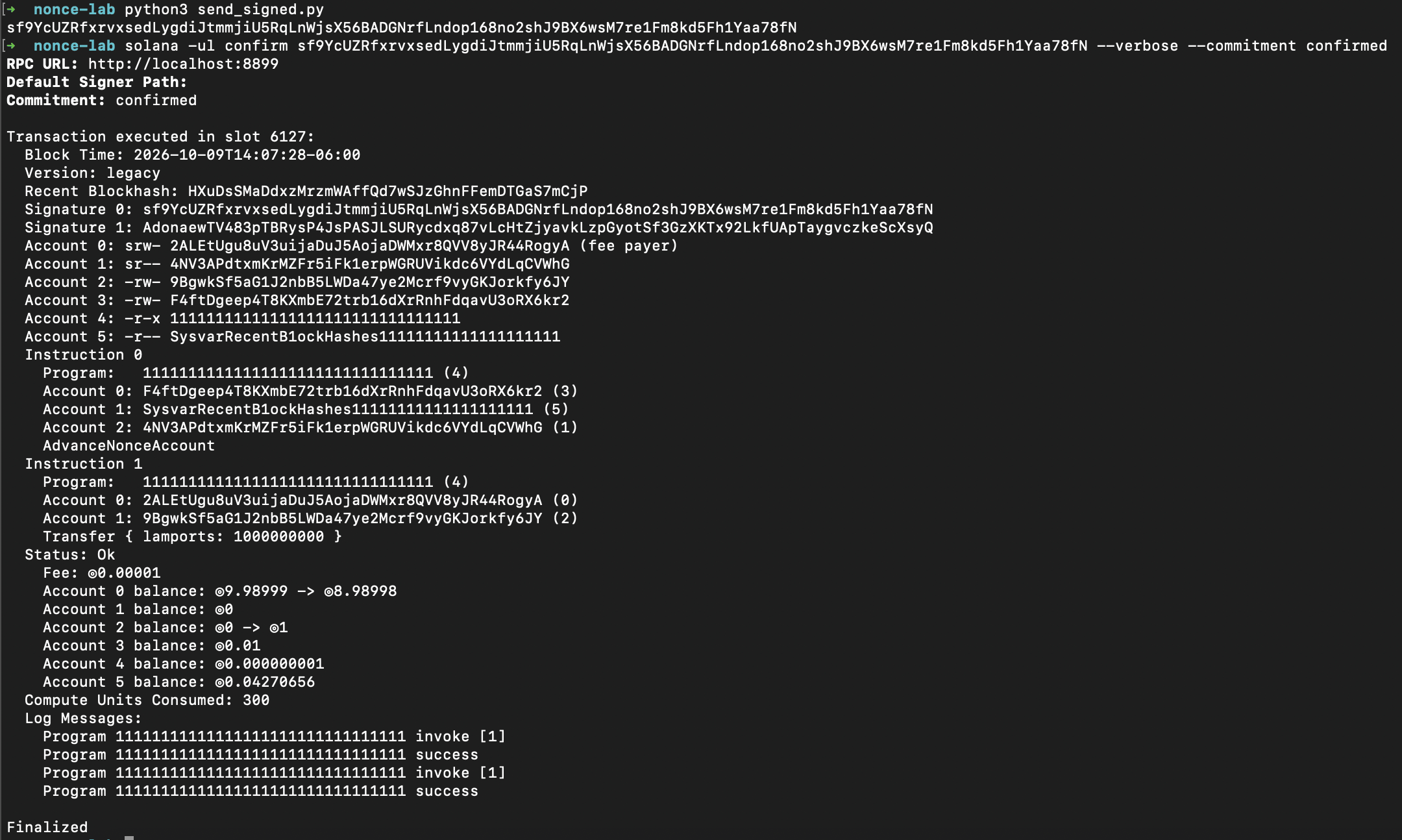
A returned signature means the node accepted the submission. If confirmation or verbose details are not available yet, repeat the confirmation command. Check the execution result, then you can read the nonce account and both balances again:
solana -ul nonce-account keys/nonce.json --commitment confirmed
solana -ul balance keys/payer.json --lamports --commitment confirmed
solana -ul balance keys/recipient.json --lamports --commitment confirmed
Nonce account and balances after the successful transfer:

The nonce changed after the transfer. The previous signed value no longer matches the account, so another transaction using that value cannot pass the freshness check. Signing a different payment with the same old value does not fix that mismatch: we must read the account’s new value and collect signatures for a new message.
A failed transaction can still consume the nonce
To force an insufficient-funds error, we will sign a 100 SOL payment. We funded the payer with only 10 test SOL earlier, so it cannot afford this transfer. Signing offline can still produce valid signatures: the validator checks the balance when it simulates or executes the payment.
After confirming the successful transfer, read the nonce again. Copy the new value into PASTE_NEW_NONCE_VALUE_HERE before running the signing command. It creates failing.json for the 100 SOL payment:
solana -ul nonce keys/nonce.json --commitment confirmed

solana -u http://127.0.0.1:1 -k keys/payer.json \
  transfer keys/recipient.json 100 \
  --nonce keys/nonce.json \
  --nonce-authority keys/authority.json \
  --blockhash PASTE_NEW_NONCE_VALUE_HERE \
  --allow-unfunded-recipient \
  --sign-only --dump-transaction-message --output json \
  > failing.json
Open send_signed.py, set SIGNED_FILE = "failing.json", and keep SKIP_PREFLIGHT = False. Read the nonce and balances before sending, then send and read the nonce again:
solana -ul nonce-account keys/nonce.json --commitment confirmed
solana -ul balance keys/payer.json --lamports --commitment confirmed
solana -ul balance keys/recipient.json --lamports --commitment confirmed

python3 send_signed.py

solana -ul nonce-account keys/nonce.json --commitment confirmed
Preflight reported InstructionError: [1, {"Custom": 1}]. Instruction 0 was the nonce advance, instruction 1 was the transfer. The simulation reached the failing transfer, but it did not commit its simulated changes. Reading the real account afterward showed the nonce was unchanged.
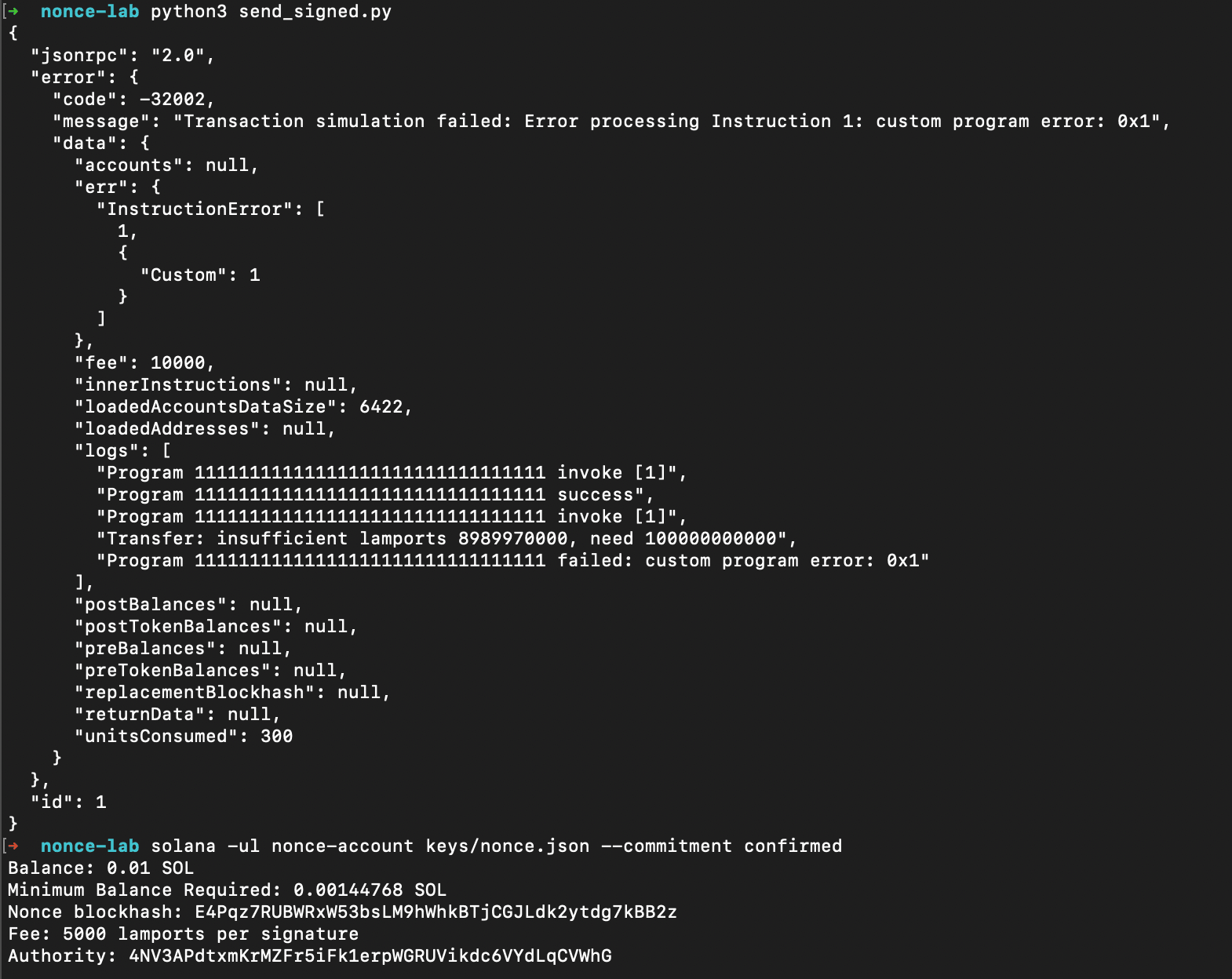
For this local failure test, change SKIP_PREFLIGHT = True in send_signed.py and save it. Keep SIGNED_FILE = "failing.json", so we submit the same signed bytes. Run the helper, copy the returned signature, and replace the signature placeholder before confirming:
python3 send_signed.py

solana -ul confirm PASTE_FAILURE_SIGNATURE_HERE --verbose --commitment confirmed
Output:
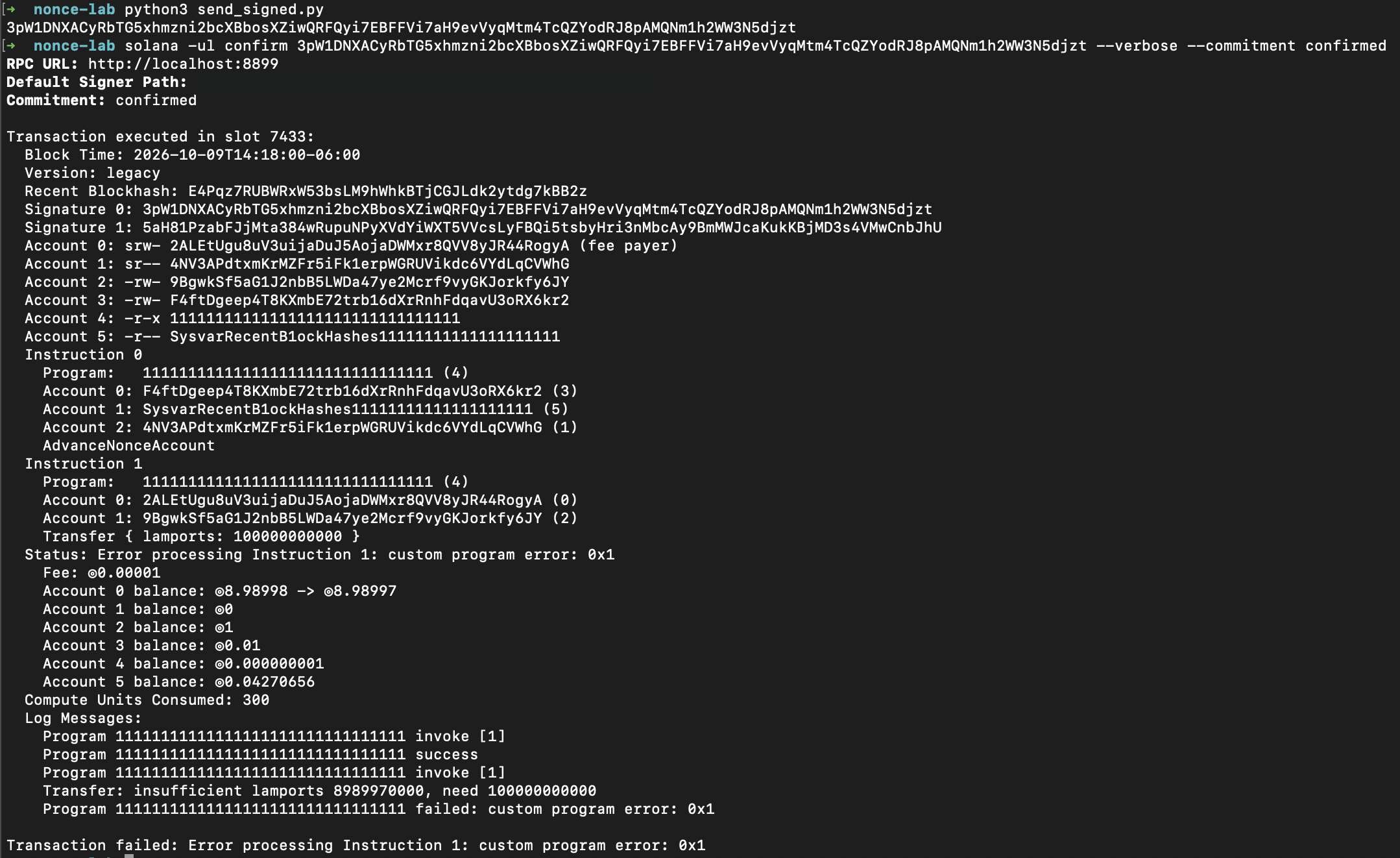
Skipping the client-facing simulation does not disable runtime validation. The transaction must still be valid enough to execute. This time it reached the validator’s execution path and produced a confirmed transaction with an instruction error, rather than only an RPC preflight rejection.
Wait for confirmation and inspect the execution error, as we did for the successful transfer. Then run the same account and balance reads again:
solana -ul nonce-account keys/nonce.json --commitment confirmed
solana -ul balance keys/payer.json --lamports --commitment confirmed
solana -ul balance keys/recipient.json --lamports --commitment confirmed
Nonce account and balances after the confirmed transaction failure:
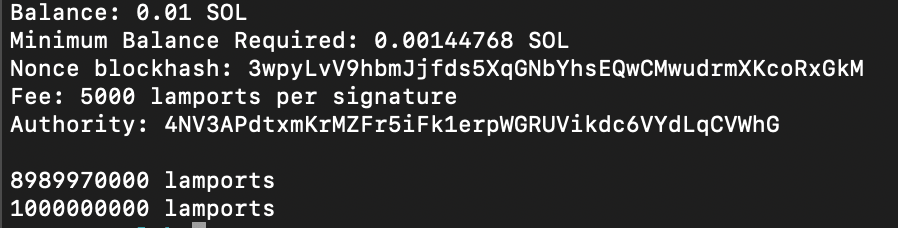
In the earlier recorded run, the resulting metadata and balances showed four things together:
- The transaction failed at instruction 1.
- The recipient received zero additional lamports.
- The payer paid 10,000 lamports in fees.
- The nonce advanced.
The runtime undid the application instructions’ changes, but kept the new nonce and the fee deduction. The Agave transaction processor saves these two account states as rollback accounts: the nonce account with its new value, and the payer account with the fee already deducted. Those are the states it keeps when a later instruction fails.
Why keep the new nonce after a failure? If the runtime restored the old value, someone could submit the same signed transaction again and trigger another failed attempt with another fee. Advancing the nonce prevents that signed transaction from being used again, even though its payment failed.
We need to ask where the failure happened. Our first attempt stopped at preflight: the node simulated the transfer, saw that it would fail, and rejected it. A simulation does not save its changes to the real nonce account. A transaction can also be rejected because its nonce is already invalid. In that case, it never gets far enough to consume the nonce.
Our second attempt reached execution and failed in the transfer instruction. The runtime retained the fee deduction and the advanced nonce while discarding the failed application’s state changes.
The same business request can therefore require different recovery actions. A rejected simulation alone does not consume the approval. After a recorded execution failure consumes the nonce, fixing the payer’s balance cannot make the old signed bytes usable again. We must read the new nonce, construct the intended payment, and collect signatures again. An uncertain network response requires investigation before either conclusion. The three stages can be summarized as follows:
preflight simulation fails:
    no committed nonce change from the simulation

nonce validation rejects the transaction:
    no valid nonce consumption to commit

nonce transaction reaches execution, later instruction fails:
    application changes roll back
    nonce advances and fee remains paid
Do not translate this into “every failed send burns the nonce.” A transport timeout, invalid nonce, failed simulation, and recorded instruction error are different events. If submission times out, inspect both signature status and account state before deciding whether to sign another transaction. Chainstack’s durable nonce docs describe the same two outcomes under failure behavior: a validation failure drops the transaction without fees, while an execution failure still advances the nonce and collects the fee.
Sharing a nonce and cancelling a pending transaction
Suppose we sign two different payments using the same nonce account and stored value. Both can have valid signatures. Once one transaction consumes that value, the other no longer matches the account and cannot execute.
This also happens if the first transaction passes validation but its payment fails during execution. The nonce is still consumed, so the second payment loses its usable nonce even though the first payment did not succeed. Solana documents this failure behavior here.
For payments that need to remain independently valid, we can use separate nonce accounts. Also, a changed nonce does not prove that a payment succeeded: we need to check that transaction’s execution result.
We can use the same mechanism to cancel a pending transaction. Anyone holding its signed bytes could submit it later. Deleting our local copy does not invalidate those bytes, but advancing the nonce account makes their stored nonce unusable.
Let’s demonstrate this with a 0.25 SOL transfer. Read the current nonce, then copy its value into PASTE_CURRENT_NONCE_VALUE_HERE:
solana -ul nonce keys/nonce.json --commitment confirmed

solana -u http://127.0.0.1:1 -k keys/payer.json \
  transfer keys/recipient.json 0.25 \
  --nonce keys/nonce.json \
  --nonce-authority keys/authority.json \
  --blockhash PASTE_CURRENT_NONCE_VALUE_HERE \
  --allow-unfunded-recipient \
  --sign-only --dump-transaction-message --output json \
  > pending.json
Keep pending.json unsent. Now use new-nonce to advance the account, then inspect it:
solana -ul -k keys/payer.json \
  new-nonce keys/nonce.json \
  --nonce-authority keys/authority.json \
  --commitment confirmed

solana -ul nonce-account keys/nonce.json --commitment confirmed
The nonce authority authorizes this operation, and the chain computes and stores the replacement value. Once the advance is confirmed, compare the account’s new nonce with the value we used in pending.json. The pending payment still contains the old value.
Open send_signed.py, set SIGNED_FILE = "pending.json" and SKIP_PREFLIGHT = False, then save and run it.
With preflight enabled, the RPC should reject the payment before forwarding it for execution because its nonce no longer matches the account. Its signatures still approve the original message, but that message has lost its usable nonce. Preflight detects the mismatch; the earlier on-chain advance performed the cancellation.
Advancing invalidates every pending transaction using that account’s previous nonce. It cannot reverse a payment that already executed. If payment submission and cancellation race, whichever consumes the old nonce first determines the outcome.
Use durable nonces when the signing process needs the time
The natural use case is a mismatch between transaction lifetime and the time needed to obtain authorization: a cold signing device, an offline custody ceremony, or geographically separated signers reviewing the same message.
Durable nonces let us keep the transaction’s bytes stable during that process. They do not supply the policy for deciding whether it should be signed. Two required transaction signatures are also not automatically a threshold multisig application; the transaction simply has two signer requirements for its specific instructions.
For a normal interactive wallet flow that can build, sign, and submit promptly, an ordinary recent blockhash usually avoids the extra account, reservation, and cancellation machinery. Use the mechanism because the signing flow needs it, not because a transaction lasting longer is always better.
There are three limits worth making explicit to anyone approving a delayed transaction:
- The world can change after signing. The sender’s balance, program state, authority configuration, and execution constraints can differ when the transaction finally runs. A durable nonce removes one freshness deadline; it does not freeze those conditions.
- Someone holding fully signed bytes can broadcast them. Keeping a transaction valid until an approval deadline does not make the network wait for a scheduled execution time.
- An uncertain result is not permission to pay again. A changed nonce tells us that its state changed, not which business action succeeded. Query the original transaction and reconcile the intended operation.
Taking it beyond localhost
The lab used a local validator so every state change was visible. A production signing flow has the same moving parts on a real cluster: an RPC node to read the nonce and submit the signed bytes, and a way to confirm the result.
- Read the nonce right before you build the message.
getAccountInfoatconfirmedcommitment returns the same 80 bytes we decoded above. - Submit with preflight on. Chainstack’s landing guide recommends skipping preflight only after a successful simulation, because
skipPreflight: truealso skips the check that catches a malformed transaction. - Confirm with signature statuses, then re-read the nonce.
getSignatureStatusesshows whether the transaction failed at execution. A durable nonce transaction has no blockhash to expire, so there is nolastValidBlockHeightto wait on. - Choose the submission path when landing speed matters. Warp transactions route
sendTransactionto the current leader through staked connections on Solana Trader Nodes and Global Nodes (see the Warp docs). The signed bytes stay the same; only the endpoint changes.
Summary
Durable nonce accounts give offline or slow signing flows more time. We sign using the account’s stored nonce instead of an ordinary blockhash that will soon expire.
The key lesson is where a failure happens. A preflight rejection alone does not change on-chain state. But once a durable transaction passes validation, a later instruction failure can still consume the nonce and charge a fee, even when the payment fails. Check the transaction’s execution result and the current nonce before preparing another attempt.
To cancel a pending approval, advance its nonce account and confirm the change. This invalidates every pending transaction using the previous value. It cannot undo a payment that already executed.
Note: durable nonces remain usable. Solana’s roadmap expects removal roughly six months after a replacement program is ready for mainnet. The final replacement choice and removal date are still unset.
Solana’s planned replacement moves offline approval into on-chain programs. Two candidates are Anza’s Programmatic Signer and Blueshift’s Vector (both will be covered in the next articles). The key signs a long-lived authorization; a relayer submits it inside an ordinary transaction, and the program verifies the approval and prevents replay before executing the instructions.
Frequently asked questions
A durable nonce is a hash stored in a nonce account owned by the System Program. A transaction uses it in the recent_blockhash field and starts with an AdvanceNonceAccount instruction, so its validity depends on the account still holding that value rather than on how many blocks have passed.
An ordinary transaction references a blockhash that is valid for 150 blocks, which Chainstack’s docs put at roughly 60 to 90 seconds. The lastValidBlockHeight returned by getLatestBlockhash marks the last block height at which it can still be accepted.
It depends on where it fails. If the simulation or nonce validation rejects the transaction, nothing is committed. If it passes validation and a later instruction fails, the application changes roll back, but the nonce still advances and the fee is still charged.
Advance the nonce account with the nonce authority’s signature, for example with solana new-nonce. Every pending transaction signed with the previous value then stops matching the account. This cannot reverse a payment that has already executed.
Solana’s roadmap says durable nonces will be removed, with no date set. The page expects removal roughly six months after a replacement program is ready for mainnet, and durable nonces keep working until then. The two candidates are Anza’s Programmatic Signer and Blueshift’s Vector.
No. Durable nonces are a Solana runtime feature, and this article’s lab runs on a local test validator. For devnet or mainnet you need an RPC endpoint to read the nonce account and submit the signed bytes, and a Chainstack Solana node works with the same JSON-RPC calls. You can get devnet SOL from the Chainstack faucet.
Related reading
- Solana: Durable nonces for offline signing (Chainstack docs, JavaScript examples)
- How to land transactions on Solana (Chainstack docs)
- Solana: How to handle the transaction expiry error (Chainstack docs)
- Solana: What is the right transaction commitment level?
- Solana: How to calculate transaction fees programmatically?
- How to get a Solana RPC endpoint for enterprise (2026 guide)