AI-ready infrastructure
 Refer and earn


 Ethereum
 Hyperliquid
 Solana
 Arbitrum
 BNB Smart Chain
 Base
 Polygon
 TRON
 Sui
 Robinhood


Sui programmable transaction blocks: how PTBs work

In Part 3, we followed Alice’s transaction from a signed request to the updated notebook. That transaction already contained a programmable transaction block. It had two inputs and one command, the call to set_value.
Now suppose Alice wants to create a notebook, change its value, and send it to Bob. If we submit each operation separately, Alice has to wait for creation before she can supply the new notebook to the update. The notebook can also remain at an intermediate state if a later transaction fails.
In this blog post, we’ll assemble the workflow in one programmable transaction block. We’ll follow the notebook and its editing capability from the constructor’s return values through two Move calls and a transfer. Then we’ll move a value too early, leave a returned object unused, and make a later command fail after an earlier one has changed the notebook.
We’ll build and run the examples with the Sui CLI, inspect the recorded transactions with Python, and use the explorer to check which objects and values reached the chain.
What is a programmable transaction block?
A programmable transaction block, or PTB, is the program a user transaction asks Sui to execute. In the notebook update from Part 3, the entire program was one MoveCall. We can add more commands to the same program and connect them through their inputs and return values.
Suppose we need a notebook whose value is 42 by the time Bob receives it. We could create the notebook in one transaction, read the construction receipt to find the object, and then send separate update and transfer requests. Each transaction has its own outcome, so creation can succeed even if the transfer later fails. In one PTB, the constructor hands its result directly to the setter, and the transfer can depend on the setter and a subsequent check.
The client can assemble that sequence from callable Move functions and Sui commands. Each command runs in order and can observe changes made earlier in the same execution. Sui commits the application changes together after the program succeeds. We’ll see what still gets recorded when a later command fails. See Sui’s PTB documentation for the execution model.
What does a PTB contain?
Part 3 introduced the transaction’s sender, gas data, and expiration. These fields apply to the whole request. The programmable part has two lists, the inputs supplied by the client and the commands the runtime executes.
TransactionData
  sender, gas data, expiration
  ProgrammableTransaction
    inputs    [Input, Input, ...]
    commands  [Command, Command, ...]
An object input tells the runtime which existing object the transaction needs, and an input can take one of three forms:
- Address-owned object: the client supplies its ID, version and digest.
- Shared object: the transaction supplies its ID and initial shared version, together with how it intends to access the object.
- Pure value: the client supplies the bytes of a value such as a number or an address. The command that uses those bytes determines their expected Move type.
See Sui’s PTB inputs and results reference.
Each command performs an operation and can leave values for later commands to use. The number of values depends on the command. In our notebook example, create returns two objects, while set_value changes the notebook through a mutable borrow and returns zero values.
| Command | What it does | What later commands can use |
|---|---|---|
MoveCall | Calls a function in a published Move package | The values declared by the function’s return signature. A PTB call can return objects and other Move values, but cannot return references |
SplitCoins | Deducts the requested amounts from a source coin and creates a new coin for each amount | One new coin of the same type per amount |
MergeCoins | Moves the balances of source coins into an existing destination coin | Zero return values. The destination coin now contains the combined balance |
TransferObjects | Sends one or more objects to an address | Zero return values. The transfer consumes the objects it receives |
MakeMoveVec | Packs values into a Move vector | One result containing the whole vector |
Publish | Publishes compiled modules as a new package and runs their initializers, if present | One UpgradeCap for the new package |
Upgrade | Consumes an UpgradeTicket to upgrade an existing package | One UpgradeReceipt, which a later command can use to finalize the upgrade |
See Sui’s PTB commands reference for the full list.
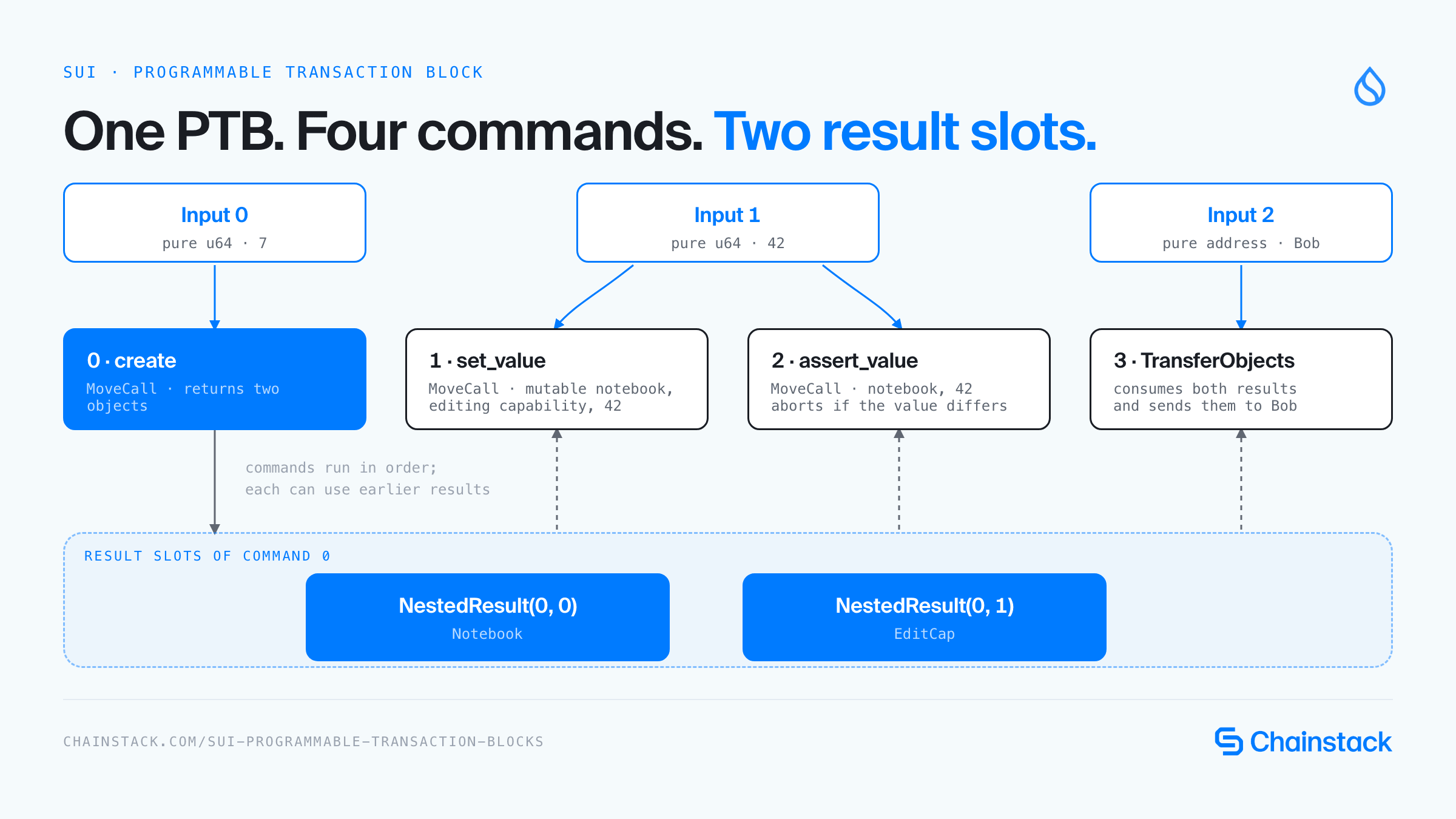
The runtime keeps the values returned by each command in their own slots. At submission time the client supplies 7, 42, and Bob’s address. In the sequence below, command 0 produces the two objects that later commands use.
The Move functions we’ll use below:
public fun create(value: u64, ctx: &mut TxContext): (Notebook, EditCap) {
let notebook = Notebook { id: object::new(ctx), value };
let cap = EditCap {
id: object::new(ctx),
notebook: object::id(¬ebook),
};
(notebook, cap)
}
public fun set_value(notebook: &mut Notebook, cap: &EditCap, value: u64) {
assert!(cap.notebook == object::id(notebook), EWrongCapability);
notebook.value = value;
}
public fun assert_value(notebook: &Notebook, expected: u64) {
assert!(notebook.value == expected, EUnexpectedValue);
}0 create(7) -> Notebook, EditCap
1 set_value(notebook, cap, 42) -> no results
2 assert_value(notebook, 42) -> no results
3 transfer both objects to Bob -> no resultsCommand 0 returns a notebook and its editing capability. The next two commands use those values to update the notebook and check its new value. The final command transfers both objects to Bob.
Build a notebook that returns its objects
This guide uses the Sui testnet-v1.83.0 release. The CLI’s JSON fields and gas selection can vary by release.
Start in a fresh directory and keep the same shell open so the addresses and IDs you assign below are available to later commands.
mkdir sui-ptb-lab
cd sui-ptb-lab
mkdir -p client evidence
sui --version
python3 --version
Output
sui 1.83.0-16d2dc1e05ed
Python 3.13.7
Select Testnet and use two disposable accounts named alice and bob. Skip either new-address command if you already have that Testnet account. Alice publishes the package and sends the objects to Bob. Bob funds the later failure experiments. Fund each account from the Sui Testnet faucet if it needs Testnet SUI.
sui client --yes envs
sui client switch --env testnet
sui client new-address ed25519 alice
sui client new-address ed25519 bob
ALICE=$(sui client addresses --json | python3 -c 'import json, sys; print(dict(json.load(sys.stdin)["addresses"])["alice"])')
BOB=$(sui client addresses --json | python3 -c 'import json, sys; print(dict(json.load(sys.stdin)["addresses"])["bob"])')
sui client chain-identifier --json
sui client faucet --address "$ALICE"
sui client faucet --address "$BOB"
Chain identifier from the captured run
{
  "base58": "69WiPg3DAQiwdxfncX6wYQ2siKwAe6L9BZthQea3JNMD",
  "hex": "4c78adac"
}
The chain identifier confirms which network the CLI is querying. Alice and Bob are local aliases for public addresses, and the commands below use the addresses from your own client. Keep the recovery phrases printed by new-address private. Account and faucet messages are omitted from the excerpt.
Create the Move package and replace its manifest with the following settings. The pinned CLI supplies the standard framework dependencies.
sui move new --path move ptb_notebookLet’s use this move/Move.toml.
[package]
name = "ptb_notebook"
edition = "2024"
The Part 3 constructor transferred its notebook to the sender. For this experiment we return the notebook to the PTB along with an EditCap. The capability points to that specific notebook. Returning two objects also gives us two distinct result slots to follow.
Let’s create a file named move/sources/notebook.move.
module ptb_notebook::notebook;
const EWrongCapability: u64 = 1;
const EUnexpectedValue: u64 = 2;
public struct Notebook has key, store {
id: UID,
value: u64,
}
public struct EditCap has key, store {
id: UID,
notebook: ID,
}
public fun create(value: u64, ctx: &mut TxContext): (Notebook, EditCap) {
let notebook = Notebook { id: object::new(ctx), value };
let cap = EditCap {
id: object::new(ctx),
notebook: object::id(¬ebook),
};
(notebook, cap)
}
public fun set_value(notebook: &mut Notebook, cap: &EditCap, value: u64) {
assert!(cap.notebook == object::id(notebook), EWrongCapability);
notebook.value = value;
}
public fun assert_value(notebook: &Notebook, expected: u64) {
assert!(notebook.value == expected, EUnexpectedValue);
}
#[test]
fun create_update_and_check() {
let ctx = &mut tx_context::dummy();
let (mut notebook, cap) = create(7, ctx);
set_value(&mut notebook, &cap, 42);
assert_value(¬ebook, 42);
transfer::public_transfer(notebook, @0xB);
transfer::public_transfer(cap, @0xB);
}
#[test, expected_failure(abort_code = EWrongCapability)]
fun reject_another_notebooks_capability() {
let ctx = &mut tx_context::dummy();
let (mut first, first_cap) = create(7, ctx);
let (second, second_cap) = create(8, ctx);
set_value(&mut first, &second_cap, 42);
transfer::public_transfer(first, @0xB);
transfer::public_transfer(first_cap, @0xB);
transfer::public_transfer(second, @0xB);
transfer::public_transfer(second_cap, @0xB);
}
#[test, expected_failure(abort_code = EUnexpectedValue)]
fun reject_an_unexpected_value() {
let ctx = &mut tx_context::dummy();
let (notebook, cap) = create(7, ctx);
assert_value(¬ebook, 8);
transfer::public_transfer(notebook, @0xB);
transfer::public_transfer(cap, @0xB);
}Run
sui move test --path moveOutput
INCLUDING DEPENDENCY MoveStdlib
INCLUDING DEPENDENCY Sui
BUILDING ptb_notebook
Running Move unit tests
[ PASS    ] ptb_notebook::notebook::create_update_and_check
[ PASS    ] ptb_notebook::notebook::reject_an_unexpected_value
[ PASS    ] ptb_notebook::notebook::reject_another_notebooks_capability
Test result: OK. Total tests: 3; passed: 3; failed: 0
The tests exercise creation, mutation and the two application assertions. We’ll use Testnet to check how the PTB runtime passes those values between commands and handles them when execution ends.
The constructor’s TxContext is supplied by the runtime, so the client passes only the initial value. Both objects can be transferred publicly because they have key and store. The setter borrows the notebook mutably and the capability immutably. Its assertion checks that the capability belongs to this notebook before the assignment.
Publication produces a package ID that later commands need. We will save the complete CLI response and use a small Python program to extract IDs and display the transaction program. This inspector reads the response representation produced by the pinned CLI. It is not a BCS decoder.
Let’s create a file named client/inspect_tx.py.
import argparse
import json
from pathlib import Path
import re

parser = argparse.ArgumentParser()
parser.add_argument("receipt")
parser.add_argument("--field", choices=["package", "notebook", "cap", "digest"])
args = parser.parse_args()
text = Path(args.receipt).read_text()

try:
    data = json.loads(text)
except json.JSONDecodeError:
    match = re.search(r"transaction '([^']+)'", text)
    if args.field == "digest" and match:
        print(match[1])
        raise SystemExit
    raise SystemExit("Expected a JSON receipt, or --field digest with a CLI execution error")

changes = data.get("objectChanges", [])

if args.field:
    if args.field == "digest":
        print(data["digest"])
    elif args.field == "package":
        print(next(c["packageId"] for c in changes if c["type"] == "published"))
    else:
        suffix = "::notebook::" + ("Notebook" if args.field == "notebook" else "EditCap")
        print(next(c["objectId"] for c in changes
                   if c["type"] == "created" and c.get("objectType", "").endswith(suffix)))
    raise SystemExit

def argument(value):
    if isinstance(value, str):
        return value
    kind, index = next(iter(value.items()))
    if isinstance(index, list):
        return f"{kind}({', '.join(map(str, index))})"
    return f"{kind}({index})"

effects = data["effects"]
status = effects["status"]
print("Digest:", data["digest"])
print("Status:", status["status"])

if "error" in status:
    print("Error:", status["error"])

envelope = data["transaction"]["data"]
print("Sender:", envelope["sender"])
gas = envelope["gasData"]
print("Gas budget (MIST):", gas["budget"])
print("Gas payment objects:", len(gas["payment"]))
ptb = envelope["transaction"]

for i, value in enumerate(ptb.get("inputs", [])):
    print(f"Input({i}):", json.dumps(value, sort_keys=True))

for i, command in enumerate(ptb.get("transactions", [])):
    kind, value = next(iter(command.items()))
    if kind == "MoveCall":
        values = ", ".join(argument(a) for a in value.get("arguments", []))
        print(f"Command {i}: {value['module']}::{value['function']}({values})")
    elif kind == "TransferObjects":
        objects, recipient = value
        print(f"Command {i}: TransferObjects([{', '.join(map(argument, objects))}], {argument(recipient)})")
    else:
        print(f"Command {i}: {kind}", json.dumps(value, sort_keys=True))

used = {k: int(v) for k, v in effects["gasUsed"].items()}
net = used["computationCost"] + used["storageCost"] - used["storageRebate"]
print("Gas used:", json.dumps(used, sort_keys=True))
print("Net gas charge (MIST):", net)

for change in changes:
    name = change.get("objectType", "").split("::")[-1]
    if name in {"Notebook", "EditCap"}:
        print("Object:", change["type"], name, change["objectId"],
              "version=" + change["version"], json.dumps(change.get("owner"), sort_keys=True))
Run
sui client publish move --sender "$ALICE" --gas-budget 100000000 --json > evidence/publish.json
PACKAGE=$(python3 client/inspect_tx.py evidence/publish.json --field package)
python3 client/inspect_tx.py evidence/publish.json --field package
Output
0x4be42d719d4fbd15a37c0c610fe50cb1ba9ff76e49c74b58a9373d4959a676a6On-chain:
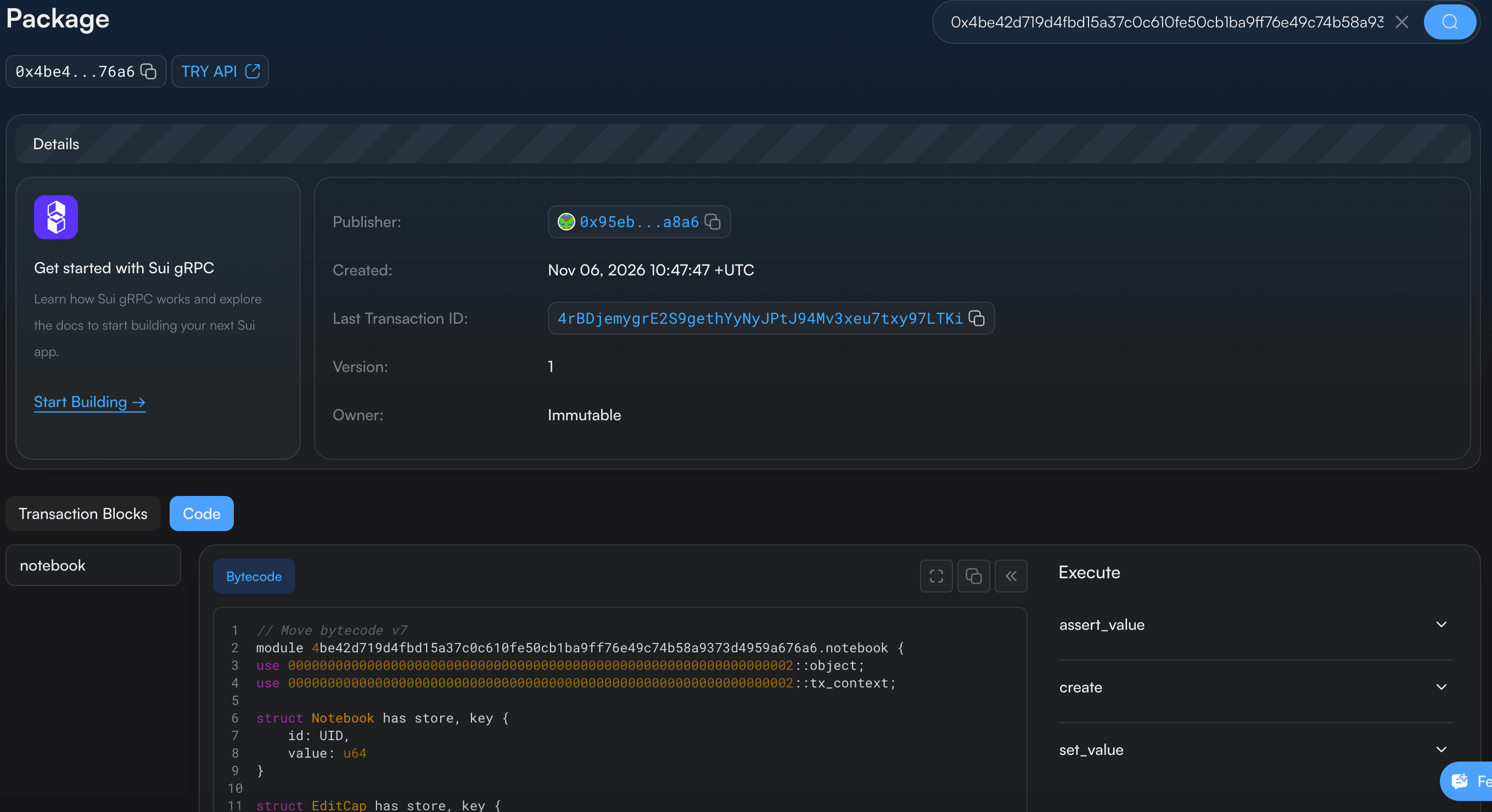
The publication receipt records a successful deployment. The package ID above identifies the code our Move calls will invoke. The field-extraction mode prints only that value, so it can be assigned to a shell variable. Use the package ID obtained from your own publication rather than copying this run’s ID.
The other mode of the program prints the sender, inputs, commands, execution status, and gas accounting. It preserves raw pure-input bytes from the CLI response. It also handles a practical CLI behavior we will encounter later: an executed failure can be printed as an error message containing a transaction digest, even when --json was requested. With --field digest, the program extracts that digest so we can fetch the committed receipt separately.
Create, update and transfer in one PTB
We can now express the four-command workflow. --assign created gives the constructor’s returned values a name in the CLI builder. The suffixes .0 and .1 select the notebook and capability from that result.
Run
sui client ptb \
  --move-call "$PACKAGE::notebook::create" 7 \
  --assign created \
  --move-call "$PACKAGE::notebook::set_value" created.0 created.1 42 \
  --move-call "$PACKAGE::notebook::assert_value" created.0 42 \
  --transfer-objects "[created.0, created.1]" "@$BOB" \
  --sender "@$ALICE" --gas-budget 50000000 --preview
Output, shortened to the command rows from the preview.
│ move-call        │ 0x4BE42D719D4FBD15A37C0C610FE50CB1BA9FF76E49C74B58A9373D4959A676A6::notebook::create 7                         │
│ assign           │ created                                                                                                        │
│ move-call        │ 0x4BE42D719D4FBD15A37C0C610FE50CB1BA9FF76E49C74B58A9373D4959A676A6::notebook::set_value created.0 created.1 42 │
│ move-call        │ 0x4BE42D719D4FBD15A37C0C610FE50CB1BA9FF76E49C74B58A9373D4959A676A6::notebook::assert_value created.0 42        │
│ transfer-objects │ [created.0, created.1] @0x173DF66EE3D8B888DE2E7A5A3FB2AF02D3CACF8B84DA33D612F22E9ABCEE9848                     │
Previewing checks what the CLI parsed and displays the builder operations. It does not execute the application. The @ prefix tells this CLI parser that a value is an address or object ID. The quoted transfer array avoids shell glob expansion. These details matter in both Bash and zsh. See the PTB CLI reference for the builder syntax.
Execute the same workflow by replacing --preview with --json.
Run
sui client ptb \
  --move-call "$PACKAGE::notebook::create" 7 \
  --assign created \
  --move-call "$PACKAGE::notebook::set_value" created.0 created.1 42 \
  --move-call "$PACKAGE::notebook::assert_value" created.0 42 \
  --transfer-objects "[created.0, created.1]" "@$BOB" \
  --sender "@$ALICE" --gas-budget 50000000 --json > evidence/success.json
python3 client/inspect_tx.py evidence/success.json
Output
Digest: FvMVgnJ9s7AZEPZTPZMbVWFQnmbG1LKJiQQy425dRnUb
Status: success
Sender: 0x95eb979fe75eca98735f4cd6dd6ea49c732e0a4aa13f5c73f9e20e15bd14a8a6
Gas budget (MIST): 50000000
Gas payment objects: 0
Input(0): {"type": "pure", "value": [7, 0, 0, 0, 0, 0, 0, 0], "valueType": null}
Input(1): {"type": "pure", "value": [42, 0, 0, 0, 0, 0, 0, 0], "valueType": null}
Input(2): {"type": "pure", "value": [23, 61, 246, 110, 227, 216, 184, 136, 222, 46, 122, 90, 63, 178, 175, 2, 211, 202, 207, 139, 132, 218, 51, 214, 18, 242, 46, 154, 188, 238, 152, 72], "valueType": null}
Command 0: notebook::create(Input(0))
Command 1: notebook::set_value(NestedResult(0, 0), NestedResult(0, 1), Input(1))
Command 2: notebook::assert_value(NestedResult(0, 0), Input(1))
Command 3: TransferObjects([NestedResult(0, 0), NestedResult(0, 1)], Input(2))
Gas used: {"computationCost": 1000000, "nonRefundableStorageFee": 0, "storageCost": 2926000, "storageRebate": 0}
Net gas charge (MIST): 3926000
Object: created Notebook 0x9e1f620e1a0c6d2e9325fc9e4556384638f969ed67f6f749f22b0d3ca96a04d3 version=1 {"AddressOwner": "0x173df66ee3d8b888de2e7a5a3fb2af02d3cacf8b84da33d612f22e9abcee9848"}
Object: created EditCap 0xedfc662039ff723bae4f02edf880064da080be0a91ecf218a0d9b555941f30e8 version=1 {"AddressOwner": "0x173df66ee3d8b888de2e7a5a3fb2af02d3cacf8b84da33d612f22e9abcee9848"}
The receipt contains four commands:
createset_valueassert_valueTransferObjects
--assign was a builder instruction, so it does not occupy a command index in the submitted transaction. Command 0 created two values, and command 3 transferred both to Bob. The effects list the notebook and capability as newly created objects whose owner is Bob.
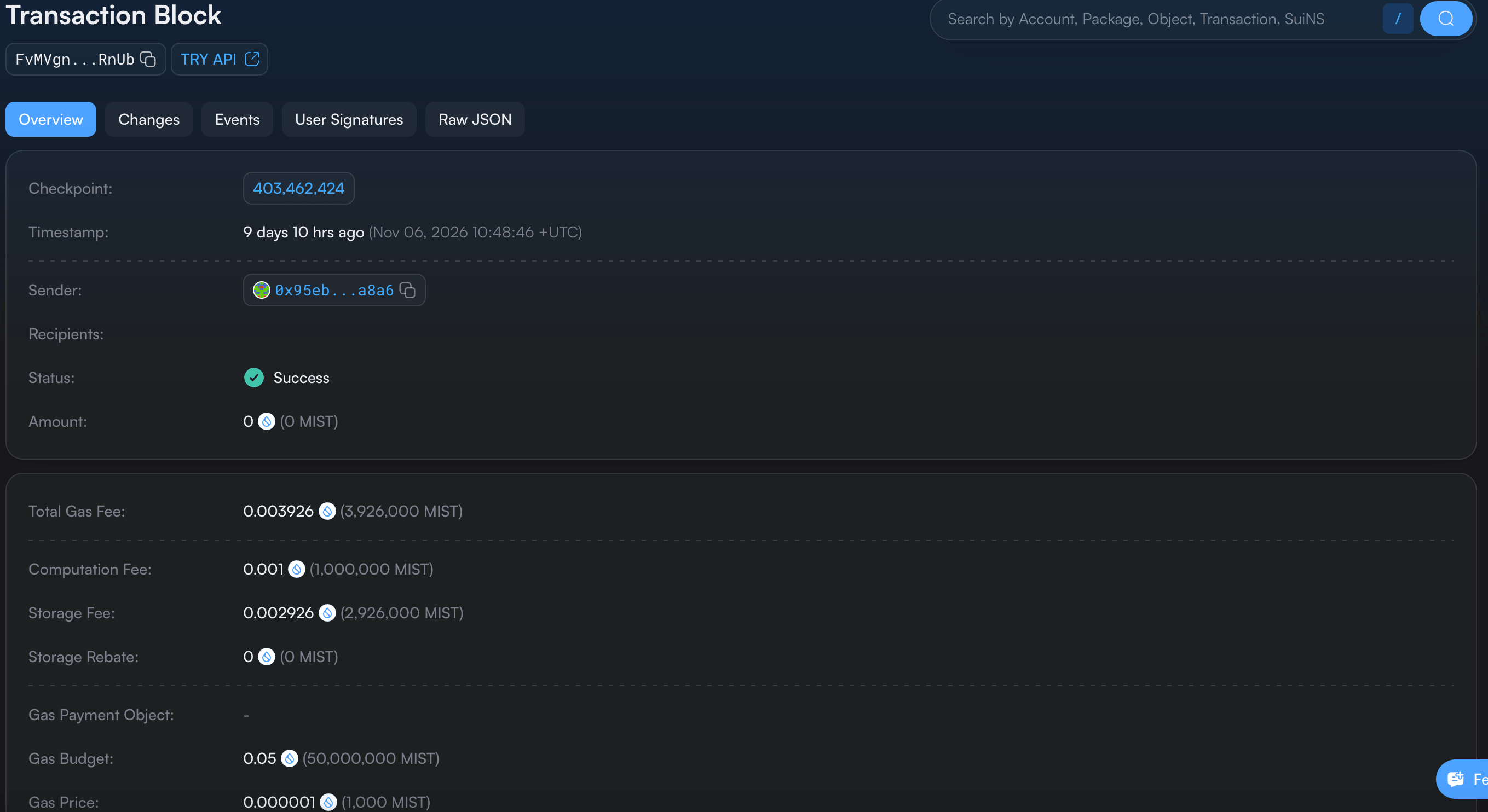
The successful transaction also exposes its four commands in the explorer. This is the same command sequence reconstructed by our Python program.
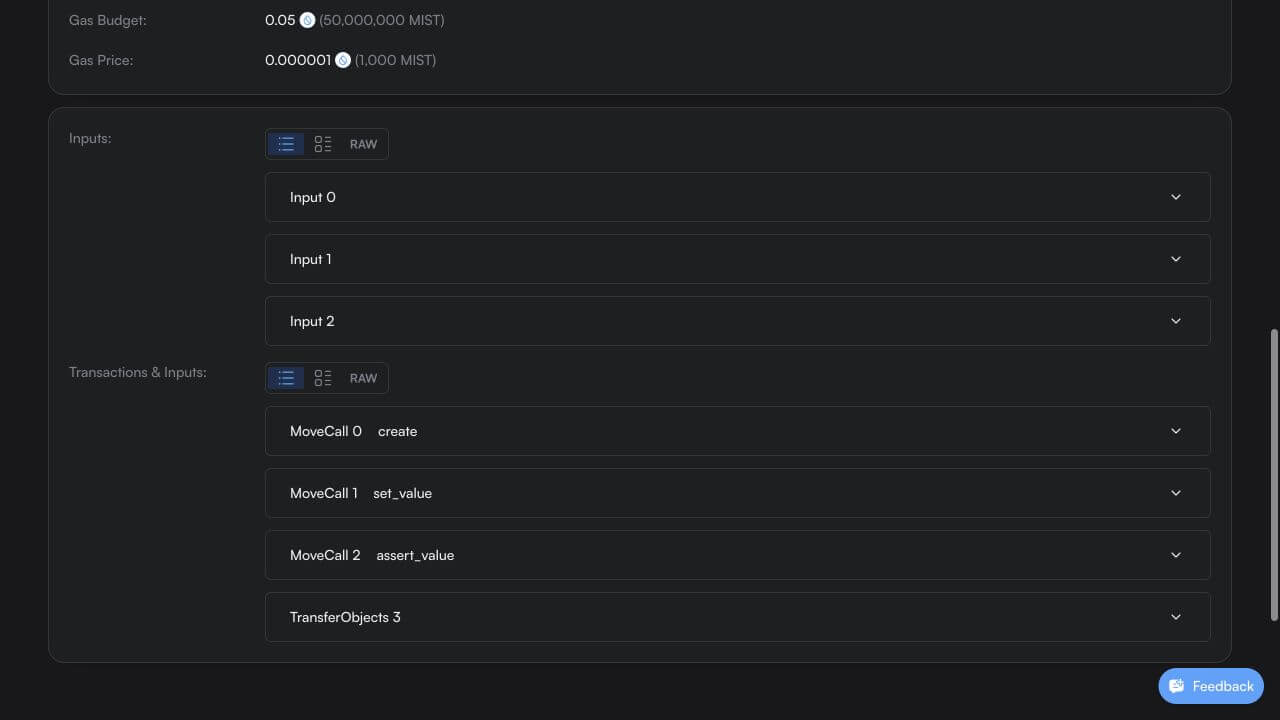
SuiVision shows two views of the same PTB. Inputs lists the values we supplied when building it. Transactions & Inputs lists the four commands in execution order. Expand a command to see which inputs or earlier results it uses.
Why are there only three inputs? Input 0 holds 7, Input 1 holds 42, and Input 2 holds Bob’s address. Both set_value and assert_value use the same 42 from Input 1. The notebook and its editing capability come from create, so the later commands use those returned objects directly.
Now that the transaction has committed, we can get the notebook’s ID from the effects and read its current state. We’ll save that snapshot so we can compare it with what remains after the abort experiment.
Run
NOTEBOOK=$(python3 client/inspect_tx.py evidence/success.json --field notebook)
CAP=$(python3 client/inspect_tx.py evidence/success.json --field cap)
sui client object "$NOTEBOOK" --json > evidence/notebook-before.json
python3 -c 'import json; x=json.load(open("evidence/notebook-before.json")); print("Value:", x["content"]["value"]); print("Version:", x["version"])'
Output
Value: 42
Version: 1
The persisted value is already 42. The initial 7 was an execution-time state inside this PTB. It was never a separately committed notebook version that another transaction could fetch between commands 0 and 1.
Follow inputs and intermediate results
Read the successful receipt from two directions. Its input vector contains the bytes for 7, the bytes for 42, and Bob’s address. Its command vector describes how those values and the constructor’s results are used. The CLI reused the same input slot for the two occurrences of 42 in this run.
In the CLI command, we used --assign created to name the values returned by create. Then we passed created.0 and created.1 to set_value. How does Sui record those two arguments?
In the transaction receipt, created.1 appears as {"NestedResult": [0, 1]}. Our Python inspector prints it as NestedResult(0, 1). Read it as “take the second value returned by the first command.” Both indexes start at zero, so command 0 is create, result 0 is the notebook, and result 1 is its EditCap.
Input(0)       = initial value 7
Input(1)       = replacement and expected value 42
Input(2)       = Bob's address
NestedResult(0, 0) = Notebook returned by command 0
NestedResult(0, 1) = EditCap returned by command 0
The first index in NestedResult(0, 1) is a command index. The second selects a returned value from that command. It does not mean input 0, object version 1, or the capability’s object ID. These indexes describe a position in the current transaction’s execution data.
Result(i) is the single-result form. Our constructor returns two values, so identifying a particular member requires NestedResult(i, j). Commands such as our setter and assertion return no values, and there is no result to select from them. Sui documents the distinction in Inputs and Results.
In the explorer, expand MoveCall 1. The two nested references are visible next to the decoded value 42.
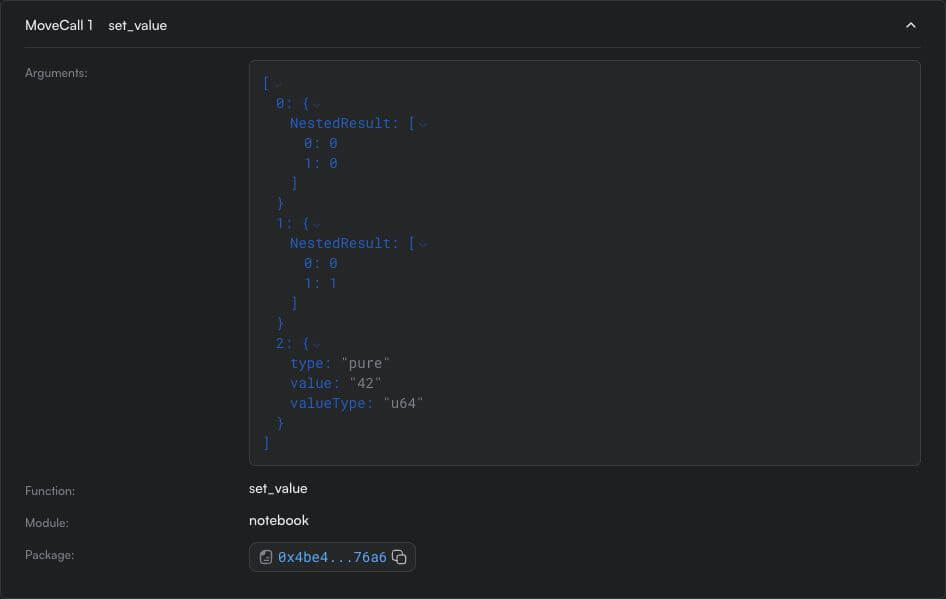
That difference in presentation is useful. The raw receipt shows [42, 0, 0, 0, 0, 0, 0, 0]. The Move signature supplies the u64 interpretation. We can independently check the little-endian value with Python.
Let’s create a file named client/decode_input.py.
import json
from pathlib import Path

receipt = json.loads(Path("evidence/success.json").read_text())
ptb = receipt["transaction"]["data"]["transaction"]
raw = bytes(ptb["inputs"][1]["value"])

print("Bytes:", raw.hex())
print("u64:", int.from_bytes(raw, "little"))
Run
python3 client/decode_input.pyOutput
Bytes: 2a00000000000000
u64: 42
In the receipt, Input(1) shows eight raw bytes and valueType: null. That means the CLI hasn’t attached a type label to those bytes. We know to decode them as a u64 because set_value declares its last parameter as value: u64.
Now a second example, this time with coins. MIST is the smallest unit of SUI. One SUI equals 1,000,000,000 MIST, so 1,000 MIST is 0.000001 SUI. The CLI uses MIST for both the coin amount and the gas budget.
In the CLI, gas refers to the coin Sui makes available for paying the transaction fee. We’ll split 1,000 MIST from it. Since we specify one amount, SplitCoins returns one new coin. TransferObjects can then use Result(0) to send that coin to Bob.
Run
sui client ptb \
  --split-coins gas "[1000]" \
  --assign tip \
  --transfer-objects "[tip]" "@$BOB" \
  --sender "@$ALICE" --gas-budget 50000000 --json > evidence/coin-tip.json
python3 client/inspect_tx.py evidence/coin-tip.json
Output
Digest: Gr6hEUA94dtJAYCL1d73iqJyfSDUDzFcB7QGDjSwBWFz
Status: success
Sender: 0x95eb979fe75eca98735f4cd6dd6ea49c732e0a4aa13f5c73f9e20e15bd14a8a6
Gas budget (MIST): 50000000
Gas payment objects: 1
Input(0): {"type": "pure", "value": "1000", "valueType": "u64"}
Input(1): {"type": "pure", "value": "0x173df66ee3d8b888de2e7a5a3fb2af02d3cacf8b84da33d612f22e9abcee9848", "valueType": "address"}
Command 0: SplitCoins ["GasCoin", [{"Input": 0}]]
Command 1: TransferObjects([Result(0)], Input(1))
Gas used: {"computationCost": 1000000, "nonRefundableStorageFee": 0, "storageCost": 988000, "storageRebate": 0}
Net gas charge (MIST): 1988000
On-chain:
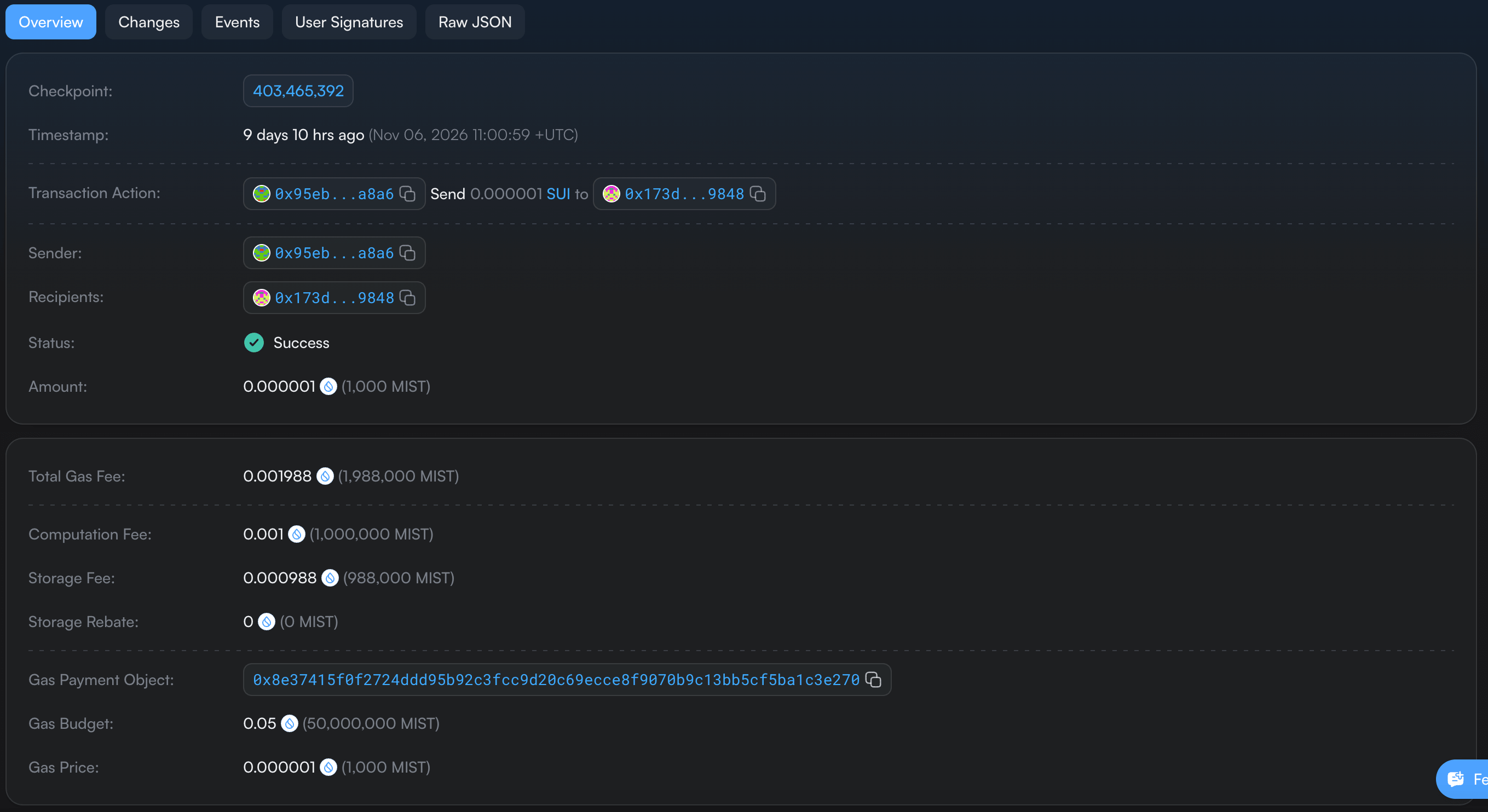
The Testnet faucet funded Alice’s SUI address balance. In this run, the single entry in gasData.payment reserves funds from that balance. That’s what the inspector counts when it prints Gas payment objects: 1. Sui makes a temporary Coin<SUI> available during execution, and GasCoin is how SplitCoins refers to it in the receipt.
Bob receives the new coin holding 1,000 MIST. Alice also pays 1,988,000 MIST in transaction fees.
The notebook starts as NestedResult(0, 0) because it comes from this PTB’s constructor. When Bob later supplies the persisted notebook to a new transaction, the CLI resolves its current object reference and the command uses an Input index. The same notebook moves from an intermediate result in one program to an external input in the next.
Borrow an object, then move it
The successful transaction reused the notebook several times. That is valid because reuse depends on the expected parameter type. set_value borrows it mutably. assert_value then borrows it immutably. The transfer finally takes it by value. Returning from a call ends its temporary borrow, so a subsequent command can borrow the value again.
A transfer consumes the value from its result position. It does not update that result slot into a reusable handle to a newly owned object. To make this visible, create another pair, transfer it, and then try to call the setter using the same results.
Run
sui client ptb \
  --move-call "$PACKAGE::notebook::create" 7 \
  --assign created \
  --transfer-objects "[created.0, created.1]" "@$BOB" \
  --move-call "$PACKAGE::notebook::set_value" created.0 created.1 42 \
  --sender "@$BOB" --gas-budget 50000000 --json > evidence/moved-error.txt
cat evidence/moved-error.txt
Output from the expected exit-1 execution.
Error executing transaction '2NTGquYcEMAoSqENbCaif4AsfDB194yn3qGvbHc7eFAJ': CommandArgumentError { arg_idx: 0, kind: ArgumentWithoutValue } in command 2The runtime reports ArgumentWithoutValue for argument 0 in command 2. The constructor was command 0, and the transfer was command 1. By the time the setter requested its first argument, that result position no longer contained the notebook. This failure happens at the PTB argument boundary before the setter can check the capability or write 42.
Recover the committed failure receipt using the digest in that CLI message.
Run
MOVED_DIGEST=$(python3 client/inspect_tx.py evidence/moved-error.txt --field digest)

sui client tx-block "$MOVED_DIGEST" --json > evidence/moved.json
python3 client/inspect_tx.py evidence/moved.json
Output, shortened to status and error.
Digest: 2NTGquYcEMAoSqENbCaif4AsfDB194yn3qGvbHc7eFAJ
Status: failure
Error: CommandArgumentError { arg_idx: 0, kind: ArgumentWithoutValue } in command 2
The moved-value failure is a committed failed execution. Its receipt contains no newly created notebook or capability. The earlier transfer did not leave Bob with a partially completed pair.
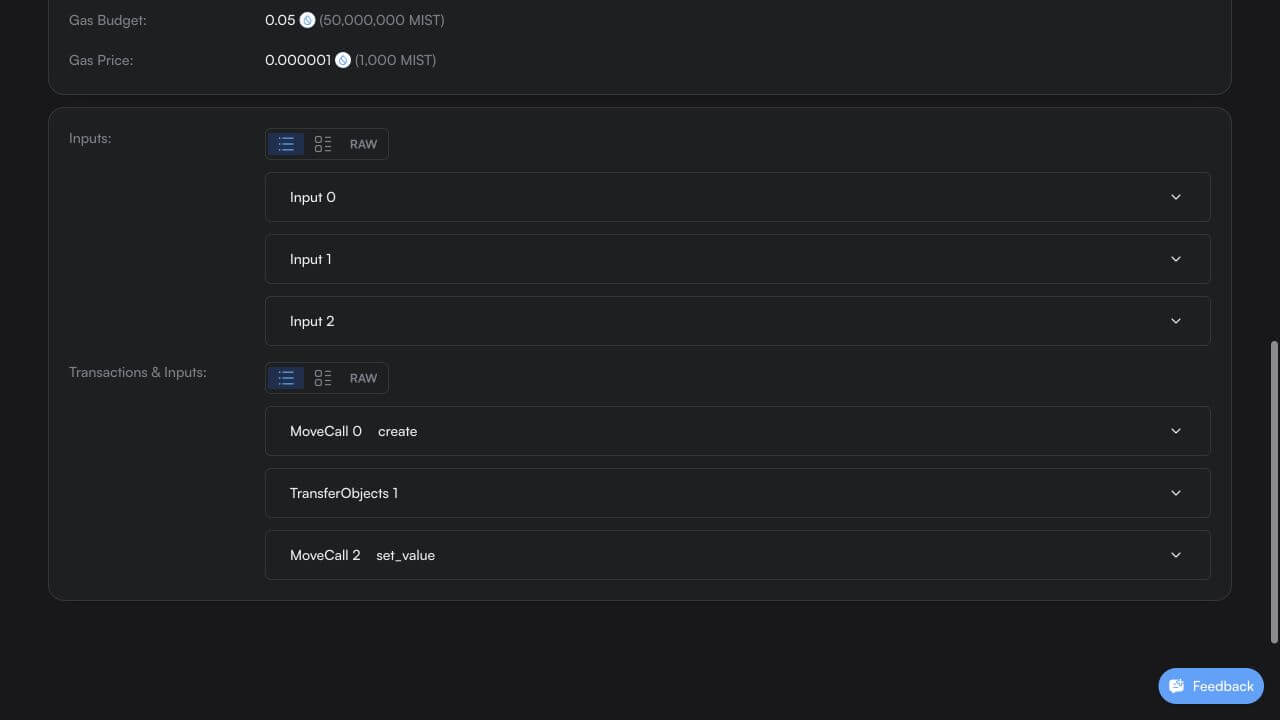
There is a second obligation at the end of execution. Returning a resource from a Move function does not automatically transfer it to the transaction sender. Try leaving both constructor results unhandled.
Run
sui client ptb \
  --move-call "$PACKAGE::notebook::create" 7 \
  --sender "@$BOB" --gas-budget 50000000 --json > evidence/unused-error.txt
cat evidence/unused-error.txt
Output from the expected exit-1 execution.
Error executing transaction '4yReK5rNeSjnSUULZaR6m4TLFbf53SAuvDTTU6UcHTeQ': UnusedValueWithoutDrop { result_idx: 0, secondary_idx: 0 }The runtime reaches its end-of-transaction checks and finds the notebook at result index 0, secondary index 0. That value lacks drop. Our capability also needs a valid destination, but the error identifies the first unhandled result.
To make the transaction succeed, we must transfer the objects, store them through suitable Move operations, or consume them through operations their modules permit. Simply passing an object by reference to a function would not resolve this obligation.
Run
UNUSED_DIGEST=$(python3 client/inspect_tx.py evidence/unused-error.txt --field digest)

sui client tx-block "$UNUSED_DIGEST" --json > evidence/unused.json
python3 client/inspect_tx.py evidence/unused.json
Output, shortened to status and error.
Digest: 4yReK5rNeSjnSUULZaR6m4TLFbf53SAuvDTTU6UcHTeQ
Status: failure
Error: UnusedValueWithoutDrop { result_idx: 0, secondary_idx: 0 }
The unused-result receipt also records a failed execution and no committed notebook creation. A successful Move function return is only one step toward a successful PTB.
What rolls back when a later command fails?
The previous failures involved newly created results. We can test rollback more directly with the notebook that Bob already owns. Set its value to 99, then ask the next command to verify that the value is 100. The setter has the correct notebook and capability, so the mismatch is deliberately introduced in the second call.
Run
sui client ptb \
  --move-call "$PACKAGE::notebook::set_value" "@$NOTEBOOK" "@$CAP" 99 \
  --move-call "$PACKAGE::notebook::assert_value" "@$NOTEBOOK" 100 \
  --sender "@$BOB" --gas-budget 50000000 --json > evidence/abort-error.txt

cat evidence/abort-error.txt
Output from the expected exit-1 execution.
Error executing transaction 'FzSGYt9vaCktgcrSYBwwUqBJJGSTZMDKL9bHf4JnufkE': 2nd command aborted within function '0x4be42d719d4fbd15a37c0c610fe50cb1ba9ff76e49c74b58a9373d4959a676a6::notebook::assert_value' at instruction 8 with code 2This time the failure comes from our Move code. The second command is assert_value, and abort code 2 is EUnexpectedValue. During execution it observes the preceding setter’s 99, which does not equal 100. The transaction stops at that assertion.
Run
ABORT_DIGEST=$(python3 client/inspect_tx.py evidence/abort-error.txt --field digest)

sui client tx-block "$ABORT_DIGEST" --json > evidence/abort.json
python3 client/inspect_tx.py evidence/abort.json
sui client object "$NOTEBOOK" --json > evidence/notebook-after.json
Output
Digest: FzSGYt9vaCktgcrSYBwwUqBJJGSTZMDKL9bHf4JnufkE
Status: failure
Error: MoveAbort(MoveLocation { module: ModuleId { address: 4be42d719d4fbd15a37c0c610fe50cb1ba9ff76e49c74b58a9373d4959a676a6, name: Identifier("notebook") }, function: 2, instruction: 8, function_name: Some("assert_value") }, 2) in command 1
Sender: 0x173df66ee3d8b888de2e7a5a3fb2af02d3cacf8b84da33d612f22e9abcee9848
Gas budget (MIST): 50000000
Gas payment objects: 0
Input(0): {"digest": "2NY6Ui5ueYzcbzQkAcZ3mHqXbBYMycofzLpzYYjWsMnc", "objectId": "0x9e1f620e1a0c6d2e9325fc9e4556384638f969ed67f6f749f22b0d3ca96a04d3", "objectType": "immOrOwnedObject", "type": "object", "version": "1"}
Input(1): {"digest": "8Q5K7eCoWAzEkMqfAeBNSmi56gCEQuMXw6NUpoYNZrKK", "objectId": "0xedfc662039ff723bae4f02edf880064da080be0a91ecf218a0d9b555941f30e8", "objectType": "immOrOwnedObject", "type": "object", "version": "1"}
Input(2): {"type": "pure", "value": [99, 0, 0, 0, 0, 0, 0, 0], "valueType": null}
Input(3): {"type": "pure", "value": [100, 0, 0, 0, 0, 0, 0, 0], "valueType": null}
Command 0: notebook::set_value(Input(0), Input(1), Input(2))
Command 1: notebook::assert_value(Input(0), Input(3))
Gas used: {"computationCost": 1000000, "nonRefundableStorageFee": 293, "storageCost": 2926000, "storageRebate": 2925707}
Net gas charge (MIST): 1000293
Object: mutated Notebook 0x9e1f620e1a0c6d2e9325fc9e4556384638f969ed67f6f749f22b0d3ca96a04d3 version=2 {"AddressOwner": "0x173df66ee3d8b888de2e7a5a3fb2af02d3cacf8b84da33d612f22e9abcee9848"}
Object: mutated EditCap 0xedfc662039ff723bae4f02edf880064da080be0a91ecf218a0d9b555941f30e8 version=2 {"AddressOwner": "0x173df66ee3d8b888de2e7a5a3fb2af02d3cacf8b84da33d612f22e9abcee9848"}
Notice the existing-object inputs. Each contains objectId, version, and digest. The CLI fetched those references when constructing the transaction. Bob signs because he owns the objects.
The PTB did not change the transaction sender after a command, and it did not create a second authorization context for the assertion.
Now compare the state snapshots. Let’s create a file named client/compare_state.py.
import json
from pathlib import Path

before = json.loads(Path("evidence/notebook-before.json").read_text())
after = json.loads(Path("evidence/notebook-after.json").read_text())

assert before["objectId"] == after["objectId"]
assert before["content"]["value"] == after["content"]["value"] == "42"
assert before["owner"] == after["owner"]
assert after["version"] > before["version"]

print("Notebook:", before["objectId"])
print("Value:", before["content"]["value"], "->", after["content"]["value"])
print("Version:", before["version"], "->", after["version"])
print("Owner unchanged:", before["owner"] == after["owner"])
print("Previous transaction:", after["prevTx"])
Run
python3 client/compare_state.pyOutput
Notebook: 0x9e1f620e1a0c6d2e9325fc9e4556384638f969ed67f6f749f22b0d3ca96a04d3
Value: 42 -> 42
Version: 1 -> 2
Owner unchanged: True
Previous transaction: FzSGYt9vaCktgcrSYBwwUqBJJGSTZMDKL9bHf4JnufkE
The application value remains 42, and the owner remains Bob. The setter’s 99 did not become committed notebook data. Yet the version advanced from 1 to 2, and the object’s previous transaction now identifies the failed execution.
That distinction matters when handling errors. Atomic rollback of the application workflow does not imply that the entire transaction has no protocol-visible effects. This run consumed the old owned input versions and produced failure effects with fresh metadata. The capability’s version advanced too, even though our Move setter borrowed it through &EditCap. A version change alone therefore does not prove that a particular application field changed.
After an executed failure, fetch current references before rebuilding a transaction. Reusing an old object ID is reasonable because identity is stable. Reusing its old version and digest as if the failed attempt had never happened can make the next transaction invalid. A request rejected before execution is a separate case and might have no committed transaction receipt at all.
The three failed PTBs in this walkthrough have one thing in common: none of them left a half-built notebook behind. They differ in where the runtime stopped, what it charged and whether any object version moved. All three digests are on Testnet, so you can check each row yourself.
| Failed PTB | Runtime error | Stopped at | Net gas (MIST) | Object versions |
|---|---|---|---|---|
| Moved value reused | CommandArgumentError, ArgumentWithoutValue | Command 2, the setter | 1,000,000 | No application objects touched |
Unused result without drop | UnusedValueWithoutDrop | End of the transaction | 1,000,000 | No application objects touched |
| Move abort | MoveAbort, code 2 in assert_value | Command 1 | 1,000,293 | Notebook and EditCap both move from version 1 to 2, value stays 42 |
Read the final state and know the limits
The abort receipt also records a charge. Its computation cost is 1,000,000 MIST, storage cost is 2,926,000, and storage rebate is 2,925,707. Following Sui’s gas accounting, the net charge is.
computationCost + storageCost - storageRebate
1,000,000 + 2,926,000 - 2,925,707 = 1,000,293 MIST
1,000,293 / 1,000,000,000 = 0.001000293 SUI
Our inspector computes this from the receipt. The receipt’s SUI balance change independently records -1000293 for Bob. Do not add nonRefundableStorageFee again to that formula. It is already reflected in the storage accounting represented by these costs and rebates.
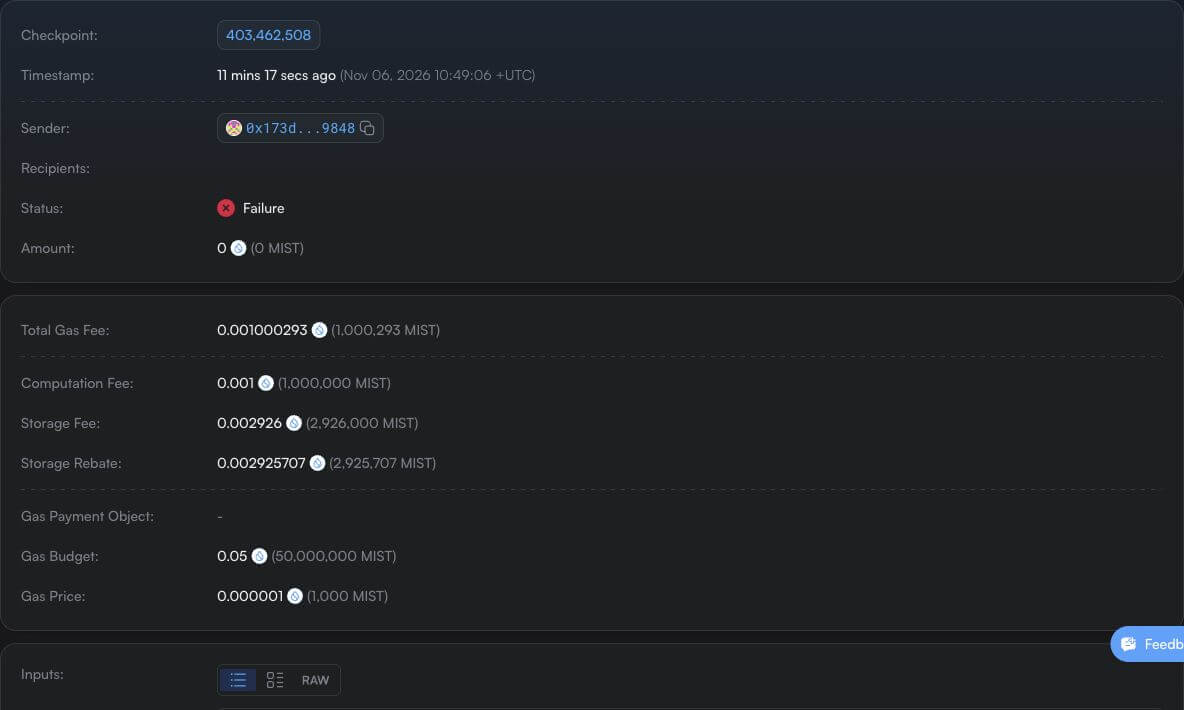
The notebook workflow and its failure receipts have an empty gas-payment object list. That does not mean the transactions had no gas payer. The CLI selected address-balance gas payment, and the sender’s SUI balance paid the charge. Sui supports this mode with gasData.payment = []. The gas representation depends on the constructed transaction and available funding. See address-balance gas payments.
Finally, query the notebook through the native gRPC API with Python. This gives us a second view of its current state, independent of the local CLI snapshots. Install the versions used in the captured run.
python3 -m venv .venv
source .venv/bin/activate
python3 -m pip install grpcio==1.84.1 grpcio-reflection==1.84.1 protobuf==7.36.2
Installation result, with download progress omitted.
Successfully installed grpcio-1.84.1 grpcio-reflection-1.84.1 protobuf-7.36.2 typing-extensions-4.16.0We use the server’s Protobuf reflection service to obtain the GetObject request and response descriptors. That avoids requiring generated Python files or an unshown dependency bundle. The wildcard field mask requests the object fields, including its owner and decoded Move value.
On Chainstack nodes. Sui removed JSON-RPC from the full node in v1.82, so reading objects and transactions now goes through gRPC, as this script does. Chainstack serves the same
sui.rpc.v2services with server reflection enabled, atsui-testnet.core.chainstack.com:443for Testnet, and authenticates requests with anx-tokenheader. The script above sends no credentials, so for a Chainstack endpoint add thex-tokenmetadata to its calls, or explore first withgrpcurl. A Chainstack Sui node holds a window of checkpoints fromlowestAvailableCheckpointto the tip, and older objects returnNotFound. See the Sui gRPC endpoint and Sui tooling docs.
Let’s create a file named client/read_object.py.
import argparse
import json
import os
import sys
from pathlib import Path

import grpc
from google.protobuf import descriptor_pool, json_format, message_factory
from grpc_reflection.v1alpha.proto_reflection_descriptor_database import (
    ProtoReflectionDescriptorDatabase,
)

parser = argparse.ArgumentParser()
parser.add_argument("object_id")
parser.add_argument("label")
args = parser.parse_args()

if not args.label.isidentifier():
    parser.error("Use a simple label such as owned, shared, or wrapped_child")
endpoint = os.environ.get("SUI_GRPC_ENDPOINT", "fullnode.testnet.sui.io:443")
host = endpoint.rsplit(":", 1)[0]

channel = (
    grpc.insecure_channel(endpoint)
    if host in {"localhost", "127.0.0.1", "[::1]"}
    else grpc.secure_channel(endpoint, grpc.ssl_channel_credentials())
)
service = "sui.rpc.v2.LedgerService"

try:
    with channel:
        pool = descriptor_pool.DescriptorPool(ProtoReflectionDescriptorDatabase(channel))
        method = pool.FindServiceByName(service).methods_by_name["GetObject"]
        request_type = message_factory.GetMessageClass(method.input_type)
        response_type = message_factory.GetMessageClass(method.output_type)
        call = channel.unary_unary(
            f"/{service}/GetObject",
            request_serializer=request_type.SerializeToString,
            response_deserializer=response_type.FromString,
        )
        response = call(
            request_type(object_id=args.object_id, read_mask={"paths": ["*"]}), timeout=30
        )
        result = json_format.MessageToDict(response, preserving_proto_field_name=True)
except grpc.RpcError as error:
    result = {"error": {"code": error.code().name, "details": error.details()}}

Path("evidence").mkdir(exist_ok=True)
path = Path("evidence") / f"{args.label}.json"
path.write_text(json.dumps(result, indent=2) + "\n")

if "error" in result:
    print("GetObject failed:", result["error"]["code"], result["error"]["details"])
    print("Saved:", path)
    sys.exit(1)

obj = result["object"]

print("Object ID:", obj["object_id"])
print("Version:", obj["version"])
print("Type:", obj["object_type"])
print("Owner:", json.dumps(obj["owner"], sort_keys=True))
print("Move value:", json.dumps(obj["json"], indent=2, sort_keys=True))
print("Saved:", path)
Run
python3 client/read_object.py "$NOTEBOOK" grpc_after_abortOutput
Object ID: 0x9e1f620e1a0c6d2e9325fc9e4556384638f969ed67f6f749f22b0d3ca96a04d3
Version: 2
Type: 0x4be42d719d4fbd15a37c0c610fe50cb1ba9ff76e49c74b58a9373d4959a676a6::notebook::Notebook
Owner: {"address": "0x173df66ee3d8b888de2e7a5a3fb2af02d3cacf8b84da33d612f22e9abcee9848", "kind": "ADDRESS"}
Move value: {
  "id": "0x9e1f620e1a0c6d2e9325fc9e4556384638f969ed67f6f749f22b0d3ca96a04d3",
  "value": "42"
}
Saved: evidence/grpc_after_abort.json
The response reports version 2, Bob’s address owner, and value 42. The program stores the full public response in evidence/grpc_after_abort.json. The version and value fields are printed from different parts of the response: runtime object metadata and the decoded Move value respectively. They answer different questions.
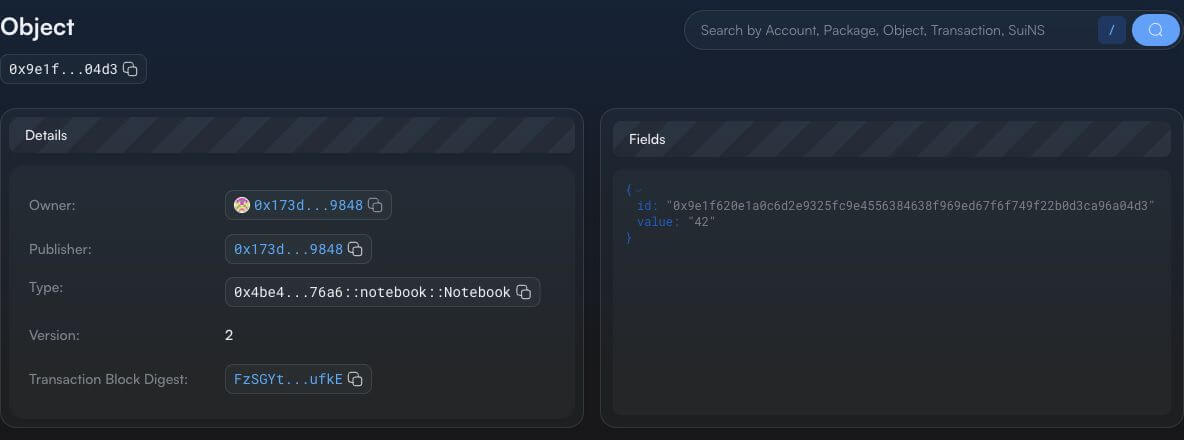
📝 Note: The notebook’s current fields still contain value
42after the failed attempt to set it to99. Compare this with the version change shown in the snapshot above.
A PTB is a fixed sequence of commands. Put loops or conditional logic inside a Move function, and keep the full transaction within the size, command, and gas limits we inspected in Part 3. If you need to compare the cost of one PTB with separate transactions, measure both workflows with the same starting objects and gas configuration. The fees above describe the transactions we actually executed. Sui’s PTB model.
Summary
A programmable transaction block (PTB) is the program inside a Sui user transaction. It contains a list of inputs and an ordered list of commands. Each command can use values supplied by the client or values returned by an earlier command. This lets applications compose Move calls and built-in Sui operations in a single submission, with intermediate values passed directly between commands.
The application changes commit together. If a command fails, those changes roll back, although the failed execution can still charge gas and advance object versions. This makes PTBs useful for workflows where several operations need to succeed together.
Frequently asked questions
A programmable transaction block, or PTB, is the program inside a Sui user transaction. It contains a list of inputs supplied by the client and an ordered list of commands. Each command can use inputs or values returned by earlier commands, so an application can compose several Move calls and built-in Sui operations in one submission.
A PTB can contain MoveCall, SplitCoins, MergeCoins, TransferObjects, MakeMoveVec, Publish and Upgrade commands. Each command returns a defined number of values, which later commands can use.
Commands refer to earlier outputs by position. Result(i) is the single value returned by command i, and NestedResult(i, j) is the j-th value returned by command i. Both indexes start at zero. In the notebook example, NestedResult(0, 0) is the notebook and NestedResult(0, 1) is its editing capability.
The application changes of the whole PTB roll back. The failed execution is still recorded, though, and it can charge gas and advance object versions. In our Testnet run, a failed assertion left the notebook value at 42, moved its version from 1 to 2 and charged 1,000,293 MIST.
Yes. A returned object without the drop ability must be transferred, stored or consumed by a later command. Otherwise the runtime fails the PTB with UnusedValueWithoutDrop. Passing the object to a function by reference does not resolve this.
No. A PTB is a fixed sequence of commands. Put loops and conditional logic inside a Move function, and keep the whole transaction within the size, command and gas limits of the network.
Related reading