AI-ready infrastructure
 Refer and earn


 Ethereum
 Hyperliquid
 Solana
 Arbitrum
 BNB Smart Chain
 Base
Base Polygon
 TRON
TRON Sui
Sui Robinhood


How to fix RPC rate limit errors (429) in 2026

TL;DR: The fastest way to make an RPC rate limit worse is to retry the failed call immediately. Your retry loop adds requests to the exact second that is already full. Read what the 429 is actually telling you (requests per second, a method-specific cap, or a block range), slow the client down with backoff and a throttle, send fewer requests, and only then pay for a higher limit.
An RPC rate limit error looks simple: your app sends too many requests, the endpoint answers with HTTP 429 Too Many Requests, and something downstream breaks. The fix is less obvious, because at least three different limits produce the same symptom, and each one needs a different change.
This guide walks through how to tell them apart, how to fix your call pattern first, and when raising the limit is the right move. Limits quoted below are Chainstack’s published figures; the diagnosis and the client-side fixes apply to any provider.
What an RPC rate limit error actually means
On Chainstack, a 429 means you hit an RPS or connection limit. The response tells you that you were too fast, not that the request was wrong, so the same request will normally succeed a moment later if you slow down.
On a Chainstack node, an RPS limit comes back as HTTP 429 with a JSON-RPC error in the body. This is a real response from a Sui Mainnet Global Node on the Developer plan, captured on September 30, 2026 after a burst of parallel requests:
{
  "jsonrpc": "2.0",
  "id": 1,
  "error": {
    "code": -32005,
    "message": "You've exceeded the RPS limit available on the current plan. Learn more how to increase the limit, visit https://docs.chainstack.com/docs/pricing-introduction#rate-limits",
    "data": { "try_again_in": "292.270667ms" }
  }
}
Code -32005 is what EIP-1474 lists as “Limit exceeded”, so other providers use it too. Notice what is missing: the response had no Retry-After header. The wait hint is in error.data.try_again_in. On Chainstack, a Solana getProgramAccounts request over its limit also returns 429 with -32005. Treat all of these the same way.
Four situations are easy to misread:
- A connection limit, not a request rate. Many workers or WebSocket clients opening connections at once can trigger a 429 on their own. The Throughput guidelines list the limits that apply to your node.
- A public endpoint. A free public endpoint is shared with everyone using it, its limits can change without notice, and its operators say it is not meant for production. Solana’s public endpoint, for example, allows 100 requests per 10 seconds per IP. The first fix is a private endpoint of your own.
- A 429 that is not real. Open the node’s Metrics in the Chainstack console (click your project, your network, then the node name) and look at the Response codes chart. If your debug logs show 429s but that chart does not, the limit is not being hit on the endpoint. Something between your client and the endpoint is producing them. Older versions of the Solana Python SDK, for example, return 429-shaped errors that do not correspond to real rate-limit hits.
- A different error that looks like throttling. A Solana account scan that runs too long or waits too long for a free slot returns
-32012, not a 429. Aneth_getLogscall over too many blocks fails on the range, not on the request rate.
The four limits behind “rate limit exceeded”
| Limit | Example on Chainstack | What you see |
|---|---|---|
| Requests per second (plan) | Developer 25 RPS, Growth 250, Pro 400, Business 600, Enterprise unlimited | 429 when total traffic to the endpoint passes the cap |
| Protocol-specific RPS | Solana Mainnet: Developer 5 RPS, Growth 50 RPS | 429 at a lower rate than the plan table suggests |
| Method-specific RPS | Solana getBlock 400 RPS, getTokenAccountsByOwner 150 RPS, getProgramAccounts tiered by program size | 429 on one method while the rest of your traffic is fine |
| Block range | eth_getLogs: 100 blocks on Developer, 10,000 on Growth and above | An error on wide ranges, regardless of request rate |
The practical consequence: the total request count can be far below your plan’s RPS and you can still hit a limit, because one heavy method or one wide range is what tripped it.
How to fix RPC rate limit errors, step by step
Work through the steps in order: the first ones cost nothing, and the last one costs money.
Step 1: find out which limit you are hitting
Change nothing in the code until you know which row of that table you are in.
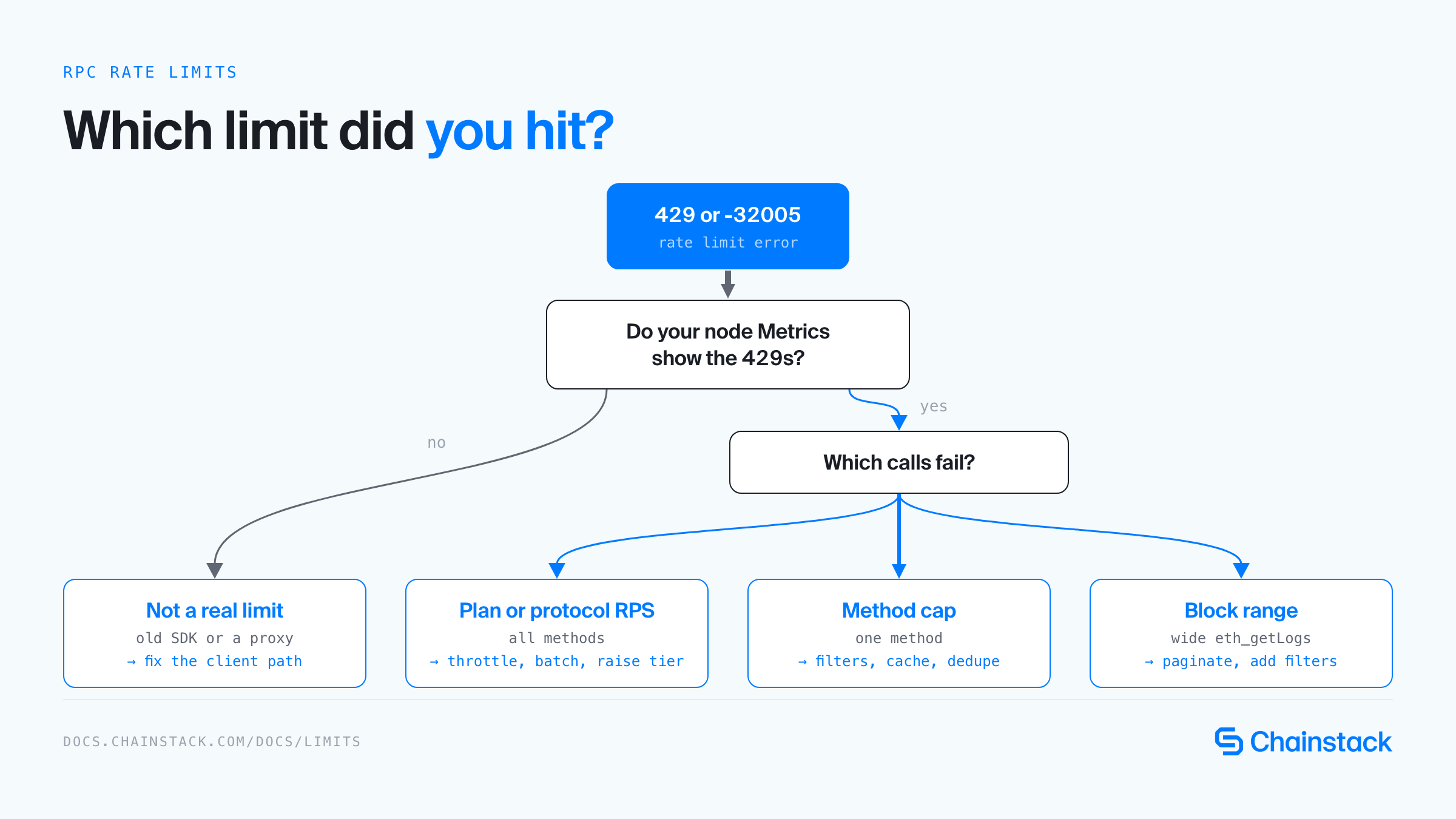
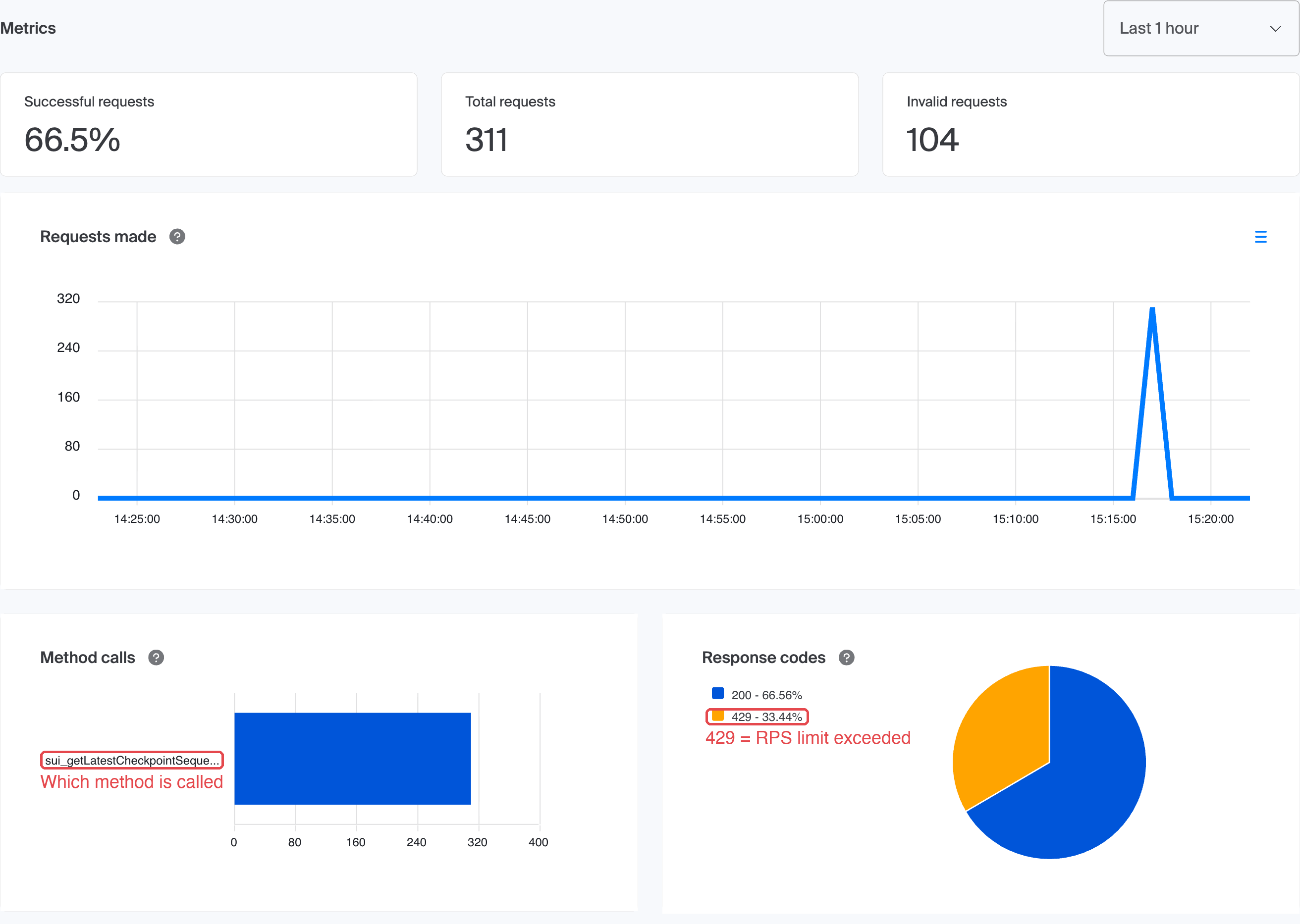
- Open the node’s Metrics (click your project, your network, then the node name). Response codes shows how many 429s the node returned, and Method calls shows which methods the traffic comes from. Both charts cover HTTP requests only, for 1 hour to 7 days. Compare the 429 count with your own logs.
- Log the method name with every failed call. If most 429s belong to one method, look at that method’s limit, not the plan’s.
- Look at timing. Errors clustered at process start point to a startup burst, such as a backfill. Errors spread across the hour point to steady load above your cap.
- Check the limit your node is running under. The node page in the console shows a banner such as “This node is currently running under the limit of 25 requests per second” on the Developer plan.
- Look for a wait hint in the 429 response. On Chainstack it is
error.data.try_again_inin the body, and other providers may send aRetry-Afterheader. Either is the shortest wait you should use.
This is what that looks like on a real node. After two bursts of parallel requests against a Developer-plan node, the Requests made chart shows the spike, Method calls shows the one method that was sent, and Response codes shows that a third of the requests came back as 429:
To find your real ceiling before production traffic does, you can run a load test against the endpoint with Chainstack’s open-source chainbench and watch the rate at which 429s begin.
Step 2: stop retrying blindly
A tight retry loop turns one rejected request into a stream of rejected requests. Wait at least as long as the response says (error.data.try_again_in on Chainstack, or Retry-After if the provider sends it), fall back to exponential backoff when there is no hint, and add jitter so parallel workers do not retry in lockstep.
async function rpc(url, body, maxRetries = 5) {
  for (let attempt = 0; attempt <= maxRetries; attempt++) {
    const res = await fetch(url, {
      method: "POST",
      headers: { "Content-Type": "application/json" },
      body: JSON.stringify(body),
    });
    if (res.status !== 429 && res.status < 500) return res.json();
    const hint = parseFloat((await res.json().catch(() => null))?.error?.data?.try_again_in);
    const wait = hint || parseFloat(res.headers.get("retry-after")) * 1000 || 2 ** attempt * 1000;
    await new Promise((r) => setTimeout(r, wait + Math.random() * 250));
  }
  throw new Error("Rate limited or unavailable after retries");
}
Retry only temporary failures: a 429 or a 5xx response. A 4xx that says the request itself is wrong will fail the same way every time.
Step 3: throttle before you hit the limit
Backoff reacts after the limit trips. A client-side throttle stops it from tripping. Cap the request rate and the number of parallel calls a little below the limit you found in step 1, so a burst has headroom.
- Node.js:
bottleneckorp-throttle - Python: the
ratelimitdecorator, orasyncio.Semaphorewithasyncio.sleep - Go:
golang.org/x/time/rate
Pair the throttle with a small concurrency cap and the backoff above. Together they handle both routine bursts and the occasional spike.
Step 4: send fewer requests
When throttling alone is not enough, the call pattern is usually the real problem.
- Batch. Combine several JSON-RPC calls into one HTTP request when the protocol supports batch arrays.
- Read logs in ranges. For catch-up reads, one
eth_getLogscall over a range beats a loop ofeth_getBlockByNumbercalls. - Subscribe instead of polling. Use
eth_subscribeover WebSocket for new blocks and events, rather than asking every few hundred milliseconds. See HTTP vs WebSocket for EVM nodes. - Cache what does not change. A finalized block, a mined transaction and its receipt never change, so read them once.
- Deduplicate. If ten components ask for the same block at the same moment, send one request and share the answer.
- Check your library. In viem, the
httptransport retries three times by default with exponential backoff (retryCount,retryDelay) and can group calls withbatch: true. In ethers v6,staticNetworkstops the provider from asking for the chain ID on every request, which saves calls if you know the network will not change.
Step 5: respect method-specific limits
Some limits are set per method, so the fix is in how you call it.
eth_getLogs. Stay inside your plan’s block range and paginate anything wider, filtering by contract address and topics to keep responses small. The Chainstack guide to eth_getLogs limitations shows the pagination loop.
Solana getProgramAccounts. On Solana RPC, the rate limit depends on the size of the program you query, and requests with filters get a higher limit than requests without. A filtered request to a program with 1M or more accounts is limited to 3 requests per 20 seconds. Add dataSize or memcmp filters, and expect a -32012 if a scan runs past its time or memory limit. If the message says the scan was abandoned while waiting for a slot, it never ran, so retry it with backoff.
Step 6: raise the ceiling when the pattern is already lean
If sustained traffic really is above your cap after steps 2 to 5, add capacity:
- Upgrade the plan. Each plan step raises the RPS cap, as in the table above.
- Add Unlimited Node to an endpoint. It converts an existing node to a flat monthly fee with an RPS tier of 25, 100, 250, 500 or 1000. It is available from the Growth plan, uses none of your plan quota, and has no overage charges. If you go over the tier, you get a rate-exceeded message rather than a bill.
- Move to a Dedicated Node. You pay for the resources the node consumes instead of per request, and block-range limits can be customized on request.
- Ask for custom limits. Enterprise customers can request a custom RPS, including for method-specific caps such as Solana
getProgramAccounts.
Spreading traffic across several endpoints with fail-over helps availability, but it does not raise a per-endpoint cap. Measure the limit first, then decide.
Troubleshooting common rate limit errors
| Symptom | Likely cause | Fix |
|---|---|---|
| 429s in your logs, none on the Metrics page | Something before the endpoint is generating them, such as an old SDK | Update the client library and check any proxy in front of the endpoint |
| 429s only for a few seconds at startup | A backfill or cache warm-up burst | Add a throttle and ramp up gradually |
| 429s on one method only | A method-specific cap | Read that method’s limit, then batch, filter or cache |
| Steady 429s under normal load | Sustained traffic above the plan’s RPS | Cut request volume first, then raise the tier |
eth_getLogs fails on wide ranges | Block range above your plan’s cap | Paginate into smaller ranges and add address and topic filters |
-32012 on a Solana scan | Scan exceeded its time or memory limit, or waited too long for a slot | Narrow the query with dataSize or memcmp filters; retry an abandoned scan with backoff |
Conclusion
Do the fixes in this order: identify which of the four limits you hit, back off and throttle the client, cut the requests you do not need, and only then buy capacity. That order is cheapest, because by the time you upgrade you know how many requests per second you really need.
Frequently asked questions
It means your client exceeded a rate limit: too many requests per second or too many connections. The request itself was fine, so it should succeed if you wait and retry.
First find which limit you hit: total requests per second, a method-specific cap, or a block range on eth_getLogs. Then add retry with backoff and jitter, throttle the client, batch or cache calls, and raise the limit if traffic is still above it.
-32005 is the JSON-RPC code that EIP-1474 lists as ‘Limit exceeded’. On Chainstack, an RPS-limit response is HTTP 429 with code -32005 and a try_again_in hint in error.data. Handle it like any 429: wait, back off and lower your request rate.
Global Nodes are capped at 25 RPS on Developer, 250 on Growth, 400 on Pro and 600 on Business, and Enterprise has no cap. Some protocols and methods have lower limits, such as Solana Mainnet at 5 RPS on Developer and 50 on Growth.
No. Wait at least the hint in the response: error.data.try_again_in on Chainstack, or the Retry-After header if the provider sends one. Without a hint, use exponential backoff with a little jitter. Immediate retries add load to the second that is already over the limit.
Then the limit is probably not being hit on the endpoint. Something between your client and the endpoint is producing 429-shaped errors, for example an outdated SDK version or a proxy. Update the client and check what sits in front of the endpoint.
100 blocks per request on the Developer plan and 10,000 on Growth, Pro, Business and Enterprise. Paginate wider queries. Dedicated Nodes support custom ranges on request.
A public endpoint is shared by everyone who uses it, so its limits are low and can change without notice. Solana’s public endpoint, for example, allows 100 requests per 10 seconds per IP and is not intended for production. Switch to a private endpoint with its own limits, then apply the steps in this guide.
Additional resources