AI-ready infrastructure
 Refer and earn


 Ethereum
 Hyperliquid
 Solana
 Arbitrum
 BNB Smart Chain
 Base
 Polygon
 TRON
 Sui
 Robinhood


Sui transaction anatomy: from request to finality


In Part 2, we explored who owns an object and how ownership affects the operations that can use it. The next question is how those operations become changes that the rest of the network agrees on.
A transaction is the unit that connects an authorized request to an onchain state transition. It carries the inputs and operations, establishes who authorizes them, and supplies the information needed to pay for execution. Its response then describes the result. Network maintenance also uses transactions, although those transactions follow a different authority path from a user’s request.
In this blog post, we will examine user and system transactions, the fields inside a request, the dependencies formed by object versions, and the records returned after execution. We will also separate rejection from an executed failure and inspect the protocol limits that constrain a request.
We will keep one small notebook example throughout. Move defines its state transition, the CLI constructs and submits transactions, and Python connects the request, response, object history, and live network configuration. This gives us the foundation we need before Part 4 combines several commands inside one programmable transaction block.
What is a transaction on Sui?
Every persistent update on Sui happens through a transaction. That includes creating an object, changing a field, transferring an asset, publishing a package, and applying protocol-managed state updates. Reading an existing object asks a node for information. It does not create another state transition.
Sui distinguishes user programmable transaction blocks (PTBs) from system transactions. Users can construct PTBs for application work. Validators create system transactions for protocol work, such as consensus-related updates, randomness updates, and end-of-epoch processing. Sui’s transaction overview introduces this division.
| Aspect | User transaction | System transaction |
|---|---|---|
| Created by | A client, for application work | Validators, for protocol work |
| Authority path | Sender authorization | Validator-controlled |
| Gas | The sender pays for execution | No user gas charge |
| Kinds | ProgrammableTransaction | ConsensusCommitPrologueV4, AuthenticatorStateUpdate, RandomnessStateUpdate, EndOfEpochTransaction, ProgrammableSystemTransaction |
A PTB can contain a single command. Calling one Move function is already a complete user transaction when the request also carries its sender, gas data, and other required fields. A transfer, Move call, and package publication are command choices within this model. They are not three alternative authorization systems (we will cover how those commands compose in the next article).
The top-level transaction kind matters when interpreting a record. User requests use ProgrammableTransaction. System kinds include ConsensusCommitPrologueV4, AuthenticatorStateUpdate, RandomnessStateUpdate, and EndOfEpochTransaction. The protocol also has ProgrammableSystemTransaction, so a system operation can use programmable execution without becoming a user-authorized PTB. The old ChangeEpoch kind is deprecated (see the pinned transaction definitions for the concrete variants).
For the application experiment, the request will say ‘use this version of Alice’s notebook and set its value to 42’. The result will say whether execution succeeded, which object version was produced, and what gas was charged. Those are separate descriptions because the result does not exist when Alice authorizes the request.
Create one observable state change
We use a notebook with one u64 field so the state transition remains visible. Alice will create it with value 7 and later update it to 42. The setter rejects values above 1000, giving us an application failure to compare with an ownership rejection.
Previous posts covered installing the CLI and the required tools. I’ll assume that setup is already complete.
sui --version
python3 --version
Output:
sui 1.83.0-16d2dc1e05ed
Python 3.13.7
Initialize the native client and create two disposable accounts. Skip a new-address command if its alias already exists.
Run:
mkdir -p sui-transaction-lab
cd sui-transaction-lab
mkdir -p client evidence

sui client --yes envs
sui client switch --env testnet
sui client new-address ed25519 anatomy-alice
sui client new-address ed25519 anatomy-bob
ALICE=$(sui client addresses --json | python3 -c 'import json,sys; print(dict(json.load(sys.stdin)["addresses"])["anatomy-alice"])')
BOB=$(sui client addresses --json | python3 -c 'import json,sys; print(dict(json.load(sys.stdin)["addresses"])["anatomy-bob"])')
sui client chain-identifier --json
sui client faucet --address "$ALICE"
sui client faucet --address "$BOB"
Output:
╭─────────┬─────────────────────────────────────┬────────╮
│ alias   │ url                                 │ active │
├─────────┼─────────────────────────────────────┼────────┤
│ testnet │ https://fullnode.testnet.sui.io:443 │ *      │
│ mainnet │ https://fullnode.mainnet.sui.io:443 │        │
│ devnet  │ https://fullnode.devnet.sui.io:443  │        │
│ local   │ http://127.0.0.1:9000               │        │
╰─────────┴─────────────────────────────────────┴────────╯
Active environment switched to [testnet]
╭─────────────────────────────────────────────────────────────────────────────────────────────╮
│ Created new keypair and saved it to keystore.                                               │
├────────────────┬────────────────────────────────────────────────────────────────────────────┤
│ alias          │ anatomy-alice                                                              │
│ address        │ 0xa7beeaeba17a2c6115de9b8c759a2df7e69a6cd3c1edb497e575ecc97361c732         │
│ keyScheme      │ ed25519                                                                    │
│ recoveryPhrase │ [REDACTED]                                                                 │
╰────────────────┴────────────────────────────────────────────────────────────────────────────╯
╭───────────────────────────────────────────────────────────────────────────────────────────────╮
│ Created new keypair and saved it to keystore.                                                 │
├────────────────┬──────────────────────────────────────────────────────────────────────────────┤
│ alias          │ anatomy-bob                                                                  │
│ address        │ 0x4f345abad74e13486953d2373d76056713af0108fb23526877bb6c4104d2ff57           │
│ keyScheme      │ ed25519                                                                      │
│ recoveryPhrase │ [REDACTED]                                                                           │
╰────────────────┴──────────────────────────────────────────────────────────────────────────────╯
{
  "base58": "69WiPg3DAQiwdxfncX6wYQ2siKwAe6L9BZthQea3JNMD",
  "hex": "4c78adac"
}
If the public faucet rate-limits you, fund these addresses through the Testnet faucet before proceeding. Keep your own shell variables. Your addresses, IDs, digests, epochs, and gas amounts will differ. All later shell commands run from sui-transaction-lab.
sui move new --path move transaction_anatomyUse the following move/Move.toml. The pinned CLI supplies the standard framework dependencies:
[package]
name = "transaction_anatomy"
edition = "2024"
Let’s create a file named move/sources/notebook.move:
module transaction_anatomy::notebook;

const EValueTooLarge: u64 = 1;

public struct Notebook has key, store {
    id: UID,
    value: u64,
}

fun new(value: u64, ctx: &mut TxContext): Notebook {
    Notebook { id: object::new(ctx), value }
}

public fun create(value: u64, ctx: &mut TxContext) {
    transfer::transfer(new(value, ctx), tx_context::sender(ctx));
}

public fun set_value(notebook: &mut Notebook, value: u64) {
    assert!(value <= 1000, EValueTooLarge);
    notebook.value = value;
}

#[test]
fun update_value() {
    let mut ctx = tx_context::dummy();
    let mut notebook = new(7, &mut ctx);
    set_value(&mut notebook, 42);
    assert!(notebook.value == 42);
    transfer::transfer(notebook, @0xA);
}

#[test]
fun accept_boundary_values() {
    let mut ctx = tx_context::dummy();
    let mut notebook = new(7, &mut ctx);
    set_value(&mut notebook, 0);
    assert!(notebook.value == 0);
    set_value(&mut notebook, 1000);
    assert!(notebook.value == 1000);
    transfer::transfer(notebook, @0xA);
}

#[test, expected_failure(abort_code = EValueTooLarge)]
fun reject_above_limit() {
    let mut ctx = tx_context::dummy();
    let mut notebook = new(7, &mut ctx);
    set_value(&mut notebook, 1001);
    transfer::transfer(notebook, @0xA);
}
Run:
sui move test --path moveOutput:
INCLUDING DEPENDENCY MoveStdlib
INCLUDING DEPENDENCY Sui
BUILDING transaction_anatomy
Running Move unit tests
[ PASS    ] transaction_anatomy::notebook::accept_boundary_values
[ PASS    ] transaction_anatomy::notebook::reject_above_limit
[ PASS    ] transaction_anatomy::notebook::update_value
Test result: OK. Total tests: 3; passed: 3; failed: 0
new creates a UID and returns a Notebook. create calls new and transfers the notebook to the transaction sender. The runtime supplies TxContext, so the client passes only the initial value.
set_value requests a mutable borrow of an existing notebook. As we saw in Part 2, Sui checks whether the sender can supply that object. Move then checks the assertion before assigning the new value.
The local tests cover the update, accepted boundary values, and the abort above the limit. Publication and calls below exercise the transaction boundary on Testnet. We will save their responses and use one inspector for IDs, object snapshots, gas, and response fields. It reads the pinned CLI’s JSON representation.
Let’s create a file named client/inspect_receipt.py:
import argparse
from datetime import datetime, timezone
import json
from pathlib import Path
import re

parser = argparse.ArgumentParser()
parser.add_argument("file")
parser.add_argument("--field", choices=["package", "notebook", "digest"])
parser.add_argument("--response", action="store_true")
args = parser.parse_args()
text = Path(args.file).read_text()

try:
    data = json.loads(text)
except json.JSONDecodeError:
    match = re.search(r"transaction '([^']+)'", text)
    if args.field == "digest" and match:
        print(match[1])
        raise SystemExit
    raise SystemExit("No JSON receipt or executed-transaction digest in this file")

if args.field:
    if args.field == "digest":
        print(data["digest"])
    elif args.field == "package":
        print(next(c["packageId"] for c in data["objectChanges"] if c["type"] == "published"))
    else:
        print(next(c["objectId"] for c in data["objectChanges"]
                   if c["type"] == "created" and c.get("objectType", "").endswith("::notebook::Notebook")))
    raise SystemExit

if args.response:
    tx = data["transaction"]
    request = tx["data"]
    print("Digest:", data["digest"])
    print("Kind:", request["transaction"]["kind"])
    print("Sender:", request["sender"])
    print("Gas data:", json.dumps(request["gasData"], sort_keys=True))
    print("Authenticator entries (CLI representation):", len(tx["txSignatures"]))
    print("Effects status:", json.dumps(data["effects"]["status"], sort_keys=True))
    print("Object change kinds:", json.dumps([c["type"] for c in data.get("objectChanges", [])]))
    print("Balance changes:", json.dumps(data.get("balanceChanges", "not returned"), sort_keys=True))
    print("Events:", json.dumps(data["events"]) if "events" in data else "not returned by this CLI response")
    print("Checkpoint:", data.get("checkpoint", "not reported"))
    stamp = datetime.fromtimestamp(int(data["timestampMs"]) / 1000, timezone.utc)
    print("Checkpoint time (UTC):", stamp.isoformat(timespec="milliseconds"))
    raise SystemExit

if "objectId" in data:
    print("Object:", data["objectId"])
    print("Value:", data["content"]["value"])
    print("Version:", data["version"])
    print("Owner:", json.dumps(data["owner"], sort_keys=True))
    print("Previous transaction:", data["prevTx"])
else:
    effects = data["effects"]
    print("Digest:", data.get("digest", "simulation only"))
    print("Execution status:", json.dumps(effects["status"], sort_keys=True))
    print("Checkpoint:", data.get("checkpoint", "not reported"))
    gas = {k: int(v) for k, v in effects["gasUsed"].items()}
    print("Gas accounting:", json.dumps(gas, sort_keys=True))
    print("Net gas (MIST):", gas["computationCost"] + gas["storageCost"] - gas["storageRebate"])
    for change in data.get("objectChanges", []):
        if change.get("objectType", "").endswith("::notebook::Notebook"):
            print("Notebook effect:", change["type"], change["objectId"], "version=" + change["version"])
Run:
sui client publish move --sender "$ALICE" --gas-budget 100000000 --json > evidence/publish.json
PACKAGE=$(python3 client/inspect_receipt.py evidence/publish.json --field package)
python3 client/inspect_receipt.py evidence/publish.json --field package
Output:
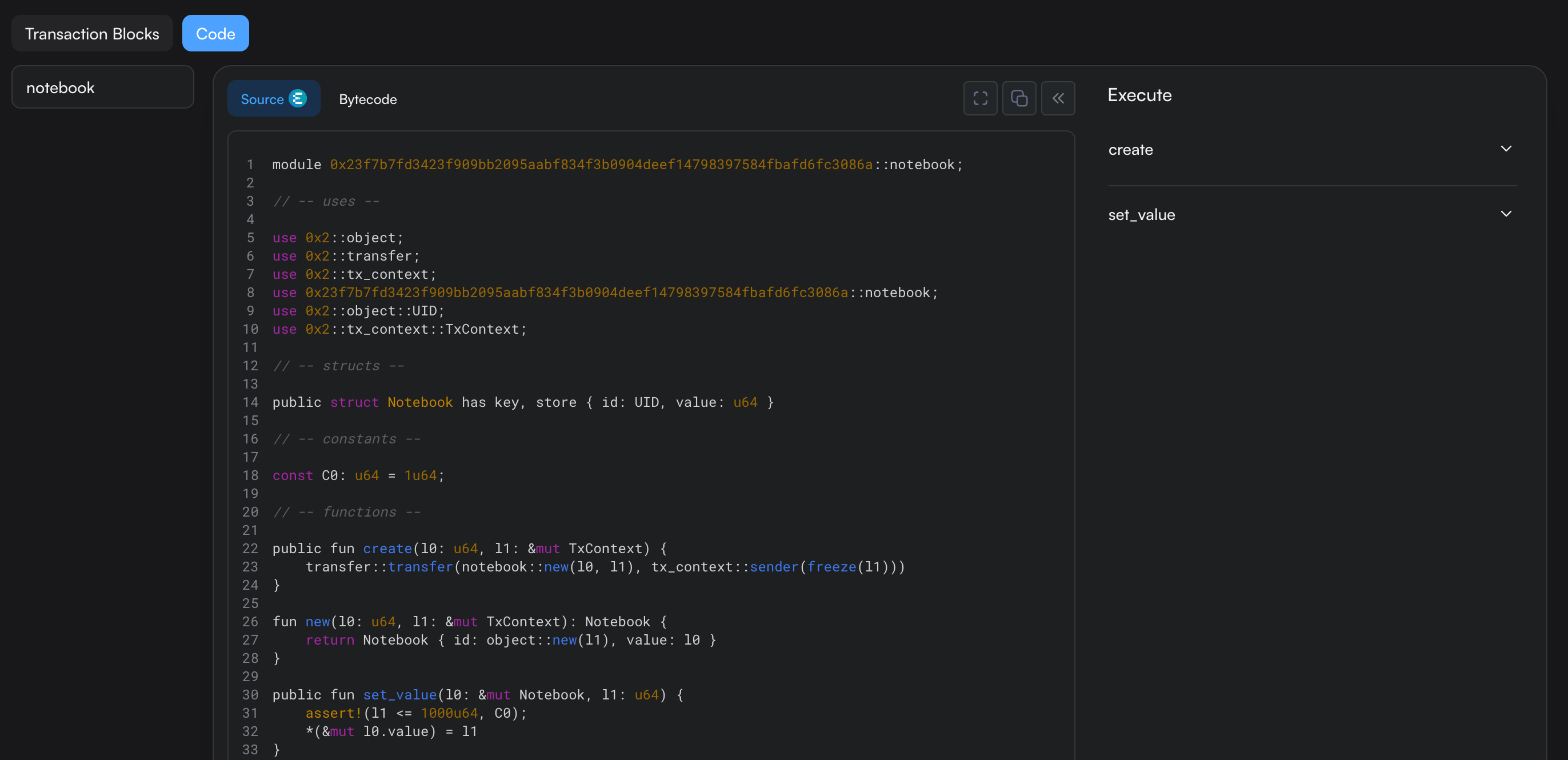
0x23f7b7fd3423f909bb2095aabf834f3b0904deef14798397584fbafd6fc3086aRun:
sui client call --package "$PACKAGE" --module notebook --function create \
  --args 7 --sender "$ALICE" --gas-budget 50000000 --json > evidence/create.json
NOTEBOOK=$(python3 client/inspect_receipt.py evidence/create.json --field notebook)

sui client object "$NOTEBOOK" --json > evidence/before.json
python3 client/inspect_receipt.py evidence/before.json
Output:
Object: 0x29d396543987507e11ff77c7d13c6cd734e18b56dd2376a0a778edea8ffcab54
Value: 7
Version: 1
Owner: {"AddressOwner": "0xa7beeaeba17a2c6115de9b8c759a2df7e69a6cd3c1edb497e575ecc97361c732"}
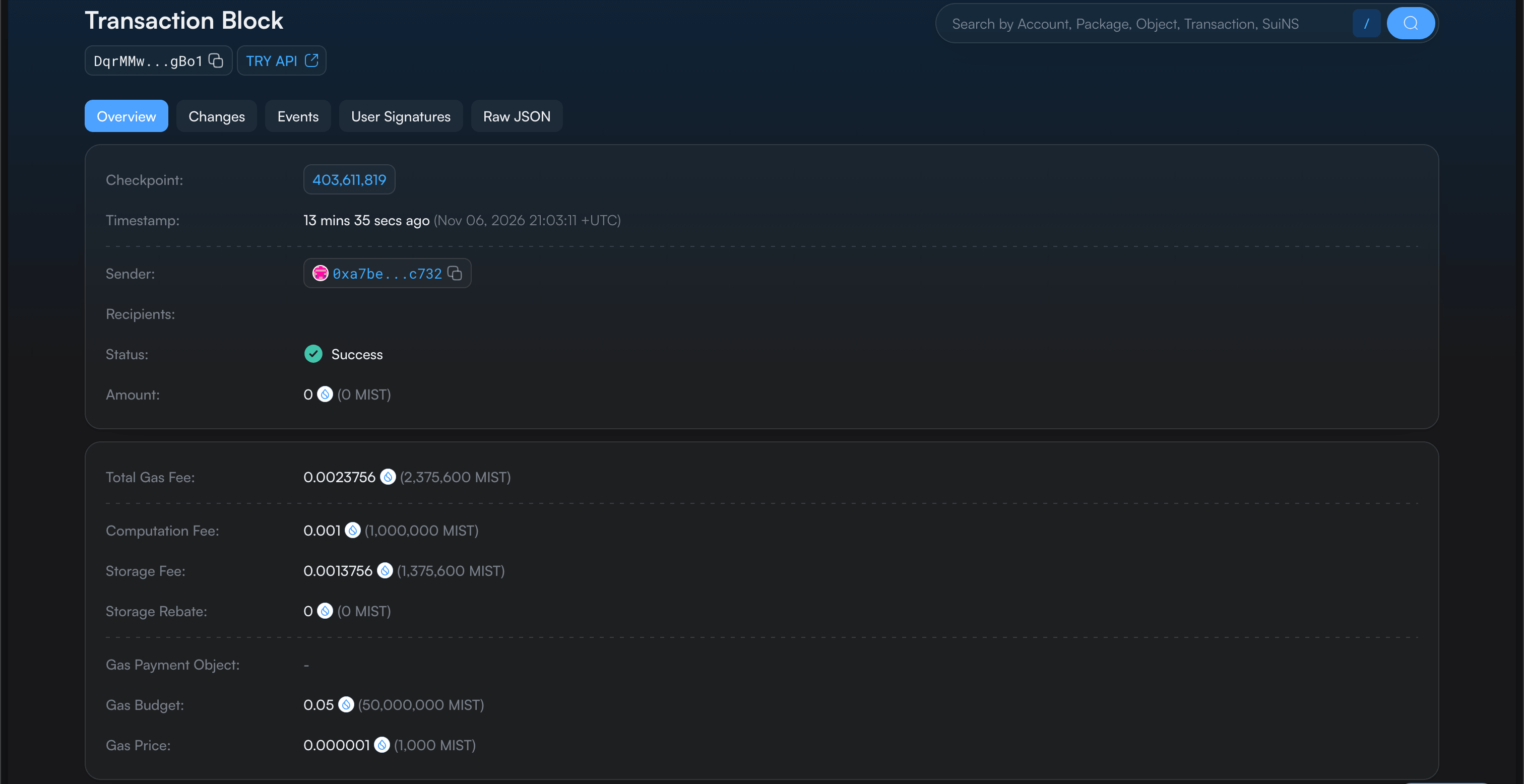
Previous transaction: DqrMMwQZFSnTkMdYDXC2Rmx769hJCVnHkXckvV4JgBo1
Publication created the package that defines our code. The next transaction called its constructor and created the notebook. The final command only read the object. Its prevTx identifies the creation transaction, which is the starting point for the object’s history.
On chain overview:
And the created package:
What data describes a user transaction?
The operation alone is insufficient to authorize a state change. A transaction must identify the sender, gas arrangement, validity conditions, and the program with its inputs. We will inspect that request before signing it.
Run:
sui client call --package "$PACKAGE" --module notebook --function set_value \
  --args "$NOTEBOOK" 42 --sender "$ALICE" --gas-budget 50000000 \
  --serialize-unsigned-transaction > evidence/unsigned.b64
TX_BYTES=$(cat evidence/unsigned.b64)

sui keytool decode-or-verify-tx --tx-bytes "$TX_BYTES" --json > evidence/unsigned-decoded.json
python3 -c 'import base64,pathlib; print("TransactionData bytes:", len(base64.b64decode(pathlib.Path("evidence/unsigned.b64").read_text())))'
Output:
TransactionData bytes: 288The CLI constructed TransactionData using Binary Canonical Serialization, or BCS, and returned those bytes as Base64. Construction can query the network for references and gas information. It has not executed the setter. The official keytool understands the BCS layout, so we can inspect its decoded representation without implementing a partial binary decoder.
Let’s create a file named client/inspect_request.py:
import argparse
import json
from pathlib import Path

parser = argparse.ArgumentParser()
parser.add_argument("decoded")
args = parser.parse_args()
decoded = json.loads(Path(args.decoded).read_text())
tx = decoded["tx"]["V1"]

print("TransactionData version: V1")
print("Sender:", tx["sender"])
gas = tx["gas_data"]
print("Gas owner:", gas["owner"])
print("Gas price (MIST per computation unit):", gas["price"])
print("Gas budget (MIST):", gas["budget"])
print("Gas payment objects:", len(gas["payment"]))
print("Expiration:", json.dumps(tx["expiration"], sort_keys=True))
kind, program = next(iter(tx["kind"].items()))
print("Transaction kind:", kind)

for i, value in enumerate(program["inputs"]):
    if "Object" in value:
        category, reference = next(iter(value["Object"].items()))
        print(f"Input({i}) {category}:", json.dumps(reference))
    else:
        raw = bytes(value["Pure"])
        print(f"Input({i}) pure bytes:", raw.hex())
        print("As the setter's u64:", int.from_bytes(raw, "little"))

for i, command in enumerate(program["commands"]):
    call = command["MoveCall"]
    print(f"Command {i}:", call["package"] + "::" + call["module"] + "::" + call["function"])
    print("Arguments:", json.dumps(call["arguments"]))
Run:
python3 client/inspect_request.py evidence/unsigned-decoded.jsonOutput:
TransactionData version: V1
Sender: 0xa7beeaeba17a2c6115de9b8c759a2df7e69a6cd3c1edb497e575ecc97361c732
Gas owner: 0xa7beeaeba17a2c6115de9b8c759a2df7e69a6cd3c1edb497e575ecc97361c732
Gas price (MIST per computation unit): 1000
Gas budget (MIST): 50000000
Gas payment objects: 0
Expiration: {"ValidDuring": {"chain": "69WiPg3DAQiwdxfncX6wYQ2siKwAe6L9BZthQea3JNMD", "max_epoch": 1276, "max_timestamp": null, "min_epoch": 1275, "min_timestamp": null, "nonce": 3915009078}}
Transaction kind: ProgrammableTransaction
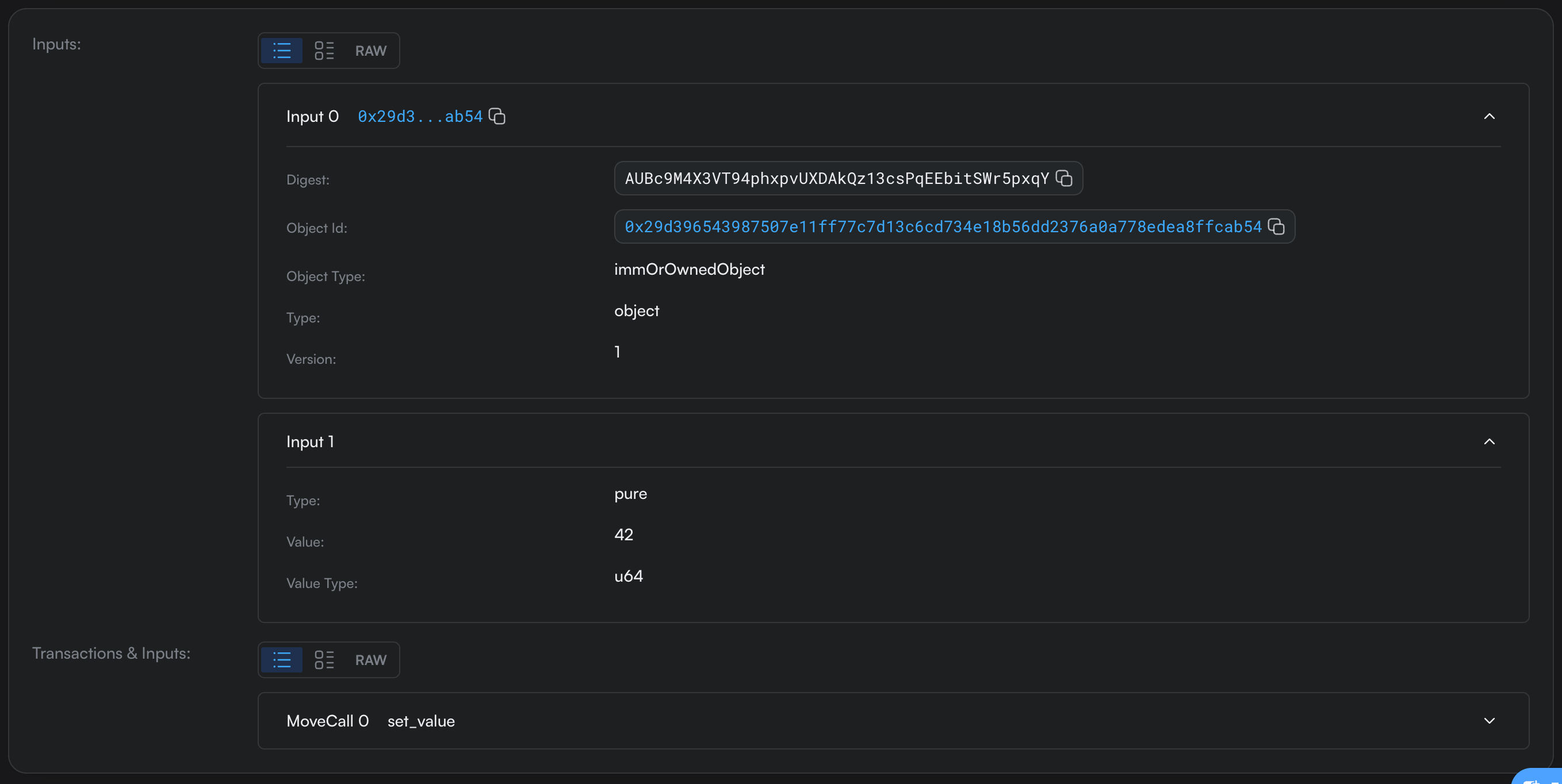
Input(0) ImmOrOwnedObject: ["0x29d396543987507e11ff77c7d13c6cd734e18b56dd2376a0a778edea8ffcab54", 1, "AUBc9M4X3VT94phxpvUXDAkQz13csPqEEbitSWr5pxqY"]
Input(1) pure bytes: 2a00000000000000
As the setter's u64: 42
Command 0: 0x23f7b7fd3423f909bb2095aabf834f3b0904deef14798397584fbafd6fc3086a::notebook::set_value
Arguments: [{"Input": 0}, {"Input": 1}]| Field | What it says | Value in our request |
|---|---|---|
sender | Who initiates the transaction | Alice |
gas_data.owner | Who pays for gas | Alice, the same address |
gas_data.price | MIST per computation unit | 1000 |
gas_data.budget | Spending limit in MIST | 50,000,000 (0.05 SUI) |
gas_data.payment | Source of payment | Empty, the CLI used Alice’s address balance |
expiration | When the request can be accepted | ValidDuring: the chain ID and an epoch range, with a nonce |
Input(0) | The notebook | ImmOrOwnedObject reference: ID, version 1, digest |
Input(1) | A pure argument | Bytes 2a00000000000000, the u64 42 |
| Command 0 | The Move call | notebook::set_value with Input(0) and Input(1) |
The outer V1 variant is the transaction-data format version. It is distinct from the notebook’s version. sender identifies Alice as the initiator. gas_data.owner identifies the gas payer. These addresses match here. A sponsored transaction separates those roles and requires the relevant sender and sponsor authorization.
The gas payment list describes the payment source. With coin-based payment it contains coin object references. Our list is empty because the CLI selected Alice’s address balance. Empty payment does not remove the gas payer or the fee. The address-balance payment rules explain this representation and sponsored payment.
The gas price is 1000 MIST per computation unit. The budget is 50,000,000 MIST, equivalent to 0.05 SUI, and limits the amount available for execution. These fields use different units. The CLI’s budget is already a monetary amount, so multiplying it by the price again would misstate the spending limit. The actual charge will come from the effects.
The expiration fields constrain when this request can be accepted. For this address-balance payment, ValidDuring binds the chain and an epoch range. Its timestamps are unset. The nonce differentiates otherwise identical requests and has no requirement to form an Ethereum-style account sequence. The request’s min/max epochs are validity bounds, while effects.executedEpoch later records where execution actually happened. Build fresh requests with current references and validity bounds instead of reusing the captured bytes.
Inside the ProgrammableTransaction
Input(0) is a notebook reference containing its ID, version, and object digest. ImmOrOwnedObject is a representation category for immutable or address-owned inputs. Our object is address-owned, and the called function requests mutable access. The category name alone does not determine the borrow mode.
Input(1) contains the pure argument bytes. The function signature tells the runtime to interpret them as a u64. The eight bytes 2a00000000000000 encode 42 in little-endian order. Pure data is not universally self-describing.
The command supplies the package, module, and function, then refers to the inputs by index. Its Input(1) argument means ‘use the value in input slot 1’. The runtime resolves those references according to the PTB input model.
Authentication accompanies the transaction data. Alice’s signature authorizes the complete request, including its gas and validity fields. It is not a parameter to set_value. We use the official signing path below and leave signature encodings and hash derivations to the later encoding installment.
Run:
sui keytool sign --address "$ALICE" --data "$TX_BYTES" --json > evidence/signature.json
SIG=$(python3 -c 'import json; print(json.load(open("evidence/signature.json"))["suiSignature"])')

sui keytool decode-or-verify-tx --tx-bytes "$TX_BYTES" --sig "$SIG" --json > evidence/signature-verified.json
python3 -c 'import json; print("Local verification:", json.dumps(json.load(open("evidence/signature-verified.json"))["result"]))'
Output:
Local verification: {"Ok": null}This confirms the signature against the retained bytes. It does not establish that current ownership, funding, validity, or the application rule will pass. The official construction and signing flow separates signing from submission. We retain the same TX_BYTES for execution.
How do objects connect transactions?
The notebook’s ID stays stable when its value changes. A transaction that uses an address-owned object refers to a particular version and digest, so it identifies the state it expects to consume. Successful mutation produces a new state of that same object. The old reference and the new reference therefore belong to different positions in the history.
Submit our saved request and read the notebook again:
Run:
sui client execute-signed-tx --tx-bytes "$TX_BYTES" --signatures "$SIG" --json > evidence/executed.json
sui client object "$NOTEBOOK" --json > evidence/after.json

python3 client/inspect_receipt.py evidence/after.json
DIGEST=$(python3 client/inspect_receipt.py evidence/executed.json --field digest)
Output:
Object: 0x29d396543987507e11ff77c7d13c6cd734e18b56dd2376a0a778edea8ffcab54
Value: 42
Version: 2
Owner: {"AddressOwner": "0xa7beeaeba17a2c6115de9b8c759a2df7e69a6cd3c1edb497e575ecc97361c732"}
Previous transaction: EUBCB5Wiq2G2BujCfrpT3ZYmzzcNkSE9D155kY4zSKdh
On chain:
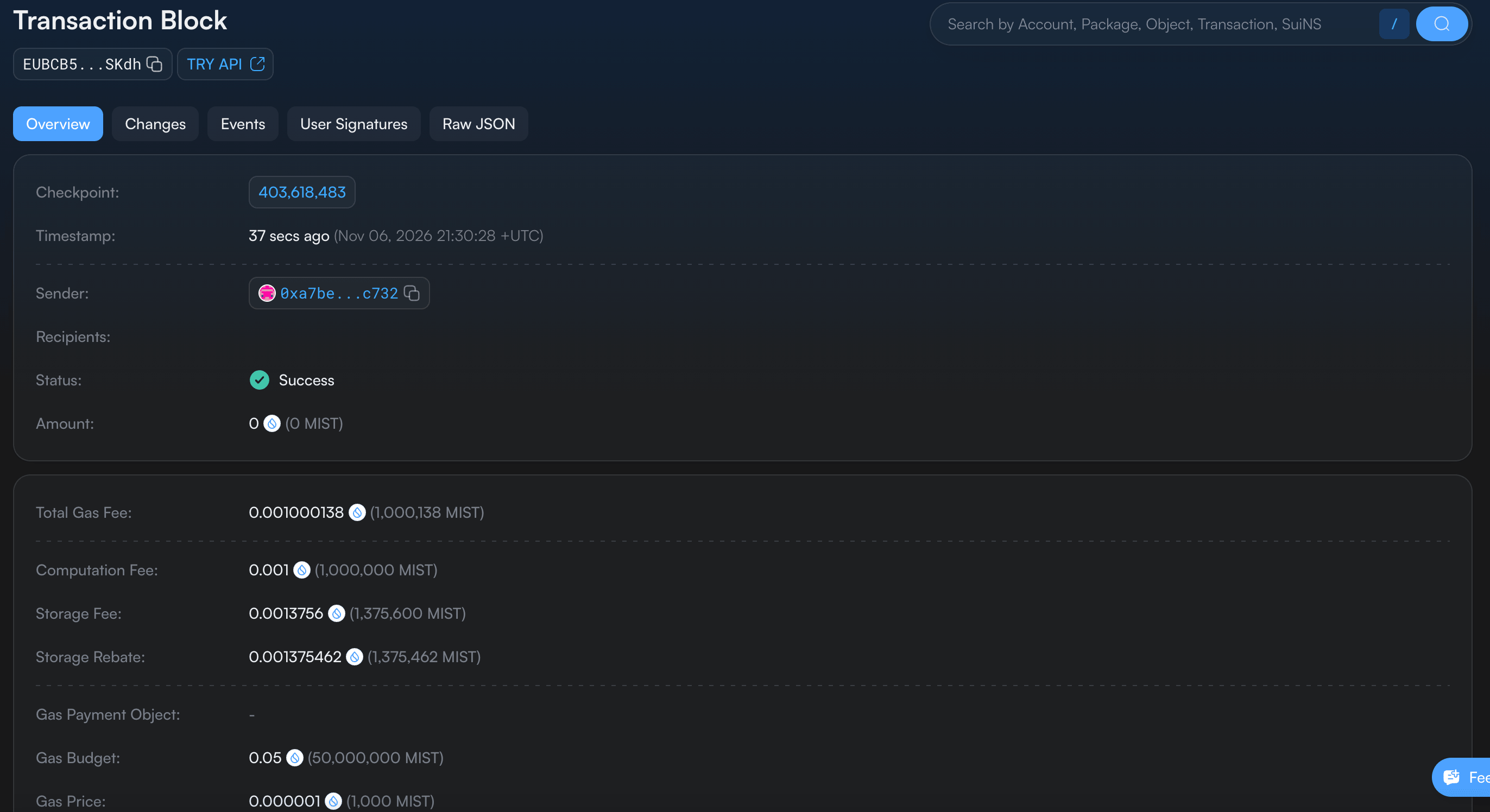
The ID and owner remain the same, while value 42 and version 2 describe the new state (don’t confuse the version 1 of the input) . This example happens to advance from 1 to 2. Sui uses Lamport-style version assignment across relevant inputs, so an application’s object version is not generally a counter of edits to one field.
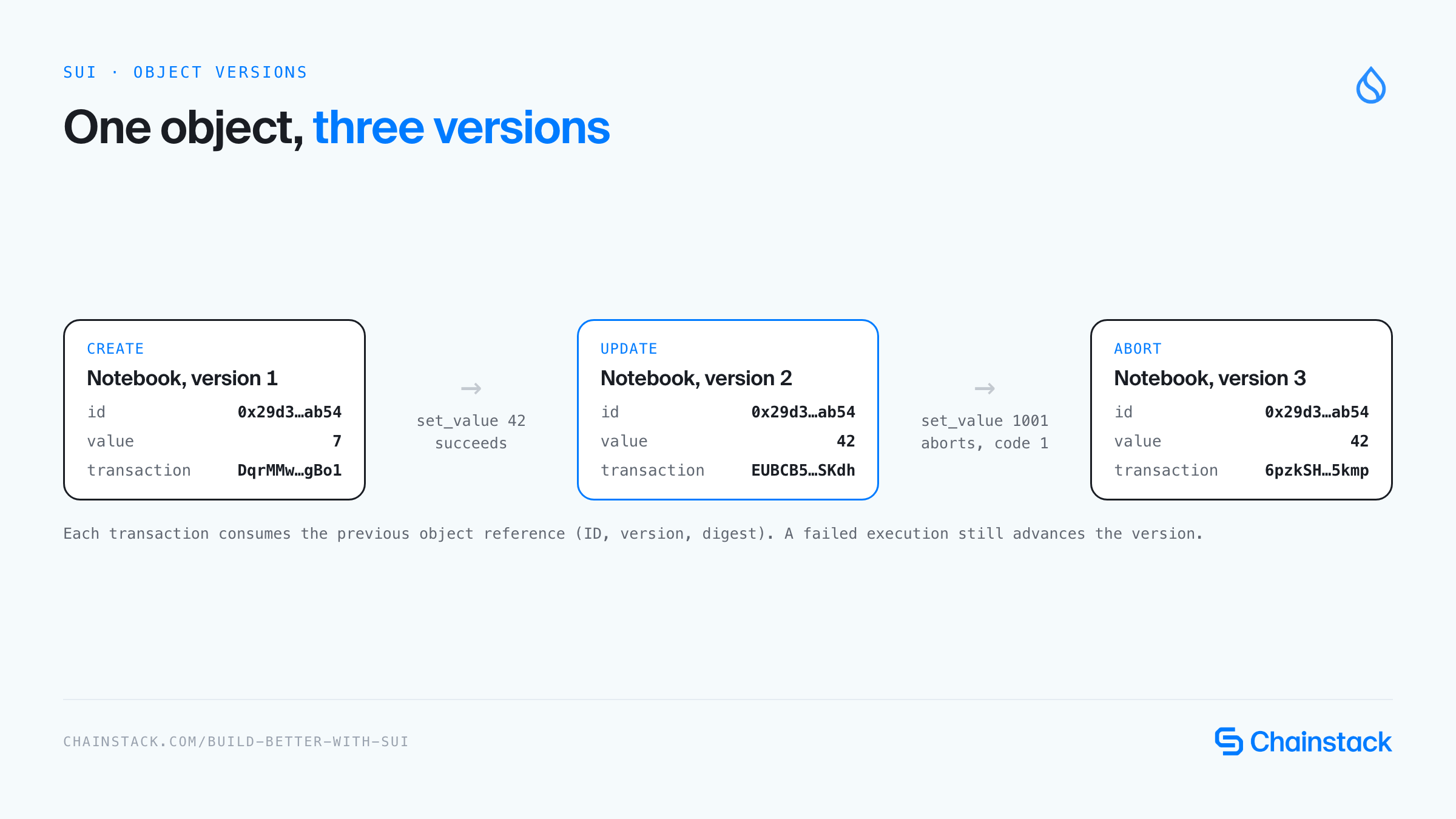
Transactions form dependencies through these produced and consumed object states. The creation must precede our update because the update uses its output. Two transactions using independent objects can avoid this particular dependency and execute in parallel when their other resources do not conflict. Two attempts to mutate the same owned object version cannot both independently consume it.
We can verify the edge directly from the creation and update receipts.
Let’s create a file named client/inspect_history.py:
import json
from pathlib import Path

created_tx = json.loads(Path("evidence/create.json").read_text())
updated_tx = json.loads(Path("evidence/executed.json").read_text())

created = next(c for c in created_tx["objectChanges"]
               if c["type"] == "created"
               and c.get("objectType", "").endswith("::notebook::Notebook"))
program = updated_tx["transaction"]["data"]["transaction"]
used = next(i for i in program["inputs"]
            if i.get("objectId") == created["objectId"])
updated = next(c for c in updated_tx["objectChanges"]
               if c.get("objectId") == created["objectId"])

reference = lambda obj: (obj["objectId"], str(obj["version"]), obj["digest"])
assert reference(created) == reference(used)
assert updated["previousVersion"] == str(used["version"])

print("Creation transaction:", created_tx["digest"])
print("Update transaction:", updated_tx["digest"])
print("Same object ID:", created["objectId"])
print("Creation output version:", created["version"])
print("Update input version:", used["version"])
print("Parent output matches child input: True")
print("Update output version:", updated["version"])
print("Update output digest:", updated["digest"])
Run:
python3 client/inspect_history.pyOutput:
Creation transaction: DqrMMwQZFSnTkMdYDXC2Rmx769hJCVnHkXckvV4JgBo1
Update transaction: EUBCB5Wiq2G2BujCfrpT3ZYmzzcNkSE9D155kY4zSKdh
Same object ID: 0x29d396543987507e11ff77c7d13c6cd734e18b56dd2376a0a778edea8ffcab54
Creation output version: 1
Update input version: 1
Parent output matches child input: True
Update output version: 2
Update output digest: 7W61hu7T2jBjH1z4Ch4UofNBb3cUFFZzezxqMYZ79XrU
The assertion compares the complete object reference produced by creation with the one used by the update. Matching only the ID would miss a stale version. The second assertion connects the mutation’s previousVersion to the input version. These checks establish an actual dependency between our two transactions.
This object dependency graph is a directed acyclic graph, or DAG. The direction follows state production and subsequent use. It is different from the DAG of validator consensus blocks used by Mysticeti.
The first describes application state dependencies. The second is part of agreeing on transaction ordering. Sui’s consensus model connects consensus ordering with parallel execution of non-conflicting work.
What does a transaction response tell us?
A response combines information about the request with information produced by execution and later recording. Reading it as one undifferentiated JSON object hides those boundaries. Ask which part of the response answers your question.
Run:
python3 client/inspect_receipt.py evidence/executed.json --responseOutput:
Digest: EUBCB5Wiq2G2BujCfrpT3ZYmzzcNkSE9D155kY4zSKdh
Kind: ProgrammableTransaction
Sender: 0xa7beeaeba17a2c6115de9b8c759a2df7e69a6cd3c1edb497e575ecc97361c732
Gas data: {"budget": "50000000", "owner": "0xa7beeaeba17a2c6115de9b8c759a2df7e69a6cd3c1edb497e575ecc97361c732", "payment": [], "price": "1000"}
Authenticator entries (CLI representation): 1
Effects status: {"status": "success"}
Object change kinds: ["mutated"]
Balance changes: [{"amount": "-1000138", "coinType": "0x2::sui::SUI", "owner": {"AddressOwner": "0xa7beeaeba17a2c6115de9b8c759a2df7e69a6cd3c1edb497e575ecc97361c732"}}]
Events: not returned by this CLI response
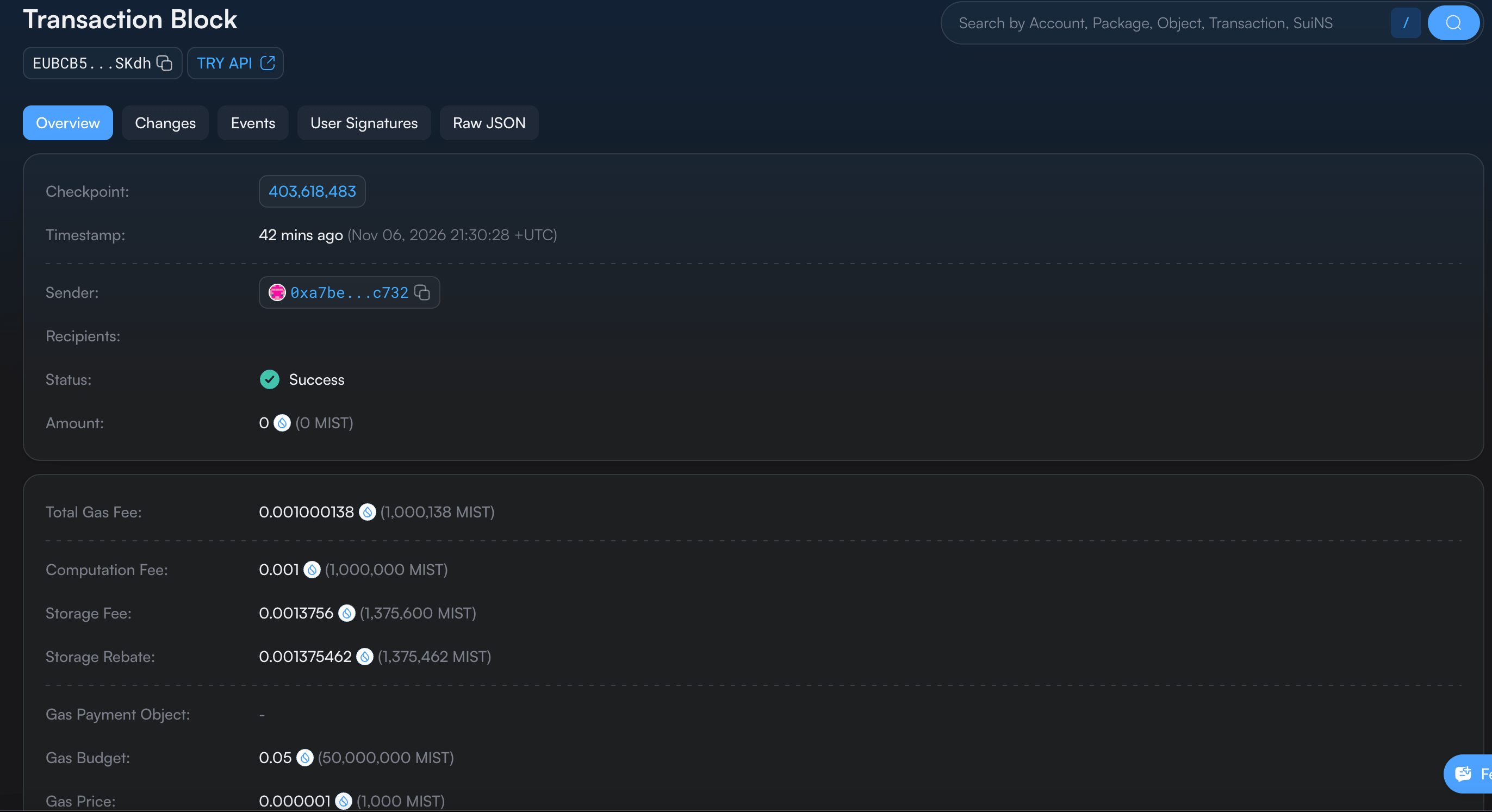
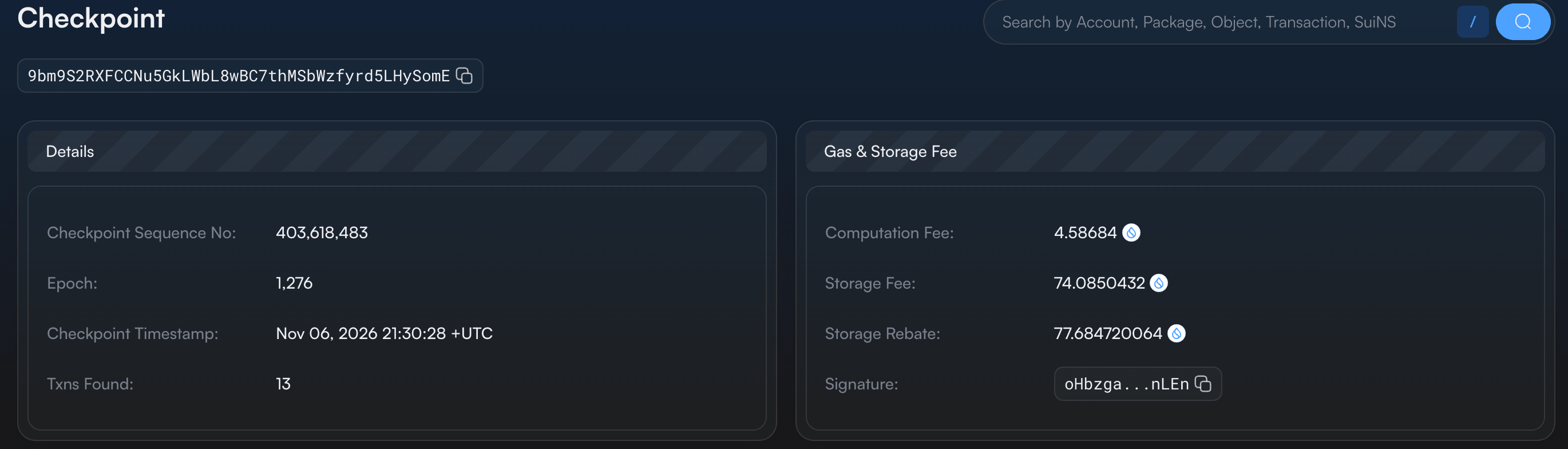
Checkpoint: 403618483
Checkpoint time (UTC): 2026-11-06T21:30:28.609+00:00
The digest identifies this transaction for lookup. It is distinct from the notebook’s ID and its object-state digest. transaction.data describes the submitted program, sender, and gas arrangement. txSignatures carries the serialized authenticator representation. Our successful user request has Alice’s signature.
The effects give the execution status and protocol-level state changes. The CLI’s objectChanges offers an object-oriented summary, including whether objects were created, mutated, or deleted. balanceChanges reports net changes by address and coin type. A mutable object and a token balance are different views of the result, so applications should not infer either one from the other.
Move events are application-defined records emitted during execution. An object can change without a custom event being emitted. Our source emits none. The CLI response here does not include an events field, which is why the inspector reports ‘not returned’ instead of pretending that an absent field is an explicit empty array. Transport selection and field masks determine which data a response includes. The native gRPC API uses its own message structure and requested fields.
The checkpoint identifies the permanent record containing this transaction. The printed timestamp belongs to that checkpoint. Let’s compare the checkpoint in the screenshot with the checkpoint in the response. They match:
We have inspected Alice’s notebook update. Now let’s examine a system transaction that updates Sui’s Clock, which provides time to Move programs.
We found it by opening the notebook transaction’s checkpoint in SuiVision and selecting the Clock entry. The commands below read that existing transaction so we can compare its sender, gas, and effects with Alice’s.

Run:
SYSTEM_DIGEST=9coHRsPjVPLDpXJv61DMDaL8tVsc5JGQywepcR53GVTb
sui client tx-block "$SYSTEM_DIGEST" --json > evidence/system.json
python3 client/inspect_receipt.py evidence/system.json --response
Output:
Digest: 9coHRsPjVPLDpXJv61DMDaL8tVsc5JGQywepcR53GVTb
Kind: ConsensusCommitPrologueV4
Sender: 0x0000000000000000000000000000000000000000000000000000000000000000
Gas data: {"budget": "0", "owner": "0x0000000000000000000000000000000000000000000000000000000000000000", "payment": [{"digest": "11111111111111111111111111111111", "objectId": "0x0000000000000000000000000000000000000000000000000000000000000000", "version": 0}], "price": "1"}
Authenticator entries (CLI representation): 1
Effects status: {"status": "success"}
Object change kinds: ["mutated"]
Balance changes: "not returned"
Events: not returned by this CLI response
Checkpoint: 403618483
Checkpoint time (UTC): 2026-11-06T21:30:28.609+00:00
on chain:
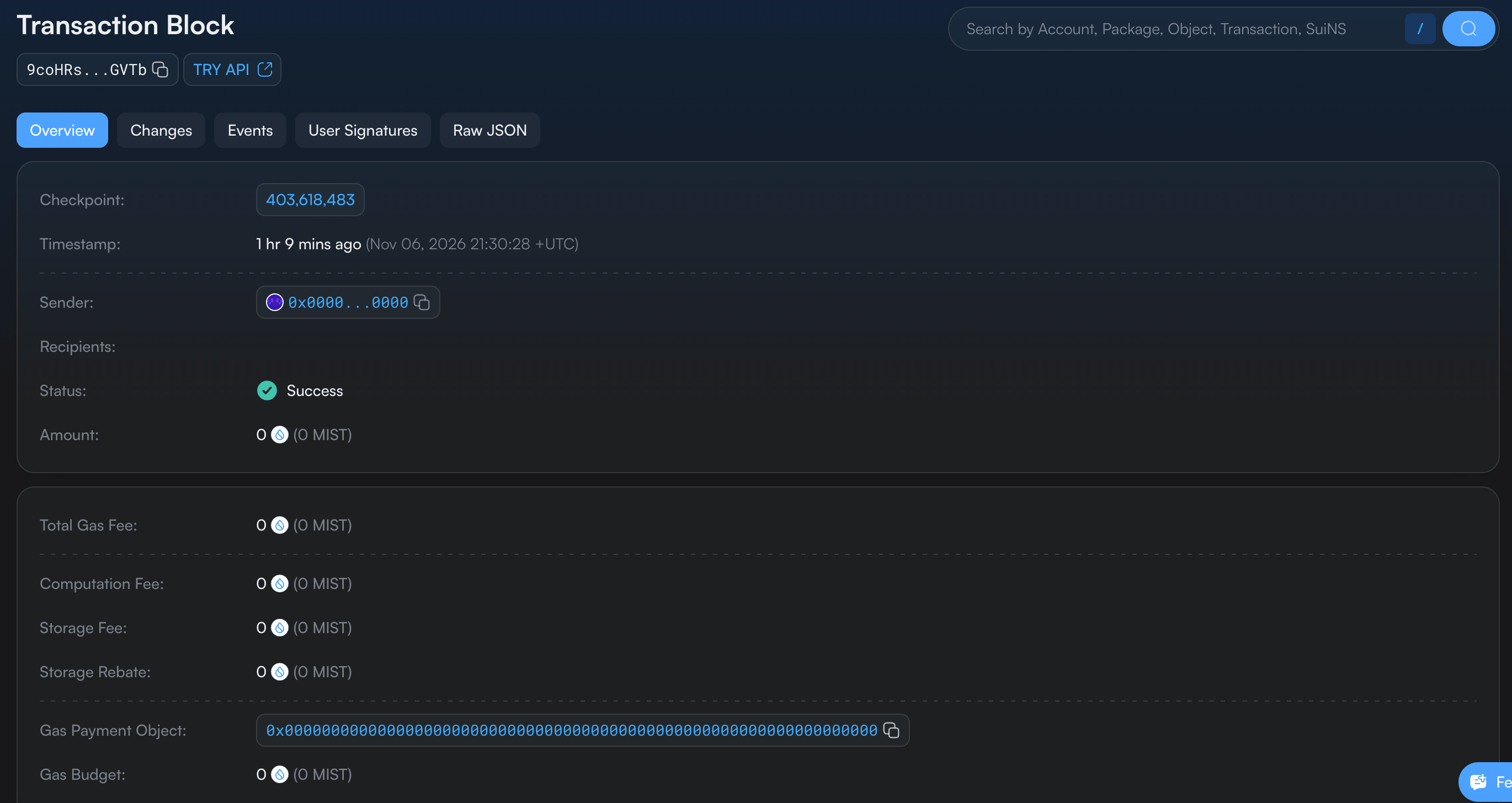
Its kind is ConsensusCommitPrologueV4 and its sender is the zero address. The object changes identify the shared 0x6 Clock object. This is protocol-maintained state associated with consensus processing, rather than Alice calling an application function. Other system kinds perform other maintenance, including randomness and epoch transitions.
The same CLI container still exposes gas data and one authenticator entry. In this system record, the gas object reference is a zero-valued placeholder, the budget is zero, and the serialized signature consists of zero bytes.
These fields do not represent a user’s funded coin and valid wallet signature. The system-transaction constructor explicitly creates the placeholder signature. System authority comes from the protocol path. A parser must inspect the kind before applying user-transaction assumptions.
From submission to execution and finality
The transaction body describes what may run. The network still has to validate the request, order it, execute it, and agree on its effects. These are separate responsibilities even when the CLI presents one call that waits for a response.
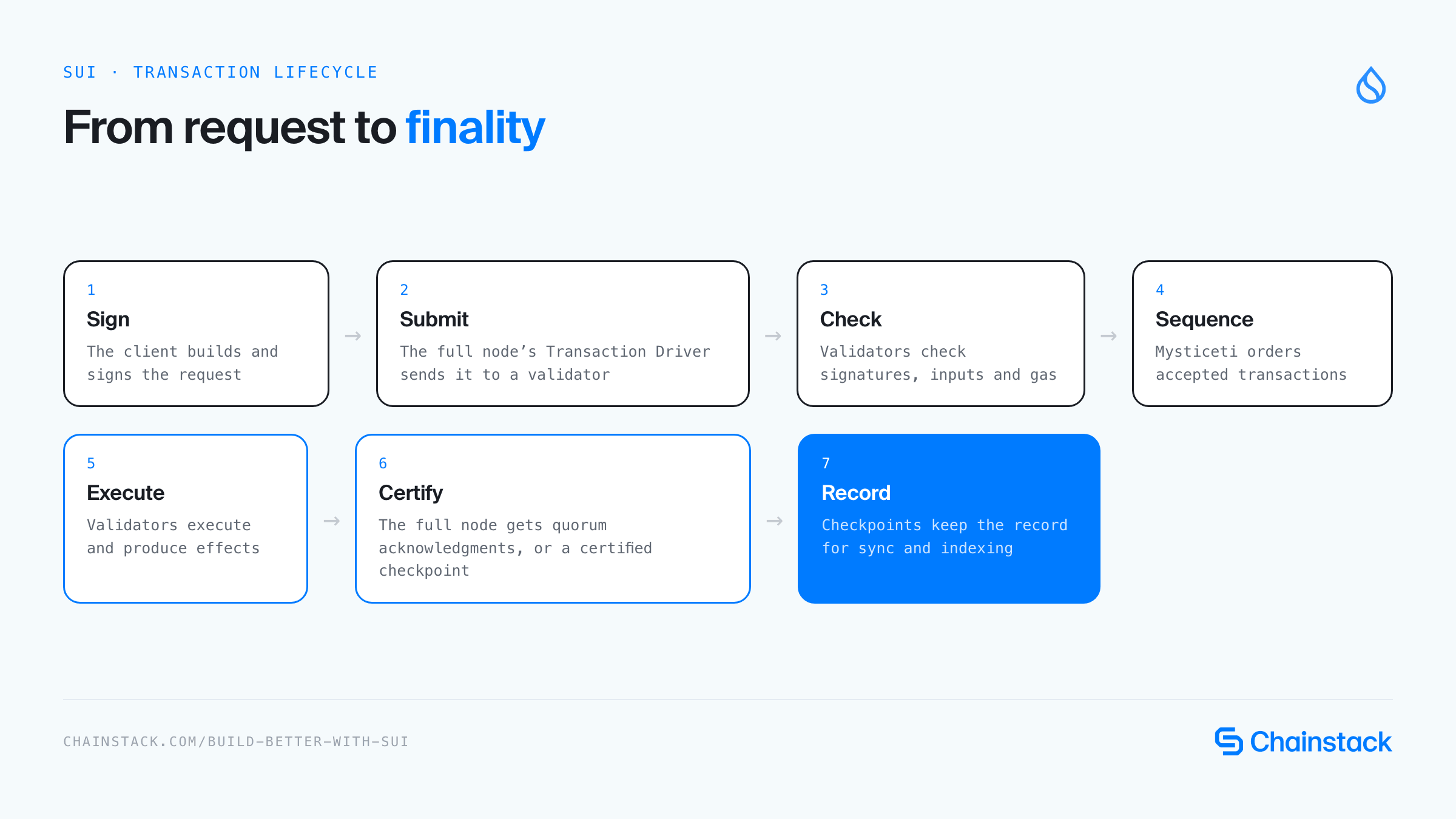
Current Sui sequences user transactions through Mysticeti. The receiving validator checks validity before proposing the request, and peers apply their checks as consensus proceeds. Accepted, committed transactions then execute deterministically. Transactions without conflicting state dependencies can execute in parallel. An owned-object input does not mean this current lifecycle skips consensus.
A full node establishes finality by obtaining quorum acknowledgments of the same effects or by observing inclusion in a certified checkpoint. The response can therefore establish settlement before an explorer’s indexer displays the transaction.
A certified checkpoint also provides the permanent stream used for state sync and indexing. These paths are described in the consensus and finality documentation.
Run:
sui client tx-block "$DIGEST" --json > evidence/confirmed.json
python3 client/inspect_receipt.py evidence/confirmed.json
Output:
Digest: EUBCB5Wiq2G2BujCfrpT3ZYmzzcNkSE9D155kY4zSKdh
Execution status: {"status": "success"}
Checkpoint: 403618483
Gas accounting: {"computationCost": 1000000, "nonRefundableStorageFee": 138, "storageCost": 1375600, "storageRebate": 1375462}
Net gas (MIST): 1000138
Notebook effect: mutated 0x29d396543987507e11ff77c7d13c6cd734e18b56dd2376a0a778edea8ffcab54 version=2
A later lookup returns the successful execution and its checkpoint. This confirms the node has the recorded transaction. The script is trusting the node’s answer, rather than independently verifying validator signatures. The checkpoint explorer shows the same update alongside the system transaction inspected above:
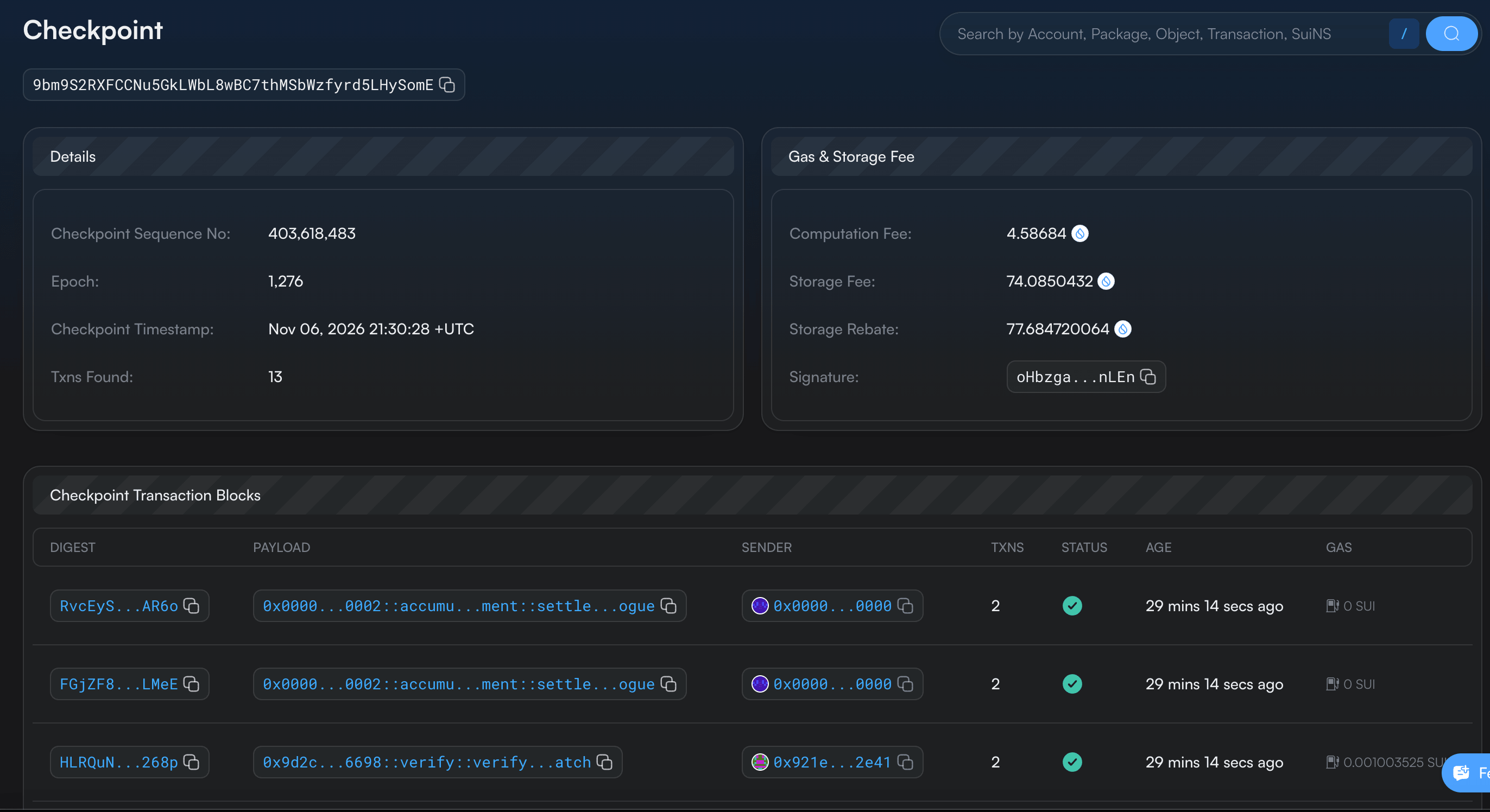
With our record somewhere below:

For an application, preserve the signed request while submission is unresolved. Retry the same signed transaction when appropriate, then inspect its recorded status. Resubmitting the same transaction is idempotent. Rebuilding a request with a fresh nonce creates a different transaction. A missing lookup can mean the node has not learned the result yet, so absence at one endpoint does not establish that no execution occurred. Sui documents these retry and lookup rules.
Lookups on Chainstack nodes. A missing lookup has more than one cause, and node retention is one of them. Sui Global Nodes on Chainstack hold checkpoints from
lowestAvailableCheckpointto the tip, andLedgerService/GetServiceInforeports that floor. Over gRPC, a transaction older than the window returnsNotFound, so read the floor before you conclude that a digest never executed. See Checkpoint retention in the Chainstack docs.
What does a failed transaction leave behind?
Signature validity, permission to access an input, and acceptance by Move code answer different questions. First let Bob try to set Alice’s notebook to 43. The value is within the setter’s limit, so ownership is the relevant failing condition.
Run:
sui client call --package "$PACKAGE" --module notebook --function set_value \
  --args "$NOTEBOOK" 43 --sender "$BOB" --gas-budget 50000000 \
  --json > evidence/wrong-owner.txt 2>&1

cat evidence/wrong-owner.txt
sui client object "$NOTEBOOK" --json > evidence/after-rejection.json
python3 client/inspect_receipt.py evidence/after-rejection.json
Output:
Gas selection failed

Caused by:
    code: 'Client specified an invalid argument', message: "Error checking transaction input objects: Transaction was not signed by the correct sender: Object 0x29d396543987507e11ff77c7d13c6cd734e18b56dd2376a0a778edea8ffcab54 is owned by account address 0xa7beeaeba17a2c6115de9b8c759a2df7e69a6cd3c1edb497e575ecc97361c732, but given owner/signer address is 0x4f345abad74e13486953d2373d76056713af0108fb23526877bb6c4104d2ff57"
Object: 0x29d396543987507e11ff77c7d13c6cd734e18b56dd2376a0a778edea8ffcab54
Value: 42
Version: 2
Owner: {"AddressOwner": "0xa7beeaeba17a2c6115de9b8c759a2df7e69a6cd3c1edb497e575ecc97361c732"}
Previous transaction: EUBCB5Wiq2G2BujCfrpT3ZYmzzcNkSE9D155kY4zSKdh
The CLI reports the problem during gas selection and input checking. Its cause is the owner mismatch. Bob cannot supply Alice’s address-owned notebook for mutable access. This attempt produced no executed-transaction receipt and left value 42 at version 2. The ‘gas selection’ heading should not be mistaken for evidence that Bob merely needed more SUI.
Now retain the correct owner and violate the Move assertion:
Run:
sui client call --package "$PACKAGE" --module notebook --function set_value \
  --args "$NOTEBOOK" 1001 --sender "$ALICE" --gas-budget 50000000 \
  --json > evidence/abort.txt 2>&1
cat evidence/abort.txt
Output:
Error executing transaction '6pzkSH2aVGYgonP6PHxDg3MMFUo6765eFhEJAsyE5kmp': 1st command aborted within function '0x23f7b7fd3423f909bb2095aabf834f3b0904deef14798397584fbafd6fc3086a::notebook::set_value' at instruction 8 with code 1The error names an executed transaction and abort code 1, our EValueTooLarge. Retrieve that execution and its resulting object metadata:
Run:
ABORT_DIGEST=$(python3 client/inspect_receipt.py evidence/abort.txt --field digest)
sui client tx-block "$ABORT_DIGEST" --json > evidence/abort-receipt.json

python3 client/inspect_receipt.py evidence/abort-receipt.json
sui client object "$NOTEBOOK" --json > evidence/after-abort.json
python3 client/inspect_receipt.py evidence/after-abort.json
Output:
Digest: 6pzkSH2aVGYgonP6PHxDg3MMFUo6765eFhEJAsyE5kmp
Execution status: {"error": "MoveAbort(MoveLocation { module: ModuleId { address: 23f7b7fd3423f909bb2095aabf834f3b0904deef14798397584fbafd6fc3086a, name: Identifier(\"notebook\") }, function: 2, instruction: 8, function_name: Some(\"set_value\") }, 1) in command 0", "status": "failure"}
Checkpoint: 403625706
Gas accounting: {"computationCost": 1000000, "nonRefundableStorageFee": 138, "storageCost": 1375600, "storageRebate": 1375462}
Net gas (MIST): 1000138
Notebook effect: mutated 0x29d396543987507e11ff77c7d13c6cd734e18b56dd2376a0a778edea8ffcab54 version=3
Object: 0x29d396543987507e11ff77c7d13c6cd734e18b56dd2376a0a778edea8ffcab54
Value: 42
Version: 3
Owner: {"AddressOwner": "0xa7beeaeba17a2c6115de9b8c759a2df7e69a6cd3c1edb497e575ecc97361c732"}
Previous transaction: 6pzkSH2aVGYgonP6PHxDg3MMFUo6765eFhEJAsyE5kmp
The assignment did not commit 1001. Value 42 and Alice’s ownership persist. The version nevertheless advanced to 3, and the object’s previous transaction is now the abort. Rollback of application changes does not mean an executed failure has no protocol-visible effects. Refresh object references before building the next request.
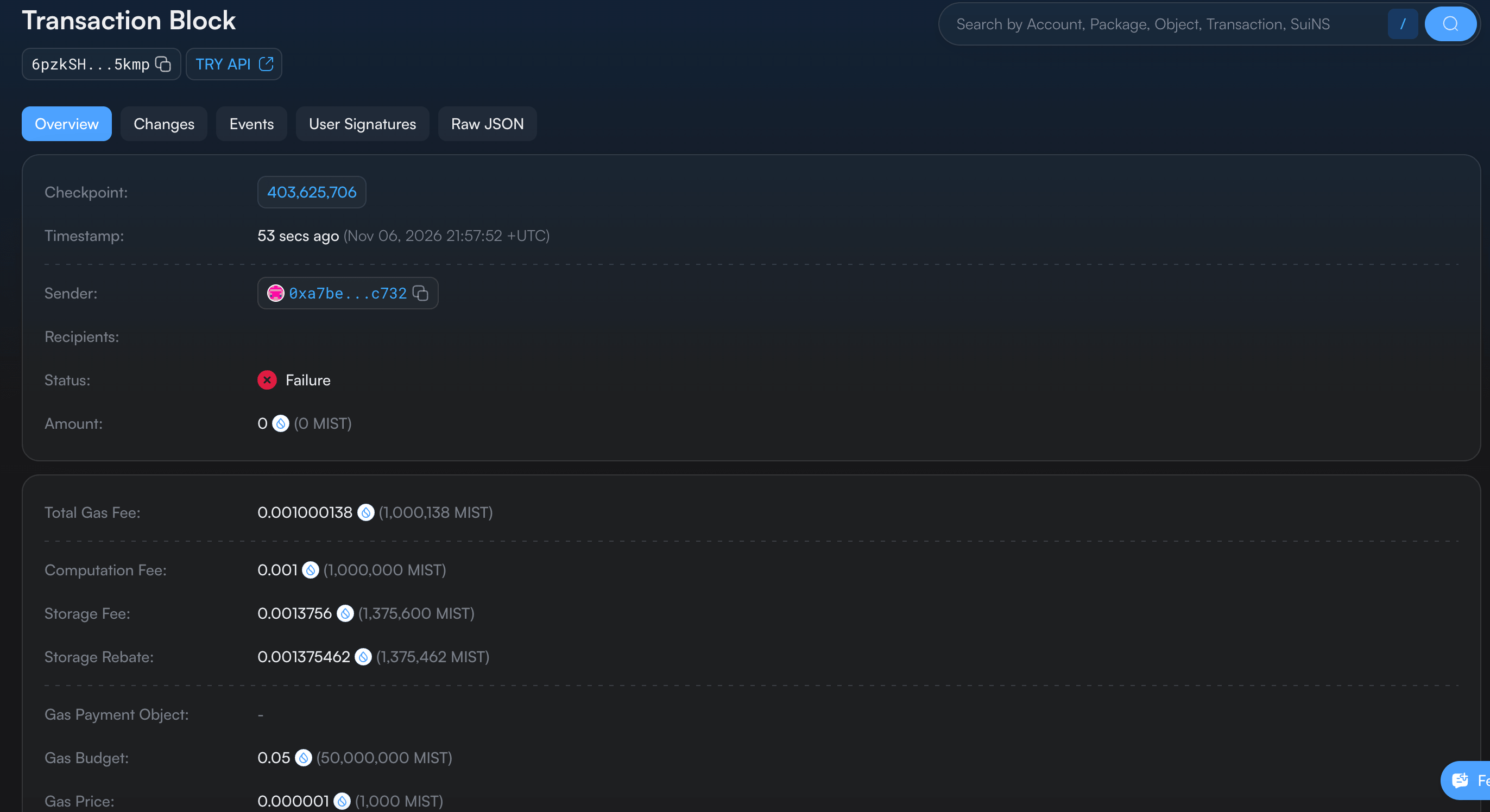
The successful update and this small failed call each charged 1,000,138 MIST in the recorded run. Equal fees here do not imply that successful and failed transactions always cost the same. The effects expose the computation and storage accounting used for the charge:
net gas = computationCost + storageCost - storageRebate
        = 1,000,000 + 1,375,600 - 1,375,462
        = 1,000,138 MIST
        = 0.001000138 SUI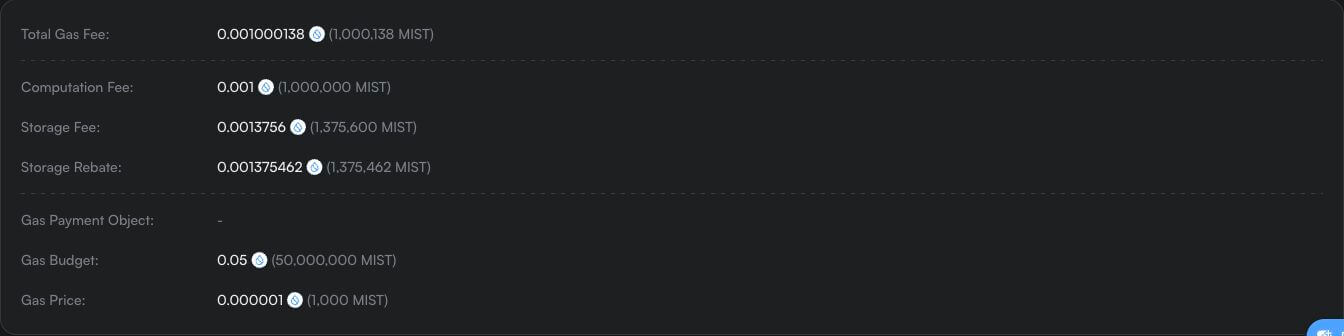
The inspector computes this amount, and the response’s SUI balance change independently records -1000138. Do not add nonRefundableStorageFee a second time. The budget remains the allowed spending amount, while the effects tell us what this execution charged. See Sui’s computation, storage, and rebate accounting.
Rejection and executed failure compared
| Aspect | Rejection | Executed failure |
|---|---|---|
| Attempt | Bob sets Alice’s notebook to 43 | Alice sets her notebook to 1001 |
| What fails | Input ownership check, before execution | The Move assertion, during execution |
| Response | Gas selection failed, no transaction digest | MoveAbort with code 1, an executed transaction digest |
| Receipt | None | Recorded, with status: failure |
| Notebook after | Value 42, version 2 | Value 42, version 3 |
| Gas | Nothing charged | 1,000,138 MIST charged |
Protocol limits and the record we read
A valid Move call is also constrained by protocol limits on transaction size, object inputs, command count, and written data. Gas is one constraint among several. A large gas budget does not authorize an oversized request. These limits depend on protocol configuration, so we will query the network instead of presenting constants as timeless guarantees.
Install the Python dependencies used for the native gRPC reads:
python3 -m venv .venv
source .venv/bin/activate
python3 -m pip install grpcio==1.84.1 grpcio-reflection==1.84.1 protobuf==7.36.2
Output:
Successfully installed grpcio-1.84.1 grpcio-reflection-1.84.1 protobuf-7.36.2 typing-extensions-4.16.0The server’s Protobuf reflection service supplies the descriptors, so the program needs no generated Python files or hidden schema bundle. GetEpoch without an epoch selects the node’s current epoch. Our field mask requests its number and protocol configuration.
Run these reads on Chainstack. The gRPC scripts in this article connect to
fullnode.testnet.sui.io:443. Sui Testnet Global Nodes on Chainstack serve the samesui.rpc.v2gRPC API atsui-testnet.core.chainstack.com:443. Change the endpoint in each script and send your node’s token asx-tokenmetadata on every call, including the reflection request. The scripts send no metadata, so add it before you switch. See the Sui tooling docs, or deploy a Sui node on Chainstack.
Let’s create a file named client/read_limits.py:
import json
from pathlib import Path

import grpc
from google.protobuf import descriptor_pool, json_format, message_factory
from grpc_reflection.v1alpha.proto_reflection_descriptor_database import (
    ProtoReflectionDescriptorDatabase,
)

service = "sui.rpc.v2.LedgerService"
with grpc.secure_channel("fullnode.testnet.sui.io:443", grpc.ssl_channel_credentials()) as channel:
    pool = descriptor_pool.DescriptorPool(ProtoReflectionDescriptorDatabase(channel))
    method = pool.FindServiceByName(service).methods_by_name["GetEpoch"]
    request_type = message_factory.GetMessageClass(method.input_type)
    response_type = message_factory.GetMessageClass(method.output_type)
    call = channel.unary_unary(
        f"/{service}/GetEpoch",
        request_serializer=request_type.SerializeToString,
        response_deserializer=response_type.FromString,
    )
    response = call(request_type(read_mask={"paths": ["epoch", "protocol_config"]}), timeout=30)
    data = json_format.MessageToDict(response, preserving_proto_field_name=True)

Path("evidence").mkdir(exist_ok=True)
Path("evidence/protocol-config.json").write_text(json.dumps(data, indent=2) + "\n")
epoch = data["epoch"]
config = epoch["protocol_config"]
print("Testnet epoch:", epoch["epoch"])
print("Protocol version:", config["protocol_version"])

for name in ("max_tx_size_bytes", "max_input_objects", "max_programmable_tx_commands",
             "max_size_written_objects"):
    print(name + ":", config["attributes"][name])

print("Saved: evidence/protocol-config.json")
Run:
python3 client/read_limits.pyOutput:
Testnet epoch: 1276
Protocol version: 140
max_tx_size_bytes: 131072
max_input_objects: 2048
max_programmable_tx_commands: 1024
max_size_written_objects: 5000000
Saved: evidence/protocol-config.json
The recorded Testnet protocol version is 140. 131072 bytes equals 128 KiB. The other values are separate ceilings: 2048 input objects, 1024 programmable commands, and 5,000,000 total serialized bytes written across objects. Individual object size has another limit.
| Protocol limit | Value on Testnet (protocol version 140) |
|---|---|
max_tx_size_bytes | 131,072 bytes (128 KiB) |
max_input_objects | 2,048 |
max_programmable_tx_commands | 1,024 |
max_size_written_objects | 5,000,000 bytes |
Sui’s ProtocolConfig definitions identify these constraints and where they are enforced. The 288 decoded request bytes shown earlier are a useful size observation, not a complete transaction-admission validator.
Finally, query the successful historical transaction and the notebook’s current state. The field mask requests the full small records for this inspection. A production client can select fewer fields.
Let’s create a file named client/read_chain.py:
import argparse
import json
from pathlib import Path

import grpc
from google.protobuf import descriptor_pool, json_format, message_factory
from grpc_reflection.v1alpha.proto_reflection_descriptor_database import (
    ProtoReflectionDescriptorDatabase,
)

parser = argparse.ArgumentParser()
parser.add_argument("digest")
parser.add_argument("object_id")
args = parser.parse_args()

service = "sui.rpc.v2.LedgerService"
with grpc.secure_channel("fullnode.testnet.sui.io:443", grpc.ssl_channel_credentials()) as channel:
    pool = descriptor_pool.DescriptorPool(ProtoReflectionDescriptorDatabase(channel))

    def read(method_name, **fields):
        method = pool.FindServiceByName(service).methods_by_name[method_name]
        request_type = message_factory.GetMessageClass(method.input_type)
        response_type = message_factory.GetMessageClass(method.output_type)
        call = channel.unary_unary(
            f"/{service}/{method_name}",
            request_serializer=request_type.SerializeToString,
            response_deserializer=response_type.FromString,
        )
        response = call(request_type(**fields, read_mask={"paths": ["*"]}), timeout=30)
        return json_format.MessageToDict(response, preserving_proto_field_name=True)

    transaction = read("GetTransaction", digest=args.digest)
    current = read("GetObject", object_id=args.object_id)

Path("evidence").mkdir(exist_ok=True)
Path("evidence/chain-transaction.json").write_text(json.dumps(transaction, indent=2) + "\n")
Path("evidence/chain-object.json").write_text(json.dumps(current, indent=2) + "\n")
tx = transaction["transaction"]
obj = current["object"]

print("Transaction:", tx["digest"])
print("Checkpoint:", tx["checkpoint"])
print("Execution status:", json.dumps(tx["effects"]["status"], sort_keys=True))
print("Current object:", obj["object_id"])
print("Current version:", obj["version"])
print("Current value:", obj["json"]["value"])
print("Current owner:", json.dumps(obj["owner"], sort_keys=True))
print("Current previous transaction:", obj["previous_transaction"])
print("Saved: evidence/chain-transaction.json and evidence/chain-object.json")
Run:
python3 client/read_chain.py "$DIGEST" "$NOTEBOOK"Output:
Transaction: EUBCB5Wiq2G2BujCfrpT3ZYmzzcNkSE9D155kY4zSKdh
Checkpoint: 403618483
Execution status: {"success": true}
Current object: 0x29d396543987507e11ff77c7d13c6cd734e18b56dd2376a0a778edea8ffcab54
Current version: 3
Current value: 42
Current owner: {"address": "0xa7beeaeba17a2c6115de9b8c759a2df7e69a6cd3c1edb497e575ecc97361c732", "kind": "ADDRESS"}
Current previous transaction: 6pzkSH2aVGYgonP6PHxDg3MMFUo6765eFhEJAsyE5kmp
Saved: evidence/chain-transaction.json and evidence/chain-object.json
The successful transaction remains in checkpoint 403618483. The latest notebook is version 3 with value 42 and the later abort as its previous transaction. Historical execution and current object state answer different questions. Reading the latest object does not reconstruct a snapshot of every earlier transaction that used it.
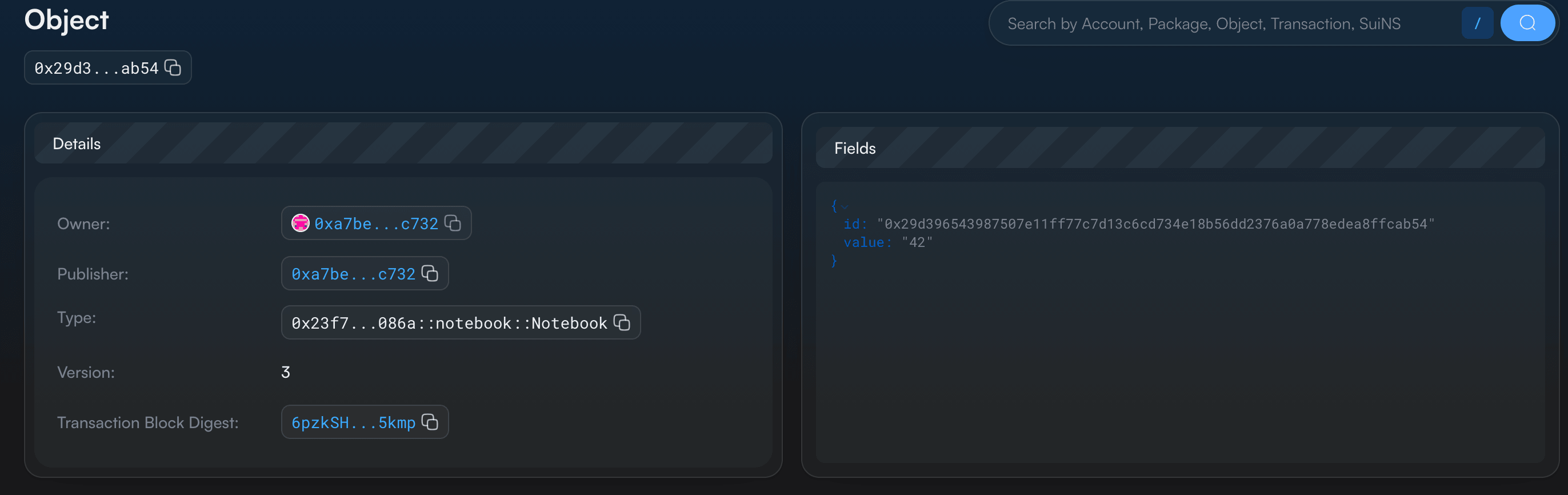
We can now identify which transaction we are reading, which object states it used, who authorized application access, which protocol rules constrained it, and which effects persisted. The request, execution result, checkpoint record, and latest state are connected, but each describes a different part of that transition.
Frequently asked questions
A transaction is the unit that connects an authorized request to an onchain state transition. Every persistent update on Sui, such as creating an object, changing a field, transferring an asset or publishing a package, happens through one. Reading an object only asks a node for information and creates no transaction.
A user transaction is a programmable transaction block that a client builds and a sender authorizes. A system transaction is created by validators for protocol work, such as consensus commits, randomness updates and end-of-epoch processing, and carries no user gas charge. Check the transaction kind before you apply user-transaction assumptions to a record.
It carries the sender, the gas data (owner, price, budget and payment), an expiration, and a programmable transaction with its inputs and commands. The sender’s signature authorizes the complete request, including its gas and validity fields. It is not a parameter of the Move function.
It depends on how it failed. A transaction rejected during input checks, such as an owner mismatch, is not executed and leaves no receipt. A transaction that executes and aborts is recorded, charges gas, and rolls back the application change, but the touched object’s version still advances.
Net gas is computationCost + storageCost - storageRebate. In our run that was 1,000,000 + 1,375,600 – 1,375,462, or 1,000,138 MIST. Do not add nonRefundableStorageFee a second time, and remember that the budget is only a spending limit.
A full node holds proof of finality when a quorum of validators acknowledges the same effects, or when a certified checkpoint includes the transaction. Look up the digest on a trusted full node and check the execution status, because a transaction that aborted onchain still counts as finalized. Resending a signed transaction is safe, since Sui executes a given transaction at most once.
Protocol configuration sets limits on transaction size, input objects, commands and bytes written. At protocol version 140 on Testnet these were 131,072 bytes, 2,048 input objects, 1,024 programmable commands and 5,000,000 written bytes. These values depend on the protocol version, so query the network instead of hard-coding them.
Related reading