AI-ready infrastructure
 Refer and earn


 Ethereum
 Hyperliquid
 Solana
 Arbitrum
 BNB Smart Chain
 Base
Base Polygon
 TRON
TRON Sui
Sui Robinhood


How to get an Ink RPC endpoint (2026 guide)

TL;DR
A backfill that asks the public Ink RPC endpoint for a few hours of logs fails with block range greater than 1000 max, which is only about 17 minutes of one-second blocks, and the same endpoint rejects debug_* and txpool_* as rpc method is not whitelisted. This guide gives you the Ink network details, explains where the public endpoint stops being enough, and shows how to deploy a private Ink RPC endpoint on Chainstack in 2026.
Ink network details and public RPC URLs
These are the details most developers need first, from the official Ink network information.
| Detail | Value |
|---|---|
| Network | Ink Mainnet |
| Chain ID | 57073 (0xdef1) |
| Currency | ETH |
| Block time | 1 second |
| Public RPC (HTTPS) | https://rpc-gel.inkonchain.com |
| Public RPC (WebSocket) | wss://ws-gel.inkonchain.com |
| Block explorer | explorer.inkonchain.com |
| Testnet | Ink Sepolia (not served by Chainstack) |
Chainlist lists Ink under the same chain ID, but it is a directory, not an infrastructure provider: swap its public URL for your own endpoint before you rely on it in production.
Add Ink to your wallet
- Open the network settings of your EVM wallet (MetaMask, for example) and choose Add a custom network
- Network name:
Ink - Default RPC URL: your Chainstack Ink endpoint (or the public URL above for a quick look)
- Chain ID:
57073 - Currency symbol:
ETH - Block explorer URL:
https://explorer.inkonchain.com
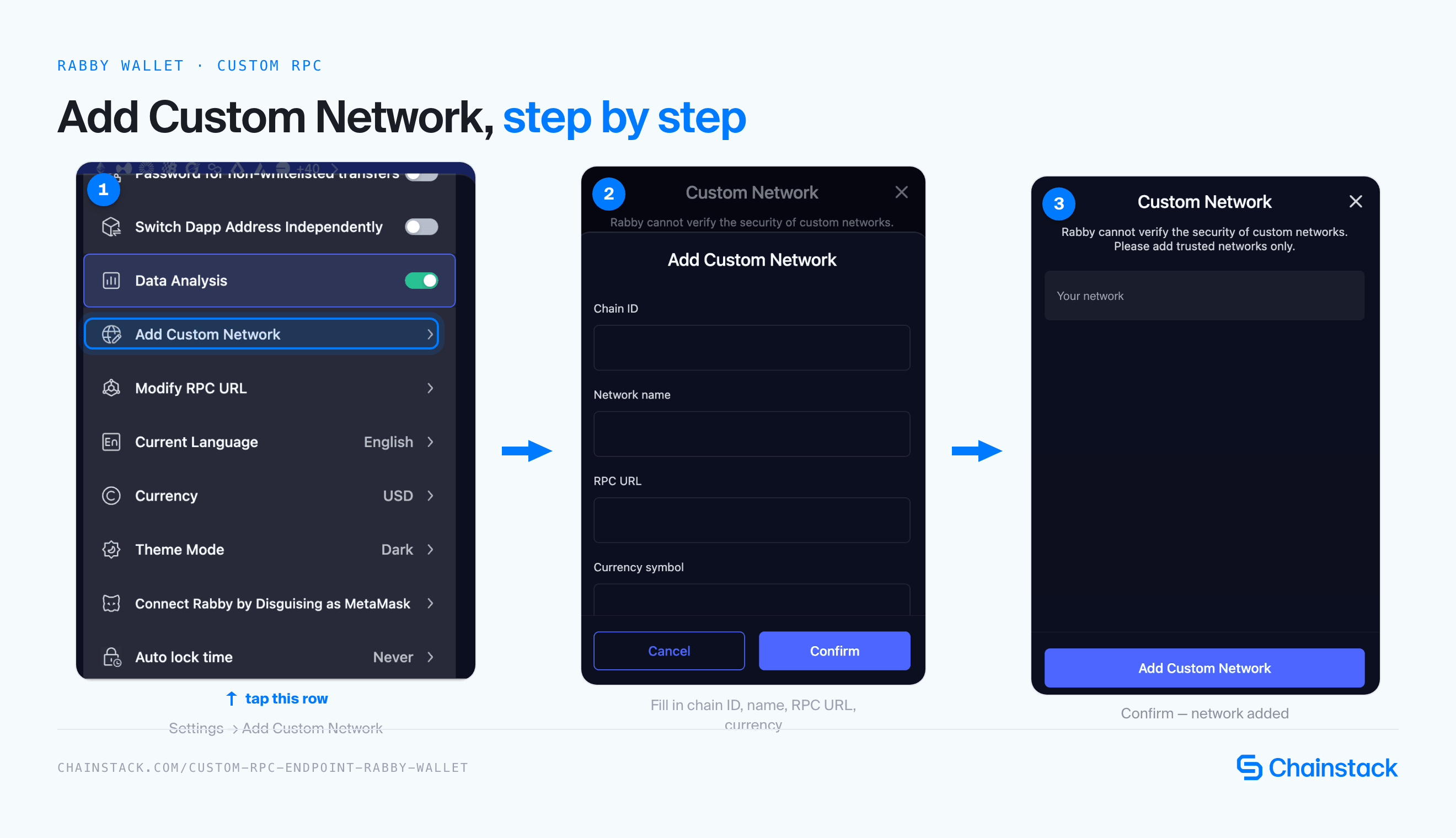
Fake Layer 2 networks are a common phishing vector, so only use values from Ink’s official docs or from your own Chainstack console.
What is an Ink RPC endpoint
An Ink RPC endpoint is the connection your code uses to read and write on Ink, an Ethereum Layer 2 on the OP Stack built by Kraken, with one-second blocks, ETH as gas, and chain ID 57073. Ink runs the standard OP Stack execution layer, so the API is Ethereum JSON-RPC over HTTPS and WebSocket: eth_*, net_*, web3_*, and, on nodes that expose them, debug_* and trace_*. Solidity and Vyper contracts deploy unchanged.
On Ink, the endpoint is what your application leans on for:
- Reading balances and contract state, and estimating fees (
eth_getBalance,eth_call,eth_estimateGas) - Broadcasting signed transactions and confirming them from receipts (
eth_sendRawTransaction,eth_getTransactionReceipt) - Streaming blocks and logs over WebSocket, and backfilling history in bounded ranges with
eth_getLogs
With a block every second and no public pending-transaction feed, the endpoint is the only place your code can learn that a transaction landed, so endpoint quality is the quality of your confirmation logic.
How Ink RPC differs from Ethereum RPC
Ink accepts the same JSON-RPC calls as Ethereum, but the cost model, the pending-transaction behavior, and the limits measured in blocks all behave differently.
| Property | Ethereum | Ink |
|---|---|---|
| Block time | About 12 s | 1 s |
| Chain ID | 1 | 57073 |
| Gas token | ETH | ETH |
| Fees | One gas fee | L2 execution fee plus an L1 data fee |
| Mempool | Public | None exposed: pending-transaction subscriptions deliver nothing |
| Tracing | debug_* and trace_*, depending on the client | debug_* and trace_* on op-reth (paid plan on Chainstack) |
eth_getProof on Chainstack | Depends on the node | Latest block only |
Two consequences matter for provider selection. A 10,000-block eth_getLogs request covers under three hours of chain time, so backfills need many pages. And eth_estimateGas covers only L2 execution, so cost estimates need the L1 fee helpers on top.
Ink RPC endpoint options
Public vs private Ink RPC endpoints
A public endpoint is enough to check that chain 57073 answers; it stops being enough when you need traces, wide log scans, or production-grade confirmation logic.
Official public endpoints:
- Mainnet:
https://rpc-gel.inkonchain.com(HTTPS),wss://ws-gel.inkonchain.com(WebSocket), operated by Gelato and listed in the Ink docs alongside endpoints from other providers - Testnet: Ink Sepolia, also listed in the Ink docs; Chainstack does not serve it
⚠️ In a check on October 6, 2026, the public Gelato endpoint rejected
eth_getLogsranges above 1,000 blocks, answereddebug_*,txpool_*, andeth_newPendingTransactionFilterwithrpc method is not whitelisted(HTTP 403), and served WebSocketnewHeads. Ink’s RPC providers page lists the public endpoints without stating their limits.
| Feature | Public endpoint | Private endpoint (Chainstack) |
|---|---|---|
| Access | Free and open | Restricted access |
| Resources | Shared infrastructure | Your plan’s quota on Global Nodes, or isolated Dedicated Nodes |
| Best use case | Development & testing | Production workloads |
eth_getLogs range | 1,000 blocks (observed October 6, 2026) | Up to 10,000 blocks on Growth and above; 100 on Developer |
debug_* and trace_* | Not whitelisted | Included on paid plans |
| Pending-transaction calls | Rejected | Accepted but never delivered, since Ink has no public mempool |
At one block per second, a log range the public endpoint refuses is still only a few hours of history, which is why anything beyond a smoke test belongs on a private endpoint.
Full node vs archive Ink node
At one block per second, “recent” on Ink means the last two minutes: Chainstack classifies a request as archive once it targets a block 127 or more behind the tip.
| Full node access | Archive node access |
|---|---|
| Latest balances and nonces before you send | Balances, code, or storage at a block more than two minutes old |
eth_call and eth_estimateGas against the current state | Re-running a past eth_call against historical state |
| Recent logs and new-block streams | eth_getLogs backfills that start more than two minutes back |
| Tracing a transaction from the last minute | Tracing an older transaction with debug_traceTransaction or trace_transaction |
Chainstack serves Ink Mainnet with archive data on Global Nodes, and offers Dedicated Nodes when you need isolated resources; see Chainstack’s archive node overview for how archive data works. An indexer that backfills a contract’s logs from its deployment is on archive territory from its first call, so confirm archive access before you design the backfill.
HTTPS vs WebSockets
Over HTTPS you poll for a block; over WebSocket every block is a billable push, and Ink produces one every second.
| Feature | HTTPS | WebSocket |
|---|---|---|
| Model | Request/response | Persistent connection |
| Complexity | Simple operationally | Requires reconnect and heartbeat logic |
| Best for | Receipt checks, eth_call reads, fee estimates, log backfills in pages | Live newHeads and logs streams for dashboards and indexers |
| Latency | Standard | Lower for frequent updates |
| Connection overhead | Per request | One-time handshake |
Pending-transaction subscriptions subscribe successfully on Ink and then deliver nothing, because pending transactions stay with the sequencer. Filters created on a Global Node live on one backend, so a follow-up eth_getFilterChanges can land elsewhere and fail with -32602 filter not found; poll eth_getLogs over an explicit range or hold a WebSocket subscription instead.
Billing matters here too: on Chainstack each pushed notification counts as a request, so a single newHeads subscription at one block per second is 86,400 pushes a day, about 2.6 million request units a month. See the pricing page for plan allowances.
How to get a private Ink RPC endpoint with Chainstack

You can deploy a private Ink RPC node on Chainstack in a few minutes:
- Log in to the Chainstack console (or create an account).
- Create a new project
- Select Ink as your blockchain protocol
- Choose network: Ink Mainnet, the only Ink network Chainstack serves
- Deploy the node
- Open Access and credentials and copy your HTTPS and WebSocket endpoints
Pick a Global Node for shared, geo-balanced access, or request a Dedicated Node when you need isolated op-reth resources; Dedicated Nodes require the Pro plan or above.
Check that the endpoint answers before you wire it into anything:
curl -s -X POST YOUR_CHAINSTACK_ENDPOINT \
  -H "content-type: application/json" \
  -d '{"jsonrpc":"2.0","id":1,"method":"eth_chainId","params":[]}'

# returns "result":"0xdef1", which is chain ID 57073
viem’s built-in ink chain defaults to the public endpoints, so pass your own URL to http():
import { createPublicClient, http, formatEther, parseEther } from "viem";
import { ink } from "viem/chains";
import { publicActionsL2 } from "viem/op-stack";

const client = createPublicClient({
  chain: ink,
  transport: http("YOUR_CHAINSTACK_ENDPOINT"), // without this, viem uses Ink's public RPC
}).extend(publicActionsL2());

const tx = { account: "YOUR_WALLET_ADDRESS", to: "YOUR_RECIPIENT_ADDRESS", value: parseEther("0.001") };

console.log("Block:", await client.getBlockNumber());
console.log("Execution + L1 data fee:", formatEther(await client.estimateTotalFee(tx)), "ETH");
📖 For the full integration guide, including MetaMask, ethers.js, web3.py, Foundry, and Hardhat, see the Chainstack Ink tooling documentation.
You can also access Chainstack Ink RPC directly from Claude, Cursor, Codex, Windsurf, Gemini CLI, GitHub Copilot, Antigravity, Claude.ai, or ChatGPT using Chainstack MCP. For the full agent stack — MCP, the Chainstack skill, llms.txt, and WebMCP — see the Chainstack Agents page.
Production readiness checklist
- Chain ID 57073 asserted at startup
- Transaction cost shown as execution plus L1 data fee, never from
eth_estimateGasalone - Confirmation built on receipts and new blocks, not on pending-transaction subscriptions
eth_getLogsbackfills paginated to your plan’s block cap (1,000 on the public endpoint, 100 on Developer, 10,000 on Growth and above)- Your own endpoint passed explicitly to viem and other libraries that ship Ink’s public RPC as a default
- The standard production basics: a fallback provider, request timeouts, retries with backoff, secrets in a manager, monitoring, and alerts
Troubleshooting common Ink RPC issues
| Issue | Cause | Fix |
|---|---|---|
block range greater than 1000 max on eth_getLogs | Public endpoint cap; Chainstack caps at 100 blocks on Developer and 10,000 on Growth and above | Paginate the backfill, or move to a paid plan or a Dedicated Node with a raised cap |
rpc method is not whitelisted (HTTP 403) | The public endpoint blocks debug_*, txpool_*, and pending-filter methods | Use a private endpoint; debug_* and trace_* need a paid Chainstack plan |
Real transaction cost is higher than eth_estimateGas suggests | The L1 data fee is charged on top of L2 gas | Use getL1Fee on the GasPriceOracle predeploy, or viem’s estimateTotalFee |
| Pending-transaction listener never fires | Pending transactions stay with the sequencer | Watch new blocks or poll eth_getTransactionReceipt |
-32602 filter not found | Filters live on one backend of a Global Node | Poll eth_getLogs over an explicit range, or hold a WebSocket subscription |
| App still hits the public RPC after you configured a provider | viem’s ink chain includes the public URLs as defaults | Pass your endpoint to http() explicitly |
Conclusion
The failures that waste the most time on Ink are quiet ones: a log backfill that dies at 1,000 blocks, a tracing call rejected as “not whitelisted”, a pending listener that never fires, and a viem client that was never pointed at your endpoint. Each has a one-line cause, and the public endpoint turns all of them on by default.
The pattern that works is short. Pass your own endpoint everywhere, show cost as execution plus L1 data fee, confirm from receipts and new blocks, and run archive reads and traces on a Global Node with the plan that matches your backfill size. Move to the Unlimited Node add-on when subscriptions dominate your usage, or to a Dedicated Node when you need isolated resources and custom limits.
Spin up an Ink Mainnet endpoint on Chainstack, then scale as your traffic grows.
FAQ
What is Ink’s chain ID and gas token? Ink Mainnet uses chain ID 57073 (0xdef1) and pays gas in ETH. There is no separate gas token, and Chainstack serves Ink Mainnet only.
Is Ink the same as the ink! smart contract language? No. ink! is a Rust-based smart-contract language for Polkadot and Substrate chains. Ink, the subject of this guide, is Kraken’s EVM-compatible Layer 2 and runs standard Solidity contracts.
Why does my transaction cost more than eth_estimateGas says? eth_estimateGas covers only L2 execution. Every Ink transaction also pays an L1 data fee for posting its data to Ethereum, which you can read with getL1Fee on the GasPriceOracle predeploy or with viem’s estimateTotalFee.
Do I need an archive node for Ink? For anything older than about two minutes, yes. At one block per second, a request 127 or more blocks behind the tip is classified as archive, so indexers and analytics jobs reach archive territory almost immediately.
Can I use the public Ink RPC in production? It is fine for development. The public endpoint caps eth_getLogs at 1,000 blocks and rejects debug_* and txpool_* as “not whitelisted”, so production workloads that backfill logs or trace transactions need a private endpoint.
Does Chainstack offer an Ink testnet? No. Chainstack serves Ink Mainnet on Global Nodes and Dedicated Nodes. Ink Sepolia is listed in the Ink docs but is not available through the Chainstack console. For testing, the Ink docs list public Ink Sepolia endpoints and a faucet.
Is there a free Ink RPC endpoint? Yes. Ink’s docs list public endpoints that need no key, with the limits described above. For a private endpoint, Chainstack has a free Developer plan with 3 million request units a month at 25 requests per second; archive data, debug, and trace start at the Growth plan. See the pricing page for current allowances.
How do I add Ink to a wallet? Open your wallet’s network settings, choose Add a custom network, and enter chain ID 57073, currency symbol ETH, your Chainstack endpoint as the RPC URL, and https://explorer.inkonchain.com as the block explorer. The steps are the same in any EVM wallet. Only use values from Ink’s official docs or your own console, since fake Layer 2 networks are a common phishing vector.
Additional resources
- Ink tooling — MetaMask, ethers.js, viem, web3.py, Foundry, and Hardhat setup on Chainstack
- Debug and trace APIs — what
debug_*andtrace_*include on Ink - Request units — how full, archive, and WebSocket requests are billed
- Throughput guidelines —
eth_getLogsblock ranges per plan - Chainstack introduces Ink Global Nodes support — the announcement
- What is Ink? — a deep dive on the chain’s design, ecosystem, and trust model
- Ink on Chainstack — protocol facts at a glance