


What is Arbitrum
Offchain Labs’ Arbitrum One is a Layer 2 (L2) scaling solution for Ethereum, introduced in 2021. Arbitrum aims to lower transaction fees and increase its ability to process thousands of transactions per second, like any scaling solution. It moves contract computation and storage from Ethereum’s primary chain, enabling significantly better throughput. Transactions on Arbitrum only cost a few cents to complete.
Despite being a separate blockchain, it uses Layer 1 (L1) security and privacy features and relays all transaction information to the main Ethereum chain. Furthermore, it is effortless for developers to integrate Arbitrum with no modifications because it supports the Ethereum Virtual Machine (EVM).
How Arbitrum works
Developers create smart contracts and submit transactions to the Arbitrum chains’ inboxes. After processing it, Arbitrum generates a transaction receipt. The transactions in Arbitrum’s inboxes impact how it handles the transaction and hence its chain state.


Arbitrum handles Ethereum transactions using a technique known as an optimistic rollup. Rollups significantly increase processing speeds by moving many transaction data off-chain. However, unlike other sidechains, optimistic rollups still publish a small amount of data on the decentralized layer one network to be validated, increasing security.
Optimistic rollups do not publish proofs of validity for transaction batches posted on-chain since they presume off-chain transactions are valid. This characteristic separates optimistic rollups from zero-knowledge rollups that print cryptographic proofs of validity for off-chain transactions.


Arbitrum Nitro
Arbitrum launched Nitro on August 31. Nitro is a significant technical upgrade for Arbitrum meant to be more EVM-compatible, create a better experience for users, lower the fees, and speed up the transactions.


Nitro is a new prover that can do Arbitrum’s classic interactive fraud proofs using WebAssembly (WASM) code.
Nitro vs Classic
If we zoom out a little, we can see that both classic and Nitro perform a similar thing: seek to establish an execution environment as close to the EVM as possible, which acts as a second layer to Ethereum.
However, unlike Classic, Nitro uses WebAssembly instead of AVM for low-level instruction. It compiles the Go code to WASM, implements to the ArbOS, and includes the most widely utilized Ethereum implementation within the Geth. Classic achieved compilation via a custom-made virtual machine named AVM (Arbitrum Virtual Machine).
One of the most crucial characteristics distinguishing Nitro from Classic is architecture.
The AVM (Arbitrum Virtual Machine) connects to the bridge and regularly validates the validity of the transactions between L1 and L2.
ArbOS
ArbOS is the operating system that runs on an Arbitrum chain at Layer 2 to govern the chain’s operation, smart contract lifecycles, security, and other functions. Offchain Labs also upgraded ArbOS, rewritten in the Go programming language. The updated version will enhance cross-chain communication between Layer 2 (Arbitrum) and Layer 1. (Ethereum).

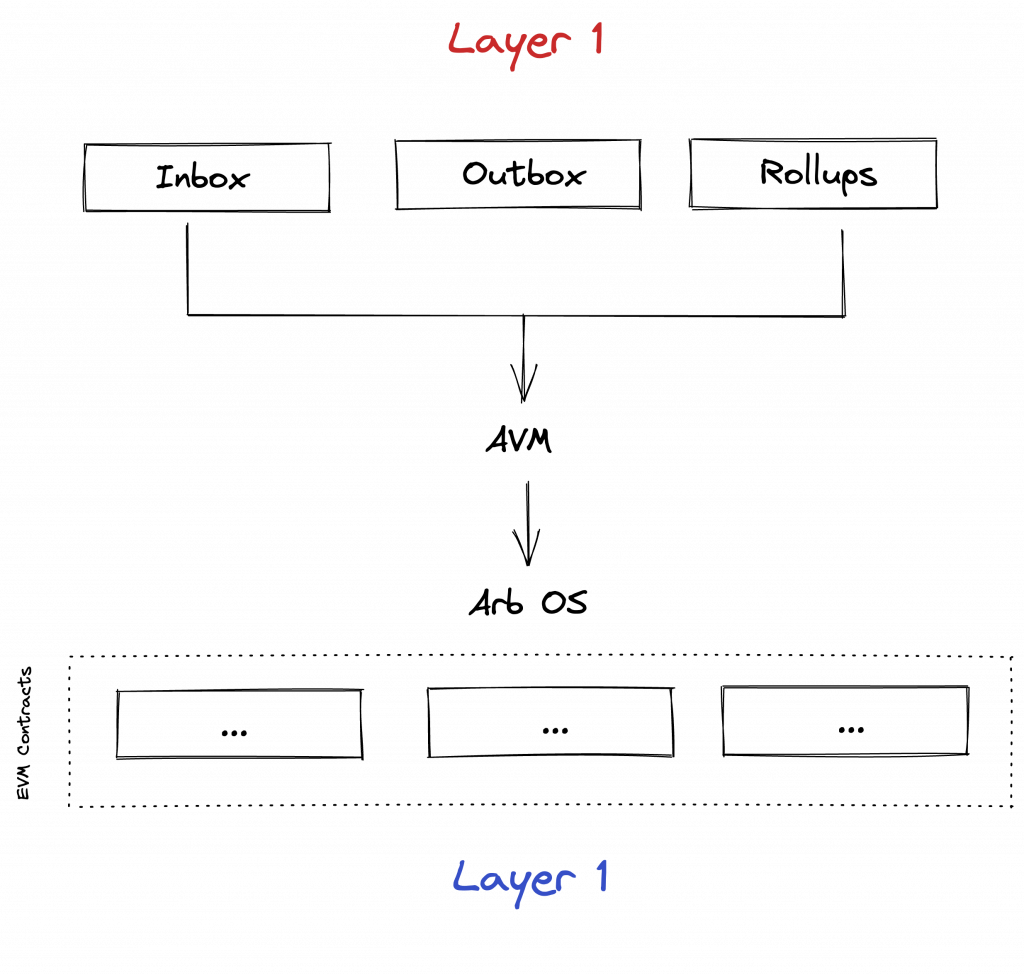
The other advantage of Nitro is its direct usage of Geth. It means most of the work of creating an L2 VM is inherited right out of the box.
Nitro migration for DApps
This section is for Solidity developers who want to migrate their DApp to Arbitrum Nitro. So let’s first talk about some advantages of moving your DApps to Nitro.
- Ethereum L1 Gas compatibility: the gas price for all EVM operations is precisely in line with Layer 1.
- Calldata compression: since compression in Nitro occurs at the protocol level, DApps don’t need to make any changes.
- Supports All Ethereum precompilers: all Ethereum L1 precompilers, including ripemd160, blake2f, and others, are supported by Arbitrum Nitro.
- Frequent timestamps: Timestamps that can be accessed via block.timestamp have been decoupled from the timestamp of the previous Layer 1 block and are updated every block.
There are a few breaking changes for RPC, protocols, and DApps.
- There is no longer the concept of a separate pool for storing gas.
- Reduced maximum contract code size: Previously, contracts up to 48KB could be deployed, but now they can only be up to 24KB.
How Arbitrum Nitro works
Since the previously mentioned Arbitrum Nitro is compiled to WASM, the current custom-designed language and compiler can be replaced with standard languages and tooling for building and compiling the entire system instead of Arbitrum Classic’s AVM architecture.
And to provide cross-chain communication and reduce the L1 expenses, the Offchain Labs are rewritten ArbsOS components in Go. They also have a new and enhanced batching and compression scheme.
According to the docs, the core of Nitro and its major innovations are based on four major concepts.
Sequencing: Nitro developed two methods to process transactions. First, a single ordered sequence is created out of all the transactions, and Nitro commits to that sequence. A deterministic state transition function then processes the transactions in that order.
Geth: By including the core code of the go-Ethereum (Geth), Nitro supports Ethereum’s data structures, formats, and virtual machines. This method of using Geth as a library assures very high levels of compatibility with Ethereum.
Separate Proving from Execution: Nitro takes the same source code and compiles it twice, once to native code for use in proving, which is designed for portability and security, and again to WASM for use in execution on a Nitro node, which is optimized for speed.
Optimistic Rollup: Using an optimistic rollup protocol with Arbitrum’s interactive fraud proofs, Nitro settles transactions to the Layer 1 Ethereum chain.
The processing of transactions in Nitro is illustrated in the below figure.


On the client level, there are no pending transactions and no txpool. The transactions get immediately accepted or rejected by the sequencer.
Running a node
You can either run your node or use Chainstack. Running your node can be both difficult and costly.
Using Arbitrum Nitro on Chainstack is just as easy as it is to launch any other node on the platform:
- Log in to the Chainstack console.
- Select a cloud provider.
- Deploy the node in any preferred global location with low latency.
This allows developers and enterprises interested in building on Arbitrum Nitro to deploy, run, and manage all the nodes they’ve launched within a single, seamless platform. With Chainstack’s help running blockchains at scale becomes truly effortless for any project, regardless of its use case or size.
Deploying a sample contract on the Arbitrum Goerli testnet
To summarize everything in this post, let’s deploy a contract on the Arbitrum Goerli testnet.
First, let’s add the Arbitrum Goerli testnet network to our wallet provider. In this case, we’ll use MetaMask.
- Network Name: Arbitrum Nitro Goerli testnet
- RPC URL: Get one with Chainstack.
- ChainID: 421613
- Symbol: GoerliETH
- Block Explorer URL: https://testnet.arbiscan.io/
Then request some Goerli ETH from the goerli faucet. Once received, bridge it to the Arbitrum Goerli testnet using the official bridge from the Arbitrum Nitro testnet.

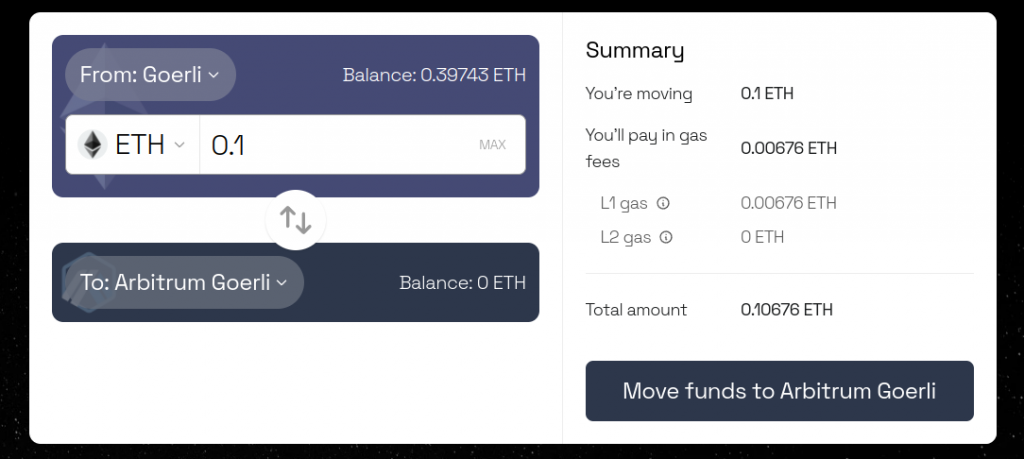
Once confirmed, it will take approximately 15 minutes to bridge the tokens.

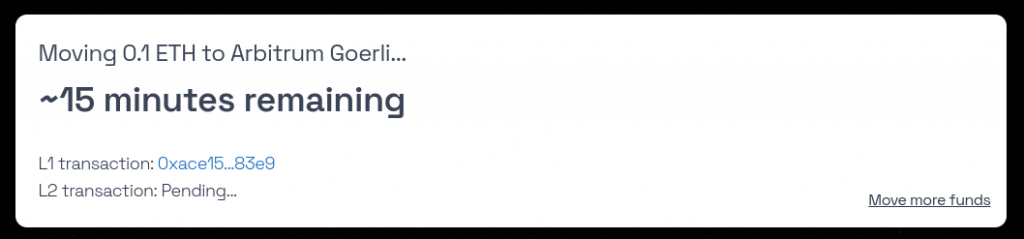
If everything goes well, now you should have your bridged GoerliETH on the Arbitrum Goerli testnet.
After that, let’s begin working on our contract. First, create a new project folder, and start a new Truffle project. We will also use the @truffle/hdwallet-provider package.
mkdir arbitrum-nitro-adoption && cd arbitrum-nitro-adoption

truffle init

npm I @truffle/hdwallet-provider
Then, inside the contracts folder, create a new Adoption.sol contract. This contract will allow an account to adopt a new pet and name it.
// SPDX-License-Identifier: MIT
pragma solidity ^0.8.15;

contract Adoption {
    event PetAdopted(uint256 petIndex, string petName);

    uint256 totalAdopted;

    mapping(uint256 => string) petName;
    mapping(uint256 => address) petOwner;

    function adopt(string memory _petName) public {
        petName[totalAdopted] = _petName;
        petOwner[totalAdopted] = msg.sender;

        totalAdopted++;

        emit PetAdopted(totalAdopted - 1, _petName);
    }
}
Now, let’s prepare the Arbitrum Nitro testnet in our truffle project for deploying the contract. Open the truffle-config.js file and paste the following content.
const HDWalletProvider = require("@truffle/hdwallet-provider");

const DEPLOYER_PRIVATE_KEY = "";
const CHAINSTACK_NITRO_TESTNET_RPC = "";

module.exports = {
  networks: {
    "nitro-goerli": {
      provider: () =>
        new HDWalletProvider(
          DEPLOYER_PRIVATE_KEY,
          CHAINSTACK_NITRO_TESTNET_RPC
        ),
      network_id: 421613,
    },
  },
  // Configure your compilers
  compilers: {
    solc: {
      version: "0.8.15", // Fetch exact version from solc-bin (default: truffle's version)
    },
  },
};
Be sure to use your own private key to deploy it. After that check, under the migrations folder, create a new file called 2_deploy_contract.js and setup the deployment instructions:
const Adoption = artifacts.require("Adoption");

module.exports = function (deployer) {
  deployer.deploy(Adoption);
};
Once all is settled, run the migrations to deploy the contract.
truffle migrate --network nitro-goerliOnce the deployment gets done, you should an output like this.

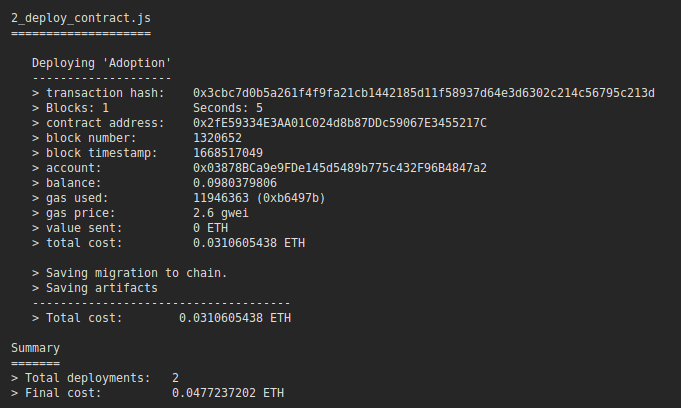
And that’s it! We’ve succesfully deployed a contract to the Arbitrums Nitro Goerli testnet.
Conclusion
The purpose of this post was to provide you with an overview of the Arbitrum Nitro, how it works, and the difference between Nitro and Classic. More about Arbitrum and its mechanism will be covered in upcoming posts.
- Discover how you can save thousands in infra costs every month with our unbeatable pricing on the most complete Web3 development platform.
- Input your workload and see how affordable Chainstack is compared to other RPC providers.
- Connect to Ethereum, Solana, BNB Smart Chain, Polygon, Arbitrum, Base, Hyperliquid, Robinhood Chain, Arc, Tempo, MegaETH, Monad, Plasma, Avalanche, Optimism, Aptos, Cronos, Gnosis Chain, Moonbeam, Celo, Aurora, TON, Ronin, and Bitcoin mainnet or testnets through an interface designed to help you get the job done.
- Fast access to blockchain archive data and gRPC streaming on Solana.
- To learn more about Chainstack, visit our Developer Portal or join our Telegram group.
- Connect your AI agent to Chainstack in seconds using Chainstack MCP — give Claude, Cursor, Codex, Gemini, and Windsurf live access to blockchain data, node management, and docs.
- Are you in need of testnet tokens? Request some from our faucets. Sepolia faucet, Base Sepolia faucet, Solana devnet faucet, Hoodi faucet, BNB faucet, zkSync faucet, Robinhood Chain faucet, Hyperliquid faucet, Monad faucet, Amoy faucet, Plasma faucet, TON faucet.
Have you already explored what you can achieve with Chainstack? Get started for free today.