



Solana is now supported on Chainstack Self-Hosted. That’s good news, but it doesn’t change the part that actually determines whether your node works: the hardware underneath it. Solana does not forgive undersized boxes, and picking the right server matters more here than for almost any other chain you could self-host.
Solana doesn’t degrade gracefully. A node with 128 GB of RAM instead of 256 doesn’t run at half speed — it falls behind slot after slot until it’s useless. A single NVMe holding both accounts and ledger doesn’t get slow — it gets IOPS-starved and starts dropping RPC responses. The gap between “spec sheet looked fine” and “the node is returning errors during a mint” is measured in hours, and by the end of those hours the box is already lost.
This is why “just run your own Solana RPC” is advice that sounds cheap and turns out expensive. The Agave client asks for real hardware — 12 cores minimum (16+ cores recommended for RPC-specific workloads), 512 GB of RAM when you enable all account indexes, PCIe Gen3 NVMe with accounts and ledger on physically separate drives, a stable public IPv4 without NAT. Miss any of those and the node either won’t sync or will fall behind and stay behind.
The fix isn’t heroics. It’s picking hardware that already matches what Agave asks for, and putting a management layer on top that handles the parts you shouldn’t be doing by hand — snapshot bootstrap, client version pinning, health checks, endpoint exposure. With Chainstack Self-Hosted running on is*hosting’s Solana-tagged bare metal, both problems close at checkout.
What is Chainstack?
Chainstack is a managed blockchain infrastructure platform for teams that need production-grade RPC access without becoming an infrastructure team. The product line spans Global Nodes, Dedicated Nodes, and Self-Hosted — three layers of how much of the stack Chainstack runs for you versus how much you run yourself.
Self-Hosted is the deepest control option: your hardware, your endpoints, your data, your network policies. Chainstack handles the node software lifecycle — deployment, health checks, updates, self-healing, snapshot bootstrap — and stays out of everything else. Solana joins a protocol list that now spans Ethereum, Optimism, Base, Unichain, Zora, World Chain, Blast, Mantle, opBNB, Arbitrum, Robinhood Chain, Polygon PoS, Starknet, TRON, Bitcoin, Sui, Tempo, Plasma, Avalanche, Arc, Sonic, Stable, Berachain, Cronos, BNB Smart Chain, Kaia, Ronin, and Hyperliquid — see the full supported clients and protocols list for networks, client versions, and exact resource requirements per chain.
is*hosting is a Chainstack partner offering bare-metal servers purpose-built for Solana workloads. Their SOLANA-tagged NL4-10 configuration on the Solana Servers page ships the hardware profile Agave asks for: AMD EPYC 9354P (32 cores, 3.25–3.8 GHz), 768 GB DDR5 RAM, and three separate NVMe drives — one for the OS, two enterprise NVMe drives for accounts and ledger.
Why Solana hardware is different
The Agave validator requirements look reasonable until you notice a phrase most operators skim past: “Accounts and ledger should not be stored on the same disk.” This is not a preference. Solana’s block processing does simultaneous heavy random writes to both — put them on one NVMe and the drive will burn out its write endurance in months while also creating IOPS contention that starves the RPC layer during load. Two drives, on their own PCIe lanes, is the price of running the node at all.
The other one that catches people: RAM. Anza lists 256 GB as the RPC minimum, but that’s for a node with no account indexes. Enable spl-token-owner and spl-token-mint indexing — which any serious application backend or DeFi indexer needs to answer getProgramAccounts queries — and you’re looking at 512 GB. Skip this and either the indexes won’t build or the node will OOMKill under load.
CPU is the counterintuitive one. Higher clock speed matters more than core count. A 32-core EPYC 9354P at 3.25 GHz base outperforms a 64-core CPU at 2.0 GHz for Solana’s block processing, because most of the hot path is single-threaded work with unforgiving deadlines. Anza spells this out: “Higher clock speed is preferable over more cores.”
Network: 1 Gbit/s symmetric is the floor for an unstaked RPC node, no NAT allowed. Solana’s gossip protocol, turbine, and repair all need clean UDP flows. Anything in the cheap-VPS category — shared bandwidth, NAT’d IPs, oversubscribed uplinks — is a non-starter.
The is*hosting Solana SKU handles all four in one config: 32-core EPYC 9354P for clock speed, 768 GB DDR5 for RPC with room for indexes, one boot NVMe plus two enterprise NVMe drives for accounts and ledger separately, and 40 Gbps port with 50 TB traffic included.
Before you start
You’ll need:
- An is*hosting account (client area login/signup)
- A payment method (is*hosting accepts card, wire, crypto — see Payment Methods)
- An SSH key pair for server access
- A domain if you want to reach the Chainstack Control Panel via a hostname instead of an IP address
SSH key pair — how you log into the server without a password. If you don’t have one, run this in your terminal:
ssh-keygen -t ed25519 -C "your.email@example.com"Press Enter through the prompts. Then:
cat ~/.ssh/id_ed25519.pubCopy the full output. You’ll paste it during server setup.
Step-by-step guide
Step 1: Pick the Solana-tagged configuration

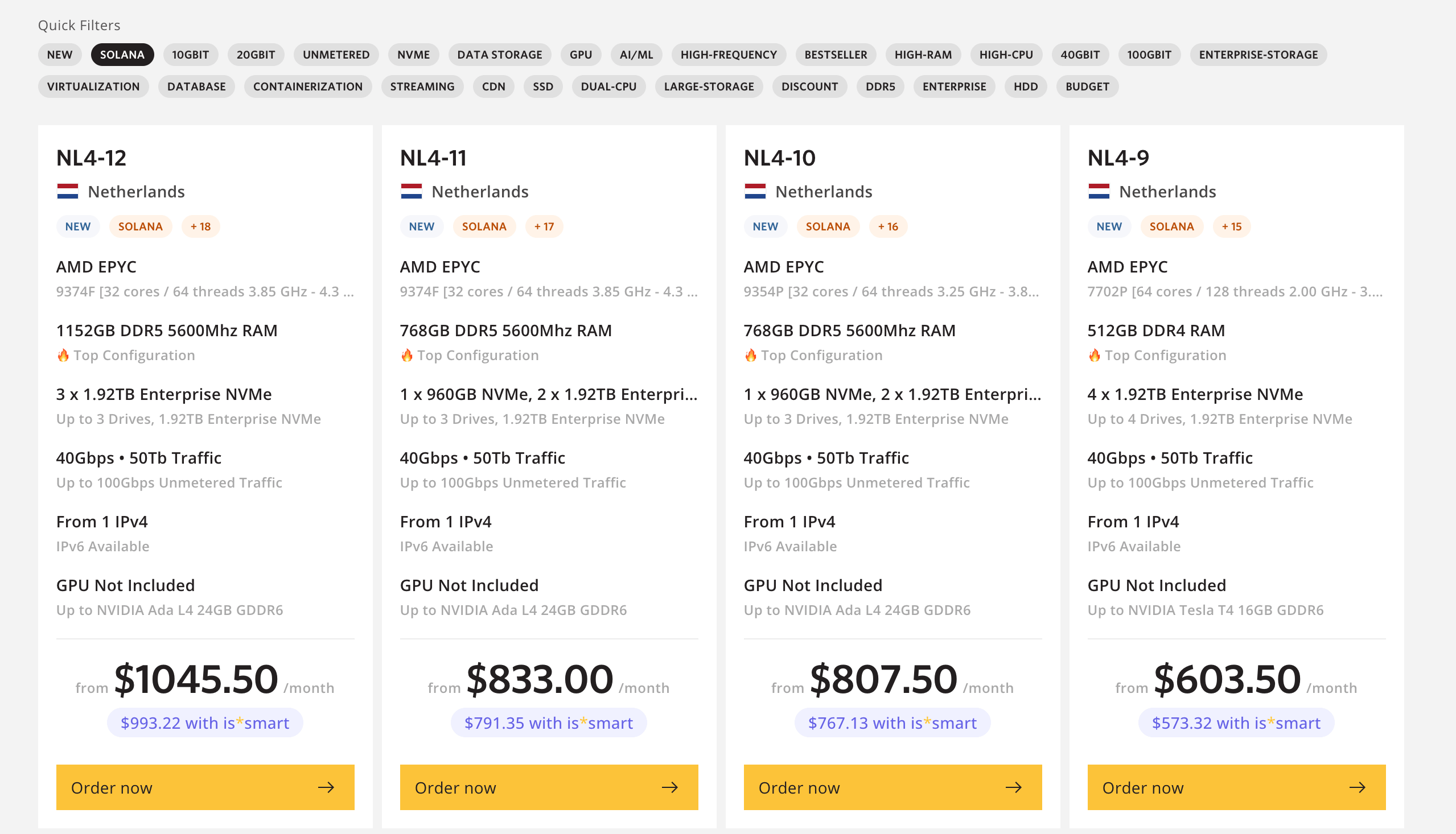
is*hosting has a dedicated Solana Servers page — go there rather than the general dedicated catalog. The SOLANA-tagged listings are pre-filtered to configs that meet Agave’s hardware bar. Click ORDER NOW on the NL4-10 listing — AMD EPYC 9354P, 768 GB DDR5, Netherlands — or go directly to the order page.
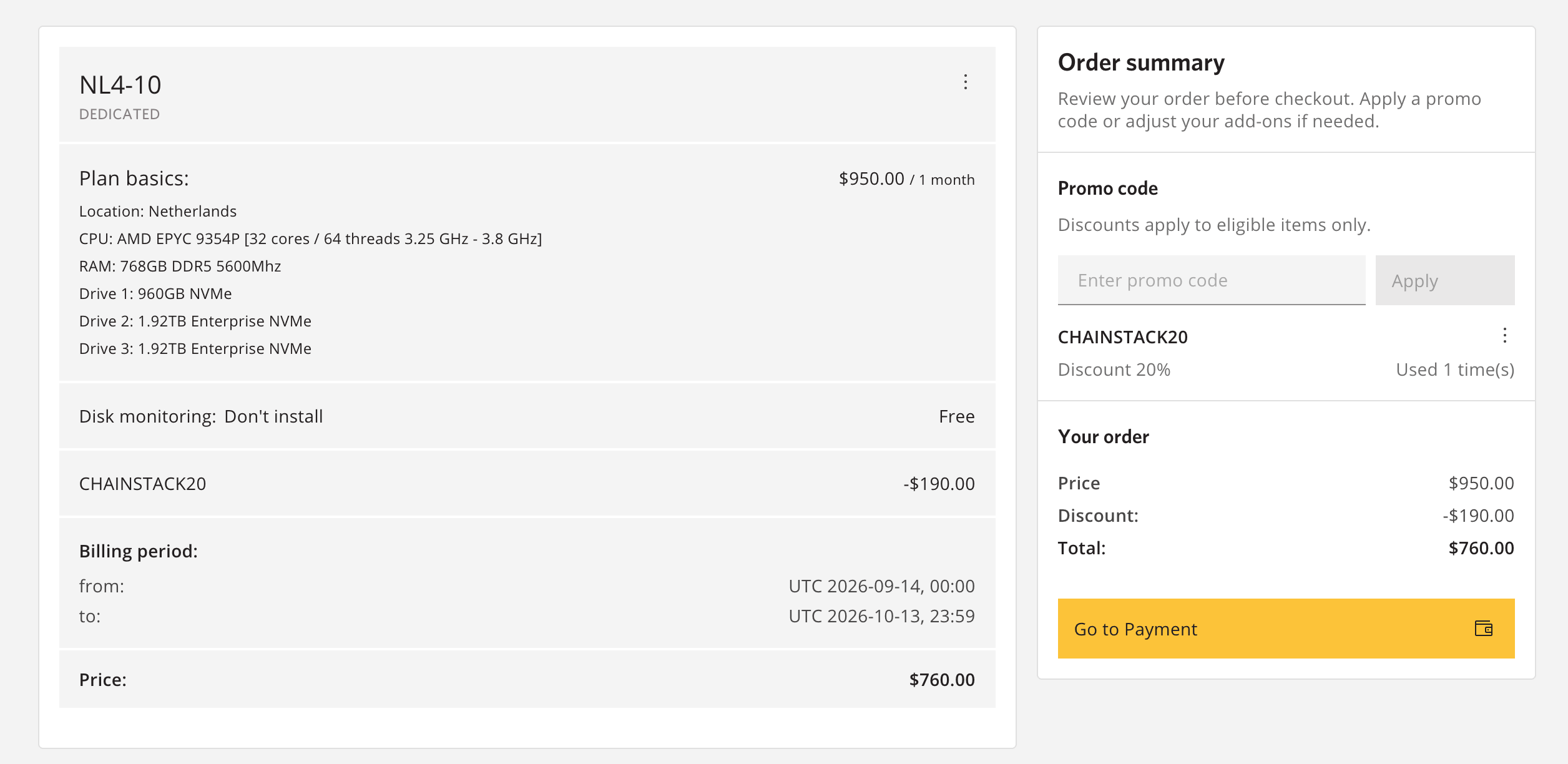
Use code CHAINSTACK20 at checkout for 20% off your first dedicated server purchase.
is*hosting also has a general Chainstack landing page with Ubuntu 24.04 + Chainstack pre-installable as an OS option — but don’t use its default “Deploy Chainstack on the server” button for this. That button points to a consumer AMD Ryzen 9 5950X box (16 cores, desktop platform, no server-grade RAM ceiling), which is fine for a lighter EVM chain but physically can’t take the 256–512 GB of RAM a Solana mainnet node needs — Ryzen desktop platforms top out well below that. For Solana, use the NL4-10 link above, and the promo code still applies at checkout. That page’s manual setup walkthrough (installing Geth and Lighthouse by hand) is also a generic Ethereum example, not the Self-Hosted flow — for Solana on Chainstack Self-Hosted, follow the steps below instead: cpctl install, then the Control Panel’s deployment wizard, not a manual client install.
The configuration:
- CPU — AMD EPYC 9354P, 32 cores / 64 threads, 3.25–3.8 GHz. High clock speed, AVX2, SHA extensions — everything Agave wants.
- RAM — 768 GB DDR5-5600. Well above Anza’s 512 GB “with all indexes” recommendation, so you have room to enable indexing without hitting the ceiling.
- Storage — 1× 960 GB NVMe for the OS + 2× 1.92 TB Enterprise NVMe for chain data (3.84 TB total). This is the “accounts and ledger on separate disks” split Anza requires, already built in. A note on sizing this against Chainstack’s own numbers: per Chainstack’s supported deployments page, Solana Devnet needs ~2.2 TB steady-state, and snapshot bootstrap needs roughly 2× that while the archive and the extracted state briefly coexist — putting Devnet’s transient peak at roughly 4.4 TB, above this configuration’s 3.84 TB data pool. Mainnet is tighter still: the actual Chainstack Self-Hosted deployment wizard provisions a 5000Gi (~5.4 TB) volume for the Solana Mainnet Agave preset, well above what this configuration provides. For either network, size up — the NL4-12 tier is a larger config (EPYC 9374F, 1152 GB RAM, 3× 1.92 TB Enterprise NVMe for 5.76 TB of data storage) that covers both Devnet’s ~4.4 TB peak and Mainnet’s ~5.4 TB preset — or confirm with is*hosting support how much headroom your deployment will actually need before you order.
- Network — 40 Gbps port, 50 TB monthly traffic, upgradeable to 100 Gbps unmetered. IPv4 + IPv6 included.
- Location — this configuration (NL4-10) is hosted in the Netherlands. is*hosting’s Solana-tagged filter also covers Finland and the US at other price/RAM tiers — see the Solana Servers page for the full list, or contact support about a specific location.
- Price — $950/month month-to-month, or $807.50/month with a 1-year commitment ($767.13/month with is*smart on the 1-year plan). Chainstack partnership discount: 20% off your first purchase with code CHAINSTACK20, applied at checkout on the Chainstack × is*hosting landing page.

Step 2: Install Ubuntu 24.04
Chainstack Self-Hosted runs on Ubuntu 24.04 LTS. During is*hosting’s server setup, pick Ubuntu 24.04 in the OS selector. If you skipped it or picked something else, you can reinstall via the client area — is*hosting exposes an OS reinstall option through the server management panel.
Ubuntu 24.04 also matches what Anza builds and tests Agave against, so you’re aligned with upstream regardless of Chainstack’s requirements.
Step 3: Install Chainstack Self-Hosted
SSH into the server:
ssh root@<server_ip>Install Chainstack Self-Hosted with the cpctl CLI:
cpctl installThis brings up the Control Panel on k3s with auto-generated values. If you need to customize the deployment — external PostgreSQL, custom Helm values, adjusted resource limits — use the advanced installation flow instead.
The Control Panel itself needs 5 cores / 6 GiB RAM / 15 GB storage as a floor per system requirements — this is a rounding error on the EPYC 9354P, and the Solana node deployment sits on top of it comfortably.
Step 4: Log into the Control Panel
Retrieve the auto-generated admin password from the values file:
yq '.cp-auth.env.CP_AUTH_BOOTSTRAP_PASSWORD' /root/.config/cp-suite/values/cp-control-panel-*.yamlUsername is admin. Open the Control Panel URL in your browser — the exact URL depends on how services are exposed on your install; see the first-login guide for LoadBalancer, NodePort, Ingress, or port-forward options.
Once logged in, go to Settings → Personal Information and change both the username and password. The bootstrap password stops working after you save.
Step 5: Deploy the Solana node
Open the Nodes menu and click Add node to start the deployment wizard:
- Protocol — Solana
- Network — Mainnet or Devnet
- Deployment preset — Agave with sizing appropriate to the network you picked. Mainnet uses the full resource preset (high CPU/RAM/storage); devnet is far lighter.

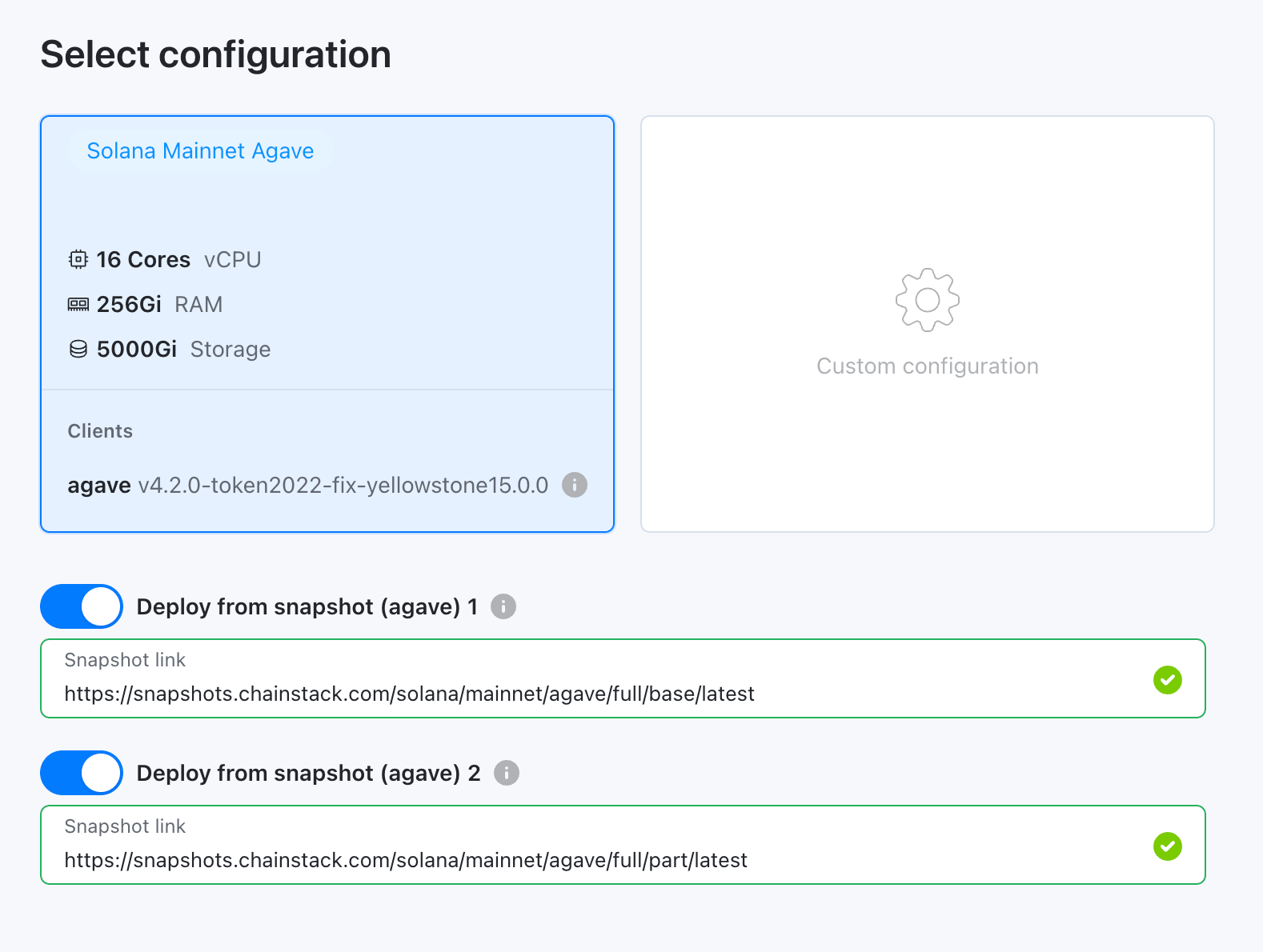
The wizard bootstraps the node from a cluster-fetched snapshot. Spin-up takes about 10 minutes; catching up to the chain head typically takes another 30–60 minutes on mainnet, or 15–30 minutes on devnet, depending on network conditions.
Step 6: Get your Solana RPC endpoints
Once the node is caught up, open its details page in the Control Panel. You’ll find:
- HTTP RPC — JSON-RPC over HTTP on port 8899
- WebSocket RPC — JSON-RPC over WebSocket on port 8900
These are internal Kubernetes service addresses by default. To reach them from outside the server, expose the services via LoadBalancer, NodePort, or Ingress — see managing nodes in the docs.
Point your application at the exposed endpoint. It’s a private Solana RPC connection with no rate limits, no shared gRPC contention, no upstream provider between you and the chain.
Summary
The setup is short, the payoff is not.
You get bare metal that was actually built for Solana — not a generic AMD box with “Solana” pasted on the marketing page, but a config with the CPU clock speed, the RAM headroom, and the drive topology Agave requires. You get a management layer that turns “provision Kubernetes, write validator flags, manage snapshots, pin client versions” into a web wizard. And you get out of the shared-RPC treadmill where somebody else’s throttle is your outage.
Code CHAINSTACK20 for 20% off your first purchase.
FAQ
Server provisioning depends on stock — is*hosting typically delivers within a few hours to a day for the Solana-tagged configs. Chainstack Self-Hosted installation and node deployment together take about 30–45 minutes. Initial sync from a cluster snapshot is another 30–60 minutes on mainnet, less on devnet. The long-tail delay is snapshot download, not compute.
Not really, if the goal is mainnet. Devnet is lighter on storage, but the CPU, RAM, and dual-NVMe topology are the same requirements — sync will fail or fall behind on underpowered hardware regardless of the network. If cost is the blocker for evaluation, use Chainstack’s managed Solana Global Nodes to validate your application against a real Solana endpoint first, then move to self-hosted once you’re ready to commit to hardware.
Basic Linux and SSH, yes. Beyond that, Chainstack Self-Hosted handles the parts that would otherwise need real ops work — Agave flag configuration, snapshot management, identity keypair persistence, service exposure, health monitoring. You’re not writing Kubernetes manifests.
The NL4-10 EPYC 9354P configuration is hosted in the Netherlands, at a Tier 3+ data center with strong European peering. is*hosting’s Solana-tagged filter also surfaces configs in Finland and the US at other RAM/price tiers. For other locations or custom builds, contact is*hosting directly.
20% off your first dedicated server purchase with code CHAINSTACK20, applied at checkout — confirmed working: a $199/month order dropped to $159.20/month with the code applied. Details and the co-branded landing page: ishosting.com/en/dedicated/apps/chainstack. Note this discount is separate from the is*smart membership discount reflected in the price above — check at checkout whether both apply together on your order.
Yellowstone gRPC as an optional add-on is on the Solana Self-Hosted roadmap for a later release. The hardware you provision today has memory headroom to absorb Yellowstone’s ~32 GiB overhead when it becomes available.
Additional resources
- Chainstack Self-Hosted documentation
- System requirements for Chainstack Self-Hosted
- Agave validator requirements (Anza official)
- is*hosting Solana Servers
- Introducing Chainstack’s partnership with is*hosting
- Solana is now available on Chainstack Self-Hosted
Related reading — self-hosted node guides