


Run your own Ethereum node for the everyday RPC traffic, and let eRPC transparently forward the heavy historical (archive) queries your node can’t serve to a Chainstack Cloud archive node. One endpoint for your apps; recent RPC served by your own node; archive only when you actually need it.
This walkthrough uses Ethereum Hoodi (a testnet) as a low-cost, reproducible example. It’s a mechanics demo — the exact same setup on Ethereum mainnet or Base is where the cost savings land.
Why
A full node keeps recent state and is cheap to run. An archive node keeps all historical state and is expensive (big disk, slow to sync). Most apps are 95% recent-state traffic and only occasionally need archive (trace_*, debug_*, balances/state at old blocks).
So: self-host the cheap full node, and route the rare archive calls to a managed archive node. eRPC sits in front of both as a single endpoint and decides per request.
Architecture

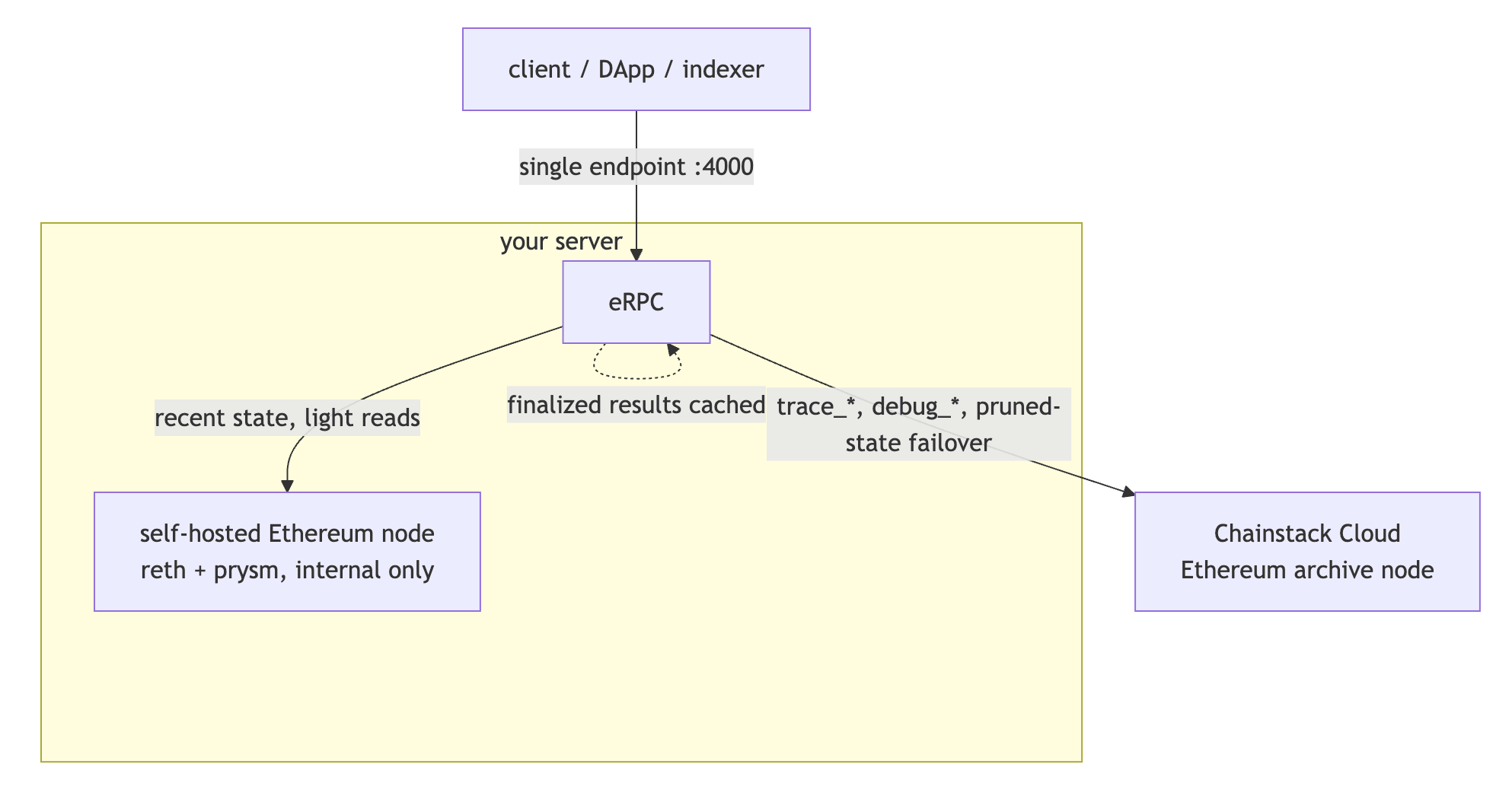
- Self-hosted node — primary. It runs as Kubernetes pods (
rethexecution +prysmconsensus) managed by Chainstack Self-Hosted. Its RPC is internal only — never exposed to the internet. - Chainstack Cloud archive node — the failover/archive upstream. Billed only for what the full node can’t serve.
- eRPC — runs on the same box (Docker). One endpoint; routes by method, fails over on error, and caches finalized data so repeat archive hits don’t re-bill Cloud.
Get and secure a server
We used a Velia bare-metal box (Ubuntu 24.04, 12 vCPU / 32 GB RAM) ordered with the Chainstack Self-Hosted management option — which ships the Control Panel pre-installed, so the whole k3s/cpctl install is done for you. Promo ChainstackSH80 gives 80% off the first month.
For Hoodi you need very little: ~8 vCPU, 32 GB RAM, ~500 GB disk. Mainnet needs much more (see System requirements).
If your box does not ship with the Control Panel pre-installed, scripts/provision.sh installs the base tooling (k3s, helm, yq, cpctl) and stops before the interactive cpctl install — follow Quick start from there.
SSH key access
Use a key, not a password. Generate one locally and attach the public half to the server:
ssh-keygen -t ed25519 -f ~/.ssh/hoodi_key
# add ~/.ssh/hoodi_key.pub to the server (provider panel, or /root/.ssh/authorized_keys)
ssh -i ~/.ssh/hoodi_key root@<SERVER-IP>
Harden the box (do this before anything else)
A fresh public server is scanned by bots within minutes. Minimum hardening:
# firewall: deny all inbound except SSH; keep Kubernetes internals working
apt-get install -y ufw fail2ban
ufw default deny incoming
ufw default allow outgoing
ufw allow 22/tcp
ufw allow in on lo
ufw allow from 10.42.0.0/16      # k3s pod CIDR
ufw allow from 10.43.0.0/16      # k3s service CIDR
ufw allow from <SERVER-IP>       # node talks to itself
ufw --force enable

# SSH: key-only
cat >/etc/ssh/sshd_config.d/99-harden.conf <<'C'
PasswordAuthentication no
PermitRootLogin prohibit-password
C
systemctl reload ssh

# ban brute-forcers
systemctl enable --now fail2ban
The Control Panel UI (Traefik) is published on ports 80/443 by k3s via a hostPort, which bypasses ufw’s INPUT chain. Block it from the internet at the raw table (find your public NIC with ip route get 8.8.8.8):
iptables -t raw -I PREROUTING -i <PUBLIC-IF> -p tcp -m multiport --dports 80,443 -j DROPReach the Control Panel later over an SSH tunnel instead: ssh -i ~/.ssh/hoodi_key -L 8080:localhost:80 root@<SERVER-IP> → http://localhost:8080.
⚠️ Also change your server’s IPMI/BMC password — it’s separate hardware and a common takeover vector.
Put chain data on NVMe (do this before deploying the node)
This bit matters for sync speed. k3s’s default local-path storage lives on the OS disk. On many bare-metal boxes that’s a SATA SSD, while the fast NVMe drives ship raw and unused — so a node deployed with defaults syncs on the slow disk.
Point k3s storage at NVMe first. With two raw NVMe drives, stripe them (RAID0) for max throughput and repoint local-path:
# RAID0 across both NVMe -> one fast 1.9 TB volume (RAID0 = no redundancy; fine for a resyncable node)
apt-get install -y mdadm
mdadm --create /dev/md0 --level=0 --raid-devices=2 /dev/nvme0n1 /dev/nvme1n1 --run
mkfs.ext4 -F /dev/md0
mkdir -p /mnt/chaindata && mount /dev/md0 /mnt/chaindata
echo '/dev/md0 /mnt/chaindata ext4 defaults,nofail 0 0' >> /etc/fstab
mdadm --detail --scan > /etc/mdadm/mdadm.conf
mkdir -p /mnt/chaindata/storage

# repoint k3s local-path default to the NVMe volume (affects newly-created PVCs)
kubectl -n kube-system get cm local-path-config -o jsonpath='{.data.config\.json}'   # note current path
# edit nodePathMap paths -> ["/mnt/chaindata/storage"], then:
kubectl -n kube-system rollout restart deploy local-path-provisioner
A single NVMe (skip RAID) is plenty for Hoodi; RAID0 just doubles throughput. For a Chainstack-blessed multi-disk setup, use LVM + TopoLVM per Environment setup. Do this before Create node so the node’s volume is provisioned on NVMe from the start (changing it later means deleting and resyncing the node).
Deploy the self-hosted Hoodi node
Chainstack Self-Hosted deploys nodes through the Control Panel UI (cpctl manages the platform, not nodes). Log in (user root, the bootstrap password from your provider email), then:
- Nodes → Create node
- Protocol Ethereum → Network Hoodi → preset Light (4 vCPU / 16 GiB)
- Create node

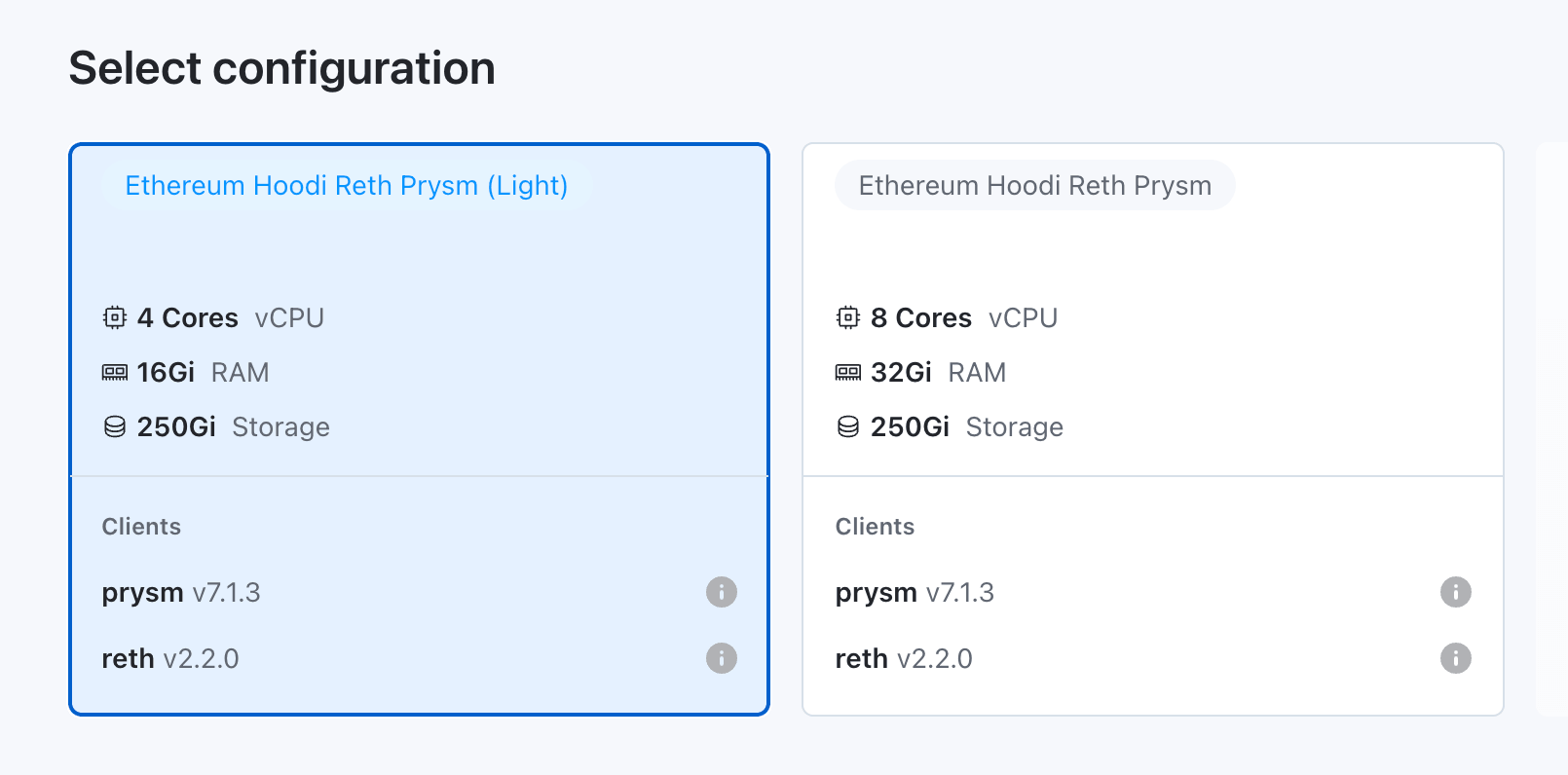
It spins up reth (execution) + prysm (consensus) pods in the control-panel-deployments namespace. The node’s RPC is a ClusterIP service (*-reth-rpc, port 8545) — internal only.
The node then syncs. reth uses staged sync (headers → bodies → sender-recovery → execution → …); eth_blockNumber stays 0x0 until the final stage, and eth_syncing returns false when caught up.
Deploy the Chainstack Cloud archive node
In the Chainstack console: create/choose a project → Deploy node → Ethereum → Hoodi → Node type: Archive → Create. Copy the HTTPS endpoint (includes the auth key).
Verify it’s archive-capable:
curl -s https://ethereum-hoodi.core.chainstack.com/<KEY> -H 'Content-Type: application/json' \
  --data '{"jsonrpc":"2.0","id":1,"method":"trace_block","params":["0x1"]}'
# returns a result (not -32601 method not found)
Configure and run eRPC
eRPC is open-source and runs from a single Docker image. Install Docker if needed (curl -fsSL https://get.docker.com | sh).
erpc/erpc.yaml:
logLevel: info
# server defaults to :4000 (RPC) and :4001 (metrics) — do NOT set server.port/metrics.port,
# the current eRPC image rejects those fields.
database:
  evmJsonRpcCache:
    connectors:
      - id: memory
        driver: memory
        memory: { maxItems: 100000 }
    policies:
      - { network: "*", method: "*", finality: finalized,   connector: memory, ttl: 0 }
      - { network: "*", method: "*", finality: unfinalized, connector: memory, ttl: 5s }
projects:
  - id: main
    networks:
      - architecture: evm
        evm: { chainId: 560048 }          # Ethereum Hoodi
        failsafe:
          - matchMethod: "*"
            timeout: { duration: 30s }
            retry:   { maxAttempts: 2, delay: 200ms }   # primary errors -> fail over to Cloud
            hedge:   { delay: 3000ms, maxCount: 1 }
    upstreams:
      - id: self-hosted-eth               # primary: local node
        endpoint: ${SELF_HOSTED_RPC_URL}
        evm: { chainId: 560048 }
        ignoreMethods: ["trace_*", "debug_*"]   # archive-only methods never hit the full node
        failsafe: [{ matchMethod: "*", timeout: { duration: 10s } }]
      - id: chainstack-cloud-eth          # archive + failover
        endpoint: ${CLOUD_RPC_URL}
        evm: { chainId: 560048 }
        tags: ["tier:fallback"]
        failsafe: [{ matchMethod: "*", timeout: { duration: 20s } }]
The three routing behaviors: method routing (ignoreMethods keeps trace_*/debug_* off the full node → they go to Cloud), error failover (retry promotes a request to Cloud when the self-hosted node errors, e.g. pruned old state), and finality cache (finalized results cached forever).
Note that error failover is reactive: the first read of an old block still hits the self-hosted node, burns one failed attempt plus the 200 ms retry delay, and only then gets served by Cloud. The cache absorbs repeats — a read at an old block is finalized data, so it’s cached forever after the first hit. If your workload reads old state often, declare the node’s serving window instead so eRPC routes by block height and skips the wasted attempt: set evm.blockAvailability.lower.latestBlockMinus: 10064 on the self-hosted upstream — reth’s full-node pruning keeps account and storage history for roughly the most recent 10,064 blocks. (You may also see evm.maxAvailableRecentBlocks in older configs; it’s deprecated in favor of blockAvailability.) This tutorial keeps the reactive setup because it’s simpler and it’s exactly the behavior verify.sh proves.
Run eRPC on the same box with host networking, so it reaches the node over the cluster network and the Cloud over the internet while its own ports 4000 and 4001 stay firewalled from outside. Point it at the node’s reth-rpc ClusterIP, which is routable from the k3s host (kube-proxy programs it into the host’s iptables). Prefer this over kubectl port-forward — a port-forward is a foreground process that dies on every disconnect and silently drops the self-hosted upstream:
# reth-rpc ClusterIP (stable while the node exists; re-read it if you redeploy the node)
SVC_IP=$(kubectl -n control-panel-deployments get svc -o jsonpath='{range .items[*]}{.metadata.name}{" "}{.spec.clusterIP}{"\n"}{end}' | awk '/reth-rpc/{print $2}')

cat > erpc.env <<E
SELF_HOSTED_RPC_URL=http://${SVC_IP}:8545
CLOUD_RPC_URL=https://ethereum-hoodi.core.chainstack.com/<KEY>
E

docker run -d --name erpc --restart unless-stopped --network host \
  -v $(pwd)/erpc.yaml:/erpc.yaml --env-file erpc.env ghcr.io/erpc/erpc:main
Changing an upstream URL later? docker restart erpc does not re-read --env-file — the env is fixed when the container is created. Edit erpc.env, then docker rm -f erpc and docker run … again. A plain restart leaves the old URL baked in and eRPC keeps hitting the stale endpoint.
eRPC boots with both upstreams and the network ready:
upstreamId=self-hosted-eth   ... bootstrapped evm state poller
upstreamId=chainstack-cloud-eth ... bootstrapped evm state poller
networks bootstrap completed
Test and prove the split
scripts/test-routing.sh fires representative calls; scripts/verify.sh reads eRPC’s Prometheus metrics (erpc_upstream_request_total) and asserts which upstream served each.
The archive path works immediately, even while the node is still syncing:
curl -s http://localhost:4000/main/evm/560048 -H 'Content-Type: application/json' \
  --data '{"jsonrpc":"2.0","id":1,"method":"trace_block","params":["0x1"]}'
# served via the Cloud upstream ✓
Full split (recent → self-hosted, archive → Cloud) requires the self-hosted node fully synced (eth_syncing=false) — until then eRPC treats it as unhealthy and routes everything to Cloud. Once synced:
./scripts/test-routing.sh && ./scripts/verify.sh
# PASS: recent call served by self-hosted
# PASS: archive call served by Cloud
Output from a real run, with the node at tip (eth_syncing=false):
$ curl -s http://<reth-rpc ClusterIP>:8545 -d '{"jsonrpc":"2.0","id":1,"method":"eth_syncing","params":[]}'
{"jsonrpc":"2.0","id":1,"result":false}

$ ./scripts/test-routing.sh && ./scripts/verify.sh
== recent (expect served by self-hosted) ==
{ "jsonrpc": "2.0", "id": 1, "result": "0x306a42" }
== archive method (expect served by Cloud) ==
== old-state read (expect failover to Cloud on pruned state) ==
{ "jsonrpc": "2.0", "id": 1, "result": "0x0" }

PASS: recent call served by self-hosted
PASS: archive call served by Cloud
The split is confirmed in eRPC’s own metrics: erpc_upstream_request_total{upstream="self-hosted-eth", category="eth_blockNumber",finality="realtime"} increments on recent reads, while {upstream="chainstack-cloud-eth",category="trace_block"} carries the archive calls.
Use it from your machine
Your code doesn’t have to live on the server. eRPC’s ports stay firewalled, so reach them over an SSH tunnel — encrypted, no firewall changes, and no need to bolt authentication onto eRPC:
ssh -i ~/.ssh/hoodi_key -N -L 4000:localhost:4000 root@<SERVER-IP>While the tunnel is up, anything on your machine — a bot, a script, curl — uses the hybrid endpoint as if it were local:
http://localhost:4000/main/evm/560048Add -L 4001:localhost:4001 to the same command if you also want the Prometheus metrics.
Two notes:
- Every request makes a round-trip to the server, so this is for development and testing. A latency-sensitive app belongs on the box, next to eRPC.
- Avoid opening port 4000 to the internet instead: this config has no authentication on the endpoint, so exposing it publicly hands your node — and the Cloud key behind it — to anyone who finds it.
Going further
- On mainnet / Base, the full node is bigger (2–3.5 TB NVMe) but the archive-offload savings are real — you avoid self-hosting a fast-growing archive and pay Cloud only for the slice you can’t serve. Same eRPC config, different
chainId. - The pattern generalizes to any EVM network supported by Chainstack Self-Hosted, such as Optimism, Base, Unichain, or Zora.
Conclusion
One server, two RPC upstreams, one endpoint your applications talk to. Recent traffic hits hardware you own at flat cost; archive traffic hits Chainstack Cloud and bills only for the slice your full node can’t serve. eRPC routes and caches between them without touching application code.
The full repo includes the erpc.yaml, the provisioning script, and the verification scripts referenced above. Fork it, swap chainId for your chain, and point the two endpoint env vars at your own nodes.
FAQ
A self-hosted node handles the majority of your traffic (recent state, standard reads) while a managed provider handles archive-heavy or method-specific requests, both behind a single endpoint. Applications see one URL; the router decides which upstream serves each request.
Yes, for the archive side. Chainstack Cloud provides the archive endpoint for trace_*, debug_*, and old-state reads that a full node can’t serve. The self-hosted node handles everything else at flat hardware cost.
eRPC’s retry policy promotes the request to Chainstack Cloud after the primary times out or errors. Applications keep working; the visible change is a small latency increase per request while the self-hosted node recovers. Chainstack Self-Hosted’s built-in monitoring alerts on the node, and pods restart automatically on most failure modes.
Recent-state methods (eth_call, eth_getBalance, eth_getBlockByNumber at recent blocks, eth_getLogs, transaction submission) go to the self-hosted node. Archive methods (trace_*, debug_*, deep historical state reads) go to Chainstack Cloud via ignoreMethods on the primary upstream. Edit ignoreMethods in erpc.yaml to change the split.
Not with eRPC — it routes EVM JSON-RPC only. The general pattern applies to any chain, but the router changes.
Chainstack Self-Hosted provides a Kubernetes-native control plane with automated deployment, snapshot sync, integrated monitoring (Prometheus, Grafana), and coordinated client updates. Running the same node from scratch with bash is possible; the operational overhead is what makes teams abandon self-hosting. See DIY vs Chainstack Self-Hosted for the full comparison.