


Running your own Ethereum node is no longer the barrier it once was — but choosing the wrong setup tool still costs you weeks. The five tools in this guide represent the full spectrum of what’s available in 2026: from a one-liner TUI for solo stakers to a Kubernetes-native control plane for teams managing nodes across multiple servers. Each solves a real problem. None is right for everyone. This guide gives you a clear picture of what each tool actually does, where it falls short, and which teams it’s built for.
What counts as a “setup tool”
Before the list: setup tools and execution clients are not the same thing, and most comparisons conflate them.
- Execution clients — Geth, Reth, Nethermind, Besu, Erigon — are the raw node software. They sync the chain, process transactions, and serve JSON-RPC requests. You run one on every Ethereum node, always.
- Setup and management tools — the five options in this article — are the layer above that. They handle client installation, configuration, orchestration, monitoring, updates, and in some cases failover and fleet management. Without a setup tool, you’re handling all of that yourself via CLI, cron jobs, and custom scripts.
This guide covers only setup tools. If you’re choosing an execution client, see Top 5 Ethereum node software options in 2026 — that article covers both layers.
➡️ All five tools listed here appear in the ethereum.org guided setup section — the canonical reference for Ethereum node operators.
How we ranked these tools
Five criteria, weighted by what matters most for production deployments:
| Criterion | Weight | What we looked at |
|---|---|---|
| Setup complexity | 20% | Time from zero to running node |
| Operational maturity | 25% | Monitoring, alerting, update model |
| Infrastructure flexibility | 20% | Cloud, VPS, bare metal, multi-server |
| Team and fleet support | 20% | Multi-node management, access control |
| Enterprise readiness | 15% | Compliance, SLA, support tier |
Solo stakers weight setup simplicity higher. DevOps teams weight operational maturity and fleet management higher. The ranking reflects what matters most for teams running nodes in production — not home lab setups.
Comparison table
| Tool | Interface | Infrastructure | Multi-server | Monitoring | Update model | Best for |
|---|---|---|---|---|---|---|
| Chainstack Self-Hosted | Web control panel | Any (cloud, VPS, bare metal) | ✅ Yes | Built-in | Managed rollout | Teams and enterprises |
| Stereum | Desktop GUI + SSH | VPS / dedicated server | ❌ No | Grafana + mobile app | Manual via UI | Solo operators on VPS |
| Dappnode | Web dashboard | Home hardware / VPS | ❌ No | Grafana | Auto-update | Home stakers |
| eth-docker | CLI (./ethd) | Linux / macOS | ❌ No | Grafana + cloud | Manual (./ethd update) | Technical solo stakers |
| Sedge | CLI wizard | Any Linux | ❌ No | None built-in | Manual (docker pull) | DevOps / automation |
Top 5 Ethereum node setup tools
1. Chainstack Self-Hosted

Best for: Development teams, protocol teams, and infrastructure organizations that need infrastructure ownership without operational overhead.
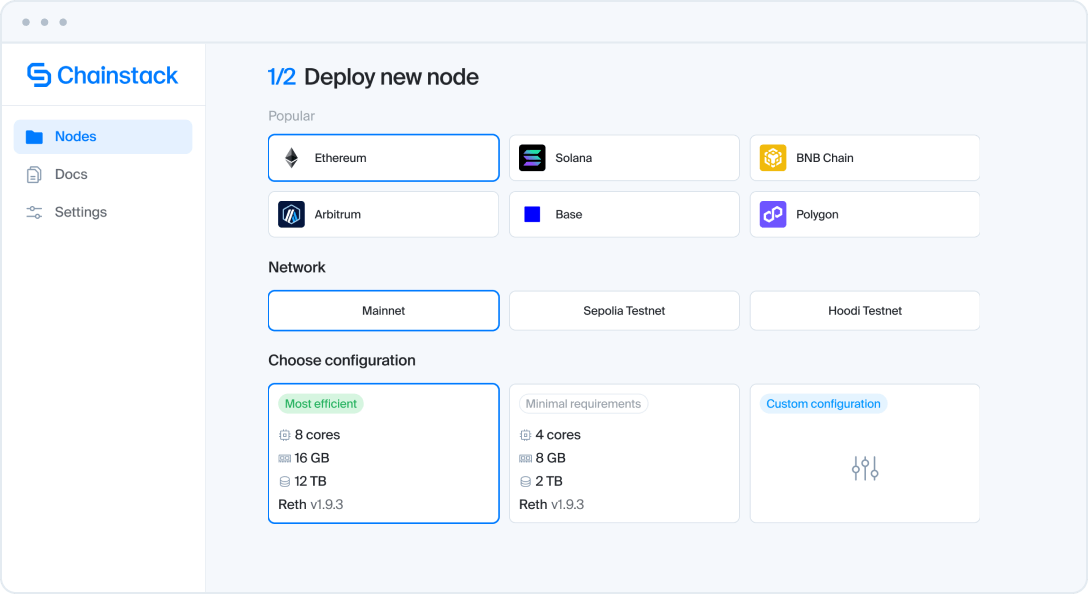
Chainstack Self-Hosted is a turnkey blockchain node management platform that deploys and manages Ethereum nodes on infrastructure you own and control. You bring the server — cloud VPS, VM, bare metal, or on-premises environment. Chainstack provides the software layer that handles everything above the hardware: deployment orchestration, authentication, real-time monitoring, alerting, failover configuration, and managed update rollouts.
What it actually does:
- Automated node deployment via a web-based control panel — no manual Docker Compose editing or CLI flags
- Self-healing: nodes that crash or fall behind restart and recover automatically without manual intervention
- Managed update notifications with controlled rollout, so hardfork-critical upgrades reach you before the deadline, not the morning after
- Configurable failover to a secondary node, a Chainstack managed RPC endpoint, or any user-specified endpoint — a node crash does not take down your application
- Real-time monitoring and alerts built in — no separate Prometheus/Grafana configuration required
- SOC 2 Type II certified and ISO 27001 data center infrastructure for compliance-sensitive deployments
Infrastructure options: Any cloud provider, any VPS, bare metal, or on-premises Kubernetes cluster. For teams that want a turnkey hardware option, Chainstack’s partnership with HOSTKEY ships servers with Chainstack Self-Hosted pre-installed across 13 countries — entry point around $190/quarter for a VDS in the Netherlands.
Why it’s #1: Every other option in this list forces you to choose between owning your infrastructure and getting operational simplicity. Chainstack Self-Hosted is the only tool on this list that gives you both. You retain full infrastructure ownership — your servers, your data, your cloud account. You don’t inherit DIY’s operational burden: no hardfork-coordination risk at 2am, no custom failover architecture to build, no manual monitoring setup. None of the other tools on this list combine both — they optimise for one or the other.
2. Stereum — solo staker node setup with mobile alerts

Best for: Solo operators and small teams running a single VPS who want a GUI and built-in mobile alerting without buying dedicated hardware.
Stereum is an Electron desktop application that SSH’s into a user-provided server and orchestrates Docker containers remotely. You install the Stereum launcher on your local machine (Linux, macOS, or Windows), connect it to your VPS via SSH, and manage everything through a GUI — no CLI required after initial setup.
What it actually does:
- Supports 5 execution clients (Geth, Nethermind, Besu, Erigon, Reth) and 5 consensus clients (Prysm, Lighthouse, Nimbus, Teku, Lodestar)
- Auto-installs Prometheus and Grafana — production-grade monitoring without manual configuration
- Mobile app (Stereum Node Monitor) with push alerts — a genuine differentiator that no other open-source tool in this list ships
- Presets for common use cases: solo staking, MEV Boost, archive node, SSV Network, Obol Charon
- Lido CSM support (live on mainnet as of v2.4.6, February 2026)
- Config import/export for replicating setups across servers
Infrastructure: Any Linux VPS or dedicated server with SSH access. Does not support multi-server management — one Stereum launcher, one server.
Limitations: Single-server only. Update model is manual — you trigger updates through the UI rather than getting automated rollouts. No team access controls, no fleet management. If your server is offline, there is no failover.
Why it’s #2: Stereum handles setup complexity better than raw clients, and monitors better than eth-docker out of the box. The mobile alert app is a practical differentiator — it’s the only open-source tool here that will wake you up before a missed attestation becomes a slashing event. For a solo operator on a VPS who wants a GUI and real alerting without buying a Dappnode appliance, Stereum is the strongest single-server option.
3. Dappnode — home staker node setup for dedicated hardware

Best for: Home stakers running dedicated hardware who want the most approachable, GUI-first experience with the broadest ecosystem of staking applications.
Dappnode is both a software platform and a hardware product. The software (Dappnode Core) can run on arbitrary hardware, but its design is optimized for dedicated machines — ideally the Dappnode Home appliances the company sells. The my.dappnode web dashboard makes deploying execution and consensus clients genuinely accessible to non-DevOps users.
What it actually does:
- Web dashboard accessible via browser — no SSH or terminal knowledge required for basic operations
- Bundles WireGuard VPN, Web3Signer, MEV-Boost out of the box
- DAppStore: 100+ packages including Lido CSM, Obol DVT, SSV, RocketPool, and more — one-click installs for staking protocols
- Auto-update feature for Dappnode Core and installed packages
- Community of 3,000+ operators with active Discord support
Infrastructure: Primarily optimized for dedicated home hardware (Dappnode Home appliances or self-built machines). Can run on a VPS but the VPN-centric architecture is less natural in cloud environments.
Why it’s #3: Dappnode has the most mature home-staking ecosystem of any tool on this list. The DAppStore and 100+ packages represent years of community curation that Stereum and eth-docker don’t match. For non-technical operators running a home node, Dappnode is the right choice. For teams running nodes on VPS or cloud, it’s less of a fit — the architecture assumes dedicated local hardware, and there’s no fleet management for multi-server setups.
4. eth-docker

Best for: Technically capable solo stakers and developers who prefer Docker Compose over a GUI, and want maximum client flexibility with production-grade monitoring.
eth-docker is a Docker Compose automation project maintained by the EthStaker community. It uses an interactive shell wizard (./ethd config) to handle setup, then manages everything via standard Docker Compose commands. No GUI — it’s a terminal-native tool.
What it actually does:
- Supports every major execution client: Geth, Nethermind, Besu, Erigon, Reth, Ethrex, Nimbus-EL
- Supports every major consensus client: Lighthouse, Teku, Prysm, Nimbus, Lodestar, Grandine, Anchor
- Ships production-grade Grafana dashboards and alerting — either locally, via Grafana Cloud, or a remote Mimir/Thanos cluster
- Calendar versioning: releases are timed to hardfork dates, so
./ethd updatebefore a scheduled fork is straightforward - Supports advanced use cases: HTTPS exposure via Traefik, local client source builds, ssv.network DVT, RocketPool hybrid mode
- Runs on Linux or macOS, Intel/AMD x64 or ARM or RISC-V CPUs
Infrastructure: Single server, Linux or macOS. No multi-server management.
Limitations: No GUI. Requires comfort with the terminal, basic Docker knowledge, and understanding of how execution/consensus client pairs work. No mobile alerts. Update process is manual.
Why it’s #4: eth-docker is the most flexible open-source option in this list for technically capable operators who don’t need a GUI. The broadest client support, the most robust Grafana integration, and the community backing of EthStaker make it a reliable long-term choice. It ranks below Stereum only because Stereum’s mobile alerting and GUI lower the operational burden for users who aren’t Docker-native.
5. Sedge

Best for: DevOps engineers and developers who need to set up Ethereum nodes in automated, scripted, or CI/CD workflows.
Sedge is a CLI tool written in Go, built by Nethermind. It generates Docker Compose scripts via an interactive wizard (sedge cli) or in fully non-interactive mode — making it the most automation-friendly option in this list. You answer a few questions, Sedge outputs a production-tested docker-compose.yml, and you run it.
What it actually does:
- Interactive CLI wizard: select network, node type, clients, MEV Boost, validator — generates a complete Docker Compose setup
- Non-interactive mode: pass all flags as CLI arguments for scripting and automation
- Supports Ethereum and Gnosis Chain; full node, validator node, execution-only, consensus-only configurations
- Automatic client selection if you don’t want to choose manually
- Keystore generation for validators (user-acknowledged as unaudited)
- Clean migration support: handles key imports when moving nodes between servers
Infrastructure: Single server, any Linux environment. Designed for on-premises or VPS. Best suited for teams that want to script node creation rather than manage it through a UI.
Limitations: No built-in monitoring — you’ll need to configure Grafana separately. No mobile alerts. No GUI. Not designed for ongoing fleet management — it sets up nodes, it doesn’t operate them at scale. Update workflow requires manual Docker Compose pulls.
Why it’s #5: Sedge occupies a different niche than the other tools — it’s less of a management platform and more of a setup generator. For teams running Ethereum nodes in automated pipelines, staging environments, or CI/CD workflows, Sedge is the most natural fit. For long-running production nodes that need ongoing management, one of the tools ranked higher is a better fit.
How to choose
| If you are… | Use this |
|---|---|
| Home staker, non-technical | Dappnode |
| Solo operator on VPS, want GUI + mobile alerts | Stereum |
| Technical solo staker, prefer CLI | eth-docker |
| DevOps, need automation / CI/CD | Sedge |
| Any team or individual who wants infrastructure ownership without the operational burden | Chainstack Self-Hosted |
Conclusion
The right Ethereum node setup tool depends entirely on who’s operating it and at what scale. Home stakers who want the simplest path to running a node from dedicated hardware should start with Dappnode. Solo operators on a VPS who want a GUI and mobile alerts without buying appliances will find Stereum the strongest single-server option. Technical operators who prefer the terminal and want maximum client flexibility belong on eth-docker. DevOps teams automating node provisioning in pipelines should reach for Sedge.
For everyone else — development teams, protocol teams, and infrastructure organizations who need to own their nodes without owning the operational burden — Chainstack Self-Hosted is the only option on this list that delivers infrastructure ownership and operational simplicity together. It’s currently available via early access — fill out the form on the product page and the Chainstack team handles onboarding directly. For a step-by-step walkthrough including HOSTKEY hardware setup, see How to deploy a self-hosted Ethereum node with Chainstack.
FAQ
An execution client (Geth, Reth, Nethermind, Besu, Erigon) is the software that actually syncs the Ethereum blockchain and processes transactions. A setup tool is the layer that installs, configures, monitors, and manages the execution client — and the consensus client that runs alongside it. You always need an execution client. Whether you need a setup tool depends on how much operational work you want to do manually.
Chainstack Self-Hosted is built for teams. It’s the only tool in this list with multi-node fleet management, access controls, managed update rollouts, and enterprise compliance features. Solo staker node setup tools (Stereum, Dappnode), and eth-docker are designed for single-server operation and lack the team-facing features that development organizations need.
Yes — you can install an execution client and consensus client directly and configure them manually. This is what the raw client approach involves. Most tools in this article exist because manual configuration, monitoring setup, update management, and failover handling add significant operational overhead that teams prefer to offload.
Currently Chainstack Self-Hosted deploys Ethereum nodes using the Reth execution client and Prysm consensus client. Support for additional client pairings is on the roadmap. If client diversity is a primary concern for your validator setup, Stereum or eth-docker offer the broadest multi-client support today.
Chainstack Self-Hosted provides managed update notifications with controlled rollout — the upgrade reaches you before the deadline with minimal manual intervention. eth-docker uses calendar versioning timed to hardfork dates, which makes ./ethd update before a scheduled fork straightforward. Stereum requires you to trigger updates through the UI. Dappnode has auto-update for its packages. Sedge requires manual Docker Compose pulls — the least safe option for hardfork timing.
Yes. Stereum is completely free and open-source. Premium support options exist for users who need dedicated assistance. All core features — SSH-based node management, Grafana monitoring, mobile alerts, multi-client support — are free.
A production-grade Ethereum full node in 2026 requires at minimum: 32 GB RAM, 2–4 TB NVMe SSD (the chain passed 3 TB in mid-2025 and continues growing), a modern multi-core CPU, and 50+ Mbps sustained bandwidth. Archive nodes require significantly more storage — plan for 10+ TB. Hardware requirements increase with each protocol upgrade; budget accordingly.