


TL;DR
Polymarket is a decentralized prediction market built on Polygon where real-world events are turned into tradable probability markets. Through the Polymarket API, developers can access market data, trading infrastructure, and settlement systems programmatically. Users buy and sell outcome tokens priced between 0 and 1, reflecting the market’s current belief about what will happen. Under the hood, the platform combines an off-chain order book for fast matching with on-chain settlement using the Conditional Token Framework, while UMA’s oracle handles final resolution. For developers, this creates a clean system where market data, trading, and settlement are all accessible through well-defined APIs and standard EVM tooling.
From a builder’s perspective, the platform is split into clear layers. Gamma API provides public market discovery, the CLOB powers trading and order execution, the Data API exposes user-level analytics, and WebSockets handle real-time updates. You can go from fetching markets to placing and tracking orders with just a wallet, API credentials, and a Polygon RPC endpoint. The workflow is straightforward, fetch a market, inspect liquidity, sign and submit a limit order, and monitor both off-chain status and on-chain settlement events.
The result is a flexible foundation for building trading bots, analytics dashboards, or entirely new interfaces on top of prediction markets. With low fees, fast confirmation times, and transparent on-chain data, Polymarket turns global sentiment into something developers can query, analyse, and act on programmatically, while still carrying the usual risks of trading, liquidity constraints, and oracle-based resolution.
What is Polymarket?
Polymarket is a decentralised, non-custodial prediction market deployed on Polygon PoS. For developers, the platform is accessible through the Polymarket API, which provides market data, trading infrastructure, and analytics endpoints.
Users trade binary outcome tokens denominated in USDC.e, with prices from $0 to $1 backed by the current market sentiment. Trades execute peer-to-peer through a hybrid off-chain order book (CLOB) and on-chain settlement using the Conditional Token Framework (CTF, ERC-1155). Markets settle transparently via UMA’s Optimistic Oracle, ensuring outcomes match collective consensus.
Markets span across various breaking news globally like elections (US presidential races), the future of nations, war, policy decisions, major sports (Super Bowl, Olympics, World Cup), finance and crypto milestones, cultural awards or natural events. This gives users an opportunity to make predictions, hedge risks, or simply track what the world believes will happen next with fast, low-cost, verifiable on-chain transactions on Polygon.
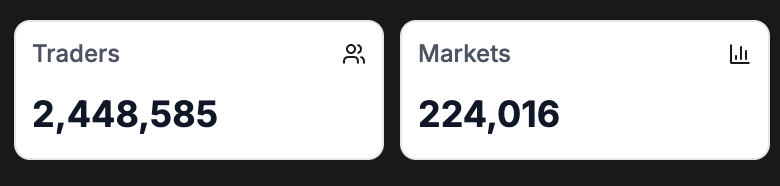
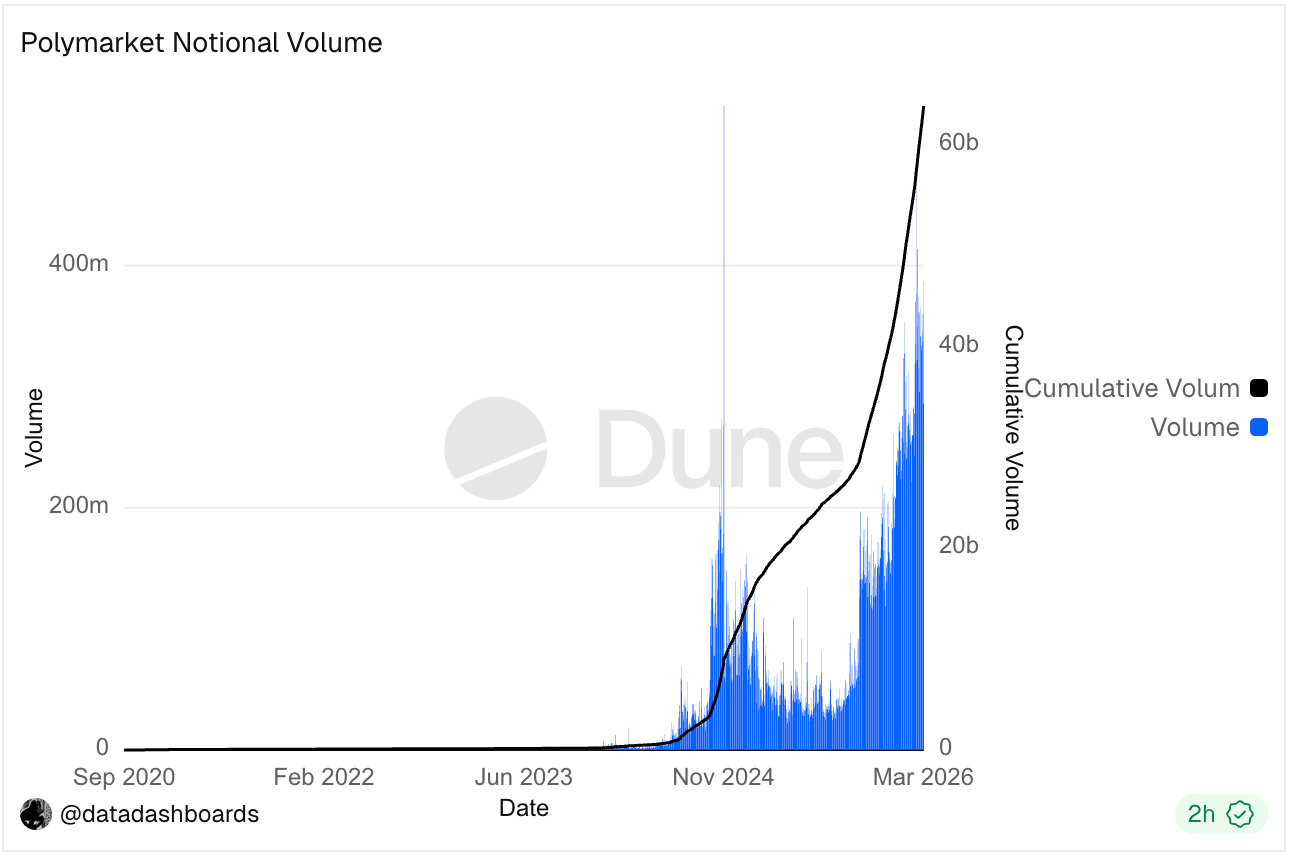
Polymarket has over 2.4 million traders across 214,735 markets, with approximately $62 billion in total trading volume.


The platform is the official prediction market partner of X (formerly Twitter), with Polymarket outcomes displayed alongside Grok analysis and live X posts, merging social data with market signals.
In October 2025, Intercontinental Exchange, the parent company of the NYSE, invested $2 billion in Polymarket, valuing the platform at $9 billion.
Polygon PoS Architecture
➡️ If you are already familiar with the architecture, skip to “Step-by-Step Guide” section below
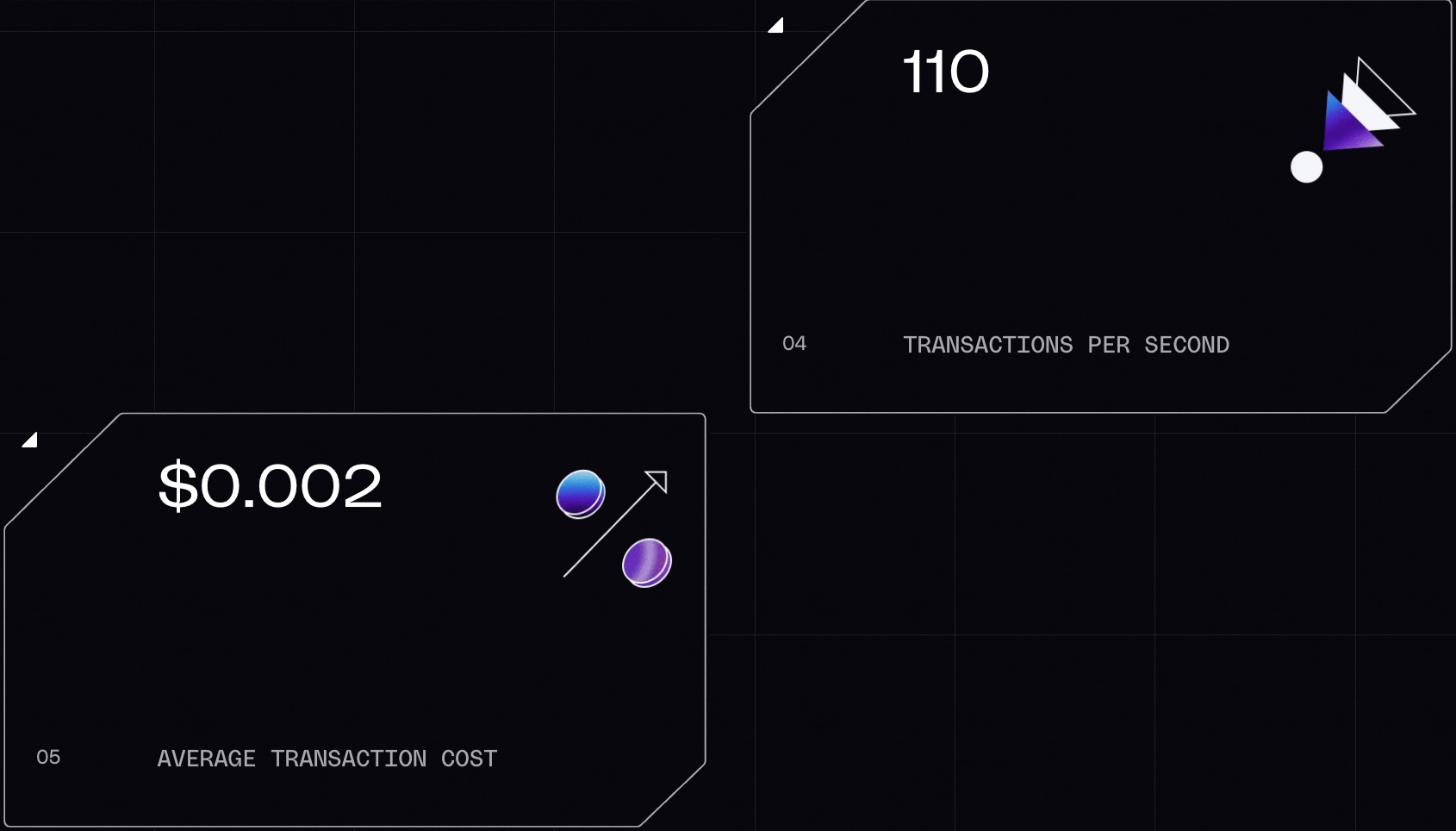
Before exploring Polymarket, it helps to understand how Polygon, the settlement layer for the platform, enables ultra-fast transactions at very low costs. Polymarket’s smart contracts, including the CTF Exchange, the Conditional Token Framework, and USDC, all run on Polygon PoS (Chain ID 137), which provides the foundation for building trading systems, event listeners, and data pipelines on the platform with real-world throughput of ~110 transactions per second, 6.4B+ total transactions processed, an average transaction cost of ~$0.002, and 159M+ unique wallet addresses. For reliable RPC access to Polygon when building on Polymarket, Chainstack provides managed nodes with low-latency endpoints.
When building applications that interact with the Polymarket API, reliable Polygon RPC access is essential for monitoring contracts, tracking trades, and submitting transactions.

Polygon PoS operates with a dual-layer architecture. The two layers are Heimdall and Bor.

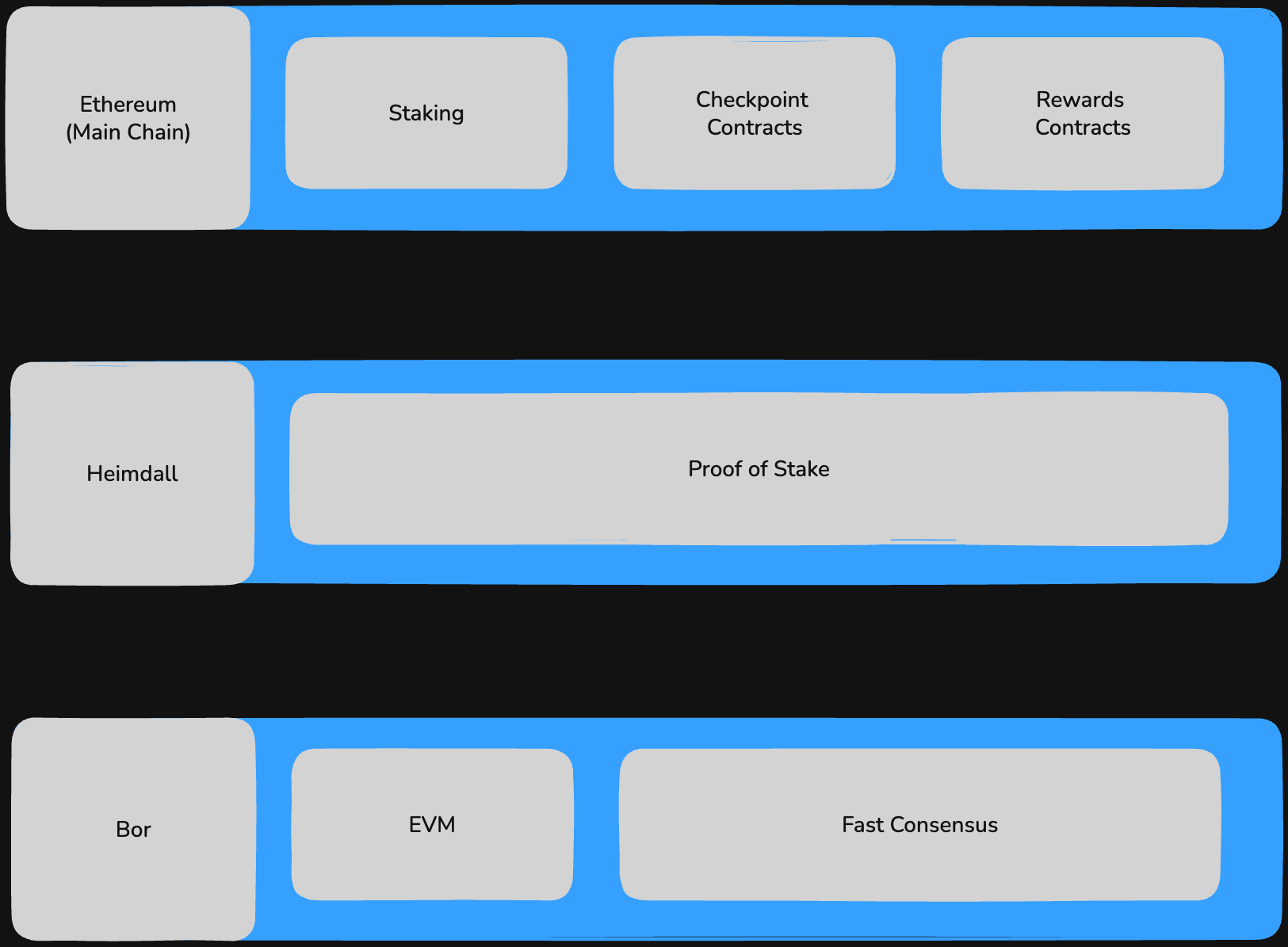
Heimdall-v2: Validator layer
Heimdall is a proof-of-stake validation layer built on top of CometBFT. It performs two primary functions:
- monitors staking contracts deployed on Ethereum mainnet & manages the validator set
- periodically commits checkpoints to Ethereum
ℹ️ A checkpoint is a Merkle root of all Bor block hashes within a given interval. Validators collectively sign the checkpoint; a proposer (selected by stake weight) submits it to the Ethereum root chain contracts. Checkpoints occur approximately every 30 minutes. Once a Polygon transaction’s checkpoint reaches Ethereum, that transaction achieves full L1 finality.
Bor: Block producer layer
Bor is an EVM-compatible block production layer based on Go Ethereum (Geth) with custom consensus modifications. Block producers are a subset of validators selected by Heimdall at regular intervals in units called spans and sprints. A span is a long window of blocks (6,400 blocks) divided into 100 sprints of 64 blocks each. Within a sprint, a single validator produces all blocks. Bor operates with 2-second block times and EVM compatibility, meaning Solidity contracts, ethers.js, viem, and Foundry all work without modification.
All Polymarket on-chain events like OrderFilled, PositionsMerged & ConditionResolution
are emitted on Bor:
Soft finality: ~ 2 sec/Bor block. Eg: trading bots to confirm fills
Full L1 finality: ~ 30 mins/Ethereum checkpoint. Eg: withdrawals to Ethereum
Polygon PoS uses POL as its gas token (migrated from MATIC in 2024). Polymarket contracts are deployed at known addresses on Polygon, and all interactions require a small amount of POL for gas, typically under $0.01 per transaction.
Polymarket API Architecture
The Polymarket API exposes distinct endpoints for different layers:
- Gamma: Market discovery
- CLOB: Trading engine
- Data: Users & analytics
- WebSocket: Real-time streaming
Gamma (market discovery)
All market data is available through public REST endpoints. No API key, no authentication, no wallet required.
<https://gamma-api.polymarket.com/events?limit=5>
Data Model
Polymarket structures data using two models:
- Event: A top-level object representing a question. Contains one or more markets.
<https://gamma-api.polymarket.com/events>
- Market: A specific tradable binary outcome within an event. Maps to a pair of CLOB token IDs, a market address, a question ID, and a condition ID.
<https://gamma-api.polymarket.com/markets>
Events are further structured in two ways:
Single-Market Events: One market represents a single binary outcome
Multi-Market Events: Two or more markets forms grouped market pair with distinct outcomes across mutually exclusive possibilities.
Eg: This multi-market event consists of multiple markets, each with a Yes/No outcome for a specific price threshold of Crude Oil (CL) by the end of March.
To discover events via the /events endpoint, common parameters can be used to filter and sort the desired results
| Parameter | Description |
|---|---|
limit | Maximum number of results returned (pagination) |
offset | Number of results to skip (pagination) |
order | Sort field: volume24hr, startDate, endDate |
ascending | Sort direction: true ascending, default false |
tag_id | Filter by tag ID |
tag_slug | Filter by tag slug instead of ID |
active | Filter to only active (unresolved) results |
closed | Filter to only closed/resolved results |
archived | Filter archived events |
Eg: Get the first 100 active events with the highest 24-hour trading volume
<https://gamma-api.polymarket.com/events?active=true&closed=false&order=volume24hr&ascending=false&limit=100>
Each market has outcomes & outcomePricesarrays that map 1:1. Prices represent implied probabilities:
{
  "outcomes": "[\\"Yes\\", \\"No\\"]",
  "outcomePrices": "[\\"0.20\\", \\"0.80\\"]"
}
// Index 0: "Yes" → 0.20 (20% probability)
// Index 1: "No" → 0.80 (80% probability)
Outcome tokens are ERC-1155 assets on Polygon using the Gnosis Conditional Token Framework, they are fully on-chain standard ERC-1155 tokens. Every YES/NO pair in existence is backed by exactly $1 of USDC.e collateral locked in the CTF contract (0x4D97D...76045).
ℹ️ Markets are tradable via the CLOB only if
enableOrderBookistrue. Always check this field before assuming a market has live liquidity.
CLOB trading engine
The CLOB API is the core trading component of the Polymarket API, responsible for order books, order matching, and trade execution. The system is hybrid-decentralized: an off-chain operator performs order matching with Exchange contract (audited by Chainsecurity), while settlement executes on-chain through signed EIP-712 messages.
<https://clob.polymarket.com/>
Polymarket’s CLOB APIs can be interacted with:
SDK Client: https://docs.polymarket.com/api-reference/clients-sdks
REST API: https://docs.polymarket.com/api-reference/introduction
❓ How to choose?
If you want the fastest path from zero to a live order, use SDK. It handles EIP-712 struct hashing, HMAC header construction, nonce management. Available in Typescript, python & rust.
Use REST if you are in a language without an official client, or if you need to separate key material from execution logic, or are building a trading system with a custom signing server.
Setup the Client
To interact with the CLOB easily, you can use the official client SDK. The client needs three things at init: the CLOB host, the chain ID (137 for Polygon), and a signer. The signer is your EOA wallet, used later to sign orders and derive API credentials.
import { ClobClient } from '@polymarket/clob-client';

const client = new ClobClient(
  '<https://clob.polymarket.com>',
  137,
  wallet.signer // your wallet used for signing & auth
);
Orderbook
The order book consists of an array of all active buy (bids) and sell (asks) orders for a market. It is the core primitive for price of tokens.
- Bids: Buyers willing to pay (highest price = strongest demand)
- Asks: Sellers willing to sell (lowest price = cheapest supply)
- Spread: The gap between them
The token_id you pass here comes from the Gamma API: it is the numeric identifier for a YES or NO outcome within a specific market.
const book = await client.getOrderBook('<token-id>');

console.log("Best bid:", book.bids); // [{ price: '0.62', size: '500' }, ...]
console.log("Best ask:", book.asks[0]);
console.log("Tick size:", book.tick_size); // will need later for creating order
To fetch the same data via REST:
const res = await fetch(
`https://clob.polymarket.com/book?token_id=<token-id>`
);

const book = await res.json();

console.log("Best bid:", book.bids[0]);
console.log("Best ask:", book.asks[0]);
console.log("Tick size:", book.tick_size);
ℹ️ The orderbook endpoint is public so it does not require authentication.
Authentication
Order placement must be extremely fast on Polygon. Signing every request with a wallet would be slow. Instead the platform uses L1 and L2 authentication layers.
L1: Wallet authentication
These methods prove you control an Ethereum/Polygon wallet. It requires a signer with a private key because they must sign a message. No gas is spent, a set of credentials bound to your wallet address are created/derived using the following methods
createApiKey()deriveApiKey()createOrDeriveApiKey()
const creds = await client.createOrDeriveApiKey();
With REST APIs, you construct and sign the EIP-712 typed data manually, then POST the result to /auth/api-key. The four required headers carry your wallet address, the signature, and a nonce used to prevent replay attacks.
const nonce = Date.now();
const sig = await wallet.signTypedData(domain, types, { nonce });

const res = await fetch('<https://clob.polymarket.com/auth/api-key>', {
  method: 'POST',
  headers: {
    'POLY_ADDRESS': wallet.address, // Polygon signer address
    'POLY_SIGNATURE': sig, // CLOB EIP-712 signature
    'POLY_NONCE': String(nonce), // Current UNIX timestamp
    'POLY_TIMESTAMP': String(nonce), // Nonce (default: 0)
  },
});
const { apiKey, secret, passphrase } = await res.json(); // will need all three in L2
L2: Authenticated trading
Once you have an API key, the system switches to API credentials generated in L1 instead of wallet signatures. The SDK computes and attaches this automatically once you pass credentials to the constructor, You never call a login endpoint or manage tokens.
const authedClient = new ClobClient(
  '<https://clob.polymarket.com>',
  137,
  wallet.signer,
  creds // API credentials from L1
);
Alternatively, for REST APIs, each request must include signed headers derived from your API key:
'POLY_ADDRESS': address, // Polygon signer address
'POLY_API_KEY': apiKey, // User’s apiKey received in L1 Auth
'POLY_PASSPHRASE': passphrase, // User’s passphrase received in L1 Auth
'POLY_SIGNATURE': signature,// HMAC signature for request
'POLY_TIMESTAMP': String(Date.now()), // Current UNIX timestamp
Orders
All orders are EIP-712 typed data structs signed client-side before submission. When you call createAndPostOrder, the SDK builds the struct, signs it with your wallet, and POST it to the CLOB operator. The operator verifies the signature, checks your balance and allowance, and either matches the order immediately or places it on the book. If matched, the operator submits a settlement transaction to the CTF Exchange on Polygon.
Order Types
All orders on Polymarket are limit orders. Order types define how those orders are executed once submitted.
- GTC: Good-Till-Cancelled
- Rests on the order book at a specified price
- Remains active until fully filled or manually cancelled
- Also cancelled if your balance becomes insufficient
- Eg: Standard limit orders and passive trading strategies
- GTD: Good-Till-Date
- Same as GTC, but with a predefined expiration time
- Automatically cancelled at a specified Unix timestamp
- Eg: Time-bound or event-driven trades
- FOK: Fill-Or-Kill
- Executes immediately against available liquidity
- Must be filled completely or is cancelled entirely
- No partial fills allowed
- Eg: All-or-nothing execution when precision matters
- FAK: Fill-And-Kill
- Executes immediately against the order book
- Fills whatever portion is available
- Cancels any remaining unfilled amount
- Eg: When partial fills are acceptable, but you don’t want resting orders
Before placing an order, all conditions below must hold before the operator accepts an order. Verify all before your first order:
- Valid Signature: Order must be correctly signed (EIP-712)
- Balance: Sufficient USDC.e for buys, or outcome tokens for sells:
0x2791B...84174 - Allowance: CTF Exchange approved to spend your USDC.e and tokens:
[0x4bFb4...982E](<https://polygonscan.com/address/0x4bFb41d5B3570DeFd03C39a9A4D8dE6Bd8B8982E>)- via client :
client.setAllowances()
- via client :
- API Credentials: Valid L2 API key, secret, and passphrase generated from the L1 step
Create Order
The price field is the implied probability expressed as a decimal
0.62means you are willing to pay $0.62 per share (62% probability)sizeis the USDC.e notional you want to spend or receivetickSizein the options object must match the market’s tick size returned by /book above- get tickSize from client:
client.getTickSize('<token-id>') - get tickSize from REST:
/tick-size, pass<token-id>
- get tickSize from client:
- Set
negRisk: trueonly ifmarket.neg_riskistruereturned by /book above. These route through0xC5d56...0f80a- get negRisk from client:
client.negRisk('<token-id>') - get negRisk from REST:
/neg-risk, pass<token-id>
- get negRisk from client:
import { Side, OrderType } from '@polymarket/clob-client';

const order = await client.createAndPostOrder(
  {
	  tokenID: '<yes-token-id>', price: 0.62, side: Side.BUY, size: 50 },
  { tickSize: '0.01', negRisk: false },
   orderType?: OrderType.GTC | OrderType.GTD, // Defaults to GTC
);
console.log(resp.orderID); // will need later in getOrder
With REST, you build and sign the order struct yourself. The signed order is posted as a JSON body alongside the L2 auth headers.
async function createOrder() {
  const signedOrder = await buildAndSignOrder();

  const body = {
    order: signedOrder,
    owner: API_OWNER, // UUID of the API key owner
    orderType: "GTC",
    "deferExec": false
  };

  const res = await fetch(`${CLOB_URL}/order`, {
    method: "POST",
    headers: {
      "Content-Type": "application/json",
      ...l2Headers("POST", "/order", JSON.stringify(body))
    },
    body: JSON.stringify(body)
  });

  const data = await res.json();

  console.log("Order ID:", data.orderID);
}
Track Order
getOrder queries the off-chain CLOB state and returns the current status and fill amount. This is the fastest way to check what happened to an order. For final on-chain confirmation that the settlement transaction landed on Polygon, listen for OrderFilled events on the CTF Exchange contract (covered in the step-by-step guide below). The two sources are complementary: CLOB gives you speed, the chain gives you finality.
const order = await client.getOrder('<order-id>'); // received above in createOrder
console.log(order.status); //(see "Order Status" section below )
console.log(order.size_matched); // USDC.e notional filled so far

// All resting orders for this wallet
const open = await client.getOpenOrders();
With REST, pass the order ID as a path parameter with L2 headers attached:
const orderId = '<order-id>';
const res = await fetch(
  `https://clob.polymarket.com/order/${orderId}`,
  { headers: l2Headers('GET', `/order/${orderId}`) }
);
const order = await res.json();
console.log(order.status, order.size_matched);
Order Status
Once the order is placed, the operator continuously runs a matching engine that pairs compatible orders. When a buy order at price X crosses with a sell order at price ≤ X, a match is found. The operator constructs a transaction using both signed orders and submits it to the on-chain exchange contract. The off-chain matching is what enables low-latency execution, no on-chain gas cost per order attempt.
The status returned immediately after submission indicates how the operator handled your order:
live: Order is resting on the book and waiting to be matchedmatched: Order matched immediately on submission; settlement is in progressdelayed: Marketable order placed into a short delay window (~3 seconds, sports markets only) to prevent information advantageunmatched: Marketable order was not matched during the delay and is now resting on the book
Trade Statuses
Once matched, the settlement transaction moves through Polygon independently of the CLOB.
The operator constructs a transaction using both signed orders and submits to Polygon via the executor. The CTF Exchange contract on Polygon verifies both order signatures, checks that combined conditions are satisfied (price, size, allowance), and performs an atomic swap: USDC moves from the buyer’s wallet, outcome tokens move from the seller’s wallet or are minted.
MATCHED: Trade has been matched and sent for on-chain submissionMINED: Transaction is included in a Polygon (Bor) blockCONFIRMED: Transaction finalized successfullyRETRYING: Submission failed and is being retriedFAILED: Transaction failed permanently
If CONFIRMED, the transaction lands on Bor in approximately 2 seconds. The contract emits OrderFilled, which is the definitive on-chain record of the trade.
After the real-world event concludes, markets resolve via UMA’s Optimistic Oracle (0xCB1822...5130), connected to Polymarket via the UMA Adapter (0x6A9D22...F74).
- A price request is created when the market is initialized
- A proposer submits the outcome after the event ends
- A challenge window (~2 hours) allows disputes
If undisputed:
- Outcome is accepted
- Condition is resolved on-chain
If disputed:
- Escalates to UMA’s Data Verification Mechanism (DVM)
- Token holders vote on the final outcome
Once resolved:
- Winning tokens can be redeemed via
redeemPositions()on the CTF contract. - Payout:
- Winning tokens: $1 per token
- Losing tokens: $0, worthless
One such successful resolution as mentioned by UMA Protocol, co-founder:
Resolution via Chainlink
For short-duration markets (e.g., 15 minute crypto prices):
- Uses Chainlink Data Streams + Automation
- Resolves automatically on-chain
- Skips UMA entirely
Data
The Data API is part of the Polymarket API and focuses on user-level activity and analytics, helping retrieve structured data for tracking positions, performance, and historical activity.
<https://data-api.polymarket.com/>Used when building dashboards, analytics pipelines, or monitoring systems:
- User Positions: Current holdings across markets, including outcome tokens and exposure
- Trade History: Executed trades with timestamps, prices, and sizes
- PnL Data: Realized and unrealized profit and loss across positions
- Activity Feeds: A record of actions tied to a wallet, useful for tracking strategies over time
Eg: Fetch user positions
const res = await fetch(
  `http://data-api.polymarket.com/positions?user=<wallet-address>`
);

const positions = await res.json();
console.log(positions);
Eg: Fetch trade history
const res = await fetch(
  `http://data-api.polymarket.com/trades?user=<wallet-address>`
);

const trades = await res.json();
console.log(trades);
This layer becomes important once you move beyond placing trades and start analyzing how those trades are performing over time.
WebSocket
The Polymarket API WebSocket layer delivers real-time updates over persistent connections. For market-making systems and analytics dashboards, WebSocket eliminates polling.
| Channel | Endpoint | Data |
|---|---|---|
| Market | wss://ws-subscriptions-clob.polymarket.com/ws/market | Book snapshots, tick updates, last trade price |
| User | wss://ws-subscriptions-clob.polymarket.com/ws/user | Order fills, status changes, cancellations |
| Sports | wss://sports-api.polymarket.com/ws | Live sports market data |
| RTDS | wss://ws-live-data.polymarket.com | Real-time data service institutional feed |
Eg: Real-time market updates
const ws = new WebSocket(
  'wss://ws-subscriptions-clob.polymarket.com/ws/market'
);

ws.addEventListener('open', () => {
  ws.send(JSON.stringify({
    type: 'market',
    assets_ids: ['<yes-token-id>'],
  }));
});

ws.addEventListener('message', (event) => {
  const msg = JSON.parse(event.data);
  console.log(msg);
});
Eg: Real-time user updates
const ws = new WebSocket(
  'wss://ws-subscriptions-clob.polymarket.com/ws/user'
);

ws.addEventListener('open', () => {
  ws.send(JSON.stringify({
    type: 'user',
    // requires L2 auth headers handled separately
  }));
});

ws.addEventListener('message', (event) => {
  const msg = JSON.parse(event.data);
  console.log(msg);
});
ℹ️ If an authenticated client goes inactive, Polymarket’s server cancels all open orders for that session. Production bots must implement a heartbeat signal to maintain active session status. See more: real-time-data-client library
Polymarket API step-by-step integration guide
This Polymarket API step-by-step integration guide takes a project from a blank directory to a working Polymarket trading client.
- Set up a Polygon wallet. Generate an EOA private key using ethers.js or viem. Fund the wallet with a small amount of POL (gas token) for transaction fees, typically $0.01–0.10 worth covers hundreds of transactions. Export the private key as an environment variable.
- Deposit USDC to your Polymarket profile address: The profile address is the address that holds the trading balance. It corresponds to your EOA or proxy wallet. Bridge or transfer USDC (Polygon-native) to this address. Configure a Chainstack endpoint. Confirm the balance via
GET /balancevia Chainstack endpoint on Polygon. - Install dependencies.
npm install @polymarket/clob-client @ethersproject/wallet viem - Derive API credentials: Call
createOrDeriveApiKey()using your signer. - Set USDC and CTF allowances. Run
client.setAllowances()once before placing any orders. This sends two transactions to Polygon: one approving the CTF Exchange to spend USDC, one approving the CTF contract. These approvals persist until explicitly revoked. Confirm withclient.getAllowances(). - Fetch a market from Gamma.: Call
GET <https://gamma-api.polymarket.com/markets?active=true&limit=5>. Pick a market. Record itsconditionIdand thetoken_idfor the YES outcome token. Verify it is active and has volume above your minimum threshold. - Query the order book: Call
client.getOrderBook('<token-id>'). Inspect the spread, negRisk, tickSize, depth at various price levels, and midpoint. Confirm the market has sufficient liquidity for your intended order size before placing. - Place a limit order: Call
client.createAndPostOrder()with the token ID, price, size, andOrderType.GTC. Confirm the response contains a validorderID. Check order status viaclient.getOrder('<order-id>'). - Subscribe to real-time updates: Open a WebSocket to the market channel and subscribe to the token ID. Confirm you receive a full book snapshot on connect followed by incremental updates. For fill notifications, subscribe to the user channel with your API credentials.
- Connect a Polygon RPC for on-chain monitoring: Use the configured Chainstack endpoint. Set up a
watchContractEventlistener on the CTF Exchange forOrderFilledevents filtered to your wallet address. This is the definitive on-chain confirmation of a trade.
Once all the steps are complete, you can build a range of apps on top of polymarket from simple analytics to find winner wallets to trading bots.
👨💻 If you want to see it action:
PolyClaw is an OpenClaw skill designed for interacting with Polymarket directly from a chat interface. It connects your Polymarket activity to a messenger-based workflow and helps surface potential arbitrage opportunities by analyzing relationships between different markets.
You can explore the implementation here:
- OpenClaw Skill: https://github.com/chainstacklabs/polyclaw
- Alpha Bot: https://github.com/chainstacklabs/polymarket-alpha-bot
- Blog: https://chainstack.com/build-polymarket-bot/
To run this kind of setup reliably, you’ll also need access to blockchain infrastructure. This is where tools like Chainstack come in quietly, providing RPC access to Polygon so your bot can read market data and execute interactions without friction.
This setup is not a guaranteed profit machine, but it is a solid playground for understanding how inefficiencies in prediction markets can be detected and acted on programmatically.
Polymarket builder tools
A range of official and community tools are available to help you build, trade, and analyze data on Polymarket.
- clob-client (TypeScript): Official CLOB SDK. Handles order placement, order books, and API credential derivation. Works with viem + ethers.
- real-time-data-client (TypeScript): WebSocket client for live market data. Handles reconnections and subscriptions out of the box.
- clob-order-utils (TypeScript): Low-level helpers for building and signing EIP-712 orders manually
- rs-clob-client (Rust): Rust client with alloy signer support and WebSocket streaming.
- uma-ctf-adapter (Solidity): Connects UMA Optimistic Oracle to CTF for market resolution.
- Polymarket Agents (Python): Reference implementation for LLM-based autonomous trading agents.
- PolyClaw OpenClaw Skill: OpenClaw skill designed for interacting with Polymarket directly from a chat.
- Polygon RPC: Production-grade Polygon RPC (archive + WebSocket + low latency). Useful for bots and indexers.
- Polymarket Subgraphs (GraphQL): Goldsky-powered subgraphs for positions, order book, activity, open interest, and PnL.
Polymarket сonsiderations
Even though Polymarket has its benefits, you should take time to understand the risks before participating:
- Market Risk: If your prediction turns out to be wrong, you can lose the full amount you committed, just like in any other trading environment.
- Low Liquidity: Some markets may not have enough participants, which can make it difficult to buy or sell positions, especially as the outcome date gets closer.
- Thin Markets: In markets with low activity, prices can be affected more easily by large trades or speculation. Transparency on-chain helps, but price swings can still happen.
- Regulatory Availability: Access to prediction markets depends on where you live. Some regions restrict or ban them, and rules can change, so it is important to check your local regulations before using the platform.
- Oracle Settlement: Final results are determined by external data providers. If there is ambiguity or disagreement about the outcome, resolution and payouts might take longer.
- Smart Contract Risk: Because the platform runs on blockchain infrastructure, there is always a risk of technical vulnerabilities. Audits and reliable wallets reduce exposure but cannot remove it completely.
Only use funds you are prepared to lose, and make sure you understand both the risks and the legal context in your region.
Conclusion
The Polymarket API turns prediction markets into programmable infrastructure. Deployed on Polygon PoS for fast, low-cost settlement and backed by USDC.e, it exposes a clean set of primitives that developers can build directly on top of.
The Gamma API gives you frictionless market discovery with no authentication required. The CLOB handles order submission and real-time book depth through REST and WebSocket. Everything runs on Polygon, meaning the same EVM tooling you already use, ethers.js, viem, Foundry, works without modification.
The ecosystem is early. Most of the interesting tools have not been built yet. Whether you are building a trading bot, a probability dashboard, or an analytics pipeline, the architecture is well-documented, the contracts are audited, and the on-chain history is fully transparent.
The market is open.
FAQ
Polymarket uses two auth layers. L1 proves wallet ownership via an EIP-712 signature and returns your API key, secret, and passphrase. L2 uses those credentials for all trading requests via HMAC-signed headers. With the SDK, createOrDeriveApiKey() handles L1 automatically. With REST, sign the typed data manually and POST to /auth/api-key.
A token ID identifies a specific outcome — YES or NO — within a market. Retrieve it from the Gamma API: call /markets and inspect clobTokenIds. First element is YES, second is NO. You need it to query the order book, place orders, and subscribe to WebSocket updates.
No. All development happens on Polygon mainnet with real USDC.e. To minimize risk, test with very small order sizes ($1 or less) and use FOK or FAK order types so orders don’t rest on the book.
Gamma is market discovery — events, prices, and metadata, no authentication required. CLOB is the trading layer — order books, order placement, and fill tracking, requires API credentials. Most integrations use both: Gamma to find a market, CLOB to trade it.
After an event concludes, a proposer submits the outcome to UMA’s Optimistic Oracle. A ~2-hour challenge window opens for disputes. If undisputed, the condition resolves on-chain and winning token holders redeem $1 per token via redeemPositions(). Short-duration markets use Chainlink Data Streams instead, resolving automatically without the UMA dispute process.
Public endpoints are rate-limited and unreliable under load — a real problem when your bot monitors OrderFilled events, tracks WebSocket feeds, and submits transactions simultaneously. For production, use a managed provider with dedicated throughput, WebSocket support, and archive access. Chainstack provides low-latency Polygon endpoints with all three.
The Polymarket API allows developers to access market data, order books, user activity, and real-time updates programmatically. It is commonly used for trading bots, analytics dashboards, market research tools, and automated trading systems built on Polygon.
Additional resources
- OpenClaw bot for Polymarket blog article
- PolyClaw SKILL for OpenClaw — Polymarket arbitrage in your pocket video guide
- How to build a Polymarket bot using Polygon RPC blog article
- Profit Either Way on Polymarket? (Hedging Bot) video guide
- Polygon’s second life: Rebuilding traction via payments
- How to get a Polygon RPC endpoint in 2026