


In brief
This post is a part of the multipart series aimed at developers looking to try their hand out at and get a taste of the enterprise blockchain world.
Of all the protocols we have covered so far, MultiChain is the only one that does not have the smart contract capabilities. Any logic that needs to be implemented is offloaded to an application that interacts with the blockchain network.
To quote Gideon Greenspan, the CEO of Coin Sciences Ltd, the company behind MultiChain:
Philosophically, MultiChain is closer to traditional database architectures, where the database platform provides a number of built-in abstractions, such as columns, tables, indexes and constraints. More powerful features such as triggers and stored procedures can optionally be coded up by application developers, in cases where they are actually needed.
Source.
So if you are looking to develop a solution that records facts on a ledger or exchanges assets, your best bet is to do an application connected to a MultiChain node.
This post focuses on the blockchain part and committing a “Hello, Block!” message to the ledger of a consortium MultiChain network.
Architecture
On MultiChain accounts are created on the node-level and are not visible to the network, unless a transaction from the account is made and put on the ledger.
Nodes have roles—miner nodes and nodes. Miner nodes verify transactions and propagate blocks. Nodes keep ledger copies.
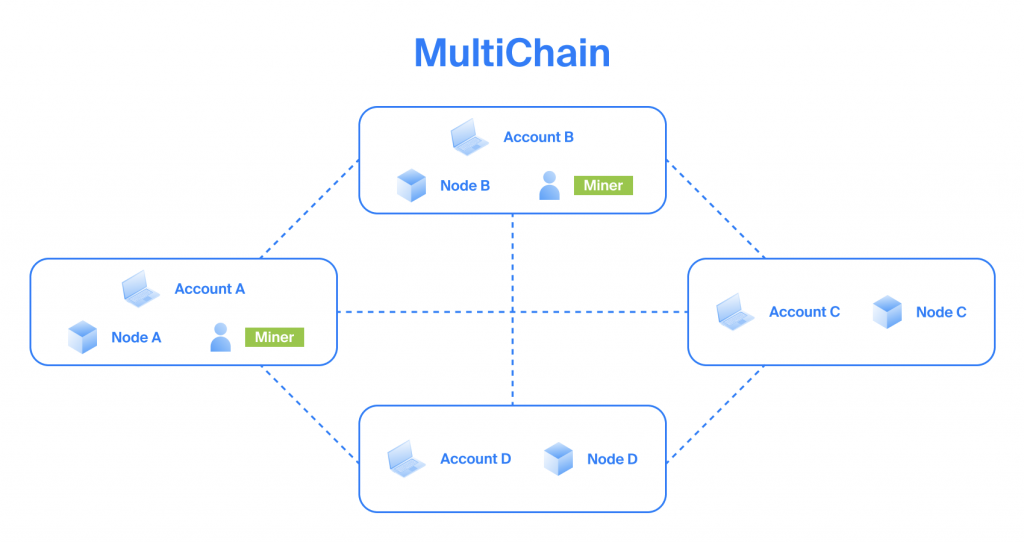
See also a brief MultiChain introduction.
Ecosystem
MultiChain is mainly driven by Coin Sciences developers—the company behind the protocol.
MultiChain, being a fork of Bitcoin, enjoys connection to the Bitcoin ecosystem.
Prerequisites
- A Chainstack account.
- A MultiChain network. See Deploy a consortium network.
Commit a “Hello, Block!” message to the ledger
At this point you should have a MultiChain network deployed as specified in the Prerequisites section.
Since MultiChain is a fork of Bitcoin Core, working with it is similar to working with the Bitcoin protocol.
Here’s an overview of how you are going to commit a “Hello, Block!” message as a ledger fact:
- Since MultiChain is a fork of Bitcoin Core, it uses the same unspent transaction output (UTXO) model. This means that any transaction that you create from your address uses the previous input transactions to your address. Unless this is a coinbase transaction—the only type of transaction that is created by miners and needs no input.
- You will use the unspent transaction output of the coinbase transaction that is in the first block of your MultiChain network.
- You will construct a raw transaction with the goal of attaching a message to this transaction.
- You will then attach a message to the transaction.
- You will sign the transaction.
- You will send the transaction to the MultiChain network.
- The transaction with your message attached to it will be picked up by a miner on the MultiChain network and committed to the ledger.
- You will then use the explorer to view the message committed to the ledger.
Get the UTXO of your MultiChain address
You need to get the unspent transaction output (UTXO) of the address you are going to use to commit the message. The address is automatically created when you deploy a MultiChain node.
Run:
curl RPC_ENDPOINT -u "RPC_USER:RPC_PASSWORD" -d '{"method":"listunspent","params":[0,999999,["WALLET_ADDRESS"]],"id":0}'where
- RPC_ENDPOINT — your MultiChain node’s RPC endpoint. Available under Access and credentials > RPC endpoint.
- RPC_USER — your MultiChain node’s RPC username. Available under Access and credentials > RPC username.
- RPC_PASSWORD — your MultiChain node’s RPC password. Available under Access and credentials > RPC password.
- WALLET_ADDRESS — your MultiChain node’s wallet address. Available under Default wallet > Address.
Example:
# curl https://nd-123-456-789.p2pify.com -u "user-name:pass-word-pass-word-pass-word" -d '{"method":"listunspent","params":[0,999999,["1KMhZ2btBe98cbdky1drfB5gaZHban8wDdAjQf"]],"id":0}'

{"result":[{"txid":"275dd751bfeebc495dbc4665f014f135de9fa426d458d37c74a0febf92e62c97","vout":0,"address":"1KMhZ2btBe98cbdky1drfB5gaZHban8wDdAjQf","account":"","scriptPubKey":"76a91487d23acdf7e4ad72db0e99c5d60886b47241903988ac1473706b700700000000000000ffffffff812aaa5f75","amount":0,"confirmations":11,"cansend":true,"spendable":true,"assets":[],"permissions":[{"for":null,"connect":true,"send":true,"receive":true,"create":false,"issue":false,"mine":false,"admin":false,"activate":false,"custom":[],"startblock":0,"endblock":4294967295,"timestamp":1604987521}]}],"error":null,"id":0}
In the output, copy the txid value and the vout value. These are the ID of the unspent transaction and output index of the unspent transaction. You will need them in the next step to create a raw transaction.
Create a raw transaction
Create a transaction that will use the ID and the index that you received in the previous step.
curl RPC_ENDPOINT -u "RPC_USER:RPC_PASSWORD" -d '{"method":"createrawtransaction","params":[[{"txid":"TRANSACTION_ID","vout":VOUT_INDEX}],{"WALLET_ADDRESS":0}],"id":1}'where
- TRANSACTION_ID — the
txidvalue of the unspent transaction that you received in the previous step. - VOUT_INDEX — the
voutvalue of the the unspent transaction that you received in the previous step. - WALLET_ADDRESS — your MultiChain node’s wallet address. Available under Default wallet > Address.
Example:
# curl https://nd-123-456-789.p2pify.com -u "user-name:pass-word-pass-word-pass-word" -d '{"method":"createrawtransaction","params":[[{"txid":"275dd751bfeebc495dbc4665f014f135de9fa426d458d37c74a0febf92e62c97","vout":0}],{"1KMhZ2btBe98cbdky1drfB5gaZHban8wDdAjQf":0}],"id":1}'

{"result":"0100000001972ce692bffea0747cd358d426a49fde35f114f06546bc5d49bceebf51d75d270000000000ffffffff0100000000000000001976a91487d23acdf7e4ad72db0e99c5d60886b47241903988ac00000000","error":null,"id":1}
In the output, copy the result value. This is the hex of the transaction that you prepared.
Add “Hello, Block!” to the transaction
You will now append the raw transaction that you prepared with your “Hello, Block!” message.
curl RPC_ENDPOINT -u "RPC_USER:RPC_PASSWORD" -d '{"method":"appendrawdata","params":["TRANSACTION_HEX",{"text":"Hello, Block!"}],"id":2}'where
- TRANSACTION_HEX — the
resultvalue that you received in the previous step. This is the hex of the transaction you prepared.
Example:
# curl https://nd-123-456-789.p2pify.com -u "user-name:pass-word-pass-word-pass-word" -d '{"method":"appendrawdata","params":["0100000001972ce692bffea0747cd358d426a49fde35f114f06546bc5d49bceebf51d75d270000000000ffffffff0100000000000000001976a91487d23acdf7e4ad72db0e99c5d60886b47241903988ac00000000",{"text":"Hello, Block!"}],"id":2}'

{"result":"0100000001972ce692bffea0747cd358d426a49fde35f114f06546bc5d49bceebf51d75d270000000000ffffffff0200000000000000001976a91487d23acdf7e4ad72db0e99c5d60886b47241903988ac0000000000000000160573706b6601756a0d48656c6c6f2c20426c6f636b2100000000","error":null,"id":2}
In the output, again copy the result value. This is the hex of the transaction that you prepared and that has now the “Hello, Block!” message attached to it.
Sign the transaction
You must sign the transaction before you can send it.
curl RPC_ENDPOINT -u "RPC_USER:RPC_PASSWORD" -d '{"method":"signrawtransaction","params":["TRANSACTION_HEX"],"id":3}where
- TRANSACTION_HEX — the
resultvalue that you received in the previous step. This is the hex of the transaction you prepared and appended with the message.
Example:
# curl https://nd-123-456-789.p2pify.com -u "user-name:pass-word-pass-word-pass-word" -d '{"method":"signrawtransaction","params":["0100000001972ce692bffea0747cd358d426a49fde35f114f06546bc5d49bceebf51d75d270000000000ffffffff0200000000000000001976a91487d23acdf7e4ad72db0e99c5d60886b47241903988ac0000000000000000160573706b6601756a0d48656c6c6f2c20426c6f636b2100000000"],"id":3}'

{"result":{"hex":"0100000001972ce692bffea0747cd358d426a49fde35f114f06546bc5d49bceebf51d75d27000000006a47304402205e7ee933fd8d4326b94eb91d612628a7e70bc44a211da15161f2fe0810a9a12a022010afba9c9f2936c04806905413f3842f6f9aec7e7de9618f1c3b5293d509d15f012102c9529cc66527d40325631d8a5d7533ec2d562a9870d66353fa01835349338f2fffffffff0200000000000000001976a91487d23acdf7e4ad72db0e99c5d60886b47241903988ac0000000000000000160573706b6601756a0d48656c6c6f2c20426c6f636b2100000000","complete":true},"error":null,"id":3}
In the output, again copy the result value. This is the hex of the transaction that you prepared, attached the message, and signed.
Send the signed transaction
Send your transaction.
curl RPC_ENDPOINT -u "RPC_USER:RPC_PASSWORD" -d '{"method":"sendrawtransaction","params":["TRANSACTION_HEX"],"id":4}'where
- TRANSACTION_HEX — the
resultvalue that you received in the previous step. This is the hex of the transaction you prepared, appended with the message, and signed.
Example:
# curl https://nd-123-456-789.p2pify.com -u "user-name:pass-word-pass-word-pass-word" -d '{"method":"sendrawtransaction","params":["0100000001972ce692bffea0747cd358d426a49fde35f114f06546bc5d49bceebf51d75d27000000006a47304402205e7ee933fd8d4326b94eb91d612628a7e70bc44a211da15161f2fe0810a9a12a022010afba9c9f2936c04806905413f3842f6f9aec7e7de9618f1c3b5293d509d15f012102c9529cc66527d40325631d8a5d7533ec2d562a9870d66353fa01835349338f2fffffffff0200000000000000001976a91487d23acdf7e4ad72db0e99c5d60886b47241903988ac0000000000000000160573706b6601756a0d48656c6c6f2c20426c6f636b2100000000"],"id":4}'
{"result":"e565c6f430b0c254e0dc37ffecf7feed109085590651810daa5d6a5997792fb5","error":null,"id":4}
In the output, copy the result value. This is the hash of the transaction that you sent. You will use this hash to view the transaction and your “Hello, Block!” message in the explorer.
View your “Hello, Block!” message on the ledger
At this point you have committed your message to the ledger. Time to look it up on the immutable MultiChain ledger!
- Go to your MultiChain project in Chainstack.
- In the project, click your MultiChain network.
- Click Explorer.
- In the explorer, enter the hash of your transaction that you received in the previous step.
- See your ”Hello, Block!” message.
Congratulations! To reiterate what you did from start to finish:
- You deployed your own consortium blockchain network using the MultiChain protocol.
- You created a transaction and attached a text message to it.
- You committed the transaction to the immutable MultiChain ledger.
And all of it was pretty easy too.
For more sophisticated and real-world scenarios, explore Chainstack tutorials.
Connect with the community
- To learn more about Chainstack, visit our Knowledge Center or join our Discord server and Telegram group.
- Sign up for a free Developer account, or explore the options offered by Growth or Business plans here.
- Take a look at our pricing tiers using a handy calculator to estimate usage and number of nodes.
Have you already explored what you can achieve with Chainstack? Get started for free today.