


TL;DR: xrplwatch is a small open-source Python tool that joins the XRP Ledger’s peer-to-peer network directly and reads transactions off the wire — the same gossip feed rippled servers exchange with each other — instead of asking a public server over JSON-RPC or WebSocket. We cloned it, ran it against XRPL mainnet, and captured what actually comes back. This walks through installing it, running it, reading its output, and what the numbers in its status line mean, with the real transactions and connection stats from our own run.
Why this is different from a normal RPC call
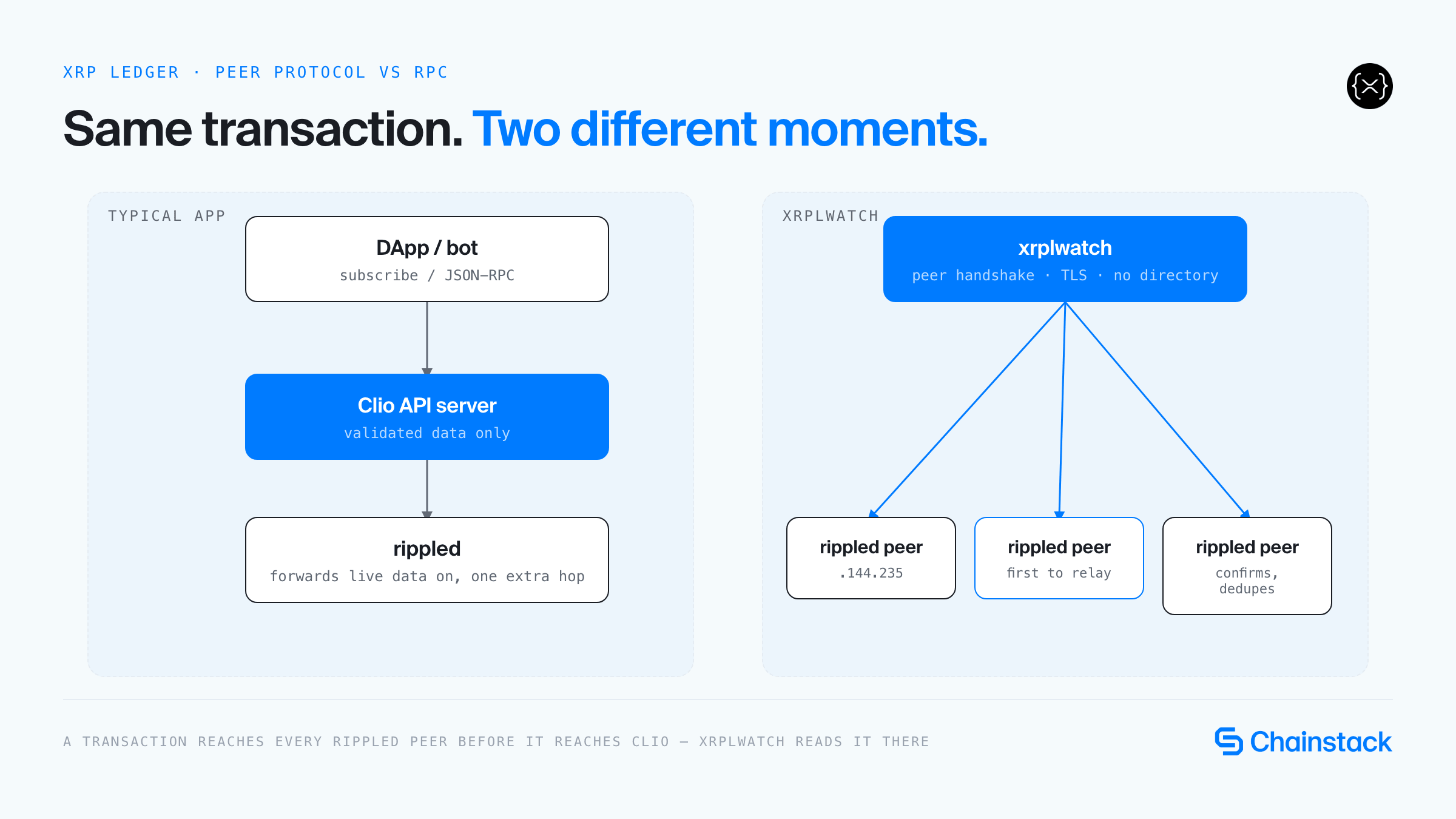
There is no mempool on the XRP Ledger. A transaction is submitted to one server, relayed peer-to-peer to that server’s connections, and applied to whichever open ledger each server is currently assembling — it only becomes final once consensus picks it into a validated ledger, roughly every 4 seconds. xrplwatch listens at the point where a transaction first appears on the network, before it’s in any ledger and before a public server would tell you about it over subscribe.
Two clients answer XRPL queries in production: rippled (a full node, sees gossip the moment a peer relays it) and Clio (a read-only API server that only serves validated data extracted from a rippled behind it — an extra hop). xrplwatch bypasses both by talking the peer protocol directly.

Setup
Requirements: Python 3.11+. (The stock python3 on macOS is commonly 3.9 — point at a 3.11+ install explicitly if that’s the case.)
git clone https://github.com/chainstacklabs/xrplwatch.git
cd xrplwatch
The project is set up for uv:
uv run python xrpl_feed.py --watch tradesWithout uv, a plain venv works identically — this is how we actually ran it:
python3.11 -m venv .venv
source .venv/bin/activate
pip install "pyopenssl>=24" "coincurve>=19" "xrpl-py>=3" "pytest>=8"
Three dependencies, each doing one job: xrpl-py (the official library, used only to decode transaction bytes into a dict), pyopenssl (reads the TLS handshake values the peer protocol requires you to sign), and coincurve (signs the handshake to prove you own the identity you present).
Sanity-check before touching the live network:
./smoke.sh --offline # runs the pytest suite only, no network callsOn our run: 23 tests, all passing.
Running it
python xrpl_feed.py --watch trades
python xrpl_feed.py --watch OfferCreate,Payment --servers 12
--watch accepts either a friendly group name or an official XRPL transaction type name, comma-separated, mixed freely:
| Group | Maps to |
|---|---|
trades | OfferCreate, OfferCancel |
pool-trades | AMMDeposit, AMMWithdraw, AMMBid |
new-pools | AMMCreate |
payments | Payment |
new-tokens | TrustSet |
collectibles | NFTokenMint, NFTokenCreateOffer, NFTokenAcceptOffer |
Leave --watch empty to see every transaction type. --servers N sets how many peer connections it tries to hold open (default 10) — it dials more than that under the hood, since most public servers are already full and refuse new peers.
What we actually saw
We ran python xrpl_feed.py --watch payments --servers 8 against live mainnet. It started at 7 connected servers, topped up to 15 as its supervisor thread replaced dropped connections, and over the run printed 1,999 unique payment transactions while filtering out 86,333 repeats — the same transaction, relayed to us again by a different peer.

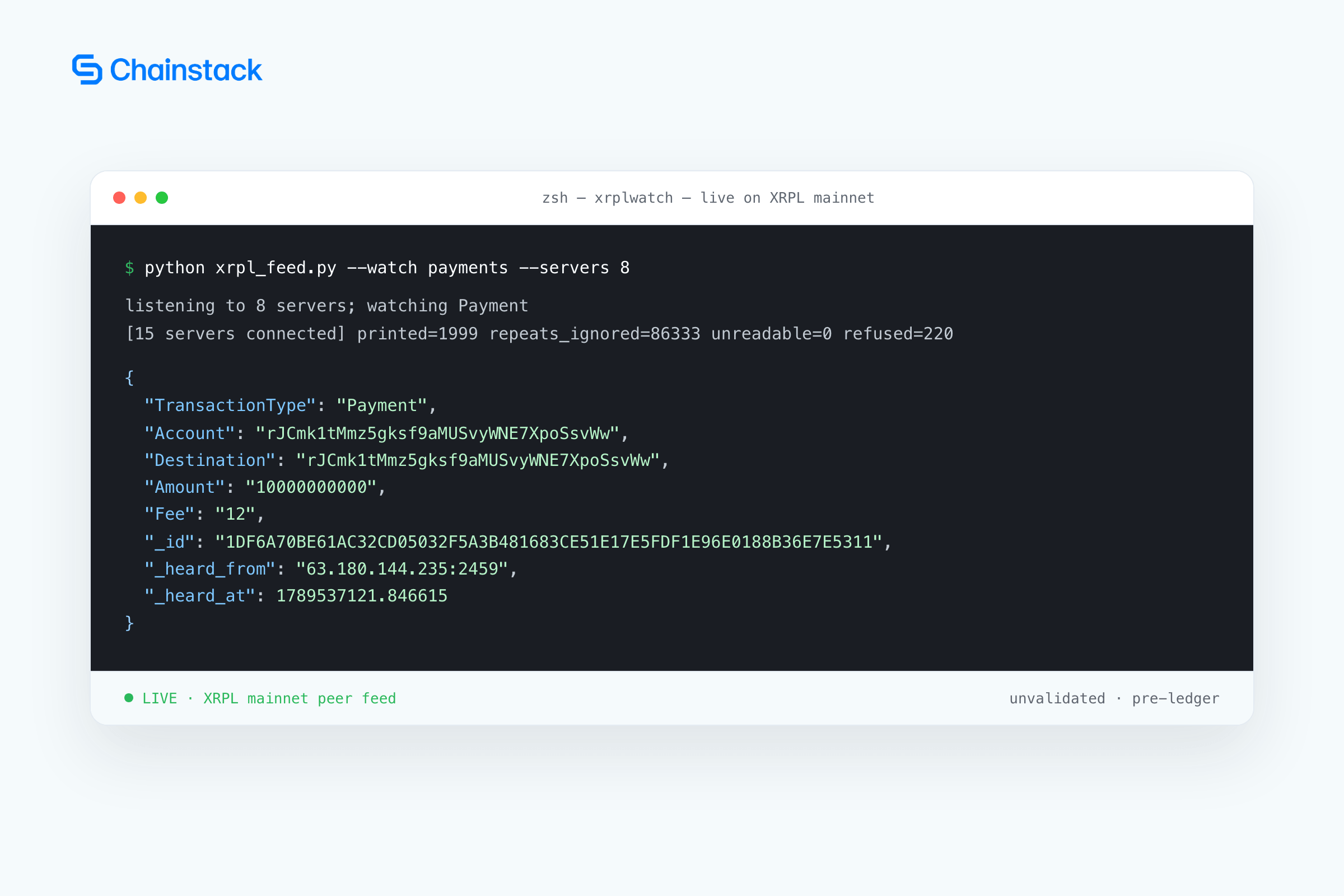
Every field in that JSON except the three prefixed with _ is the transaction exactly as decoded by xrpl-py — the same fields any XRPL API would give you. The three added fields are the point of the tool: _id is the transaction’s canonical hash, computed from the raw bytes before any decoding happens; _heard_from is which peer relayed it to us first; _heard_at is a Unix timestamp with microsecond precision, taken the instant the bytes arrived, before decoding.
Reading the status line
Printed every 30 seconds on stderr. In our run, the counters meant:
- printed — transactions that matched the
--watchfilter and got emitted (1,999 in our run) - repeats_ignored — the same transaction seen again from a different peer (86,333 — every peer relays the same traffic, so most of what arrives has already been seen)
- unreadable — bytes that didn’t decode as a transaction (0)
- compressed_skipped — messages the tool doesn’t unpack, since compression isn’t supported
- dropped — transactions dropped because the decode queue backed up (0)
- refused — connection attempts that failed, usually because the target server’s peer slots were full (220 refusals to hold 15 connections — normal, not an error)
Using it as a library
from xrplwatch import TransactionFeed

feed = TransactionFeed(on_transaction=print, only_types=["OfferCreate"])
feed.start(number_of_servers=10)
feed.wait()   # blocks until feed.stop() is called or on_transaction raises
feed.connected_servers and feed.counts expose the same numbers as the CLI’s status line, live, if you want to build your own monitoring around it.
Limitations, as observed
- You are a guest on someone else’s server. Nothing entitles you to a peer slot — expect the refusal count to run well ahead of the connected count, always.
- This is unvalidated data. A transaction you see here may never make it into a ledger. Treat everything as provisional until you check it against a validated ledger.
- The speed advantage is real but small. Per the project’s own measurement: seconds ahead of validated-ledger data, but only tens of milliseconds ahead of a plain WebSocket subscription to a well-connected
rippled. - Transactions only. No consensus messages, no ledger data, no compressed messages, no IPv6 peers.
From borrowed peer slots to your own node

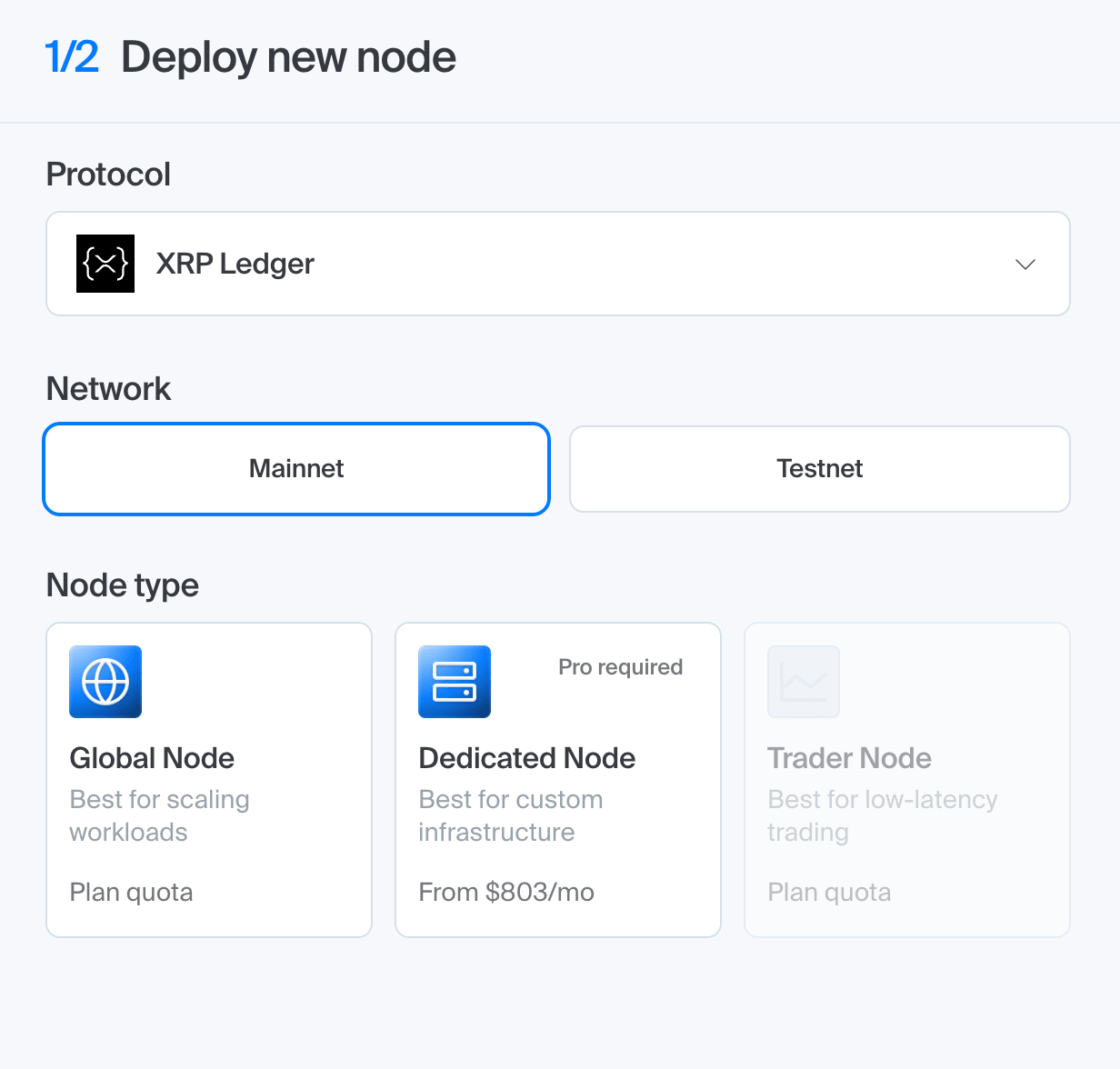
Everything above runs on peer slots xrplwatch borrows from public servers — slots any of those servers can revoke the moment they get busy. Getting an endpoint that’s actually yours takes about a minute:
- Log in to the Chainstack console (or create an account).
- Create a new project.
- Select XRP Ledger as your blockchain protocol.
- Choose network: XRP Ledger Mainnet or Testnet.
- Deploy the node.
- Open Access and credentials and copy your HTTPS and WebSocket endpoints.
That deploys a Global Node — Chainstack’s shared, pay-as-you-go tier, which is what we used below. Dedicated Nodes and self-hosted deployments are also available for XRP Ledger if you need a single-tenant node or full infra control.
We took the HTTPS endpoint and queried it directly, the same way any app would:
curl YOUR_CHAINSTACK_ENDPOINT \
  -H 'Content-Type: application/json' \
  -d '{"method":"server_info","params":[{}]}'
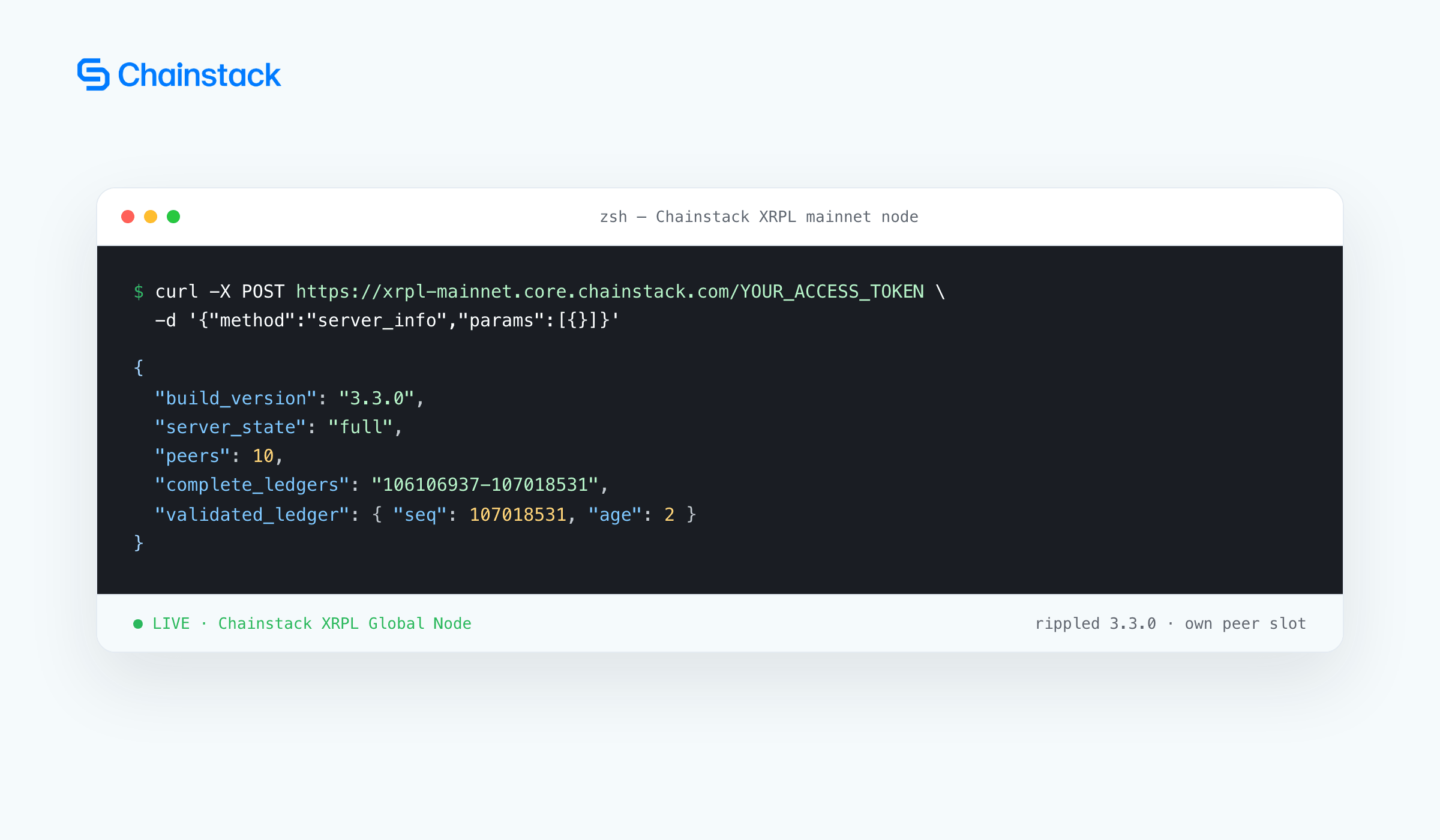
server_info confirms this is a rippled node, not Clio — no clio_version field, server_state: "full", and a validated ledger only 2 seconds old. This is a peer slot nobody else can take from you, reachable over a plain WebSocket subscription instead of a signed peer handshake.
This is also where xrplwatch’s own limitation stops mattering: xrplwatch only listens. Once you have this endpoint, you can submit the transactions it helped you detect (sign locally, then call the submit method) and confirm them by polling tx until a validated ledger contains them — or subscribe to the same transaction stream over the WebSocket endpoint instead of dialling peers yourself. Worked examples for both are in the XRP Ledger tooling docs.
Conclusion
xrplwatch works by borrowing peer slots on servers you don’t control, on a best-effort basis — that’s the whole point, it’s a demonstration of the protocol, not infrastructure you’d depend on. We verified it end to end: it installs cleanly, its offline test suite passes, and it produces real, correctly decoded mainnet transactions within about a minute of starting. We then verified the other side of the claim too, deploying a Chainstack XRP Ledger node and confirming it answers as a fully synced rippled server. The moment borrowed peer slots stop being enough, that’s a node of your own — self-hosted or from an RPC provider.
FAQ
No. It’s a demonstration of the peer gossip layer, not production infrastructure — it depends on borrowed, revocable peer slots on other people’s servers. We deployed a Chainstack XRPL Global Node alongside it and confirmed it answers as a fully synced rippled server with a peer slot nobody can revoke — that’s the model to use for anything you depend on.
No. It reads transactions the moment a peer relays them, before consensus has picked them into a validated ledger. A transaction seen here can still fail to make it into any ledger.
3.11 or newer. macOS ships 3.9 by default in many setups, so you may need to install 3.11+ separately and point the venv at it explicitly.
Per the project’s own measurement, only tens of milliseconds ahead of a WebSocket subscription to a well-connected rippled — seconds ahead of validated-ledger data, but not a large edge over an ordinary live subscription.
Related reading
- Top 6 XRP Ledger RPC providers for payments in 2026
- How to get an XRP Ledger RPC endpoint (2026 guide)
- What is XRP Ledger? Consensus, RLUSD, and RPC explained