


Google Cloud is shutting down Blockchain Node Engine (BNE) and Blockchain RPC on December 15, 2026, and has named Quicknode as the recommended migration target. Before you click “start migrating” on the partner page, do the math on what Google’s migration guide does not show you: how a credit-based pricing model — 20 credits per EVM request, 30 on Solana — rewrites your monthly bill compared to Chainstack’s 1 Request Unit per full call (2 per archive). For most BNE workloads — particularly anything archive-heavy or trace-heavy — the gap is 3–5x on the live calculator. This guide walks through the migration mechanics, the architectural choices, and the pricing math, with code examples for Ethereum, Polygon, and Solana.
🤔 Already convinced? Try Chainstack before you commit to the default migration path
The shutdown timeline
The shutdown comes in two phases, both documented in the BNE release notes:
- June 15, 2026 — limited support begins. New BNE nodes cannot be created. New Blockchain RPC endpoints cannot be provisioned. Existing resources keep running and receive critical updates.
- December 15, 2026 — full shutdown. Google deletes every existing node and endpoint. Any application still pointing at BNE URLs will start failing. There is no grace period.
The first deadline has already passed, and it is the one most teams underestimate. Since June 15, you cannot spin up a fresh BNE node — not for testing, not for a parallel cutover, not for staging. Whatever you had running on June 14 is what you have to work with until you fully migrate off. If you operate a production dApp, plan to be fully migrated by mid-November to leave margin for issues.
What you are actually migrating
Google is retiring two distinct products, and they have different migration paths:
- Blockchain Node Engine — dedicated full and archive nodes, per-project provisioning, supports Ethereum (Mainnet, Sepolia, Holesky, Goerli), Polygon (Mainnet, Amoy), and Solana.
- Blockchain RPC — a shared endpoint service, supports only Ethereum Mainnet and Holesky.
Knowing which one you are on changes the migration. Blockchain RPC was a key-in-URL shared endpoint — the model Chainstack uses by default — so for those workloads migration is a pure host swap. BNE was per-project with a separate API key, so migration involves both a URL swap and removing the key from your request headers or query parameters. Details further down.
Network mapping
Every BNE network has a direct Chainstack equivalent. Two testnets need a different target because they are being retired across the broader Ethereum ecosystem, not just by Google:
| BNE network | Chainstack equivalent | Notes |
|---|---|---|
| Ethereum Mainnet | Ethereum Mainnet | Direct swap |
| Ethereum Sepolia | Ethereum Sepolia | Direct swap |
| Ethereum Holesky | Ethereum Hoodi or Sepolia | Holesky is being retired ecosystem-wide. Hoodi is the long-lived replacement. |
| Ethereum Goerli | Ethereum Sepolia or Hoodi | Goerli is long deprecated. |
| Polygon Mainnet | Polygon Mainnet | Direct swap |
| Polygon Amoy | Polygon Amoy | Direct swap |
| Solana | Solana | Direct swap. Chainstack adds Yellowstone gRPC, Trader Nodes, and Warp transactions. |
Beyond the BNE chains, Chainstack supports 70+ protocols, so this is also an opportunity to consolidate other infrastructure on a single provider. If you already know which network you are moving and want a side-by-side comparison with Quicknode before touching code, start with the Chainstack BNE migration overview.
Choosing your Chainstack node type
For most BNE migrations, a Global Node is the right default. It is a load-balanced endpoint that routes requests to the nearest healthy region and fails over in under one second, with archive and debug/trace support on paid plans. This is the closest match for Blockchain RPC users and covers most BNE full-node workloads.
You need a different node type when the workload has specific characteristics:
- Predictable high steady traffic → Global Node with the Unlimited Node add-on. Converts to a flat monthly fee at a fixed RPS tier. This is the most direct apples-to-apples replacement for BNE’s flat per-node billing, and the reason it exists is precisely the workload shape BNE attracted.
- Isolation, compliance, or VPC Service Controls → Dedicated Node. Exclusive infrastructure, archive mode, full debug/trace, available on Pro plans and above. If you relied on BNE’s per-project isolation or VPC Service Controls, this is the analog.
- Trading and other latency-critical workloads → Trader Node. Regional, low-latency endpoints with the Warp transactions add-on for fast transaction landing on Solana, Ethereum, and BNB Smart Chain. Available on paid plans. Start with a Global Node unless you have a clear reason not to. The other options are not better — they are different, for specific workload shapes. (For workloads that must run inside your own cloud account — VPC Service Controls or strict data residency — see the FAQ.)
Start with a Global Node unless you have a clear reason not to. The other options are not better — they are different, for specific workload shapes.
The fastest migration path: AI agent
Before walking through manual steps: if you use Claude Code, Codex CLI, Cursor, Windsurf, Gemini CLI, Antigravity, or any other agentic coding tool, the fastest migration is to let the agent do it. Chainstack publishes a runbook for this. Paste the following into your agent and approve the plan it generates:
get docs.chainstack.com/docs/migrate-to-chainstack-with-ai.md
The agent scans your codebase for BNE endpoints, checks coverage against Chainstack, plans the swap, and executes after you approve. It uses the Chainstack MCP server for live deployment options and pricing. Full details in the migrate to Chainstack with AI guide. The manual steps below are for teams that prefer to migrate by hand or want to understand what the agent is doing.
Manual migration: endpoint and authentication
What changes depends on which Google product you are leaving.
From Blockchain RPC: The API key is already embedded in your endpoint URL — same model Chainstack uses — so this is a pure host swap.
# Before — Blockchain RPC (key already in URL, copy from Google Cloud console)
ETHEREUM_RPC_URL=YOUR_BLOCKCHAIN_RPC_ENDPOINT

# After — Chainstack (key in URL path)
ETHEREUM_RPC_URL=https://ethereum-mainnet.core.chainstack.com/YOUR_AUTH_KEY
From Blockchain Node Engine: BNE authenticated with a separate Google Cloud API key, passed either as the X-goog-api-key header or as a ?key= query parameter. Chainstack puts the auth key in the URL path, so you need to both swap the URL and remove the header or query param.
# Before — BNE JSON-RPC (key as query parameter)
# https://json-rpc.NODE_ID.blockchainnodeengine.com?key=YOUR_BNE_KEY

# Before — BNE JSON-RPC (key as X-goog-api-key header)
# https://json-rpc.NODE_ID.blockchainnodeengine.com

# Before — BNE WebSocket
# wss://ws.NODE_ID.blockchainnodeengine.com?key=YOUR_BNE_KEY

# Before — BNE Beacon Chain API
# https://beacon.NODE_ID.blockchainnodeengine.com

# After — Chainstack (key in URL path, no separate header or query param)
ETHEREUM_RPC_URL=https://ethereum-mainnet.core.chainstack.com/YOUR_AUTH_KEY
ETHEREUM_WS_URL=wss://ethereum-mainnet.core.chainstack.com/YOUR_AUTH_KEY
If you authenticated to BNE with the X-goog-api-key header, remove the custom header entirely after migrating — Chainstack credentials live in the URL.
If you used BNE’s beacon.NODE_ID.blockchainnodeengine.com endpoint for consensus-layer data (validator workloads, deep staking inspection), Chainstack exposes the standard Beacon Chain API on Ethereum nodes — point your client at the Chainstack Beacon endpoint and keep your existing calls.
Connection examples
The application code does not change. Only the URL.
Python with web3.py:
from web3 import Web3

# Before — BNE
# w3 = Web3(Web3.HTTPProvider("https://json-rpc.NODE_ID.blockchainnodeengine.com?key=YOUR_BNE_KEY"))

# After — Chainstack
w3 = Web3(Web3.HTTPProvider("YOUR_CHAINSTACK_ENDPOINT"))

print(w3.eth.block_number)
JavaScript with ethers.js:
import { JsonRpcProvider } from "ethers";

const provider = new JsonRpcProvider(process.env.ETHEREUM_RPC_URL);

const block = await provider.getBlockNumber();
console.log("Current block:", block);
TypeScript with viem:
import { createPublicClient, http } from "viem";
import { mainnet } from "viem/chains";

const client = createPublicClient({
  chain: mainnet,
  transport: http(process.env.ETHEREUM_RPC_URL),
});

console.log(await client.getBlockNumber());
Polygon and Solana — what’s different
Polygon. Mechanically the same as Ethereum — JSON-RPC surface identical, env-var swap pattern applies as-is. The chain-specific consideration is the heimdall vs bor split: if your BNE setup gave you access to heimdall consensus-layer endpoints, confirm your Chainstack node configuration matches. Archive nodes run the Bor client, so use the debug_* methods (with flatCallTracer) instead of the Erigon-only trace_* namespace. For latency-sensitive trading on Polygon, Chainstack Trader Nodes provide regional low-latency endpoints. More on the Chainstack Polygon blog tag.
Solana. The migration is a direct URL swap on the JSON-RPC side, but Solana also gives you tools BNE did not offer. For real-time streaming workloads, the Yellowstone gRPC Geyser plugin is available as an add-on from the Growth plan — typed events streamed from validator memory with sub-50ms latency, useful for trading bots, indexers, and analytics that previously polled getProgramAccounts. For latency-critical trading, Chainstack Trader Nodes add Warp transactions for direct-to-leader landing on Solana (Warp also covers Ethereum and BNB Smart Chain). The Solana trading infrastructure 2026 guide goes deeper.
Pricing: flat RU vs credit multipliers
This is where Google’s migration guide goes quiet. Chainstack and Quicknode use fundamentally different billing models:
- Chainstack charges 1 Request Unit per full-node call and 2 RU per archive call, flat across all methods.
- Quicknode uses API Credits with per-method multipliers. For EVM, every standard method costs 20 credits per request. Heavy methods —
debug_traceCall,debug_traceBlockByNumber,trace_block— cost 40 credits. On Solana, standard methods cost 30 credits regardless of complexity. The dedicated BNE migration page collects customer notes from teams that switched off Quicknode after running into exactly this overage pattern.
That gives a baseline of 20x credits-per-request on EVM and 30x on Solana compared to Chainstack Request Units. Below is the full multiplier table checked against Quicknode’s published API credits in October 2026.
Quicknode credit multipliers, per method
EVM — 20 credits per request: eth_call, eth_chainId, eth_blockNumber, eth_gasPrice, eth_estimateGas, eth_feeHistory, eth_maxPriorityFeePerGas, eth_syncing, eth_getBalance, eth_getCode, eth_getStorageAt, eth_getLogs, eth_getFilterChanges, eth_getBlockByNumber, eth_getBlockByHash, eth_getBlockReceipts, eth_getTransactionByHash, eth_getTransactionReceipt, eth_getTransactionCount, eth_sendRawTransaction, net_version, web3_clientVersion.
EVM heavy — 40 credits per request: debug_traceCall, debug_traceBlockByNumber, debug_traceBlockByHash, trace_block.
Solana — 30 credits per request, for standard methods: getAccountInfo, getProgramAccounts, getBalance, getMultipleAccounts, getTokenAccountsByOwner, getTokenAccountBalance, getTokenSupply, getSignatureStatuses, getSignaturesForAddress, getTransaction, getConfirmedTransaction, getLatestBlockhash, getRecentBlockhash, getBlockHeight, getSlot, getMinimumBalanceForRentExemption, simulateTransaction, sendTransaction, logsSubscribe.
On Chainstack, all of the above cost 1 Request Unit (full) or 2 RU (archive). No method has a different multiplier.
Real-world workload pricing
The interactive calculator maps those per-method multipliers into final monthly bills across four workload profiles. Numbers as of June 2026:
| Workload profile | Chainstack | Quicknode | Alchemy | QN markup vs Chainstack |
|---|---|---|---|---|
| Default (general reads) | $49 (Growth) | $208 | $175 | 4.2x |
| Data (logs + archive heavy) | $199 (Pro) | $703 ($499 sub + $204 overage) | $788 | 3.5x |
| DeFi | $49 (Growth) | $212 | $176 | 4.3x |
| Wallet | $49 (Growth) | $242 | $180 | 4.9x |

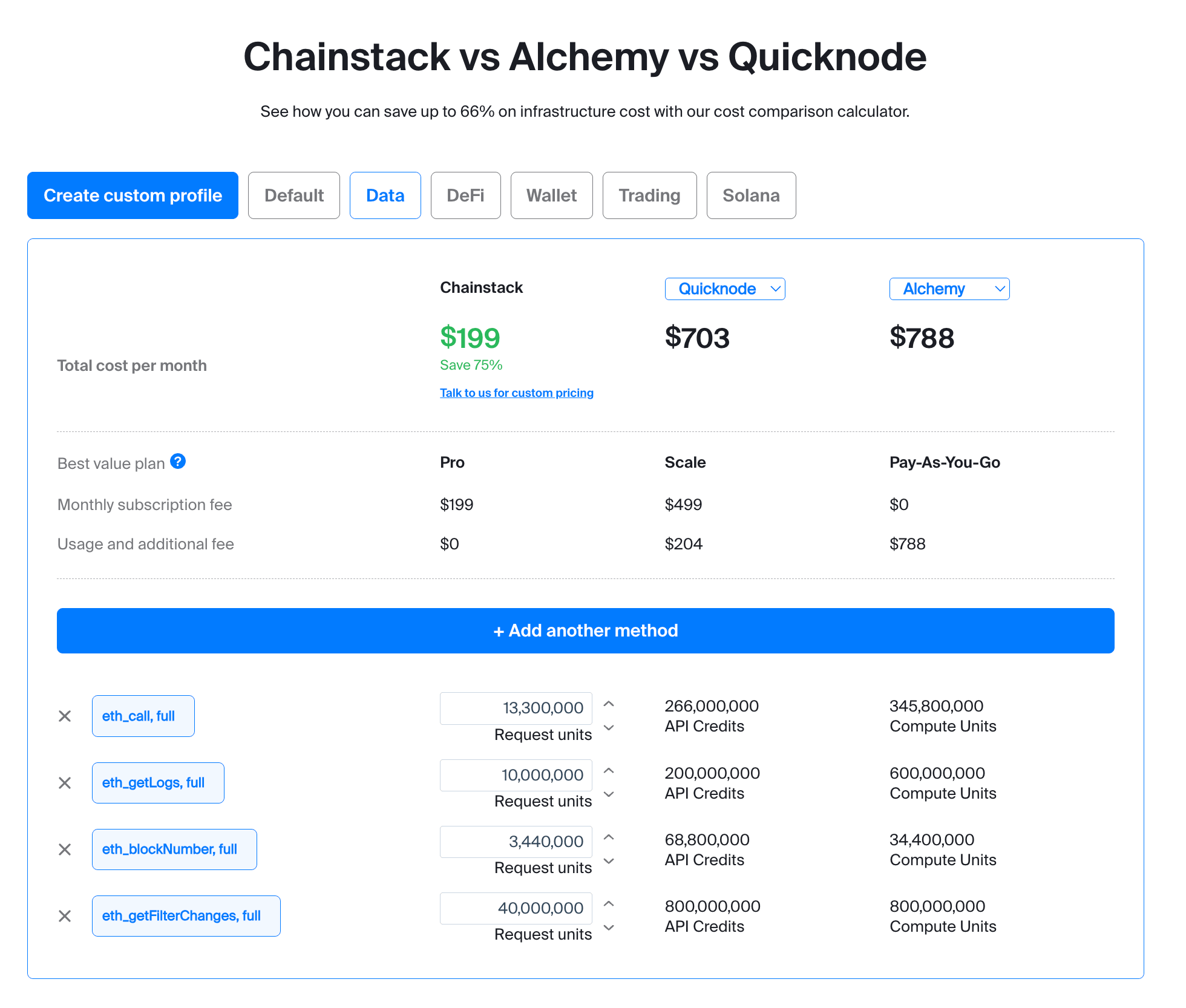
eth_call, eth_getLogs, and eth_getFilterChanges. The Pro plan ($199) absorbs the entire workload in included Request Units. Quicknode Scale ($499) hits its credit ceiling and adds $204 in overage. Open the calculator and run your own numbers →.Two patterns matter beyond the headline:
Chainstack’s “usage and additional fee” is $0 across all four profiles. The monthly subscription covers the included Request Units, and the profiles fit within them. On Quicknode the same profiles always show a “subscription + usage” structure — included credits run out, overage stacks on top.
Quicknode’s best-value plan changes by workload. Default, DeFi, and Wallet land on Build plus overage, while Data needs Scale. A team picking a Quicknode plan based on initial light traffic gets force-upgraded as soon as archive or logs queries appear — exactly the workloads BNE attracted because BNE gave archive nodes by default.
On Solana, Quicknode charges 30 credits for every standard method, including the ones your indexer or trading bot calls thousands of times per second: getProgramAccounts, getAccountInfo, getTokenAccountsByOwner, getSignaturesForAddress. On Chainstack each of those is one Request Unit. Multiply your own method distribution by 30 credits before committing — the number that comes back is often the deciding factor on its own.
Validate and cut over
Once you have a Chainstack node provisioned and your endpoint URLs swapped, run through this before you decommission BNE:
- Test your actual RPC methods. Replay a recent day of production traffic against the Chainstack endpoint. Compare responses and latency percentiles. Particular attention to archive queries, debug/trace methods, and WebSocket subscription behaviour.
- Check throughput at your real rate. Review the throughput guidelines and add the Unlimited Node add-on if you need a flat-fee high-volume tier.
- Run blue-green in production. Use a feature flag or weighted load balancer. Start with 10% traffic on Chainstack, observe error rates, ramp gradually. Keep BNE as fallback until you are confident.
- Set up access rules and IP allowlists for the new endpoint via the access rules guide before exposing it to production traffic.
- Decommission. Delete BNE nodes from your Google Cloud console once Chainstack is stable. Google deletes Blockchain RPC endpoints automatically on December 15, 2026, but BNE nodes you delete yourself to stop the meter.
When Chainstack isn’t the right answer
A few cases where the migration off BNE is not a straightforward win for Chainstack:
- You need GCP Marketplace consolidated billing. Chainstack is not listed on GCP Marketplace. If your finance team requires single-invoice procurement through Google Cloud, this needs a sales conversation rather than a self-serve migration.
- Your workload is dominated by light reads under the included Request Units of any provider. At very low volumes (sub-3M RU/month), every provider has a free tier and the pricing-model differences become irrelevant. Pick the developer experience you prefer.
- You operate an in-house infrastructure team and want full ownership. Self-hosting your own nodes is a real option, especially if you already run validators or relay infrastructure. If you have the operational maturity to run nodes from scratch, you may not need any managed provider.
- You need debug or trace on the free Developer plan. Debug and trace methods on Global Nodes require a paid plan. If your prototype depends on
debug_traceCalland you cannot commit to Growth, plan accordingly. - You need a chain Chainstack doesn’t support. Chainstack covers 70+ protocols, but very niche or brand-new chains may not be available — check the protocols list before committing.
Conclusion
The migration mechanics off BNE are simple: swap the URL, remove the BNE API key from headers or query params, and let your application keep running. For most workloads a Global Node is the right default. Dedicated and Trader options exist for specific shapes — isolation and latency — and the official migration doc is the canonical reference for the mapping.
The harder decision is which provider you migrate to. Google’s recommendation to use Quicknode is one path. It is also a commercial partnership, not the result of a workload-by-workload comparison. For BNE workloads that lean archive-heavy or trace-heavy — exactly the workloads BNE attracted by offering archive nodes — credit-based billing at 20x on EVM produces bills 3–5x higher than flat Request Units. Run the numbers against your real method distribution before committing.
The migration window is shorter than the December date suggests. June 15 is when your safety net disappeared: no new BNE nodes for testing, no parallel cutover from a clean source. Start now, validate against your real workload, and use the AI agent runbook if you want the discovery and swap done in minutes rather than days.
FAQ
For a simple endpoint swap with no archive dependencies, most teams complete cutover in 2–4 hours of focused work plus a week of parallel-run validation. If you use the AI agent migration path, the endpoint discovery and swap can be done in minutes — the validation week is the same.
Google deletes the nodes and endpoints. Any application still pointing at BNE URLs returns connection errors. There is no grace period.
Chainstack is not currently listed on GCP Marketplace. Billing is direct with Chainstack. If consolidated cloud billing is a hard requirement for your finance team, raise it with Chainstack sales early — there are workarounds for enterprise contracts.
For Ethereum, yes — full JSON-RPC compatibility including the debug and trace namespaces on Dedicated Nodes and on Global Nodes on paid plans. See the debug and trace APIs reference for per-protocol availability. BNE disabled debug and admin by default; on Chainstack, debug/trace is enabled via node configuration on supported plans.
Two options. Dedicated Nodes give you isolated infrastructure under Chainstack’s management — self-serve from the Pro plan and above, and the simpler choice for most cases. Hybrid hosting goes further: the nodes run inside your own cloud account, with Chainstack’s interface managing them. Hybrid is contact-sales only, takes longer to set up (no instant Bolt deploy, no daily automated backups by default), and is billed as subscription plus node management fee rather than Request Units. If your compliance team requires nodes inside your VPC and you have time before December 15, contact Chainstack to scope a hybrid deployment. Otherwise, a Dedicated Node in your preferred region is the faster path.
Provision the Chainstack node, point a staging copy of your application at it, and replay a recent day of production traffic. For trading and indexing workloads, run both endpoints live in shadow mode (Chainstack receives a mirrored copy of production traffic but its responses are not used) for at least 72 hours before flipping any real traffic.
Related reading
Same comparison, different angles
- Chainstack vs Quicknode vs Alchemy: most cost-effective blockchain API in 2026
- Quicknode RPC provider overview (2026)
- How to migrate your blockchain RPC endpoints to Chainstack
For specific workloads
Canonical references