


This guide shows how to build a Hyperliquid on-chain activity tracker using Chainstack to monitor large trading activity and send real-time Telegram alerts. The process covers fetching trading data through Chainstack Hyperliquid RPC, monitoring large movements across any address to detect high-leverage activity, and building a Telegram bot that automatically sends a ping the moment any significant event is detected.
Prefer diving straight into the code? Get the Hyper Tracker bot on author’s GitHub start getting automated pings instantly.
Prerequisite
To track trading data and run a bot, you must have the following before you begin:
- Node.js 17+, If not installed → Node.js Download
- A Telegram account
- Basic understanding of JavaScript
- Familiarity with common DeFi terminologies
✅ Verify Node.js version by running node -v in your terminal. If it’s below 17, update it and confirm the new version.
What is Hyperliquid?
Hyperliquid is a Layer 1 blockchain designed for derivatives trading that allows users to trade perpetual contracts (perps) with leverage. It runs on HyperBFT, a custom consensus algorithm that delivers full decentralization and on-chain transparency while providing execution speeds similar to a centralized exchange. Users can hold multiple positions across assets like BTC, ETH, and SOL using cross or isolated margin with a transparent on-chain order book. Since all trading activity is publicly visible, anyone can inspect positions, leverage, balances, and overall market behavior.
Hyperliquid is straightforward to build on using Chainstack. Its RPC layer exposes clean, well-structured endpoints for fetching user states, position data, and order book details, making it easy to build monitoring tools, analytics dashboards, or automated systems on top of the protocol.
→ Learn more about Hyperliquid in our deep dive
Why track high on-chain activity on Hyperliquid?
Monitoring large movements in real time gives a strategic advantage by providing insights into market behavior and potential price action. Analyzing the activities of large holders, also known as whales, can reveal shifts in trends and highlight opportunities for profitable trades.
If you’re a trader, builder, quant, or enjoy following whale wallets, real-time raw on-chain activity becomes actionable signals.
For this project, “high activity” refers to meaningful position changes on Hyperliquid like:
- A new position opens
- Leverage increase/decrease in a position
- A position becomes profitable or close to liquidation
Build the Hyperliquid on-chain activity tracker
We will use:
- A Chainstack account → Create your account for free
- Node.js
- Yarn or npm
- Axios
- Dotenv
- Telegram account
- Botfather
- VS Code or your choice of code editor
Set up Hyperliquid RPC on Chainstack
Head to Console and create a free account
This is where you can manage all your nodes across 70+ protocols
Click on “Add node”


Choose Hyperliquid and then select “Hyperliquid Mainnet” in the network section below

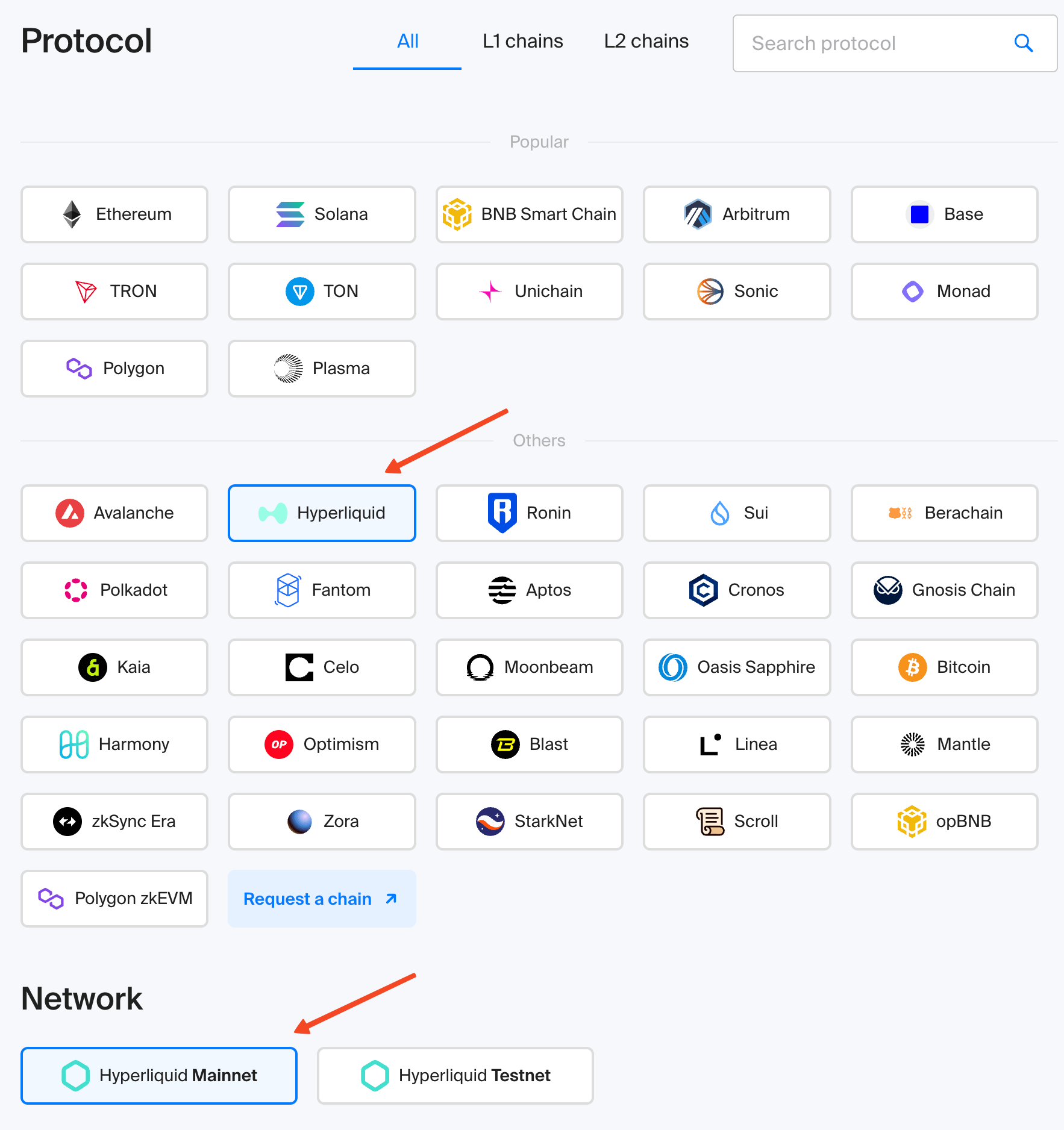
Click “Next”
In the next step, select the type of node. For this project, choose “Global Node” Give your node a name, review all the settings in the summary, and click “Deploy Node”

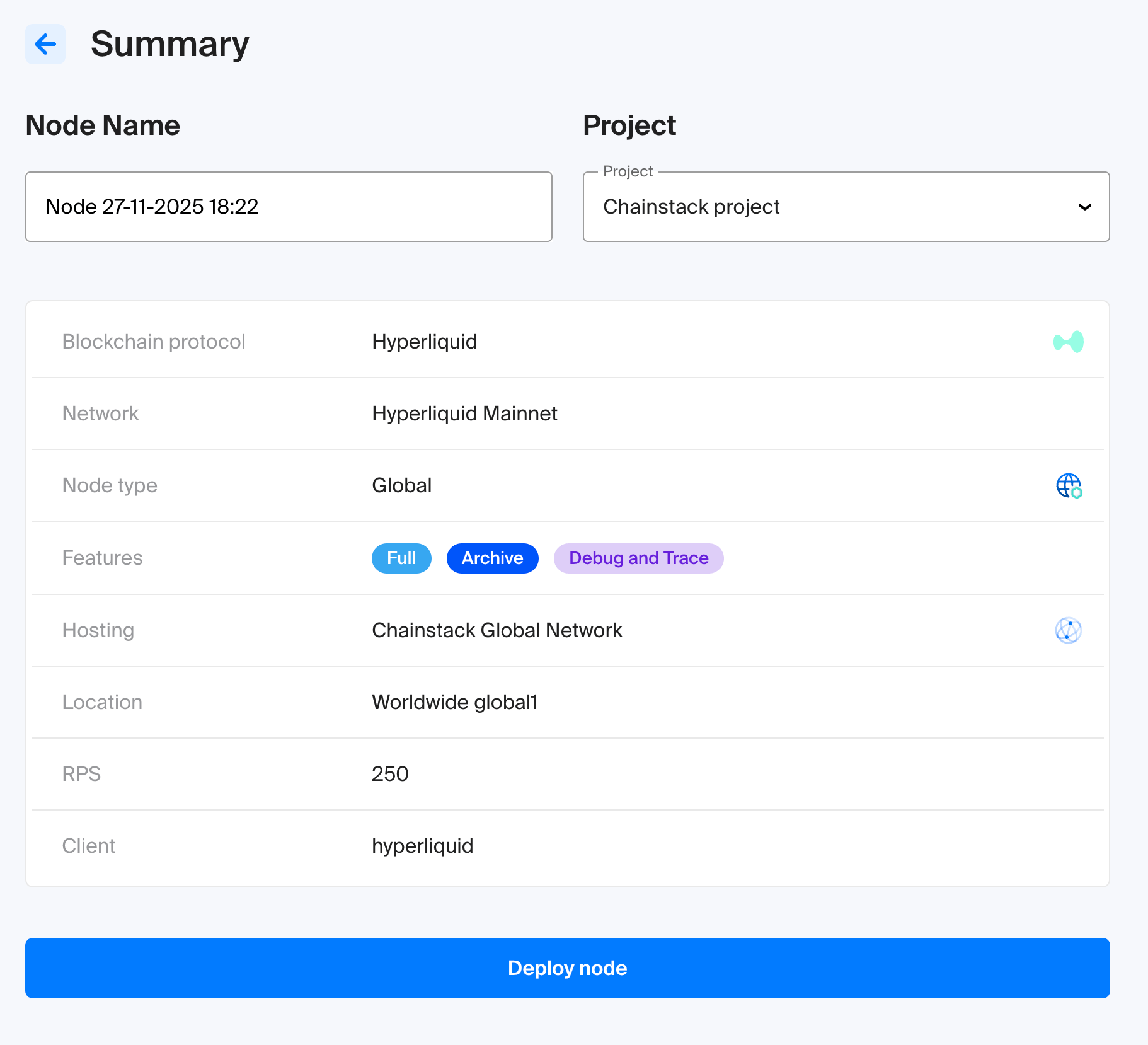
Once the node is deployed, click “View Node Details”. Scroll down to the “Access and credentials” section. Here you will find the endpoint URL, copy it and keep it safe. It will be needed in the next step.
⚠️ Do not expose your URL. Store it securely in a .env file and add it to your .gitignore before pushing the code to GitHub. Consider using password-protected endpoints to enhance security.
Set up your Telegram bot and broadcast channel
Before sending automated alerts, you’ll need two things in place: a dedicated Telegram bot and a channel where those alerts will be published.
Create your bot via BotFather
- Open Telegram and search for BotFather, the official tool for creating and managing bots
- Start a conversation and run the command
/newbot - BotFather will guide you through choosing your bot’s display name and unique username
- After the setup, you will receive a Bot Token. Store this token securely, it will later go into your
.envfile as theTELEGRAM_BOT_TOKEN
Set up a Telegram channel
- Create a new channel in Telegram, either public or private
- If you choose a public channel, assign it a clear and memorable handle (for example: @hypertracker)
- This handle or channel ID will serve as your
TELEGRAM_CHANNEL_ID
Connect the Hyperliquid on-chain activity bot to your channel
- Open the channel’s settings or admin panel
- Add your bot as a member
- Promote it to an administrator so it can post messages automatically
After completing these steps, you will have both the TELEGRAM_BOT_TOKEN and the TELEGRAM_CHANNEL_ID needed to send alerts programmatically.
Set up the environment
Create a new project folder
mkdir hypertracker
cd hypertracker
npm init -y
Install dependencies
npm install axios dotenvCreate an .env file with the following keys
CHAINSTACK_URL=<Your-Chainstack-Endpoint-URL>
BOT_TOKEN=<Your-Telegram-Bot-Token>
CHAT_ID=<Your-Telegram-Channel-or-Supergroup-ID>
USERS=<Whale-Wallet-1,Whale-Wallet-2>
COIN=<Crypto-Holding-Symbol>
POLL_INTERVAL_MS=<Polling-Interval-in-Milliseconds>CHAINSTACK_URL: The RPC endpoint URL obtained from Chainstack when the Hyperliquid node was deployedBOT_TOKEN: The token generated by BotFather for your Telegram botCHAT_ID: The unique identifier for the Telegram channel or supergroup where the bot will send alerts. Supergroup IDs usually start with-100….USERS: A comma-separated list of whale wallet addresses to track.COIN: The symbol of the cryptocurrency to track (e.g.,BTC,ETH,SOL)POLL_INTERVAL_MS: The interval in milliseconds at which the bot fetches new data from Chainstack. For example,5000will make the bot check for updates every 5 seconds.
Monitor on-chain positions and activity
Create a file named activity.js. This script monitors a user’s open positions on Hyperliquid Perps using a Chainstack RPC endpoint. If a user opens, updates, or closes a position, it returns a structured update that can be forwarded to a Telegram bot.
Import Required Libraries
import axios from "axios";
import { CONFIG } from "./config.js";
Track Last Known State
const lastState = {};Each tracked user gets an entry like
lastState[user] = { size: <number>, entry: <number>}This allows the script to detect:
- new positions
- size changes
- position closed
Create Hyperliquid RPC Caller
async function hyperInfo(payload) {
  const url = `${CONFIG.CHAINSTACK_URL}/info`;

  try {
    const { data } = await axios.post(url, payload, {
      headers: { "Content-Type": "application/json" },
    });

    return data;
  } catch (err) {
    console.error(err.message);
    throw err;
  }
}
hyperInfo is a helper function that:
- Builds a URL ending in
/info, - Sends a POST request with a JSON payload
- Returns parsed JSON directly (
data) - Throws an error if the RPC fails
Fetch All Account State
export async function getAccountState(userAddress) {
  const user = userAddress.toLowerCase();
  const coin = CONFIG.COIN.toUpperCase();

  const active = await hyperInfo({
    type: "activeAssetData",
    user,
    coin,
  });

  const clearing = await hyperInfo({
    type: "clearinghouseState",
    user,
  });

  return { active, clearing };
}
For this project, we’re looking at whale traders who dominate the spotlight with massive positions and attention-grabbing liquidations, including:
- James Wynn: 0x5078c2fbea2b2ad61bc840bc023e35fce56bedb6
- Andrew Tate: 0xB78D97390a96A17Fd2B58FeDBEB3DD876c8F660A
- Machi Big Brother: 0x020ca66c30bec2c4fe3861a94e4db4a498a35872
The getAccountState functions fetches information related to these whales by:
- Converting wallet address → lowercase
- Converts coin symbol → uppercase
- Fetches both:
- Returns both together in one object:
{
  active: <activeAssetData>,
  clearing: <clearinghouseState>
}
This becomes the raw input for activity detection.
Detect Position Activity
export function detectActivity(user, clearing) {
  const assetPositions = clearing.assetPositions || [];
  const pos = assetPositions.length > 0 ? assetPositions[0].position : null;

  if (!pos) {
    if (lastState[user]?.size && lastState[user].size > 0) {
      lastState[user] = { size: 0, entry: 0 };
      return {
        type: "POSITION_CLOSED",
        msg: `User ${user} closed all positions.`,
      };
    }
    lastState[user] = { size: 0, entry: 0 };
    return null;
  }

  const size = Number(pos.szi || 0);
  const entry = Number(pos.entryPx || 0);
  const leverage = Number(pos.leverage?.value || 0);
  const unrealizedPnl = Number(pos.unrealizedPnl || 0);
  const liquidationPx = pos.liquidationPx
    ? Number(pos.liquidationPx).toFixed(2)
    : "0.00";

  if (!lastState[user] || lastState[user].size === 0) {
    lastState[user] = { size, entry };
    return {
      type: "ORDER_ACTIVITY",
      sizeBefore: 0,
      sizeAfter: size,
      entry,
      msg: `User ${user} has an opened a position.
      \nSize: ${size}${size}
      \nEntry: $${entry}
      \nLeverage: ${leverage}x
      \nPnL: $${unrealizedPnl}
      \nLiquidation Price: $${liquidationPx}
      `,
    };
  }

  const prev = lastState[user];

  if (size !== prev.size) {
    lastState[user] = { size, entry };
    return {
      type: "ORDER_ACTIVITY",
      sizeBefore: prev.size,
      sizeAfter: size,
      entry,
      msg: `Order activity:\nUser: ${user}\nOld Size: ${prev.size}\nNew Size: ${size}`,
    };
  }

  console.log("No change detected.");
  return null;
}
detectActivity triggers when:
- user closed their position
- user opens a new position and then extract:
- position size
- entry price of position
- leverage value
- Unrealized Profit/loss in USD
- Liquidation Price
- detects a change in size of position
- no activity logs
Telegram Hyperliquid on-chain activity tracker utility
Create a file named bot.js. This script handles all communication between your trading monitor and your Telegram bot. It uses your bot token to send pings in real-time such as position opened, position updated, or position closed.
import axios from "axios";
import { CONFIG } from "./config.js";

const TELEGRAM_API_URL = `https://api.telegram.org/bot${CONFIG.BOT_TOKEN}/`;
const CHAT_ID = CONFIG.CHAT_ID;

export async function sendMessage(chatId, text) {
  try {
    const { data } = await axios.post(`${TELEGRAM_API_URL}sendMessage`, {
      chat_id: chatId,
      text,
      parse_mode: "Markdown",
    });

    return data;
  } catch (err) {
    console.error(err.message);
    return null;
  }
}

export async function sendAlert(text) {
  const res = await sendMessage(CHAT_ID, text);

  if (!res?.ok) {
    console.error(res);
  }
}
sendMessage endpoint sends the message to the chatId
sendAlert for sending bot alerts. This is the function you call from your monitoring script whenever:
- a whale opens a position
- a trader updates their size
- leverage changes
- a position is closed
Get real-time Hyperliquid tracker alerts
Run the monitoring script:
node index.js

Watch Alerts in Telegram:
Open Telegram and check your bot or channel.
You’re live
Your bot is now online, tracking whales automatically and sending real-time notifications straight to your phone.
Considerations
- Security
- Keep your credentials private at all times. Your Chainstack endpoint, Telegram bot token, and chat ID should only live in a .env file. Make sure this file is ignored by Git so it never ends up in a public repository.
- Poll Settings and RPC Use
- Polling too frequently can cause unnecessary strain or hit RPC limits. Choose a polling interval that balances speed and stability. If you plan to track many wallets at once, consider spacing out requests or adding caching.
- Scaling the Bot
- If you expand the bot to monitor multiple traders, coins, or different types of activity, you might want to reorganize your code so everything stays efficient. Using queues, timers, or lightweight backend frameworks can help when scaling.
- RPC Issues
- Network issues and RPC hiccups are normal when dealing with blockchain data. Good error logs make it much easier to understand what went wrong and to keep the bot stable over long periods of time use reliable services (e.g., Chainstack) to ensure faster and more consistent updates.
- Future Upgrades
- You can always add more features later such as tracking funding rates, liquidation warnings, order book snapshots, or grouping alerts into cleaner messages. You could even connect dashboards or build your own analytics layer on top of this foundation.
Summary
This guide walks through how to build a simple but powerful real time Hyperliquid on-chain activity tracker using Node.js, Chainstack, and a Telegram bot. You learned how Hyperliquid exposes transparent on chain trading data and how to read that data through a Chainstack Hyperliquid RPC endpoint so you can follow whale movements as they happen.
The tutorial covered setting up your development environment, deploying a Hyperliquid node, creating a Telegram bot with BotFather, and storing your credentials safely. From there you built the core script that keeps track of a wallet’s open positions, watches for changes, and sends alerts whenever something meaningful happens. That includes new positions, updates in size or leverage, or full position closures.
Once the bot is running, you have a lightweight tool that delivers useful trading signals straight to your Telegram channel. It is especially helpful for traders who want to stay close to market shifts or for builders experimenting with on-chain data. With the setup in place, you can expand the bot to support more wallets, more coins, or additional functionalities like a trading bot using /exchange endpoint and eventually shape it into a full monitoring system for your own research or trading workflow.