


In Instructions and Messages, we looked at how a client turns instructions into the message a Solana validator can execute. In Solana Transactions: Execution, Fees, and Runtime, we followed that message into a signature.
Transaction v1 gives us a reason to open those bytes again. The transaction can carry more data, but its resource settings, account references, and signatures also have a different layout. Code that successfully handled a v0 transaction can make the wrong assumptions about a v1 transaction before any program executes.
We will follow one small SOL transfer through construction, encoding, signing, execution, and readback. Then we will remove two settings, add an old ComputeBudget instruction, change a signed byte, and execute a transaction larger than the previous size limit. By the end, we should be able to explain both the successful receipt and the failures from the bytes that produced them.
Short answer: Solana transaction v1 is a transaction format that raises the maximum size from 1,232 to 4,096 bytes, puts the message before the signatures, moves compute and fee settings into the message, and stores every address inline instead of using lookup tables. It has been active on Solana mainnet since September 15, 2026, so any client that reads blocks or transactions must declare that it supports it. See also Chainstack’s Solana transaction v1 guide. This is part one: the format and the bytes. Part two covers reading and migrating.
What v1 changes before a program runs
As of October 14, 2026, Solana’s official documentation lists transaction v1 as active on mainnet, devnet, and testnet. It raises the maximum serialized transaction size from 1,232 to 4,096 bytes. The format is defined in SIMD-0385, alongside the size work described in the larger transaction upgrade. Current format and activation documentation
That size is the budget for the whole transaction, including signatures and account addresses. We cannot fill it with 4,096 bytes of application data and append the rest afterward.
There are three changes to keep in mind while reading the experiment:
| Change | Legacy and v0 | v1 |
|---|---|---|
| Wire envelope | Signature count, signatures, message | Message, signatures |
| Resource requests | ComputeBudget instructions | Message configuration |
| Account address storage | Inline keys (v0 can also use ALTs) | Every address inline |
A serialized transaction contains a message and the signatures that authorize it. The message describes the operation: which accounts are involved, which instructions should execute, and the transaction’s lifetime. The transaction format determines where that message and its signatures appear in the byte sequence.
Legacy and v0 transactions begin with a signature count, followed by the signatures themselves. Each signature occupies 64 bytes. A reader first decodes the count, reads that many signatures, and then reaches the message.
V1 reverses this arrangement: the message comes first, and the signatures follow it. For our single-signer examples, the layouts can be pictured as:
Legacy / v0:
[signature count: 1] [64-byte signature] [message]

v1:
[message: 0x81 | header | ...] [64-byte signature]
The signature count has not disappeared. The message header already contains a field specifying how many signatures are required. Legacy and v0 carry both that header field and the separate count before the signature array. V1 uses the header field to determine the number of signatures at the end, so it needs no additional count prefix there.
For example, if a v1 transaction contains 240 bytes and its header requires one signature, the final 64 bytes contain that signature. The preceding 176 bytes form the message it authorizes.
This changes how a reader finds the message boundary. Code that always treats the beginning of a transaction as a signature count will misinterpret v1’s initial 0x81 version byte. The reader must identify the format before deciding where the message and signatures begin.
Implementation reference: Kit’s transaction codec.
The complete field order:

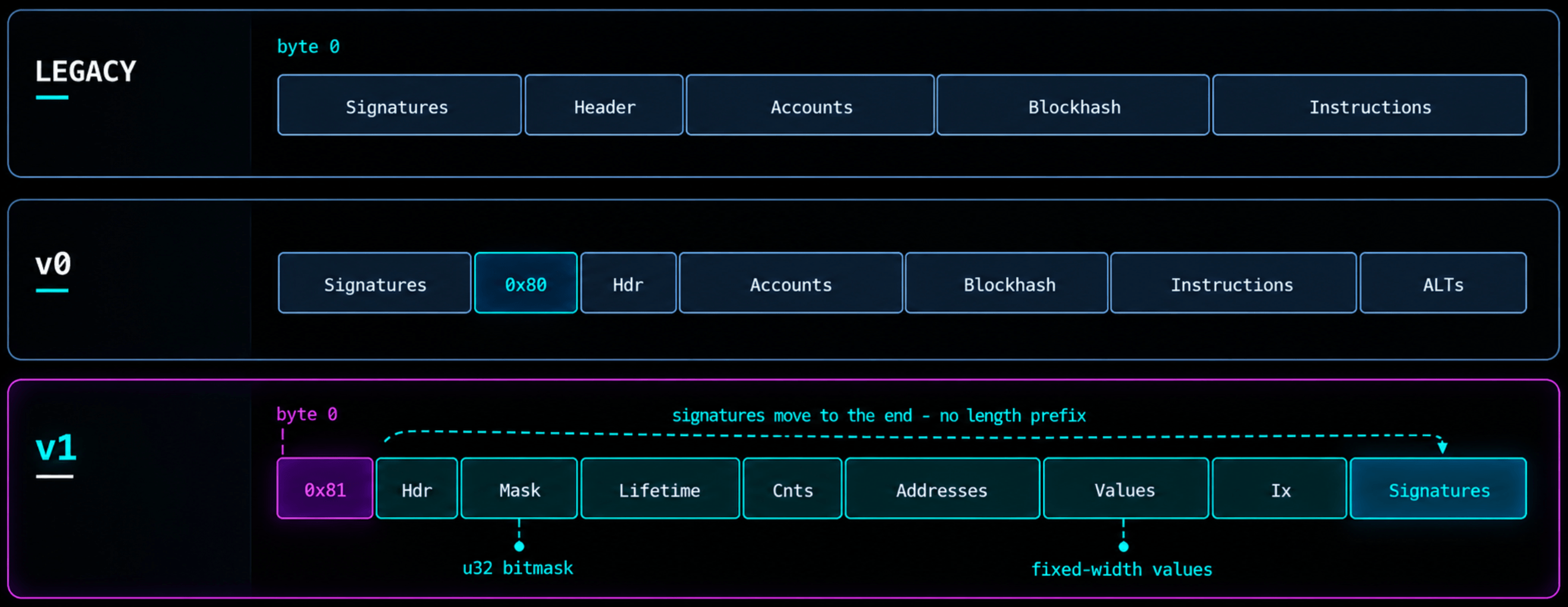
0x81 Version marker: A single byte identifying the v1 format. Its highest bit marks a versioned format, and its remaining seven bits contain the version number: 1.
         One byte: 10000001
┌───────────────┬───────────────────────┐
│ Highest bit   │ Remaining seven bits  │
│       1       │       0000001         │
└───────────────┴───────────────────────┘
  Versioned format       Version 1
Hdr Header: Three one-byte counts describe account permissions: how many accounts must sign, how many signed accounts are read-only, and how many unsigned accounts are read-only.
┌─────────────────┬─────────────────┬───────────────────┐
│ Required        │ Read-only       │ Read-only         │
│ signatures      │ signed accounts │ unsigned accounts │
│ 1 byte          │ 1 byte          │ 1 byte            │
└─────────────────┴─────────────────┴───────────────────┘
Mask Configuration mask: A four-byte bitmask identifying which resource settings are explicitly included. It tells the decoder which values to read from the Values section.
Logical bit positions within the 32-bit mask:

┌────────────┬──────┬─────────────┬──────────┬──────────────┐
│ Bits 31–5  │ Bit 4│ Bit 3       │ Bit 2    │ Bits 1–0     │
│ Reserved   │ Heap │ Loaded data │ CU limit │ Priority fee │
└────────────┴──────┴─────────────┴──────────┴──────────────┘
Lifetime Lifetime value: A 32-byte value used to check transaction validity. For a transaction using a recent blockhash, this field contains that blockhash.
┌──────────────────────────────────────────────────────┐
│                  Lifetime hash                       │
│                     32 bytes                         │
└──────────────────────────────────────────────────────┘
Cnts Counts: Two one-byte counts: the number of instructions and the number of account addresses. These tell the decoder how many entries to read in the corresponding sections.
┌────────────────────────┬────────────────────────┐
│ Number of instructions │ Number of addresses    │
│ 1 byte                 │ 1 byte                 │
└────────────────────────┴────────────────────────┘
Addresses Account addresses: The list of 32-byte public keys used by the transaction, including signers, other accounts, and programs. Instructions reference their positions in this list. In v1, every address is included directly; there are no address lookup table references.
┌────────────────┬────────────────┬─────┬────────────────┐
│ Address 0      │ Address 1      │ ... │ Last address   │
│ 32 bytes       │ 32 bytes       │     │ 32 bytes       │
└────────────────┴────────────────┴─────┴────────────────┘
     Fee payer

Total size = address count × 32 bytes
Values Configuration values: The actual resource settings selected by Mask: priority fee, compute-unit limit, loaded-account-data limit, and heap size. Present values appear in a defined order with fixed widths; absent settings occupy no bytes here.
Include only the settings selected by Mask:

┌────────────────┬────────────┬───────────────┬────────────┐
│ Priority fee   │ CU limit   │ Loaded data   │ Heap size  │
│ 8 bytes        │ 4 bytes    │ limit: 4 bytes│ 4 bytes    │
└────────────────┴────────────┴───────────────┴────────────┘
Ix Instructions: The operations to execute. Each instruction has a header containing its program’s address index, account count, and data length. All instruction headers appear first, followed by their payloads containing account indexes and instruction data.
┌──────────┬──────────┬─────┬───────────┬───────────┬─────┐
│ Header 0 │ Header 1 │ ... │ Payload 0 │ Payload 1 │ ... │
└──────────┴──────────┴─────┴───────────┴───────────┴─────┘

Each header — 4 bytes:
┌─────────────────┬─────────────────┬──────────────────┐
│ Program address │ Account count   │ Data length      │
│ index: 1 byte   │ 1 byte          │ 2 bytes          │
└─────────────────┴─────────────────┴──────────────────┘

Each corresponding payload:
┌────────────────────────┬─────────────────────────────┐
│ Account indexes        │ Instruction data            │
│ 1 byte per index       │ Length specified by header  │
└────────────────────────┴─────────────────────────────┘
Signatures Signatures: One 64-byte Ed25519 signature per required signer, authorizing the preceding message bytes. They appear at the end without a separate length prefix because their count is already specified in Hdr.
┌────────────────┬────────────────┬─────┬────────────────┐
│ Signature 0    │ Signature 1    │ ... │ Last signature │
│ 64 bytes       │ 64 bytes       │     │ 64 bytes       │
└────────────────┴────────────────┴─────┴────────────────┘

Total size = required-signature count × 64 bytes
These fields and their relationships are defined in the v1 transaction format specification.
Build one transfer with an explicit resource request
We’ll build a v1 transaction that transfers 0.01 SOL on devnet, with explicit resource limits and a priority fee. We’ll inspect its bytes, simulate it, submit it, and confirm the result in Explorer.
solana-keygen new --no-bip39-passphrase --silent --outfile ./devnet-sender.json

solana airdrop 1 --url devnet --keypair ./devnet-sender.json # Or get from faucet

solana-keygen pubkey ./devnet-sender.json
# Output: BkgAAzjLJxe4fedV9og1m4BuuP9pwQv66qbrWznhohjK

solana balance --url devnet --keypair ./devnet-sender.json
# Output: 1 SOL
Run the scripts on Chainstack. The scripts call the public devnet endpoint. To run them on your own node, deploy a Solana devnet node in the Chainstack console, copy its HTTPS endpoint, and replace
https://api.devnet.solana.comin thecreateSolanaRpc(devnet(...))calls and thefetchURL. Request devnet SOL from the Chainstack faucet instead of usingsolana airdrop. The same calls work on a Chainstack endpoint:simulateTransaction,sendTransactionandgetTransaction.
Init the project with:
npm init -y
npm install @solana/kit@8.0.0 @solana-program/system@0.14.1
npm install --save-dev tsx@4.23.15
Now we will create a script that sends the transaction, create transfer-v1.tsx:
import { readFileSync } from 'node:fs';
import { setTimeout as sleep } from 'node:timers/promises';
import {
  appendTransactionMessageInstruction, createKeyPairSignerFromBytes,
  createSolanaRpc, createTransactionMessage, devnet, generateKeyPairSigner,
  getBase64EncodedWireTransaction, pipe, setTransactionMessageConfig,
  setTransactionMessageFeePayerSigner, setTransactionMessageLifetimeUsingBlockhash,
  signTransactionMessageWithSigners, lamports,
} from '@solana/kit';
import { getTransferSolInstruction } from '@solana-program/system';

async function main() {
  const rpc = createSolanaRpc(devnet('https://api.devnet.solana.com'));
  const sender = await createKeyPairSignerFromBytes(
    Uint8Array.from(JSON.parse(readFileSync('./devnet-sender.json', 'utf8'))),
  );
  const recipient = await generateKeyPairSigner();
  const { value: lifetime } = await rpc.getLatestBlockhash({ commitment: 'confirmed' }).send();

  const config = {
    computeUnitLimit: 20_000,
    loadedAccountsDataSizeLimit: 64 * 1024,
    heapSize: 64 * 1024,
    priorityFeeLamports: 5_000n,
  };
  const transfer = getTransferSolInstruction({
    source: sender, destination: recipient.address, amount: lamports(10_000_000n),
  });
  const message = pipe(
    createTransactionMessage({ version: 1 }),
    m => setTransactionMessageFeePayerSigner(sender, m),
    m => setTransactionMessageLifetimeUsingBlockhash(lifetime, m),
    m => appendTransactionMessageInstruction(transfer, m),
    m => setTransactionMessageConfig(config, m),
  );
  const signed = await signTransactionMessageWithSigners(message);
  const base64 = getBase64EncodedWireTransaction(signed);
  console.log('Recipient:', recipient.address);
  console.log('Message hex:', Buffer.from(signed.messageBytes).toString('hex'));

  const { value: simulation } = await rpc.simulateTransaction(base64, {
    encoding: 'base64', commitment: 'confirmed', sigVerify: true,
  }).send();
  if (simulation.err) {
    console.error(simulation.err, simulation.logs);
    throw new Error('Simulation failed');
  }

  const signature = await rpc.sendTransaction(base64, {
    encoding: 'base64', preflightCommitment: 'confirmed',
  }).send();
  console.log(`https://explorer.solana.com/tx/${signature}?cluster=devnet`);

  for (let attempt = 0; attempt < 60; attempt++) {
    const receipt = await rpc.getTransaction(signature, {
      encoding: 'json', commitment: 'confirmed', maxSupportedTransactionVersion: 1,
    }).send();
    if (receipt?.meta) {
      if (receipt.meta.err) {
        console.error(receipt.meta.err);
        throw new Error('Transaction failed');
      }
      if (receipt.version !== 1) throw new Error('RPC did not return a v1 receipt');
      console.log(`Confirmed v1; fee: ${receipt.meta.fee} lamports`);
      return;
    }
    await sleep(1000);
  }
  throw new Error('Receipt not available yet; check Explorer before rerunning.');
}

main().catch(error => {
  console.error(error instanceof Error ? error.message : error);
  process.exitCode = 1;
});
Run with:
npx tsx transfer-v1.tsxOutput:


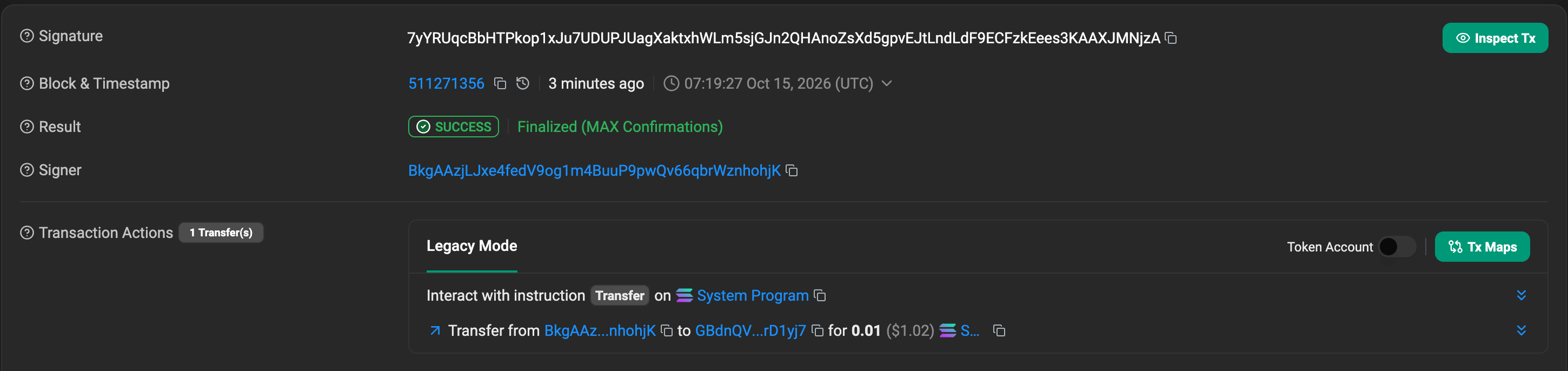
The transaction contains one instruction: a System Program transfer of 0.01 SOL. Its resource settings live in the v1 message configuration: 20,000 CU, 64 KiB of loaded account data, a 64 KiB heap, and a 5,000-lamport priority fee. These are requested limits; actual resource consumption can be lower. We include the larger heap to make that optional field visible in the encoding.
The script signs the message locally, encodes the transaction as base64, and simulates it. Simulation checks whether it can execute without changing onchain state. If simulation succeeds, the script submits the same signed transaction to devnet.
Submission returns a transaction signature, but that alone does not prove successful execution. The script waits for a confirmed receipt and checks that it reports version 1 with no execution error.
On explorer:

View this transaction on Solscan (devnet)
The recipient received 10,000,000 lamports (0.01 SOL). The sender spent 10,010,000 lamports: the transfer plus a 10,000-lamport fee, consisting of a 5,000-lamport base fee and our 5,000-lamport priority fee.
The transaction consumed 150 CU against the requested 20,000 CU limit. The limit specifies how much computation execution may use; it does not mean the transaction consumes that entire amount.
Read the 240 bytes behind the receipt
We’ll retrieve the confirmed transaction from devnet using getTransaction with base64 encoding. Decoding that response gives us the serialized bytes, which we can inspect by offset.
Let’s create inspect-transfer.tsx:
import assert from 'node:assert/strict';
import { createSolanaRpc, devnet, signature } from '@solana/kit';

async function main() {
  const tx = signature(
    '7yYRUqcBbHTPkop1xJu7UDUPJUagXaktxhWLm5sjGJn2QHAnoZsXd5gpvEJtLndLdF9ECFzkEees3KAAXJMNjzA',
  );

  const rpc = createSolanaRpc(devnet('https://api.devnet.solana.com'));

  const receipt = await rpc.getTransaction(tx, {
    encoding: 'base64',
    commitment: 'confirmed',
    maxSupportedTransactionVersion: 1,
  }).send();

  assert(receipt && receipt.version === 1);

  const bytes = Buffer.from(receipt.transaction[0], 'base64');
  assert.equal(bytes.length, 240);

  // These ranges describe this specific single-transfer transaction.
  // Start is inclusive; end is exclusive.
  const fields = [
    ['Version', 0, 1],
    ['Header', 1, 4],
    ['Config mask', 4, 8],
    ['Recent blockhash', 8, 40],
    ['Instruction count', 40, 41],
    ['Address count', 41, 42],
    ['Addresses', 42, 138],
    ['Config values', 138, 158],
    ['Instruction header', 158, 162],
    ['Account indexes', 162, 164],
    ['Transfer data', 164, 176],
    ['Signature', 176, 240],
  ] as const;

  console.log(`Version: ${receipt.version}; slot: ${receipt.slot}`);
  console.log(`Total bytes: ${bytes.length}`);
  console.log('Offsets  Field               Hex');

  for (const [name, start, end] of fields) {
    const field = bytes.subarray(start, end);
    const preview = field.length > 20 ? field.subarray(0, 8) : field;
    const hex = preview.toString('hex').match(/../g)!.join(' ');
    const range = start === end - 1 ? `${start}` : `${start}–${end - 1}`;
    const suffix = preview.length < field.length ? ' ...' : '';

    console.log(`${range.padEnd(9)}${name.padEnd(20)}${hex}${suffix}`);
  }
}

main().catch(console.error);
Run it:
npx tsx inspect-transfer.tsxOutput:
Version: 1; slot: 511271356
Total bytes: 240

Offsets  Field               Hex (long fields shortened)
0        Version             81
1–3      Header              01 00 01
4–7      Config mask         1f 00 00 00
8–39     Recent blockhash    2c 97 90 b4 82 b4 c6 e5 ...
40       Instruction count   01
41       Address count       03
42–137   Addresses           9f c5 1e cc 80 b9 9f ee ...
138–157  Config values       88 13 00 00 00 00 00 00 20 4e 00 00 00 00 01 00 00 00 01 00
158–161  Instruction header  02 02 0c 00
162–163  Account indexes     00 01
164–175  Transfer data       02 00 00 00 80 96 98 00 00 00 00 00
176–239  Signature           06 03 cd 63 45 7f 25 1d ...
Our transfer has three unique addresses: the sender, the recipient, and the System Program. The transaction header describes their roles through counts. The instructions then refer to positions in that address array.
For this transaction the header is 01 00 01:
| Header byte | Value | Consequence |
|---|---|---|
| Required signatures | 1 | The first address must sign |
| Readonly signed accounts | 0 | That signer is writable |
| Readonly unsigned accounts | 1 | The last address is readonly |
The resulting address order is sender at index 0, recipient at index 1, and System Program at index 2. The sender is also the fee payer. The recipient’s account changes, but the transfer does not require the recipient’s signature. The Rust message documentation describes the same account-role ordering.
Let’s decode the four instruction-header bytes:
02       program address index = 2, the System Program
02       number of instruction account indexes = 2
0c 00    instruction data length = 12, as a little-endian u16
The next two bytes, 00 01, select the sender and recipient. They do not include the System Program again; its position was already identified by the header.
The 12 data bytes are:
02 00 00 00                 SystemInstruction::Transfer
80 96 98 00 00 00 00 00     10,000,000 lamports as a little-endian u64
These bytes are the payload interpreted by the System Program. V1 changes the surrounding transaction representation while this transfer retains its program-specific encoding.
There is a decoder trap that our one-instruction example initially hides. V1 stores all instruction headers first, followed by the corresponding instruction payloads. For two instructions, the layout is:
header 0 | header 1 | accounts 0 + data 0 | accounts 1 + data 1Reading a header and immediately consuming its payload would place the cursor inside the next header. The Kit v1 message codec and instruction codec make this split explicit.
Decode the mask and keep the fee units straight
The four mask bytes at offset 4 decode to 0x1f, or binary 11111. Each set bit accounts for one four-byte word in the configuration-value region. The priority fee occupies eight bytes, so it uses two bits together.
| Mask bits | Field | Encoding in our transaction |
|---|---|---|
| 0 and 1 | Priority fee | Eight-byte little-endian integer |
| 2 | Compute unit limit | Four-byte little-endian integer |
| 3 | Loaded-account data size limit | Four-byte little-endian integer |
| 4 | Heap size | Four-byte little-endian integer |
All five bits are present, so our configuration values occupy 5 × 4 = 20 bytes. The fields appear in mask order. There are no names, JSON keys, or padding bytes in this region. The configuration codec translates between the positional representation and typed values.
The loaded-account cap measures account data needed for execution. It does not measure the 96 address bytes we put on the wire. The heap request describes another resource again: memory available to program execution. Giving both fields the same number in our transaction does not make them interchangeable.
For our transaction, those bytes separate into:
88 13 00 00 00 00 00 00     5,000 lamports of priority fee
20 4e 00 00                 20,000 compute units
00 00 01 00                 65,536 loaded-account bytes
00 00 01 00                 65,536 heap bytes
The fee field is easy to migrate incorrectly. Legacy and v0 use a compute-unit price, measured in micro-lamports per CU. V1 carries a total priority fee, measured in lamports. The legacy calculation rounds up to whole lamports. Fee definitions and arithmetic
We can make the two requests numerically equivalent:
// Legacy/v0: 20,000 CU at 250,000 micro-lamports per CU.
const limit = 20_000n;
const microLamportsPerCu = 250_000n;
const priorityFee =
  (limit * microLamportsPerCu + 999_999n) / 1_000_000n;

console.log(priorityFee); // 5000n

// V1 expresses that total directly.
const config = { priorityFeeLamports: 5_000n };
BigInt preserves integer arithmetic here. The 999_999n implements ceiling division for nonnegative integer values. We divide by one million because one lamport contains one million micro-lamports.
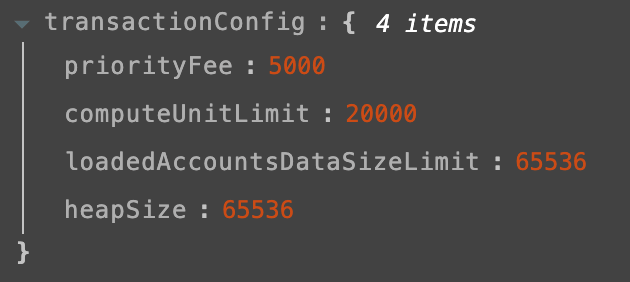
The configuration recorded in our confirmed devnet transaction matches these decoded values:
- 20,000 CU
- 65,536-byte loaded-account-data limit
- 65,536-byte heap request
- 5,000-lamport priority fee

View this transaction on Solscan (devnet)
If we double the v1 compute limit while leaving priorityFeeLamports unchanged, the requested priority fee remains 5,000 lamports. In the legacy price model, holding the price constant while doubling the requested limit doubles the derived priority fee. Those are different pricing inputs, even when one example gives the same total.
This also changes how a relayer or indexer reads the budget. Searching only the instruction list can miss the entire v1 resource request. A version-aware reader takes configuration from the v1 message and handles ComputeBudget instructions for the older formats. The Foundation’s budget-reading implementation shows that dispatch and unit normalization.
Follow the exact bytes into signature verification
In our transaction, the signature covers bytes 0 through 175, including the version, account roles, blockhash, addresses, resource configuration, and transfer instruction. The 64-byte signature occupies bytes 176 through 239.
The v1 signing rule associates signature i with address i in the required-signer region. Our transaction requires one signature, so we verify it against the sender’s public key at address index 0.
We’ll retrieve the same confirmed devnet transaction and verify its signature using Node’s Ed25519 verifier. Then we’ll change one priority-fee byte in a local copy and check whether the original signature still verifies.
Create verify-transfer.tsx:
import assert from 'node:assert/strict';
import { createPublicKey, verify } from 'node:crypto';
import { createSolanaRpc, devnet, signature } from '@solana/kit';

async function main() {
  const tx = signature(
    '7yYRUqcBbHTPkop1xJu7UDUPJUagXaktxhWLm5sjGJn2QHAnoZsXd5gpvEJtLndLdF9ECFzkEees3KAAXJMNjzA',
  );

  const rpc = createSolanaRpc(devnet('https://api.devnet.solana.com'));

  const receipt = await rpc.getTransaction(tx, {
    encoding: 'base64',
    commitment: 'confirmed',
    maxSupportedTransactionVersion: 1,
  }).send();

  assert(receipt && receipt.version === 1);

  const bytes = Buffer.from(receipt.transaction[0], 'base64');
  assert.equal(bytes.length, 240);

  // These offsets apply to this transaction.
  const messageBytes = bytes.subarray(0, 176);
  const signatureBytes = bytes.subarray(176, 240);
  const senderPublicKeyBytes = bytes.subarray(42, 74);

  // Wrap the raw Ed25519 public key in the format Node expects.
  const publicKey = createPublicKey({
    format: 'der',
    type: 'spki',
    key: Buffer.concat([
      Buffer.from('302a300506032b6570032100', 'hex'),
      senderPublicKeyBytes,
    ]),
  });

  const originalValid = verify(
    null,
    messageBytes,
    publicKey,
    signatureBytes,
  );

  // Change the priority fee in a local copy of the message.
  const changed = Buffer.from(messageBytes);
  changed[138] ^= 1;

  const changedValid = verify(
    null,
    changed,
    publicKey,
    signatureBytes,
  );

  console.log(`Original signature valid: ${originalValid}`);
  console.log(
    `Priority fee change (local copy): ${messageBytes.readBigUInt64LE(138)} -> ${changed.readBigUInt64LE(138)} lamports`,
  );
  console.log(`Modified signature valid: ${changedValid}`);
}

main().catch(error => {
  console.error(error instanceof Error ? error.message : error);
  process.exitCode = 1;
});
Run it:
npx tsx verify-transfer.tsxOutput:
Original signature valid: true
Priority fee change (local copy): 5000 -> 5001 lamports
Modified signature valid: false
The first check verifies the original 176 message bytes against the sender’s public key and signature. It returns true.
At offset 138, the first priority-fee byte changes from 0x88 to 0x89. Because the fee is encoded as a little-endian integer, this changes its value from 5,000 to 5,001 lamports. The instruction, public key, and signature remain unchanged. The second verification returns false because the message has changed.
This mutation affects only a local buffer. Buffer.from(messageBytes) creates a copy, while subarray() creates a view into the original buffer. Copying preserves the original message for comparison.
The DER SPKI prefix tells Node how to interpret the raw public key. It is used when importing the key and is not part of the transaction. For Ed25519, Node requires null or undefined as the algorithm argument; the key determines the algorithm. We pass the message bytes directly to verify().
These offsets apply to our specific transaction. A different number of addresses, configuration values, or instructions can move the signature boundary.
The result demonstrates that resource configuration is covered by the signature, just like the transfer instruction. Signature verification is still only one check: the network also validates the transaction’s lifetime, loads its accounts, and executes its instructions. A correctly signed transaction can fail if its requested resources are insufficient.
Remove one setting and identify the failing layer
In v1, an omitted compute-unit limit means zero CU, and an omitted loaded-account-data limit means zero bytes. The other fields have different defaults: an omitted priority fee means zero lamports, while an omitted heap request retains a 32 KiB heap. Optional fields therefore need to be interpreted individually. Configuration defaults
We’ll simulate the same transfer with one configuration field removed at a time, then test an old ComputeBudget instruction and a malformed mask.
We compile the messages without signatures and set sigVerify: false to isolate resource handling. Signature verification was covered in the previous section. Simulation uses devnet state without broadcasting the transaction or changing balances. Simulation options
Create simulate-limits.tsx:
import assert from 'node:assert/strict';
import {
  address,
  appendTransactionMessageInstructions,
  compileTransaction,
  createNoopSigner,
  createSolanaRpc,
  createTransactionMessage,
  devnet,
  getBase64EncodedWireTransaction,
  lamports,
  pipe,
  setTransactionMessageConfig,
  setTransactionMessageFeePayerSigner,
  setTransactionMessageLifetimeUsingBlockhash,
  type Instruction,
  type V1TransactionConfig,
} from '@solana/kit';
import { getTransferSolInstruction } from '@solana-program/system';

async function main() {
  const endpoint = 'https://api.devnet.solana.com';
  const rpc = createSolanaRpc(devnet(endpoint));

  // Public addresses from our confirmed devnet transaction.
  // The no-op signer supplies account metadata, not a real signature.
  const sender = createNoopSigner(
    address('BkgAAzjLJxe4fedV9og1m4BuuP9pwQv66qbrWznhohjK'),
  );
  const recipient = address(
    'GBdnQV4GuQbWvKe6sVa2rcXw1oawuu7vDANi2DrD1yj7',
  );

  const { value: lifetime } = await rpc
    .getLatestBlockhash({ commitment: 'confirmed' })
    .send();

  const config: V1TransactionConfig = {
    computeUnitLimit: 20_000,
    loadedAccountsDataSizeLimit: 64 * 1024,
    heapSize: 64 * 1024,
    priorityFeeLamports: 5_000n,
  };

  const transfer = getTransferSolInstruction({
    source: sender,
    destination: recipient,
    amount: lamports(10_000_000n),
  });

  function build(
    settings: V1TransactionConfig,
    instructions: readonly Instruction[] = [transfer],
  ) {
    const message = pipe(
      createTransactionMessage({ version: 1 }),
      m => setTransactionMessageFeePayerSigner(sender, m),
      m => setTransactionMessageLifetimeUsingBlockhash(lifetime, m),
      m => appendTransactionMessageInstructions(instructions, m),
      m => setTransactionMessageConfig(settings, m),
    );

    return getBase64EncodedWireTransaction(
      compileTransaction(message),
    );
  }

  const oldBudgetInstruction: Instruction = {
    programAddress: address(
      'ComputeBudget111111111111111111111111111111',
    ),
    data: Uint8Array.from([2, 1, 0, 0, 0]), // SetComputeUnitLimit(1)
  };

  const baseline = build(config);

  const cases = [
    ['Baseline', baseline],
    [
      'Missing CU limit',
      build({ ...config, computeUnitLimit: undefined }),
    ],
    [
      'Missing loaded cap',
      build({ ...config, loadedAccountsDataSizeLimit: undefined }),
    ],
    [
      'Old ComputeBudget instruction',
      build(config, [oldBudgetInstruction, transfer]),
    ],
  ] as const;

  // Error instruction indexes are small integers.
  const json = (value: unknown) =>
    JSON.stringify(value, (_, item) =>
      typeof item === 'bigint' ? Number(item) : item,
    );

  for (const [label, transaction] of cases) {
    const { value } = await rpc.simulateTransaction(transaction, {
      encoding: 'base64',
      commitment: 'confirmed',
      sigVerify: false,
    }).send();

    console.log(`${label}: ${json(value.err)}`);
    console.log(
      `  CU consumed: ${value.unitsConsumed}; logs: ${json(value.logs)}`,
    );

    if (
      label === 'Baseline' ||
      label === 'Old ComputeBudget instruction'
    ) {
      assert.equal(
        value.err,
        null,
        'Expected success; check the public fee payer balance.',
      );
    } else {
      assert.notEqual(value.err, null);
    }
  }

  // Clear fee bit 1 while leaving fee bit 0 set.
  const invalid = Buffer.from(baseline, 'base64');
  invalid.writeUInt32LE(0x1d, 4);

  // Use raw JSON-RPC to display the server's decoding error directly.
  const response = await fetch(endpoint, {
    method: 'POST',
    headers: { 'content-type': 'application/json' },
    body: JSON.stringify({
      jsonrpc: '2.0',
      id: 1,
      method: 'simulateTransaction',
      params: [
        invalid.toString('base64'),
        {
          encoding: 'base64',
          commitment: 'confirmed',
          sigVerify: false,
        },
      ],
    }),
    signal: AbortSignal.timeout(20_000),
  });

  if (!response.ok) throw new Error(`HTTP ${response.status}`);

  const body = await response.json();
  console.log(`Invalid mask: ${JSON.stringify(body.error)}`);
  assert.equal(body.error?.code, -32602);
}

main().catch(error => {
  console.error(error instanceof Error ? error.message : error);
  process.exitCode = 1;
});
Run it:
npx tsx simulate-limits.tsxOutput:
Baseline: null
  CU consumed: 150; logs: ["Program 11111111111111111111111111111111 invoke [1]","Program 11111111111111111111111111111111 success"]
Missing CU limit: {"InstructionError":[0,"ComputationalBudgetExceeded"]}
  CU consumed: 0; logs: ["Program 11111111111111111111111111111111 invoke [1]","Program 11111111111111111111111111111111 failed: Computational budget exceeded"]
Missing loaded cap: "MaxLoadedAccountsDataSizeExceeded"
  CU consumed: 0; logs: []
Old ComputeBudget instruction: null
  CU consumed: 300; logs: ["Program ComputeBudget111111111111111111111111111111 invoke [1]","Program ComputeBudget111111111111111111111111111111 success","Program 11111111111111111111111111111111 invoke [1]","Program 11111111111111111111111111111111 success"]
Invalid mask: {"code":-32602,"message":"failed to deserialize solana_transaction::versioned::VersionedTransaction: Invalid value: invalid transaction config mask"}
What each failing case shows
Missing compute limit
This case copies the baseline configuration, then removes its compute limit:
[
  'Missing CU limit',
  build({ ...config, computeUnitLimit: undefined }),
]
We omit the field, so v1 applies zero CU. The transfer reaches execution but fails with ComputationalBudgetExceeded.
Missing loaded-account-data limit
This case removes the loaded-data limit:
[
  'Missing loaded cap',
  build({ ...config, loadedAccountsDataSizeLimit: undefined }),
]
The effective limit becomes zero bytes. Account loading fails before the transfer executes, producing MaxLoadedAccountsDataSizeExceeded and empty program logs.
Old ComputeBudget instruction
This instruction encodes the older format’s request for a one-CU limit:
const oldBudgetInstruction: Instruction = {
  programAddress: address(
    'ComputeBudget111111111111111111111111111111',
  ),
  data: Uint8Array.from([2, 1, 0, 0, 0]),
};
We prepend it while keeping the original configuration:
build(config, [oldBudgetInstruction, transfer])V1 still uses the 20,000-CU message limit. Processing the old instruction adds 150 CU, increasing consumption from 150 to 300 CU.
Malformed configuration mask
These lines change the valid mask from 0x1f to 0x1d:
const invalid = Buffer.from(baseline, 'base64');
invalid.writeUInt32LE(0x1d, 4);
The simulation request includes:
sigVerify: false,Signature checking is skipped, but the decoder still rejects the incomplete priority-fee bit pair with RPC error -32602.
Fixing the transaction
Building with the complete configuration restores the resource limits and lets Kit generate the correct mask:
const baseline = build(config);For actual submission, the earlier transfer script signs the rebuilt message using the sender’s real keypair:
const signed = await signTransactionMessageWithSigners(message);
const base64 = getBase64EncodedWireTransaction(signed);

const signature = await rpc.sendTransaction(base64, {
  encoding: 'base64',
  preflightCommitment: 'confirmed',
}).send();
The no-op signer used in the simulation test does not provide real signatures.
Spend the larger byte budget and inspect its limits
We’ll build a transaction larger than the old 1,232-byte ceiling and confirm that it fits within v1’s 4,096-byte limit.
Our first transaction contained one transfer. Now we’ll put 60 transfers into one v1 transaction, sending 0.01 SOL each time from the same sender to the same recipient.
The total transfer amount is 0.60 SOL. Repeating the instruction lets us grow the instruction regions while keeping the same three addresses: sender, recipient, and System Program.
We’ll use the same project and funded devnet-sender.json from the previous examples. The sender needs enough devnet SOL for the transfers and transaction fee.
Create batch-transfer.tsx:
import assert from 'node:assert/strict';
import { readFileSync } from 'node:fs';
import { setTimeout as sleep } from 'node:timers/promises';
import {
  appendTransactionMessageInstructions,
  createKeyPairSignerFromBytes,
  createSolanaRpc,
  createTransactionMessage,
  devnet,
  generateKeyPairSigner,
  getBase64EncodedWireTransaction,
  lamports,
  pipe,
  setTransactionMessageConfig,
  setTransactionMessageFeePayerSigner,
  setTransactionMessageLifetimeUsingBlockhash,
  signTransactionMessageWithSigners,
} from '@solana/kit';
import { getTransferSolInstruction } from '@solana-program/system';

async function main() {
  const rpc = createSolanaRpc(devnet('https://api.devnet.solana.com'));

  const sender = await createKeyPairSignerFromBytes(
    Uint8Array.from(
      JSON.parse(readFileSync('./devnet-sender.json', 'utf8')),
    ),
  );

  const recipient = await generateKeyPairSigner();

  const { value: lifetime } = await rpc
    .getLatestBlockhash({ commitment: 'confirmed' })
    .send();

  const config = {
    computeUnitLimit: 20_000,
    loadedAccountsDataSizeLimit: 64 * 1024,
    heapSize: 64 * 1024,
    priorityFeeLamports: 5_000n,
  };

  const transfer = getTransferSolInstruction({
    source: sender,
    destination: recipient.address,
    amount: lamports(10_000_000n),
  });

  const message = pipe(
    createTransactionMessage({ version: 1 }),
    m => setTransactionMessageFeePayerSigner(sender, m),
    m => setTransactionMessageLifetimeUsingBlockhash(lifetime, m),
    m => appendTransactionMessageInstructions(
      Array(60).fill(transfer),
      m,
    ),
    m => setTransactionMessageConfig(config, m),
  );

  const signed = await signTransactionMessageWithSigners(message);
  const base64 = getBase64EncodedWireTransaction(signed);
  const bytes = Buffer.from(base64, 'base64');

  assert.equal(bytes.length, 1_302);

  console.log('Recipient:', recipient.address);
  console.log(`Wire bytes: ${bytes.length}`);
  console.log(`Instructions: ${bytes[40]}; addresses: ${bytes[41]}`);

  const { value: simulation } = await rpc.simulateTransaction(base64, {
    encoding: 'base64',
    commitment: 'confirmed',
    sigVerify: true,
  }).send();

  if (simulation.err) {
    console.error(simulation.err, simulation.logs);
    throw new Error('Simulation failed');
  }

  console.log(`Simulated CU: ${simulation.unitsConsumed}`);

  const signature = await rpc.sendTransaction(base64, {
    encoding: 'base64',
    preflightCommitment: 'confirmed',
  }).send();

  console.log(`https://solscan.io/tx/${signature}?cluster=devnet`);

  for (let attempt = 0; attempt < 60; attempt++) {
    const receipt = await rpc.getTransaction(signature, {
      encoding: 'base64',
      commitment: 'confirmed',
      maxSupportedTransactionVersion: 1,
    }).send();

    if (receipt?.meta) {
      assert.equal(receipt.meta.err, null);
      assert.equal(receipt.version, 1);

      // Confirm that the recorded transaction contains the bytes we sent.
      assert.deepEqual(
        Buffer.from(receipt.transaction[0], 'base64'),
        bytes,
      );

      // In this transaction, the recipient is address index 1.
      const received =
        receipt.meta.postBalances[1] - receipt.meta.preBalances[1];

      assert.equal(received, 600_000_000n);

      console.log(`Confirmed v1; wire bytes: ${bytes.length}`);
      console.log(`Recipient gained: ${received} lamports`);
      console.log(`Fee: ${receipt.meta.fee} lamports`);
      return;
    }

    await sleep(1_000);
  }

  throw new Error(
    'Receipt not available yet; check Solscan before rerunning.',
  );
}

main().catch(error => {
  console.error(error instanceof Error ? error.message : error);
  process.exitCode = 1;
});
Run it:
npx tsx batch-transfer.tsxOutput:
Recipient: 8hmZDCeS5vzAKA5eS6MdWqv9m3UeF61yXz2vcLENEMGm
Wire bytes: 1302
Instructions: 60; addresses: 3
Simulated CU: 9000
https://solscan.io/tx/2Zs67m8jo8SBtoCvyKgmuy5C6Fo3qLweNSrwd8AiJgAdPTvuysCN7FJsDxx4ZLZjLqzwRWMgdgWjn8xMQtD5WDSX?cluster=devnet
Confirmed v1; wire bytes: 1302
Recipient gained: 600000000 lamports
Fee: 10000 lamports
On Explorer:

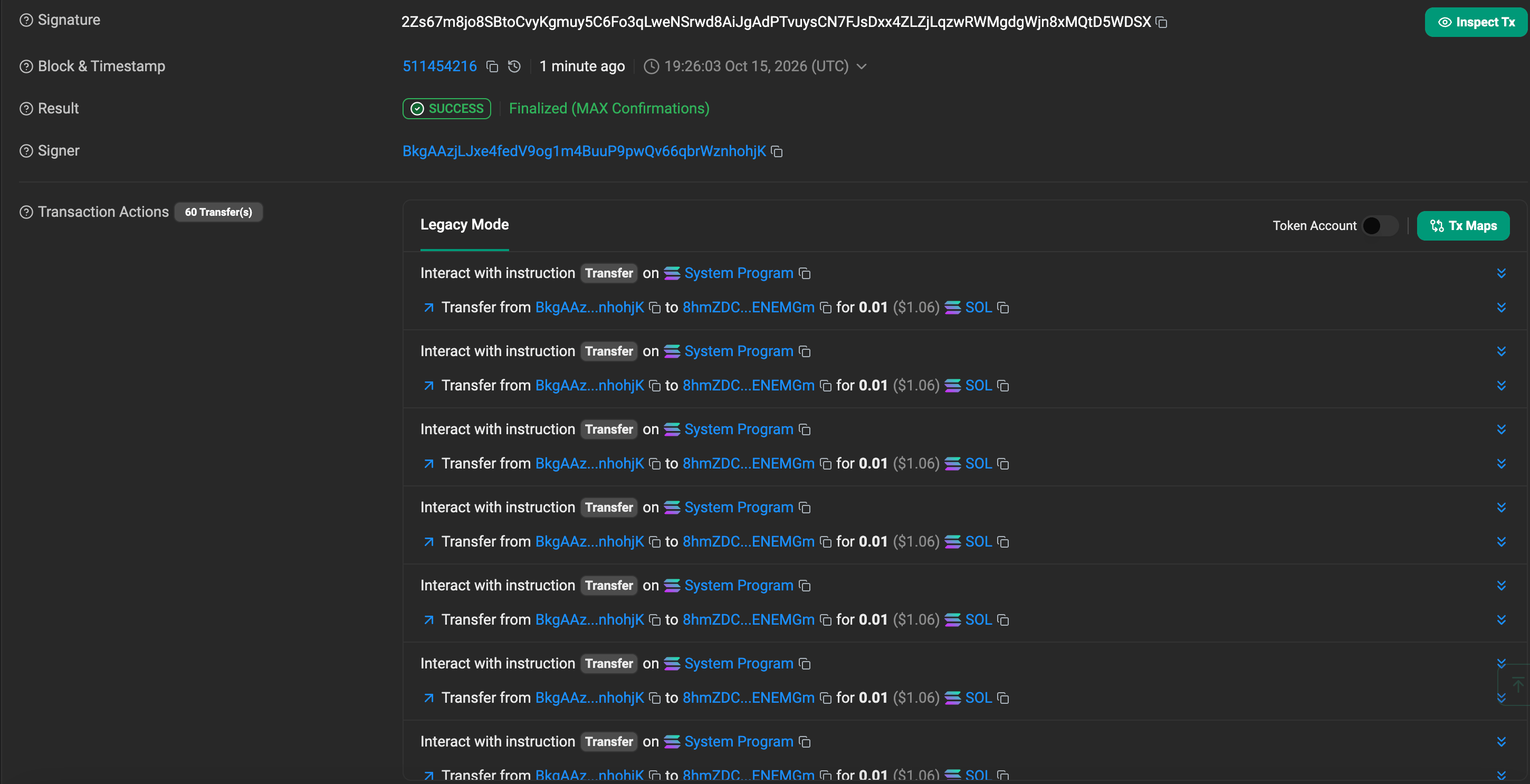
View this transaction on Solscan (devnet)
The main change is:
m => appendTransactionMessageInstructions(
  Array(60).fill(transfer),
  m,
),
This adds 60 instruction entries to the message. Each entry executes a transfer of 10,000,000 lamports. Reusing the instruction object does not merge those executions.
The address array still contains only three addresses. Every transfer refers to the same sender and recipient indexes, and every instruction header identifies the same System Program.
The serialized size is:
42             Version, header, mask, blockhash, and counts
96             Three 32-byte addresses
20             Configuration values
60 × 4         Instruction headers
60 × (2 + 12)  Account indexes and transfer data
64             One signature
--------------
1,302 bytes
Put our observed transaction on a common byte scale with the format limits:

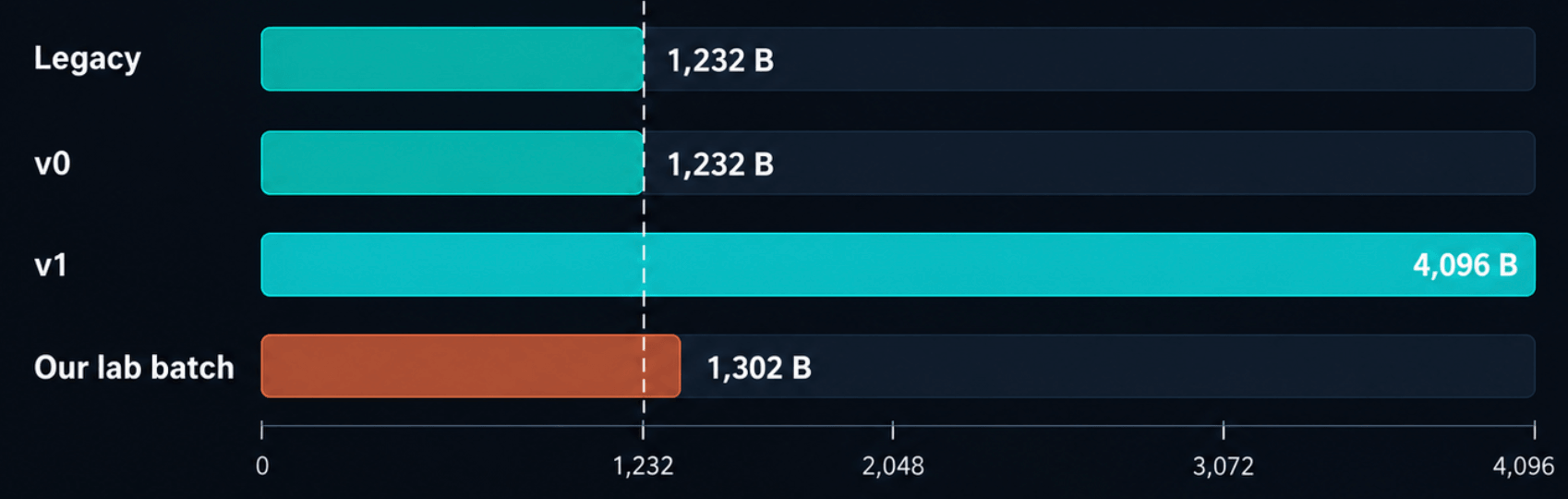
Compared with our 240-byte single transfer, each additional transfer adds 18 bytes: a four-byte instruction header, two account indexes, and 12 bytes of transfer data.
The layout becomes:
Byte range     Region                         Size

0–157          Message fields through config   158 bytes
158–397        All 60 instruction headers      240 bytes
398–1237       All 60 instruction payloads     840 bytes
1238–1301      Sender signature                 64 bytes
All 60 headers appear before the first instruction payload. Each header remains 02 02 0c 00: System Program at index 2, two account indexes, and 12 bytes of instruction data. This ordering follows the v1 wire specification.
The devnet simulation of this layout consumed 9,000 CU, which fits within our existing 20,000-CU limit. The configuration applies to the whole transaction, so the 60 instructions share that limit.
After confirmation, the script retrieves the transaction again and checks that:
- Its version is 1.
- Its serialized bytes match the bytes we submitted.
- The recipient gained 600,000,000 lamports, or 0.60 SOL.
The confirmed transaction contains all 60 transfers. The recipient received 0.60 SOL, execution consumed 9,000 CU, and the fee was 10,000 lamports.
Our transaction occupies 1,302 bytes, exceeding the previous 1,232-byte ceiling by 70 bytes. V1 allows up to 4,096 bytes; legacy and v0 retain their existing size limit. These limits apply to serialized transaction bytes, before base64 encoding. Large transactions must use encoding: 'base64' when simulating and submitting them; sendTransaction rejects a v1 transaction over 1,232 bytes sent as base58. Transaction size and RPC encoding
The larger byte budget still has separate constraints:
- Instructions: The current maximum is 64. Our batch uses 60.
- Addresses: The current maximum is 64. Our transaction uses three.
- Signatures: The current maximum is 12. Our transaction needs one.
- Compute: The instructions must fit within the transaction’s requested compute limit.
Unused bytes do not override these checks. The count fields can represent values beyond some of the accepted limits, so successfully encoding a message does not establish that the runtime will accept it. V1 transaction constraints.
Summary
Solana transaction v1 introduces a 4,096-byte transaction format with a new layout and explicit resource configuration.
The message comes first, followed by signatures whose count is determined by the header. Those signatures authorize the entire message, including its resource limits and priority fee. All account addresses are stored inline, removing v1’s dependency on Address Lookup Tables.
Resource requests move from ComputeBudget instructions into message configuration. The compute-unit and loaded-account-data limits must be set explicitly because their defaults are zero. The priority fee also changes units: v1 specifies a total in lamports, while legacy and v0 specify a price in micro-lamports per CU.
The larger byte budget still operates alongside separate instruction, account, signature, and execution limits. Decoding, signature verification, account loading, and program execution remain distinct stages with different failure conditions.
This article covered the format and the bytes. Reading v1 transactions over RPC and migrating wallets and indexers is covered in Solana transaction v1 migration: readers, wallets and indexers.
Frequently asked questions
Transaction v1 is a Solana transaction format with a 4,096-byte size limit. The message comes first and the signatures follow it, compute and fee settings live in a message configuration instead of ComputeBudget instructions, and every account address is stored inline. It is active on mainnet since September 15, 2026.
A v1 transaction can be up to 4,096 bytes, up from 1,232 for legacy and v0. The limit covers the whole transaction, including signatures and addresses. Anything over 1,232 bytes must be submitted as base64, because base58 stays capped at the old size.
No. A v1 transaction stores every address inline, up to 64 of them, and has no lookup table references. Address lookup tables still work on v0 transactions.
In v1 the priority fee is a total in lamports set in the message configuration. In legacy and v0 it is a price in micro-lamports per compute unit. To compare them, multiply the old price by the compute unit limit and divide by 1,000,000, rounding up to whole lamports.
The limit defaults to zero compute units, so the transaction fails with ComputationalBudgetExceeded when it executes. The loaded-account data limit also defaults to zero bytes and fails with MaxLoadedAccountsDataSizeExceeded. Set both explicitly.
Not for configuration. A v1 transaction takes its limits and priority fee from the message configuration, and ComputeBudget instructions are ignored for that purpose. If you include one, it still consumes compute units, 150 in our test, and runs as a no-op.
Yes. Legacy and v0 transactions keep their format and their 1,232-byte limit, and blocks can now contain all three versions. That is why readers and indexers must handle each version. See part two for how.
Related reading
- Solana transaction v1 migration: readers, wallets and indexers (part two)
- Solana: Transaction v1 explained (Chainstack docs)
- Solana: understanding the compute budget (Chainstack docs)
- Solana: address lookup tables (Chainstack docs)
- Solana: Instructions and Messages
- Solana Transactions: Execution, Fees, and Runtime
- Solana Durable Nonce Accounts: Offline Signing Explained